Google Professional Data Engineer BigQuery and Analytics

Use for BigQuery warehousing, SQL transformations, performance tuning, BI consumption, and BigQuery ML style analytical workloads.

Exams
PROFESSIONAL-DATA-ENGINEER
Questions
77
Comments
1161

1. PROFESSIONAL-DATA-ENGINEER Topic 1 Question 149

Sequence
6
Discussion ID
16678
Source URL
https://www.examtopics.com/discussions/google/view/16678-exam-professional-data-engineer-topic-1-question-149/
Posted By
madhu1171
Posted At
March 15, 2020, 5:19 p.m.

Question

You are migrating your data warehouse to BigQuery. You have migrated all of your data into tables in a dataset. Multiple users from your organization will be using the data. They should only see certain tables based on their team membership. How should you set user permissions?

  • A. Assign the users/groups data viewer access at the table level for each table
  • B. Create SQL views for each team in the same dataset in which the data resides, and assign the users/groups data viewer access to the SQL views
  • C. Create authorized views for each team in the same dataset in which the data resides, and assign the users/groups data viewer access to the authorized views
  • D. Create authorized views for each team in datasets created for each team. Assign the authorized views data viewer access to the dataset in which the data resides. Assign the users/groups data viewer access to the datasets in which the authorized views reside

Suggested Answer

A

Answer Description Click to expand


Community Answer Votes

Comments 25 comments Click to expand

Comment 1

ID: 286585 User: someshsehgal Badges: Highly Voted Relative Date: 5 years, 1 month ago Absolute Date: Tue 09 Feb 2021 05:59 Selected Answer: - Upvotes: 41

Correct A: A . Now it is feasible to provide table level access to user by allowing user to query single table and no other table will be visible to user in same dataset.

Comment 1.1

ID: 428755 User: Shiv_am Badges: - Relative Date: 4 years, 6 months ago Absolute Date: Sat 21 Aug 2021 16:31 Selected Answer: - Upvotes: 2

A is not at all possible

Comment 1.1.1

ID: 459248 User: squishy_fishy Badges: - Relative Date: 4 years, 5 months ago Absolute Date: Fri 08 Oct 2021 15:28 Selected Answer: - Upvotes: 8

It is possible for about a year now. https://cloud.google.com/bigquery/docs/table-access-controls-intro#example_use_case

Comment 1.2

ID: 634610 User: alecuba16 Badges: - Relative Date: 3 years, 7 months ago Absolute Date: Thu 21 Jul 2022 15:33 Selected Answer: - Upvotes: 2

The problem is that option A has a lot of work for the DevOps, meanwhile option D is easier to manage. The view is like having a shortcut to the same data, but with different permissions

Comment 1.2.1

ID: 910111 User: cetanx Badges: - Relative Date: 2 years, 9 months ago Absolute Date: Tue 30 May 2023 11:34 Selected Answer: - Upvotes: 3

According to Chat GPT, it is also D.
And it explains why it shouldn't be "A" as;

Granularity: While you can assign access permissions at the table level, it doesn't allow for fine-grained access control. For example, if you want to restrict access to certain columns or rows within a table based on user or group, table-level permissions would not be sufficient.

Scalability: In organizations with many tables and users, managing permissions at the table level can quickly become unwieldy. You would need to individually set permissions for each user for each table, which can be time-consuming and error-prone.

Security: Table-level permissions expose the entire table to a user or a group. If the data in the table changes over time, users might get access to data they shouldn't see. With authorized views, you have more control over what data is exposed.

Maintenance: If the structure of your data changes (for instance, if tables are added or removed, or if the schema of a table changes), you would need to manually update the permissions for each affected table.

Comment 1.3

ID: 1192905 User: BigDataBB Badges: - Relative Date: 1 year, 11 months ago Absolute Date: Wed 10 Apr 2024 13:08 Selected Answer: - Upvotes: 1

the request says "team membership", so access depends on the team and not the user

Comment 1.4

ID: 469133 User: jits1984 Badges: - Relative Date: 4 years, 4 months ago Absolute Date: Thu 28 Oct 2021 11:03 Selected Answer: - Upvotes: 12

Should still be D.

Question states - "They should only see certain tables based on their team membership"

Option A states - Assign the users/groups data viewer access at the table level for each table

With A, everyone will see every table. Hence D.

Comment 2

ID: 64368 User: madhu1171 Badges: Highly Voted Relative Date: 5 years, 12 months ago Absolute Date: Sun 15 Mar 2020 17:19 Selected Answer: - Upvotes: 27

D should be the answer

Comment 2.1

ID: 459246 User: squishy_fishy Badges: - Relative Date: 4 years, 5 months ago Absolute Date: Fri 08 Oct 2021 15:27 Selected Answer: - Upvotes: 3

There is only one dataset mentioned in the question here. "You have migrated all of your data into tables in a dataset"

Comment 2.2

ID: 652374 User: ducc Badges: - Relative Date: 3 years, 6 months ago Absolute Date: Sat 27 Aug 2022 01:06 Selected Answer: - Upvotes: 1

It is updated, now A is correct

Comment 3

ID: 1710291 User: postbox4643 Badges: Most Recent Relative Date: 1 month, 1 week ago Absolute Date: Thu 29 Jan 2026 20:35 Selected Answer: D Upvotes: 1

Why Option D is the Best Fit
In BigQuery, simply creating a view isn't enough to grant access to the underlying data. If a user has access to a view but not the source table, the query will fail. An Authorized View solves this by allowing the view itself to "authorize" access to the source data, even if the user doesn't have direct access to those tables.

Comment 4

ID: 1581594 User: 2fbe820 Badges: - Relative Date: 8 months, 2 weeks ago Absolute Date: Sun 29 Jun 2025 13:04 Selected Answer: D Upvotes: 1

obviously D. A is not cumbersome and difficult to manage

Comment 5

ID: 1350361 User: plum21 Badges: - Relative Date: 1 year, 1 month ago Absolute Date: Sun 02 Feb 2025 12:11 Selected Answer: D Upvotes: 2

The question was created at the time when it was not possible to share data on table level (dataset was the only option). At that time D was possible only. Right now A is feasible as well.

Comment 6

ID: 1334478 User: LP_PDE Badges: - Relative Date: 1 year, 2 months ago Absolute Date: Tue 31 Dec 2024 00:26 Selected Answer: C Upvotes: 1

Authorized views provide a centralized way to manage access. You define the data each team can see in a view and then grant access to that view. This is much easier to maintain and update than managing permissions on individual tables.
Why not D? - Option D suggests creating separate datasets for each team and using authorized views within those datasets. This adds unnecessary complexity and overhead.
You would need to manage multiple datasets.You would need to grant the authorized views access to the original dataset.

Comment 7

ID: 1303373 User: SamuelTsch Badges: - Relative Date: 1 year, 4 months ago Absolute Date: Sat 26 Oct 2024 20:15 Selected Answer: A Upvotes: 2

Table level access could be done in bigquery.

Comment 8

ID: 1265064 User: JamesKarianis Badges: - Relative Date: 1 year, 7 months ago Absolute Date: Tue 13 Aug 2024 10:38 Selected Answer: D Upvotes: 1

Recommended approach

Comment 9

ID: 1224105 User: dsyouness Badges: - Relative Date: 1 year, 9 months ago Absolute Date: Tue 04 Jun 2024 13:49 Selected Answer: D Upvotes: 2

Should be D.

Comment 10

ID: 1099864 User: MaxNRG Badges: - Relative Date: 2 years, 2 months ago Absolute Date: Mon 18 Dec 2023 17:37 Selected Answer: D Upvotes: 4

https://cloud.google.com/solutions/migration/dw2bq/dw-bq-data-governance
When you create the view, it must be created in a dataset separate from the source data queried by the view. Because you can assign access controls only at the dataset level, if the view is created in the same dataset as the source data, your users would have access to both the view and the data.
https://cloud.google.com/bigquery/docs/authorized-views
This approach aligns with the Google Cloud best practices for data governance, ensuring that users can only access the data intended for them without having direct access to the source tables. Authorized views serve as a secure interface to the underlying data, and by placing these views in separate datasets per team, you can manage permissions effectively at the dataset level.

Comment 11

ID: 1076617 User: lokiinaction Badges: - Relative Date: 2 years, 3 months ago Absolute Date: Tue 21 Nov 2023 21:02 Selected Answer: - Upvotes: 2

but the question said that all data are copied into one dataset. so it should be C

Comment 12

ID: 1065615 User: spicebits Badges: - Relative Date: 2 years, 4 months ago Absolute Date: Wed 08 Nov 2023 13:25 Selected Answer: - Upvotes: 2

A is the best answer for security as stated in the documentation - https://cloud.google.com/bigquery/docs/row-level-security-intro#comparison_of_authorized_views_row-level_security_and_separate_tables

Comment 13

ID: 1015705 User: EsaP Badges: - Relative Date: 2 years, 5 months ago Absolute Date: Sun 24 Sep 2023 13:22 Selected Answer: - Upvotes: 1

A is a better fit than D for this case

Comment 14

ID: 1015473 User: barnac1es Badges: - Relative Date: 2 years, 5 months ago Absolute Date: Sun 24 Sep 2023 05:52 Selected Answer: C Upvotes: 1

Authorized Views: Authorized views in BigQuery allow you to control access to specific rows and columns within a table. This means you can create views for each team that restrict access to only the data relevant to that team.
Single Dataset: Keeping all the authorized views and the underlying data in the same dataset simplifies management and access control. It avoids the need to create multiple datasets, making the permission management process more straightforward.

Option A (assigning data viewer access at the table level) would not provide the granularity you need, as it would allow users to see all tables in the dataset. This does not align with the requirement to restrict access based on team membership.

Comment 15

ID: 985675 User: arien_chen Badges: - Relative Date: 2 years, 6 months ago Absolute Date: Sun 20 Aug 2023 11:09 Selected Answer: D Upvotes: 1

https://cloud.google.com/bigquery/docs/share-access-views#:~:text=the%20source%20data.-,Authorized%20views,-should%20be%20created

For best practice, Option D is bettern than others.

Comment 16

ID: 849007 User: midgoo Badges: - Relative Date: 2 years, 11 months ago Absolute Date: Fri 24 Mar 2023 07:01 Selected Answer: A Upvotes: 2

[A] is correct if it is for individual table
However, in practice we normally do [C] as most of the time, the view is a JOIN of a few tables or a subset of the table (some columns removed)

Comment 17

ID: 812854 User: musumusu Badges: - Relative Date: 3 years ago Absolute Date: Sat 18 Feb 2023 11:25 Selected Answer: - Upvotes: 1

Answer A, Trick here is, if question is not asking for data level Access such as some rows or columns, don't go for authorized view in that case i would go for C. If it's Table level request only in question, then A is simple answer

2. PROFESSIONAL-DATA-ENGINEER Topic 1 Question 184

Sequence
11
Discussion ID
79593
Source URL
https://www.examtopics.com/discussions/google/view/79593-exam-professional-data-engineer-topic-1-question-184/
Posted By
AWSandeep
Posted At
Sept. 2, 2022, 10:36 p.m.

Question

You are building a report-only data warehouse where the data is streamed into BigQuery via the streaming API. Following Google's best practices, you have both a staging and a production table for the data. How should you design your data loading to ensure that there is only one master dataset without affecting performance on either the ingestion or reporting pieces?

  • A. Have a staging table that is an append-only model, and then update the production table every three hours with the changes written to staging.
  • B. Have a staging table that is an append-only model, and then update the production table every ninety minutes with the changes written to staging.
  • C. Have a staging table that moves the staged data over to the production table and deletes the contents of the staging table every three hours.
  • D. Have a staging table that moves the staged data over to the production table and deletes the contents of the staging table every thirty minutes.

Suggested Answer

C

Answer Description Click to expand


Community Answer Votes

Comments 30 comments Click to expand

Comment 1

ID: 712330 User: NicolasN Badges: Highly Voted Relative Date: 3 years, 4 months ago Absolute Date: Sun 06 Nov 2022 14:40 Selected Answer: C Upvotes: 21

[C]
I found the correct answer based on a real case, where Google's Solutions Architect team decided to move an internal process to use BigQuery.
The related doc is here: https://cloud.google.com/blog/products/data-analytics/moving-a-publishing-workflow-to-bigquery-for-new-data-insights

Comment 1.1

ID: 712331 User: NicolasN Badges: - Relative Date: 3 years, 4 months ago Absolute Date: Sun 06 Nov 2022 14:40 Selected Answer: - Upvotes: 19

The interesting excerpts:
"Following common extract, transform, load (ETL) best practices, we used a staging table and a separate production table so that we could load data into the staging table without impacting users of the data. The design we created based on ETL best practices called for first deleting all the records from the staging table, loading the staging table, and then replacing the production table with the contents."
"When using the streaming API, the BigQuery streaming buffer remains active for about 30 to 60 minutes or more after use, which means that you can’t delete or change data during that time. Since we used the streaming API, we scheduled the load every three hours to balance getting data into BigQuery quickly and being able to subsequently delete the data from the staging table during the load process."

Comment 1.1.1

ID: 1051247 User: squishy_fishy Badges: - Relative Date: 2 years, 4 months ago Absolute Date: Mon 23 Oct 2023 01:56 Selected Answer: - Upvotes: 2

I second this. At my work, I run into this exact steaming buffer thing, it will not let me delete the data until after 60 minutes.

Comment 1.1.2

ID: 763281 User: AzureDP900 Badges: - Relative Date: 3 years, 2 months ago Absolute Date: Sun 01 Jan 2023 18:28 Selected Answer: - Upvotes: 1

Agreed C is right

Comment 2

ID: 659676 User: nwk Badges: Highly Voted Relative Date: 3 years, 6 months ago Absolute Date: Mon 05 Sep 2022 04:20 Selected Answer: - Upvotes: 11

Vote B - "Some recently streamed rows might not be available for table copy typically for a few minutes. In rare cases, this can take up to 90 minutes"
https://cloud.google.com/bigquery/docs/streaming-data-into-bigquery#dataavailability

Comment 2.1

ID: 747068 User: jkhong Badges: - Relative Date: 3 years, 2 months ago Absolute Date: Fri 16 Dec 2022 11:48 Selected Answer: - Upvotes: 1

Aren't there other aspects of data pipelining that we should be aware of? other than merely referring to the number of 'recommended' minutes stated in docs. B doesn't address how the appended data is subsequently deleted, since the table is append-only, the size will constantly grow, and so the user may unnecessarily incur more storage costs.

Comment 2.2

ID: 661089 User: YorelNation Badges: - Relative Date: 3 years, 6 months ago Absolute Date: Tue 06 Sep 2022 12:29 Selected Answer: - Upvotes: 1

They don't seems concerned too much by data accuracy in the question

Comment 2.3

ID: 687018 User: devaid Badges: - Relative Date: 3 years, 5 months ago Absolute Date: Wed 05 Oct 2022 18:05 Selected Answer: - Upvotes: 4

A and B are discarded because the UPDATE statement, is not performance efficient. Neither appending more and more values to the stagging table. It's better cleaning the stagging table, and merging with the master dataset.

Comment 2.3.1

ID: 1102326 User: MaxNRG Badges: - Relative Date: 2 years, 2 months ago Absolute Date: Thu 21 Dec 2023 10:50 Selected Answer: - Upvotes: 1

You can use BigQuery's features like MERGE to efficiently update the production table with only the new or changed data from the staging table, reducing processing time and costs.

Comment 3

ID: 1705102 User: Feisar Badges: Most Recent Relative Date: 2 months ago Absolute Date: Thu 08 Jan 2026 11:19 Selected Answer: A Upvotes: 1

Option a. You shouldn´t really delete from staging and append only means BQ doesn´t have to worry about updates etc.

3 hours so the streaming buffer is definitely written to disk

Comment 4

ID: 1574147 User: AdriHubert Badges: - Relative Date: 9 months, 1 week ago Absolute Date: Mon 02 Jun 2025 13:41 Selected Answer: A Upvotes: 1

Read the MaxNRG comment

Comment 5

ID: 1303927 User: SamuelTsch Badges: - Relative Date: 1 year, 4 months ago Absolute Date: Mon 28 Oct 2024 11:42 Selected Answer: A Upvotes: 5

deleting data from my point of view is not a good practice to build datawarehouse solutions. So, C and D are excluded.
according to the official documentation, the updating/merging process could last till 90 minutes. 3 hours could be enough.

Comment 6

ID: 1217320 User: TVH_Data_Engineer Badges: - Relative Date: 1 year, 9 months ago Absolute Date: Fri 24 May 2024 10:46 Selected Answer: A Upvotes: 5

An append-only staging table ensures that all incoming data is captured without risk of data loss or overwrites, which is crucial for maintaining data integrity in a streaming ingestion scenario.
Three-Hour Update Interval:

Updating the production table every three hours strikes a good balance between minimizing the latency of data availability for reporting and reducing the frequency of potentially resource-intensive update operations.
This interval is frequent enough to keep the production table relatively up-to-date for reporting purposes while ensuring that the performance of both ingestion and reporting processes is not significantly impacted.
Frequent updates (like every ninety minutes or every thirty minutes) could introduce unnecessary overhead and contention, especially if the dataset is large or if there are complex transformations involved.

Comment 7

ID: 1102328 User: MaxNRG Badges: - Relative Date: 2 years, 2 months ago Absolute Date: Thu 21 Dec 2023 10:53 Selected Answer: A Upvotes: 3

Not C nor D. Moving and deleting:
Deleting data from the staging table every 3 or 30 minutes could lead to data loss if the production table update fails, and it also requires more frequent and potentially resource-intensive operations.

Options C and D cause rebuilding of the staging table, which slows down ingestion, and may lose data if errors occur during recreation.

A or B

Comment 7.1

ID: 1102330 User: MaxNRG Badges: - Relative Date: 2 years, 2 months ago Absolute Date: Thu 21 Dec 2023 10:53 Selected Answer: - Upvotes: 1

When designing a report-only data warehouse in BigQuery, where data is streamed in and you have both staging and production tables, the key is to balance the frequency of updates with the performance needs of both the ingestion and reporting processes. Let's evaluate each option:

Comment 7.1.1

ID: 1102331 User: MaxNRG Badges: - Relative Date: 2 years, 2 months ago Absolute Date: Thu 21 Dec 2023 10:54 Selected Answer: - Upvotes: 1

A. Staging table as append-only, updating production every three hours: This approach allows for a consistent flow of data into the staging table without interruptions. Updating the production table every three hours strikes a balance between having reasonably fresh data and not overloading the system with too frequent updates. However, this may not be suitable if your reporting requirements demand more up-to-date data.

B. Staging table as append-only, updating production every ninety minutes: This is similar to option A but with a more frequent update cycle. This could be more appropriate if your reporting needs require more current data. However, more frequent updates can impact performance, especially during the update windows.

Comment 7.1.1.1

ID: 1102332 User: MaxNRG Badges: - Relative Date: 2 years, 2 months ago Absolute Date: Thu 21 Dec 2023 10:54 Selected Answer: - Upvotes: 1

C. Staging table moves data to production and clears staging every three hours: Moving data from staging to production and then clearing the staging table ensures that there is only one master dataset. However, this method might lead to more significant interruptions in data availability, both during the move and the clearing process. This might not be ideal if continuous access to the latest data is required.

D. Staging table moves data to production and clears staging every thirty minutes: This option provides the most up-to-date data in the production table but could significantly impact performance. Such frequent data transfers and deletions might lead to more overhead and could interrupt both the ingestion and reporting processes.

Comment 7.1.1.1.1

ID: 1102333 User: MaxNRG Badges: - Relative Date: 2 years, 2 months ago Absolute Date: Thu 21 Dec 2023 10:55 Selected Answer: - Upvotes: 2

Considering these options, A (Staging table as append-only, updating production every three hours) seems to be the most balanced approach. It provides a good compromise between having up-to-date data in the production environment and maintaining system performance. However, the exact frequency should be fine-tuned based on the specific performance characteristics of your system and the timeliness requirements of your reports.

It's also important to implement efficient mechanisms for transferring data from staging to production to minimize the impact on system performance. Techniques like partitioning and clustering in BigQuery can be used to optimize query performance and manage large datasets more effectively.

Comment 8

ID: 1096588 User: Aman47 Badges: - Relative Date: 2 years, 2 months ago Absolute Date: Thu 14 Dec 2023 16:20 Selected Answer: - Upvotes: 1

Neither. In the current scenario, DataStream (a new google resource) captures the CDC data and uses Dataflow to Replicate the changes to big query.

Comment 9

ID: 734934 User: hauhau Badges: - Relative Date: 3 years, 3 months ago Absolute Date: Sun 04 Dec 2022 09:13 Selected Answer: B Upvotes: 2

Vote B
C : the doc says streaming data can be used up to 90 minutes not 3 hours
B : correct , insert staging table first with append
and use merge from staging into production table

Comment 9.1

ID: 734936 User: hauhau Badges: - Relative Date: 3 years, 3 months ago Absolute Date: Sun 04 Dec 2022 09:16 Selected Answer: - Upvotes: 2

B just say "update", not specificlly mention DML. update can be merge

Comment 9.1.1

ID: 1102327 User: MaxNRG Badges: - Relative Date: 2 years, 2 months ago Absolute Date: Thu 21 Dec 2023 10:50 Selected Answer: - Upvotes: 1

You can use BigQuery's features like MERGE to efficiently update the production table with only the new or changed data from the staging table, reducing processing time and costs.

Comment 10

ID: 725554 User: Atnafu Badges: - Relative Date: 3 years, 3 months ago Absolute Date: Thu 24 Nov 2022 05:31 Selected Answer: - Upvotes: 3

C
Following common extract, transform, load (ETL) best practices, we used a staging table and a separate production table so that we could load data into the staging table without impacting users of the data. The design we created based on ETL best practices called for first deleting all the records from the staging table, loading the staging table, and then replacing the production table with the contents.

When using the streaming API, the BigQuery streaming buffer remains active for about 30 to 60 minutes or more after use, which means that you can’t delete or change data during that time. Since we used the streaming API, we scheduled the load every three hours to balance getting data into BigQuery quickly and being able to subsequently delete the data from the staging table during the load process.
Building a script with BigQuery on the back end
https://cloud.google.com/blog/products/data-analytics/moving-a-publishing-workflow-to-bigquery-for-new-data-insights

Comment 11

ID: 685996 User: John_Pongthorn Badges: - Relative Date: 3 years, 5 months ago Absolute Date: Tue 04 Oct 2022 09:43 Selected Answer: C Upvotes: 4

D : read more on Streaming inserts and timestamp-aware queries as the following link
it is the same as this question exactly, but it is quite similar.
https://cloud.google.com/blog/products/bigquery/performing-large-scale-mutations-in-bigquery

read carefully in the content below.
When using timestamps to keep track of updated and deleted records, it’s a good idea to periodically delete stale entries. To illustrate, the following pair of DML statements can be used to remove older versions as well as deleted records.

You’ll notice that the above DELETE statements don’t attempt to remove records that are newer than 3 hours. This is because data in BigQuery’s streaming buffer is not immediately available for UPDATE, DELETE, or MERGE operations, as described in DML Limitations. These queries assume that the actual values for RecordTime roughly match the actual ingestion time.

Comment 11.1

ID: 686004 User: John_Pongthorn Badges: - Relative Date: 3 years, 5 months ago Absolute Date: Tue 04 Oct 2022 09:51 Selected Answer: - Upvotes: 1

https://cloud.google.com/architecture/database-replication-to-bigquery-using-change-data-capture#prune_merged_data

https://cloud.google.com/bigquery/docs/reference/standard-sql/data-manipulation-language#limitations

Comment 12

ID: 679649 User: John_Pongthorn Badges: - Relative Date: 3 years, 5 months ago Absolute Date: Mon 26 Sep 2022 13:05 Selected Answer: - Upvotes: 1

Either C or D But When will we delete stale data on staging table ? Every xxx????
https://cloud.google.com/architecture/database-replication-to-bigquery-using-change-data-capture#prune_merged_data

Comment 12.1

ID: 894053 User: Oleksandr0501 Badges: - Relative Date: 2 years, 10 months ago Absolute Date: Wed 10 May 2023 16:01 Selected Answer: - Upvotes: 1

gpt: "Overall, deleting the staging table every 30 minutes is a better choice than every 3 hours because it reduces the risk of data inconsistencies and performance issues."

Comment 13

ID: 662157 User: TNT87 Badges: - Relative Date: 3 years, 6 months ago Absolute Date: Wed 07 Sep 2022 09:22 Selected Answer: D Upvotes: 2

D. Have a staging table that moves the staged data over to the production table and deletes the contents of the staging table every thirty minutes.

Comment 14

ID: 662155 User: TNT87 Badges: - Relative Date: 3 years, 6 months ago Absolute Date: Wed 07 Sep 2022 09:21 Selected Answer: - Upvotes: 1

Ans D
D. Have a staging table that moves the staged data over to the production table and deletes the contents of the staging table every thirty minutes.

Comment 15

ID: 657824 User: AWSandeep Badges: - Relative Date: 3 years, 6 months ago Absolute Date: Fri 02 Sep 2022 22:36 Selected Answer: D Upvotes: 2

D. Have a staging table that moves the staged data over to the production table and deletes the contents of the staging table every thirty minutes.

3. PROFESSIONAL-DATA-ENGINEER Topic 1 Question 243

Sequence
28
Discussion ID
130349
Source URL
https://www.examtopics.com/discussions/google/view/130349-exam-professional-data-engineer-topic-1-question-243/
Posted By
raaad
Posted At
Jan. 4, 2024, 10:45 p.m.

Question

You are preparing data that your machine learning team will use to train a model using BigQueryML. They want to predict the price per square foot of real estate. The training data has a column for the price and a column for the number of square feet. Another feature column called ‘feature1’ contains null values due to missing data. You want to replace the nulls with zeros to keep more data points. Which query should you use?

  • A. image
  • B. image
  • C. image
  • D. image

Suggested Answer

C

Answer Description Click to expand


Community Answer Votes

Comments 23 comments Click to expand

Comment 1

ID: 1171020 User: 52ed0e5 Badges: Highly Voted Relative Date: 2 years ago Absolute Date: Mon 11 Mar 2024 13:50 Selected Answer: A Upvotes: 14

Option A is the correct choice because it retains all the original columns and specifically addresses the issue of null values in ‘feature1’ by replacing them with zeros, without altering any other columns or performing unnecessary calculations. This makes the data ready for use in BigQueryML without losing any important information.

Option C is not the best choice because it includes the EXCEPT clause for the price and square_feet columns, which would exclude these columns from the results. This is not desirable since you need these columns for the machine learning model to predict the price per square foot

Comment 2

ID: 1124089 User: datapassionate Badges: Highly Voted Relative Date: 2 years, 1 month ago Absolute Date: Tue 16 Jan 2024 11:29 Selected Answer: C Upvotes: 8

Correct answer is C.
It both replace NULL with 0 and pass price per square foot of real estate.

Comment 2.1

ID: 1149009 User: George_Zhu Badges: - Relative Date: 2 years ago Absolute Date: Tue 13 Feb 2024 09:42 Selected Answer: - Upvotes: 6

Option C isn't a good practice. What if any 0 value is contained in the column of squre_feet, then price / 0 will throw an exception. IF(IFNULL(squre_feet, 0) = 0, 0, price/squre_feet).

Comment 2.1.1

ID: 1294127 User: baimus Badges: - Relative Date: 1 year, 5 months ago Absolute Date: Mon 07 Oct 2024 09:55 Selected Answer: - Upvotes: 4

I think the assumption here is that no houses are zero feet in size. If they are, that should be caught in preprocessing, which is outside the short scope of this question. If the answer isn't C, then it's A, which would mean the question is suggesting you need an ML model to calculate price per square for data where you already have both price and square feet as features. In that instance you clearly need to only divide one by the other. Those columns must be intended to be the target, or the whole question is nonsense.

Comment 2.1.2

ID: 1402337 User: desertlotus1211 Badges: - Relative Date: 11 months, 3 weeks ago Absolute Date: Sun 23 Mar 2025 16:19 Selected Answer: - Upvotes: 1

The question is asking about Null values for the feature1 column, no other column with Null values.

Comment 3

ID: 1625131 User: SahandJ Badges: Most Recent Relative Date: 4 months ago Absolute Date: Tue 11 Nov 2025 22:23 Selected Answer: A Upvotes: 1

You shouldn't remove features from the dataset based on an assumption of what the ML Engineer wants. Clean the column that's needed and allow the ML Engineer to do any further processing if he so desires.

Comment 4

ID: 1585395 User: noki_nho Badges: - Relative Date: 8 months ago Absolute Date: Thu 10 Jul 2025 23:15 Selected Answer: C Upvotes: 1

"You are preparing data that your machine learning team will use to train a model using BigQueryML" this detail makes answer C more eligible than answer A

Comment 5

ID: 1573081 User: 22c1725 Badges: - Relative Date: 9 months, 2 weeks ago Absolute Date: Wed 28 May 2025 17:02 Selected Answer: C Upvotes: 1

I would go with "C" becuse of this: "Another feature" so that implies there is a first feaure which would be doin calculation to prdict the price.

Comment 6

ID: 1573080 User: 22c1725 Badges: - Relative Date: 9 months, 2 weeks ago Absolute Date: Wed 28 May 2025 16:58 Selected Answer: A Upvotes: 1

🎯 Final Answer: A is the most correct answer based on what is explicitly required.

Option C would only be correct if the question said something like:
“You need to prepare data that includes the price_per_sqft target column...”

But it doesn’t — it only states what the model will predict, not what you are to calculate.

Comment 7

ID: 1361376 User: MarcoPellegrino Badges: - Relative Date: 1 year ago Absolute Date: Tue 25 Feb 2025 08:55 Selected Answer: C Upvotes: 2

It's the only one that:
- computes the price per square foot of real estate. Note that "the training data has a column for the price and a column for the number of square feet" only.
- fills NAs with zeros

Comment 8

ID: 1347084 User: LP_PDE Badges: - Relative Date: 1 year, 1 month ago Absolute Date: Sun 26 Jan 2025 20:49 Selected Answer: C Upvotes: 3

Not worded well but the best answer I would think would be C since it has price per square foot but I understand the argument for A.

Comment 9

ID: 1330337 User: AWSandeep Badges: - Relative Date: 1 year, 2 months ago Absolute Date: Sun 22 Dec 2024 10:58 Selected Answer: C Upvotes: 2

Let's step away from GCP for a minute. If price & square feet are already features, then there is no need for BigQuery ML to do any prediction. You'd want to predict price per square foot based on other fields like location, weather, etc. The first sentence in the question indicates that a machine learning team is preparing the data for model training. Therefore, C's query a fantastic preparation step. If this query for any other use case, then A would've been the answer.

Comment 10

ID: 1323931 User: Robbing_the_hood Badges: - Relative Date: 1 year, 3 months ago Absolute Date: Mon 09 Dec 2024 09:54 Selected Answer: C Upvotes: 2

To people saying you need price and square footage to predict price/sq. feet: you do not need an ML model then, you need a calculator. C is the correct answer because you want to predict price/sq. feet from the features EXCLUDING price and sq. footage.

Comment 11

ID: 1305573 User: ToiToi Badges: - Relative Date: 1 year, 4 months ago Absolute Date: Thu 31 Oct 2024 20:55 Selected Answer: C Upvotes: 3

Gemini told me C

Here's why it's the best of the limited choices:

Calculates price_per_sqft: It includes the calculation for the target variable your model needs.
Handles Nulls: It uses IFNULL(feature1, 0) to replace nulls in feature1 with 0, similar to COALESCE.
Most Comprehensive: While it excludes the original price, square_feet, and feature1 columns, it still retains any other columns that might be present in the training_data table.

Comment 11.1

ID: 1320036 User: cloud_rider Badges: - Relative Date: 1 year, 3 months ago Absolute Date: Sat 30 Nov 2024 04:25 Selected Answer: - Upvotes: 1

C is wrong as it excludes price and square feet values, what will model use to train model?

Comment 11.1.1

ID: 1323932 User: Robbing_the_hood Badges: - Relative Date: 1 year, 3 months ago Absolute Date: Mon 09 Dec 2024 09:55 Selected Answer: - Upvotes: 1

The features? Why would you train an ML model if you have price and sq. feet available?

Comment 12

ID: 1305110 User: SamuelTsch Badges: - Relative Date: 1 year, 4 months ago Absolute Date: Wed 30 Oct 2024 19:18 Selected Answer: C Upvotes: 2

it should be C.

Comment 13

ID: 1294124 User: baimus Badges: - Relative Date: 1 year, 5 months ago Absolute Date: Mon 07 Oct 2024 09:52 Selected Answer: C Upvotes: 2

This must be C, though the wording isn't great. If price and square foot are included in the data, they are either intended to be the target, in which case you need to create that target as per C, or if they are genuinely features, you DO NOT need a machine learning model. If you already know price and square feet, price per square foot is just price/ft2. You don't need ML to predict that, it's just a division. The only context this makes sense in is if they mean "price and square foot are the target, and feature1 is the predictive feature", which means C is correct. The removing nulls from feature1 and the creation of price per square foot is C.

Comment 14

ID: 1241485 User: 47767f9 Badges: - Relative Date: 1 year, 8 months ago Absolute Date: Wed 03 Jul 2024 17:20 Selected Answer: C Upvotes: 2

Font Cloude 3.5 and GPT 4o, in theoy is better to keep the less amount of features, then price_per_sqft and feature1 cleaned is the best option

Comment 15

ID: 1204166 User: srinidutt Badges: - Relative Date: 1 year, 10 months ago Absolute Date: Mon 29 Apr 2024 20:26 Selected Answer: - Upvotes: 2

EXCEPT means it won't select that column.

Comment 16

ID: 1161813 User: demoro86 Badges: - Relative Date: 2 years ago Absolute Date: Wed 28 Feb 2024 17:51 Selected Answer: A Upvotes: 4

C is not a valid answer. You are introducing a redundant variable, that could be valid, but removing from the dataset 2 variables that exactly influence in the predictions you are trying to make.

Comment 17

ID: 1161812 User: demoro86 Badges: - Relative Date: 2 years ago Absolute Date: Wed 28 Feb 2024 17:51 Selected Answer: - Upvotes: 2

C is not a valid answer. You are introducing a redundant variable, that could be valid, but removing from the dataset 2 variables that exactly influence in the predictions you are trying to make.

Comment 17.1

ID: 1294123 User: baimus Badges: - Relative Date: 1 year, 5 months ago Absolute Date: Mon 07 Oct 2024 09:50 Selected Answer: - Upvotes: 2

Just to clarify, they don't "influence" the prediction, they are in fact the target. The model needs to predict price per square foot. If you have price, and square foot, they are either 1) the prediction target price/squarefoot, or if not then you absolutely do not need a machine learning model, you just device price by square foot.

4. PROFESSIONAL-DATA-ENGINEER Topic 1 Question 4

Sequence
31
Discussion ID
79677
Source URL
https://www.examtopics.com/discussions/google/view/79677-exam-professional-data-engineer-topic-1-question-4/
Posted By
AWSandeep
Posted At
Sept. 3, 2022, 6:43 a.m.

Question

You create an important report for your large team in Google Data Studio 360. The report uses Google BigQuery as its data source. You notice that visualizations are not showing data that is less than 1 hour old. What should you do?

  • A. Disable caching by editing the report settings.
  • B. Disable caching in BigQuery by editing table details.
  • C. Refresh your browser tab showing the visualizations.
  • D. Clear your browser history for the past hour then reload the tab showing the virtualizations.

Suggested Answer

A

Answer Description Click to expand


Community Answer Votes

Comments 19 comments Click to expand

Comment 1

ID: 821524 User: Khaled_Rashwan Badges: Highly Voted Relative Date: 3 years ago Absolute Date: Sat 25 Feb 2023 14:43 Selected Answer: - Upvotes: 16

A. Disable caching by editing the report settings.

By default, Google Data Studio 360 caches data to improve performance and reduce the amount of queries made to the data source. However, this can cause visualizations to not show data that is less than 1 hour old, as the cached data is not up-to-date.

To resolve this, you should disable caching by editing the report settings. This can be done by following these steps:

Open the report in Google Data Studio 360.
Click on the "File" menu in the top left corner of the screen.
Select "Report settings" from the dropdown menu.
In the "Report settings" window, scroll down to the "Data" section.
Toggle off the "Enable cache" option.
Click the "Save" button to apply the changes.
Disabling caching ensures that the data shown in the visualizations is always up-to-date, but it may increase the query load on the data source and affect the report's performance. Therefore, it's important to consider the trade-off between performance and data accuracy when making this change.

Comment 2

ID: 1618135 User: 3244fd8 Badges: Most Recent Relative Date: 4 months, 3 weeks ago Absolute Date: Sun 19 Oct 2025 10:47 Selected Answer: A Upvotes: 1

A. Disable caching by editing the report settings.

Comment 3

ID: 1362313 User: Ahamada Badges: - Relative Date: 1 year ago Absolute Date: Wed 26 Feb 2025 22:40 Selected Answer: A Upvotes: 1

By default there's a cach in google data studio (looker studio). So you should disable it

Comment 4

ID: 1300758 User: SamuelTsch Badges: - Relative Date: 1 year, 4 months ago Absolute Date: Mon 21 Oct 2024 06:54 Selected Answer: A Upvotes: 1

To ensure that Google Data Studio visualizations show the most recent data, you should disable caching within Data Studio's report settings.

Comment 5

ID: 1060869 User: rocky48 Badges: - Relative Date: 2 years, 4 months ago Absolute Date: Thu 02 Nov 2023 21:28 Selected Answer: A Upvotes: 3

A. Disable caching by editing the report settings.

By default, Google Data Studio 360 caches data to improve performance and reduce the amount of queries made to the data source. However, this can cause visualizations to not show data that is less than 1 hour old, as the cached data is not up-to-date.

Comment 6

ID: 1050465 User: rtcpost Badges: - Relative Date: 2 years, 4 months ago Absolute Date: Sun 22 Oct 2023 12:51 Selected Answer: A Upvotes: 1

Disabling caching in the report settings will ensure that the visualizations are not using cached data and will reflect the most up-to-date information from your Google BigQuery data source. This will allow your report to show data that is less than 1 hour old. Caching is often used for performance optimization, but it can result in delays in displaying real-time or near-real-time data, so disabling it is the appropriate action in this case.

Comment 7

ID: 975506 User: Websurfer Badges: - Relative Date: 2 years, 7 months ago Absolute Date: Tue 08 Aug 2023 12:52 Selected Answer: A Upvotes: 1

disable caching in report setting will get the issue resolved

Comment 8

ID: 810165 User: Morock Badges: - Relative Date: 3 years ago Absolute Date: Thu 16 Feb 2023 02:35 Selected Answer: D Upvotes: 1

The solution from the site is perfect.

Comment 9

ID: 786605 User: PolyMoe Badges: - Relative Date: 3 years, 1 month ago Absolute Date: Tue 24 Jan 2023 15:32 Selected Answer: A Upvotes: 1

what is relevant here is to uncache Data Studio

Comment 10

ID: 784790 User: samdhimal Badges: - Relative Date: 3 years, 1 month ago Absolute Date: Mon 23 Jan 2023 00:45 Selected Answer: - Upvotes: 4

A. Disable caching by editing the report settings.

Data Studio 360 uses caching to speed up report loading times. When caching is enabled, Data Studio 360 will only show the data that was present in the data source at the time the report was loaded. To ensure that the visualizations in your report are always up-to-date, you should disable caching by editing the report settings. This will force Data Studio 360 to retrieve the latest data from the data source (in this case BigQuery) every time the report is loaded.

Option B is incorrect as it would only disable caching in BigQuery, but it wouldn't affect the caching in Data Studio 360, so the visualizations would still not show the latest data.

Option C and D will not help as the data is not being updated in Data Studio 360, it's just the cache that needs to be updated.

Comment 11

ID: 768231 User: korntewin Badges: - Relative Date: 3 years, 2 months ago Absolute Date: Sat 07 Jan 2023 05:24 Selected Answer: - Upvotes: 1

I'm confused, is it possible that the cache is in BigQuery level? and the looker just get the cache from bigquery

Comment 12

ID: 724010 User: ejlp Badges: - Relative Date: 3 years, 3 months ago Absolute Date: Tue 22 Nov 2022 01:52 Selected Answer: A Upvotes: 1

Based on the doc, you can refresh the report using refresh button on the report, not the browser's refresh button. So the answer is A.

Comment 13

ID: 714647 User: maksi Badges: - Relative Date: 3 years, 4 months ago Absolute Date: Wed 09 Nov 2022 15:22 Selected Answer: - Upvotes: 1

On my opinion it's C, because Data Studio doesn't support the Real-Time dashboard updates, so it means that if caching will be disabled, user will be forced to update the dashboard manually, otherwise report will be stuck on the data from the last update. According to documentation https://support.google.com/looker-studio/answer/7020039?hl=en#zippy=%2Cin-this-article, if we want to keep the data fresh we need to setup caching with minimum value of 15 minites - it means that data in the report will be updated automatically wvery 15 minutes, if cache will be disabled completely then the report will be stuck until we will manually update it. So, tbh for me it doesn't make sense to disable cache.

Comment 14

ID: 708834 User: viks1122 Badges: - Relative Date: 3 years, 4 months ago Absolute Date: Tue 01 Nov 2022 05:24 Selected Answer: - Upvotes: 1

C.
Since the data is not always stale. When it is, click on refresh button. Document also says the same
Refresh report data manually
Report editors can refresh the cache at any time:

View or edit the report.
In the top right, click More options. and then click RefreshRefresh data .
This refreshes the cache for every data source added to the report.

Comment 14.1

ID: 709216 User: beowulf_kat Badges: - Relative Date: 3 years, 4 months ago Absolute Date: Tue 01 Nov 2022 15:28 Selected Answer: - Upvotes: 3

Refreshing the web browser does not refresh the data behind the viz's in Data Studio. You have to click the 'refresh data source' button.

Comment 15

ID: 704610 User: nicholascz Badges: - Relative Date: 3 years, 4 months ago Absolute Date: Wed 26 Oct 2022 13:14 Selected Answer: A Upvotes: 1

https://support.google.com/looker-studio/answer/7020039?hl=en#zippy=%2Cin-this-article

Comment 16

ID: 699630 User: kennyloo Badges: - Relative Date: 3 years, 4 months ago Absolute Date: Thu 20 Oct 2022 09:18 Selected Answer: - Upvotes: 1

A. should be correct. after disabled the cache, it will retrieve data every time.

Comment 17

ID: 686048 User: max_c Badges: - Relative Date: 3 years, 5 months ago Absolute Date: Tue 04 Oct 2022 10:56 Selected Answer: C Upvotes: 3

Same question from a Cloud guru and answer was C. The wording is slightly different in the documentation but still, the idea is that you can trigger a manual refresh

Comment 17.1

ID: 790387 User: Lestrang Badges: - Relative Date: 3 years, 1 month ago Absolute Date: Sat 28 Jan 2023 08:56 Selected Answer: - Upvotes: 2

The option is to refresh the browser tab not inside data studio itself. incorrect.

5. PROFESSIONAL-DATA-ENGINEER Topic 1 Question 9

Sequence
35
Discussion ID
79679
Source URL
https://www.examtopics.com/discussions/google/view/79679-exam-professional-data-engineer-topic-1-question-9/
Posted By
AWSandeep
Posted At
Sept. 3, 2022, 6:48 a.m.

Question

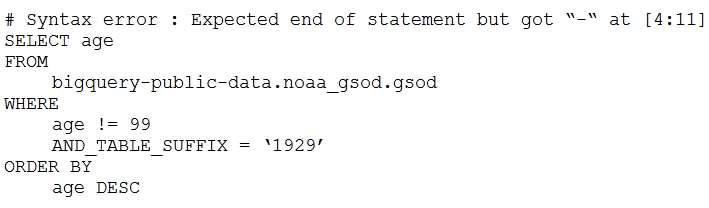
Your company is using WILDCARD tables to query data across multiple tables with similar names. The SQL statement is currently failing with the following error:
image
Which table name will make the SQL statement work correctly?

  • A. 'bigquery-public-data.noaa_gsod.gsod'
  • B. bigquery-public-data.noaa_gsod.gsod*
  • C. 'bigquery-public-data.noaa_gsod.gsod'*
  • D. 'bigquery-public-data.noaa_gsod.gsod*`

Suggested Answer

D

Answer Description Click to expand


Community Answer Votes

Comments 20 comments Click to expand

Comment 1

ID: 677244 User: Ender_H Badges: Highly Voted Relative Date: 3 years, 5 months ago Absolute Date: Fri 23 Sep 2022 16:28 Selected Answer: - Upvotes: 36

None, the actual `bigquery-public-data.noaa_gsod.gsod*`
with back ticks at the beginning and at the end.

Comment 1.1

ID: 776766 User: Davijde13 Badges: - Relative Date: 3 years, 1 month ago Absolute Date: Sun 15 Jan 2023 16:58 Selected Answer: - Upvotes: 11

I suspect there has been some typo with copy-paste of the option D

Comment 1.2

ID: 1106649 User: jitvimol Badges: - Relative Date: 2 years, 2 months ago Absolute Date: Wed 27 Dec 2023 08:56 Selected Answer: - Upvotes: 4

yes, I see from another source that actually ans D has to be backtick. Probably a problem when this web do data ingestion.

Comment 2

ID: 1617151 User: af17139 Badges: Most Recent Relative Date: 4 months, 4 weeks ago Absolute Date: Tue 14 Oct 2025 14:04 Selected Answer: D Upvotes: 1

A very common reason for SQL statements with wildcard tables to fail in BigQuery is not enclosing the table name pattern in backticks (`)

Comment 3

ID: 1608862 User: Setna Badges: - Relative Date: 6 months ago Absolute Date: Sat 13 Sep 2025 19:00 Selected Answer: D Upvotes: 1

Focus only on what the question asks. This question contains several errors in the query, but the question addresses only one of them. The table name. Option D.

Comment 4

ID: 1559542 User: fassil Badges: - Relative Date: 11 months ago Absolute Date: Thu 10 Apr 2025 12:56 Selected Answer: D Upvotes: 3

just read this guys : https://cloud.google.com/bigquery/docs/querying-wildcard-tables

Comment 5

ID: 1330489 User: Mariaantonirajc Badges: - Relative Date: 1 year, 2 months ago Absolute Date: Sun 22 Dec 2024 18:18 Selected Answer: B Upvotes: 1

B This is the correct syntax. The wildcard * is outside any quotes or string delimiters. This tells BigQuery to query all tables that match the pattern gsod* within the noaa_gsod dataset.

Comment 6

ID: 1329360 User: sravi1200 Badges: - Relative Date: 1 year, 2 months ago Absolute Date: Fri 20 Dec 2024 09:35 Selected Answer: B Upvotes: 1

Big Query does not use quotations while fetching data from the table :
example: select * from project-id.dataset_name.table_name; is the syntax

Comment 7

ID: 901998 User: vaga1 Badges: - Relative Date: 1 year, 5 months ago Absolute Date: Tue 24 Sep 2024 07:11 Selected Answer: D Upvotes: 1

let's forget the fact that in BQ is used ` instead than ' which retrieves an error in any case. ` is called backquote, backtick, or left quote while ' is simply an apostrophe. Let's consider ' to be ` in every answer, since moderators could have not been aware of such when they had received the question.

Comment 7.1

ID: 902000 User: vaga1 Badges: - Relative Date: 2 years, 9 months ago Absolute Date: Fri 19 May 2023 16:12 Selected Answer: - Upvotes: 2

Who used BQ knows that the backquote is necessary only for the project name, while it can be used for the whole string, and necessary only when the project name contains special (special in this specific context) characters.

- is a special character. so
`bigquery-public-data`.noaa_gsod.gsod1940
would have worked too.

The question now turns out to be
`bigquery-public-data`.noaa_gsod.gsod*
still works or due to the * presence we need to write
`bigquery-public-data.noaa_gsod.gsod*`
?

I personally do not remember, and I do not have a BQ at my disposal at the moment.
But I know for sure that
`bigquery-public-data.noaa_gsod.gsod*`
works while
`bigquery-public-data`.noaa_gsod.gsod*
is not in the options.

Comment 8

ID: 1050476 User: rtcpost Badges: - Relative Date: 1 year, 5 months ago Absolute Date: Tue 24 Sep 2024 07:11 Selected Answer: D Upvotes: 2

Option D (assuming to have backticks)

Refer: https://cloud.google.com/bigquery/docs/querying-wildcard-tables
The following query is NOT valid because it isn't properly quoted with backticks:
```
#standardSQL
/* Syntax error: Expected end of statement but got "-" at [4:11] */
SELECT
max
FROM
# missing backticks
bigquery-public-data.noaa_gsod.gsod*
WHERE
max != 9999.9 # code for missing data
AND _TABLE_SUFFIX = '1929'
ORDER BY
max DESC
```

Comment 9

ID: 1065075 User: RT_G Badges: - Relative Date: 1 year, 5 months ago Absolute Date: Tue 24 Sep 2024 07:11 Selected Answer: D Upvotes: 1

Reference: https://cloud.google.com/bigquery/docs/querying-wildcard-tables
The wildcard table name contains the special character (*), which means that you must enclose the wildcard table name in backtick (`) characters. For example, the following query is valid because it uses backticks:


#standardSQL
/* Valid SQL query */
SELECT
max
FROM
`bigquery-public-data.noaa_gsod.gsod*`
WHERE
max != 9999.9 # code for missing data
AND _TABLE_SUFFIX = '1929'
ORDER BY
max DESC

Comment 10

ID: 1207163 User: ABKR1300 Badges: - Relative Date: 1 year, 5 months ago Absolute Date: Tue 24 Sep 2024 07:11 Selected Answer: - Upvotes: 4

Few might go with the Option B which will be a blunder because of the below reason.

While querying the tables or views with the name, it is optional to surround with the backticks. But while querying the list of tables with Wild card character, it is must to surround with the backticks.

We can get the Syntax error: Expected end of input but got "*" with the below query

SELECT * FROM bigquery-public-data.noaa_gsod.gsod*
WHERE _TABLE_SUFFIX = "2024"

So, option D might be the correct one, provided if there is a typo.

Comment 11

ID: 1236984 User: Chintu_573 Badges: - Relative Date: 1 year, 8 months ago Absolute Date: Tue 25 Jun 2024 18:23 Selected Answer: B Upvotes: 1

IN option D, there is differert ' ` on first and last. That's why right option is second.

Comment 12

ID: 1214894 User: dsyouness Badges: - Relative Date: 1 year, 9 months ago Absolute Date: Tue 21 May 2024 13:33 Selected Answer: B Upvotes: 3

bigquery-public-data.noaa_gsod.gsod* also works

Comment 13

ID: 1065072 User: RT_G Badges: - Relative Date: 2 years, 4 months ago Absolute Date: Tue 07 Nov 2023 19:22 Selected Answer: D Upvotes: 1

Agree with others - Option D

Comment 14

ID: 1056902 User: axantroff Badges: - Relative Date: 2 years, 4 months ago Absolute Date: Sun 29 Oct 2023 16:08 Selected Answer: D Upvotes: 1

D. 'bigquery-public-data.noaa_gsod.gsod*` is the right answer with 1 typo

Comment 15

ID: 895917 User: Pavaan Badges: - Relative Date: 2 years, 10 months ago Absolute Date: Fri 12 May 2023 14:43 Selected Answer: - Upvotes: 3

Answer is 'D'
Reference : https://cloud.google.com/bigquery/docs/wildcard-table-reference

Enclose table names with wildcards in backticks
The wildcard table name contains the special character (*), which means that you must enclose the wildcard table name in backtick (`) characters.

Comment 16

ID: 881991 User: Melampos Badges: - Relative Date: 2 years, 10 months ago Absolute Date: Wed 26 Apr 2023 22:04 Selected Answer: B Upvotes: 2

bigquery-public-data.noaa_gsod.gsod* works

Comment 17

ID: 844617 User: hkhnhan Badges: - Relative Date: 2 years, 11 months ago Absolute Date: Mon 20 Mar 2023 08:35 Selected Answer: B Upvotes: 1

should be B, the backtick at D answer is wrong ' instead of `

6. PROFESSIONAL-DATA-ENGINEER Topic 1 Question 239

Sequence
38
Discussion ID
130182
Source URL
https://www.examtopics.com/discussions/google/view/130182-exam-professional-data-engineer-topic-1-question-239/
Posted By
scaenruy
Posted At
Jan. 3, 2024, 1:55 p.m.

Question

The data analyst team at your company uses BigQuery for ad-hoc queries and scheduled SQL pipelines in a Google Cloud project with a slot reservation of 2000 slots. However, with the recent introduction of hundreds of new non time-sensitive SQL pipelines, the team is encountering frequent quota errors. You examine the logs and notice that approximately 1500 queries are being triggered concurrently during peak time. You need to resolve the concurrency issue. What should you do?

  • A. Increase the slot capacity of the project with baseline as 0 and maximum reservation size as 3000.
  • B. Update SQL pipelines to run as a batch query, and run ad-hoc queries as interactive query jobs.
  • C. Increase the slot capacity of the project with baseline as 2000 and maximum reservation size as 3000.
  • D. Update SQL pipelines and ad-hoc queries to run as interactive query jobs.

Suggested Answer

B

Answer Description Click to expand


Community Answer Votes

Comments 9 comments Click to expand

Comment 1

ID: 1114054 User: raaad Badges: Highly Voted Relative Date: 2 years, 2 months ago Absolute Date: Thu 04 Jan 2024 21:37 Selected Answer: B Upvotes: 9

- BigQuery allows you to specify job priority as either BATCH or INTERACTIVE.
- Batch queries are queued and then started when idle resources are available, making them suitable for non-time-sensitive workloads.
- Running ad-hoc queries as interactive ensures they have prompt access to resources.

Comment 2

ID: 1609372 User: judy_data Badges: Most Recent Relative Date: 5 months, 4 weeks ago Absolute Date: Mon 15 Sep 2025 14:03 Selected Answer: B Upvotes: 1

You can query BigQuery data by using one of the following query job types:
Interactive query jobs. By default, BigQuery runs queries as interactive query jobs, which are intended to start executing as quickly as possible.

Batch query jobs. Batch queries have lower priority than interactive queries. When a project or reservation is using all of its available compute resources, batch queries are more likely to be queued and remain in the queue. After a batch query starts running, the batch query runs the same as an interactive query. For more information, see query queues.

Comment 3

ID: 1347069 User: LP_PDE Badges: - Relative Date: 1 year, 1 month ago Absolute Date: Sun 26 Jan 2025 19:45 Selected Answer: B Upvotes: 1

By updating your SQL pipelines to run as batch queries you can reduce concurrency, avoid quota errors, and ensure that your analysts have the resources they need for their interactive queries.

Comment 4

ID: 1305579 User: ToiToi Badges: - Relative Date: 1 year, 4 months ago Absolute Date: Thu 31 Oct 2024 21:12 Selected Answer: B Upvotes: 2

This question has nothing to do with increasing slots, it is just confusing and misleading, therefore A and C do not make sense.
D (All interactive queries): Running all queries as interactive would prioritize speed over cost-efficiency and might not be necessary for your non-time-sensitive SQL pipelines.

Comment 5

ID: 1213500 User: josech Badges: - Relative Date: 1 year, 9 months ago Absolute Date: Sun 19 May 2024 00:37 Selected Answer: C Upvotes: 3

You already have a 2000 slots consumption and sudden peaks, so you should use a baseline of 2000 slots and a maximum of 3000 to tackle the peak concurrent activity.
https://cloud.google.com/bigquery/docs/slots-autoscaling-intro

Comment 6

ID: 1191250 User: CGS22 Badges: - Relative Date: 1 year, 11 months ago Absolute Date: Mon 08 Apr 2024 01:21 Selected Answer: A Upvotes: 2

Why A is the best choice:

Addresses Concurrency: Increasing the maximum reservation size to 3000 slots directly addresses the concurrency issue by providing more capacity for simultaneous queries. Since the current peak usage is 1500 queries, this increase ensures sufficient headroom.
Cost Optimization: Setting the baseline to 0 means you only pay for the slots actually used, avoiding unnecessary costs for idle capacity. This is ideal for non-time-sensitive workloads where flexibility is more important than guaranteed instant availability.

Comment 7

ID: 1154434 User: JyoGCP Badges: - Relative Date: 2 years ago Absolute Date: Tue 20 Feb 2024 03:34 Selected Answer: B Upvotes: 2

Option B

Comment 7.1

ID: 1191251 User: CGS22 Badges: - Relative Date: 1 year, 11 months ago Absolute Date: Mon 08 Apr 2024 01:21 Selected Answer: - Upvotes: 1

B: While batch queries are generally more cost-effective for large, non-interactive workloads, they don't solve the concurrency problem. If multiple batch queries are triggered simultaneously, they would still compete for the same limited slot pool.

Comment 8

ID: 1112760 User: scaenruy Badges: - Relative Date: 2 years, 2 months ago Absolute Date: Wed 03 Jan 2024 13:55 Selected Answer: B Upvotes: 2

B.
Update SQL pipelines to run as a batch query, and run ad-hoc queries as interactive query jobs.

7. PROFESSIONAL-DATA-ENGINEER Topic 1 Question 8

Sequence
39
Discussion ID
16641
Source URL
https://www.examtopics.com/discussions/google/view/16641-exam-professional-data-engineer-topic-1-question-8/
Posted By
-
Posted At
March 15, 2020, 8:44 a.m.

Question

You are building new real-time data warehouse for your company and will use Google BigQuery streaming inserts. There is no guarantee that data will only be sent in once but you do have a unique ID for each row of data and an event timestamp. You want to ensure that duplicates are not included while interactively querying data. Which query type should you use?

  • A. Include ORDER BY DESK on timestamp column and LIMIT to 1.
  • B. Use GROUP BY on the unique ID column and timestamp column and SUM on the values.
  • C. Use the LAG window function with PARTITION by unique ID along with WHERE LAG IS NOT NULL.
  • D. Use the ROW_NUMBER window function with PARTITION by unique ID along with WHERE row equals 1.

Suggested Answer

D

Answer Description Click to expand


Community Answer Votes

Comments 21 comments Click to expand

Comment 1

ID: 681066 User: Ender_H Badges: Highly Voted Relative Date: 3 years, 5 months ago Absolute Date: Tue 27 Sep 2022 20:31 Selected Answer: - Upvotes: 12

I personally don't think any answer is correct,

D is the closest one but it's missing a "ORDER BY timestamp DESC" to ensure to get only the latest record based in the timestamp

Comment 1.1

ID: 1318837 User: ndimu Badges: - Relative Date: 1 year, 3 months ago Absolute Date: Wed 27 Nov 2024 19:30 Selected Answer: - Upvotes: 2

the idea is you can have multiple events occurring at the same time so the only way to distinct is id

Comment 1.2

ID: 776764 User: Davijde13 Badges: - Relative Date: 3 years, 1 month ago Absolute Date: Sun 15 Jan 2023 16:56 Selected Answer: - Upvotes: 7

The question mention only duplicated data and nothing about taking only the latest ones. Therefore I assume there is no need to always take the latest, we should ensure we take only one record for each ID.

Comment 2

ID: 305460 User: daghayeghi Badges: Highly Voted Relative Date: 5 years ago Absolute Date: Mon 08 Mar 2021 03:16 Selected Answer: - Upvotes: 9

D:
https://cloud.google.com/bigquery/streaming-data-into-bigquery#manually_removing_duplicates

Comment 3

ID: 1607465 User: joqu Badges: Most Recent Relative Date: 6 months ago Absolute Date: Tue 09 Sep 2025 11:05 Selected Answer: D Upvotes: 1

D but it needs ORDER BY and should use QUALIFY instead of WHERE

Comment 4

ID: 1399890 User: willyunger Badges: - Relative Date: 12 months ago Absolute Date: Tue 18 Mar 2025 00:20 Selected Answer: D Upvotes: 2

D is closest, as there will always be at least 1 row for each ID. Would have rather used SELECT DISTINCT.

Comment 5

ID: 1065070 User: RT_G Badges: - Relative Date: 1 year, 5 months ago Absolute Date: Tue 24 Sep 2024 07:10 Selected Answer: D Upvotes: 1

D ensures data is partitioned by the unique id and only one record is picked thereby ensuring results are de-duplicated

Comment 6

ID: 1050470 User: rtcpost Badges: - Relative Date: 1 year, 5 months ago Absolute Date: Tue 24 Sep 2024 07:10 Selected Answer: D Upvotes: 2

This approach will assign a row number to each row within a unique ID partition, and by selecting only rows with a row number of 1, you will ensure that duplicates are excluded in your query results. It allows you to filter out redundant rows while retaining the latest or earliest records based on your timestamp column.

Options A, B, and C do not address the issue of duplicates effectively or interactively as they do not explicitly remove duplicates based on the unique ID and event timestamp.

Comment 7

ID: 208073 User: Radhika7983 Badges: - Relative Date: 1 year, 5 months ago Absolute Date: Tue 24 Sep 2024 07:10 Selected Answer: - Upvotes: 8

Correct answer is D. Group by column us used to check for the duplicates where you can have the count(*) for each of the unique id column. If the count is greater than 1, we will know duplicate exists.The easiest way to remove duplicates while streaming inserts is to use row_number. Use GROUP BY on the unique ID column and timestamp column and SUM on the values will not remove duplicates.
I also executed LAG function and LAG function will return NULL on unique id when no previous records with same unique id exist. Hence LAG is also not an option here.

Comment 8

ID: 474007 User: MaxNRG Badges: - Relative Date: 1 year, 5 months ago Absolute Date: Tue 24 Sep 2024 07:09 Selected Answer: - Upvotes: 6

D is correct because it will just pick out a single row for each set of duplicates.
A is not correct because this will just return one row.
B is not correct because this doesn’t get you the latest value, but will get you a sum of the same event over time which doesn’t make too much sense if you have duplicates.
C is not correct because if you have events that are not duplicated, it will be excluded.

Comment 9

ID: 819313 User: Zosby Badges: - Relative Date: 3 years ago Absolute Date: Thu 23 Feb 2023 15:50 Selected Answer: - Upvotes: 1

Correct D

Comment 10

ID: 811314 User: Morock Badges: - Relative Date: 3 years ago Absolute Date: Fri 17 Feb 2023 03:12 Selected Answer: D Upvotes: 3

Row number gives the unique number ranking based on target column.

Comment 11

ID: 740928 User: odacir Badges: - Relative Date: 3 years, 3 months ago Absolute Date: Sat 10 Dec 2022 12:34 Selected Answer: D Upvotes: 1

It's the only valid option, try it your self with examples in QB.

Comment 12

ID: 618613 User: Mamta072 Badges: - Relative Date: 3 years, 8 months ago Absolute Date: Sun 19 Jun 2022 11:43 Selected Answer: - Upvotes: 1

Ans is D as Row number is the clause to fetch unique record from duplicate

Comment 13

ID: 559280 User: Arkon88 Badges: - Relative Date: 4 years ago Absolute Date: Wed 02 Mar 2022 09:44 Selected Answer: - Upvotes: 1

Answer: D

Comment 14

ID: 529954 User: samdhimal Badges: - Relative Date: 4 years, 1 month ago Absolute Date: Sat 22 Jan 2022 16:58 Selected Answer: - Upvotes: 3

correct answer -> Use the ROW_NUMBER window function with PARTITION by unique ID along with WHERE row equals 1.

You can use the ROW_NUMBER() to turn non-unique rows into unique rows and then delete the duplicate rows.

Reference:
https://www.mysqltutorial.org/mysql-window-functions/mysql-row_number-function/

Comment 14.1

ID: 784809 User: samdhimal Badges: - Relative Date: 1 year, 5 months ago Absolute Date: Tue 24 Sep 2024 07:09 Selected Answer: - Upvotes: 4

When you are using BigQuery streaming inserts, there is no guarantee that data will only be sent once. However, you can use the ROW_NUMBER window function to ensure that duplicates are not included while interactively querying data. By using a PARTITION BY clause on the unique ID column, you can assign a unique number to each row within a result set, based on the order specified in the timestamp column. Then, a WHERE clause can be used to select only the row with the number 1. This will return the first row for each unique ID based on the timestamp column, which will ensure that duplicates are not included in your query results.

Comment 14.1.1

ID: 784810 User: samdhimal Badges: - Relative Date: 3 years, 1 month ago Absolute Date: Mon 23 Jan 2023 01:00 Selected Answer: - Upvotes: 2

Option A is not recommended because it will only return the first row based on the timestamp column, it doesn't consider the unique ID, so you could have multiple rows with the same timestamp, and you will get one of them arbitrarily.

Option B is not recommended because it's used for aggregation, it doesn't return the first row for each unique ID based on the timestamp column.

Option C is not recommended because it's used for comparing rows, it doesn't return the first row for each unique ID based on the timestamp column.

Comment 15

ID: 485659 User: nofaruccio Badges: - Relative Date: 4 years, 3 months ago Absolute Date: Wed 24 Nov 2021 07:30 Selected Answer: - Upvotes: 1

Sorry, but IMHO no response is correct, because, in addition to making the ID field unique, it occurs consider the record with most recent timestamp

Comment 16

ID: 462024 User: anji007 Badges: - Relative Date: 4 years, 4 months ago Absolute Date: Thu 14 Oct 2021 14:42 Selected Answer: - Upvotes: 1

Ans: D

Comment 17

ID: 319796 User: lbhhoya82 Badges: - Relative Date: 4 years, 11 months ago Absolute Date: Thu 25 Mar 2021 06:19 Selected Answer: - Upvotes: 1

Correct : D

8. PROFESSIONAL-DATA-ENGINEER Topic 1 Question 264

Sequence
42
Discussion ID
130360
Source URL
https://www.examtopics.com/discussions/google/view/130360-exam-professional-data-engineer-topic-1-question-264/
Posted By
scaenruy
Posted At
Jan. 5, 2024, 2:59 a.m.

Question

You are running your BigQuery project in the on-demand billing model and are executing a change data capture (CDC) process that ingests data. The CDC process loads 1 GB of data every 10 minutes into a temporary table, and then performs a merge into a 10 TB target table. This process is very scan intensive and you want to explore options to enable a predictable cost model. You need to create a BigQuery reservation based on utilization information gathered from BigQuery Monitoring and apply the reservation to the CDC process. What should you do?

  • A. Create a BigQuery reservation for the dataset.
  • B. Create a BigQuery reservation for the job.
  • C. Create a BigQuery reservation for the service account running the job.
  • D. Create a BigQuery reservation for the project.

Suggested Answer

D

Answer Description Click to expand


Community Answer Votes

Comments 20 comments Click to expand

Comment 1

ID: 1121760 User: Matt_108 Badges: Highly Voted Relative Date: 2 years, 1 month ago Absolute Date: Sat 13 Jan 2024 15:51 Selected Answer: D Upvotes: 12

Option D, reservation can't be applied to resources lower than projects (only to Org, folders or projects)

Comment 1.1

ID: 1127629 User: AllenChen123 Badges: - Relative Date: 2 years, 1 month ago Absolute Date: Sun 21 Jan 2024 05:44 Selected Answer: - Upvotes: 6

Seems correct. https://cloud.google.com/bigquery/docs/reservations-intro#understand_workload_management

Comment 2

ID: 1120483 User: task_7 Badges: Highly Voted Relative Date: 2 years, 2 months ago Absolute Date: Fri 12 Jan 2024 07:23 Selected Answer: B Upvotes: 7

Reserve assignments
To use the slot capacity you purchased, assign projects, folders, or organizations to a reservation. When a job in a project runs, it uses slots from the assigned reservation. Resources can inherit roles from their parents in the resource hierarchy. Even if a project is not assigned to a reservation, it inherits the assignment from the parent folder or organization, if any. If a project does not have an assigned or inherited reservation, the job uses on-demand pricing. For more information about the resource hierarchy, see Organizing BigQuery Resources .

Comment 2.1

ID: 1314490 User: Positron75 Badges: - Relative Date: 1 year, 3 months ago Absolute Date: Tue 19 Nov 2024 08:30 Selected Answer: - Upvotes: 2

The first sentence of that text already points towards D, not B. You can't assign jobs to a reservation, only projects, folders or organizations.

Comment 2.1.1

ID: 1332520 User: apoio.certificacoes.closer Badges: - Relative Date: 1 year, 2 months ago Absolute Date: Fri 27 Dec 2024 17:29 Selected Answer: - Upvotes: 1

Best that could be done is a specify this a batch job, but the slot capacity is still at the project level.

Comment 3

ID: 1607448 User: judy_data Badges: Most Recent Relative Date: 6 months ago Absolute Date: Tue 09 Sep 2025 09:35 Selected Answer: D Upvotes: 1

Reservations are assigned at project level https://cloud.google.com/bigquery/docs/reservations-tasks

Comment 4

ID: 1410153 User: desertlotus1211 Badges: - Relative Date: 11 months, 3 weeks ago Absolute Date: Tue 25 Mar 2025 20:53 Selected Answer: C Upvotes: 2

Answer C provides the granularity you need. Answer D is for the entire project... however the question ONLY wants it for the CDC process - so service account is better.

In BigQuery, reservations are assigned to "assignments", which can be:

Project

Folder

Organization

Service account

Comment 5

ID: 1325892 User: m_a_p_s Badges: - Relative Date: 1 year, 3 months ago Absolute Date: Thu 12 Dec 2024 23:24 Selected Answer: D Upvotes: 2

"When you create commitments and reservations, they are associated with a Google Cloud project." - https://cloud.google.com/bigquery/docs/reservations-intro#admin-project

Comment 6

ID: 1314496 User: Positron75 Badges: - Relative Date: 1 year, 3 months ago Absolute Date: Tue 19 Nov 2024 08:40 Selected Answer: D Upvotes: 3

https://cloud.google.com/bigquery/docs/reservations-intro#assignments

Comment 7

ID: 1305164 User: SamuelTsch Badges: - Relative Date: 1 year, 4 months ago Absolute Date: Wed 30 Oct 2024 21:40 Selected Answer: B Upvotes: 1

Option B provides a more granularity solution

Comment 8

ID: 1267355 User: viciousjpjp Badges: - Relative Date: 1 year, 6 months ago Absolute Date: Sat 17 Aug 2024 00:35 Selected Answer: B Upvotes: 2

The correct answer is B. Create a BigQuery reservation at the job level.

Create a BigQuery reservation at the job level: This is the most suitable option. By creating a job-level reservation, you can allocate resources specifically to the CDC process and improve the accuracy of cost forecasting.

Steps to create and apply a BigQuery reservation:
Identify the job: Clearly identify the job that executes the CDC process.
Create a reservation: Use the BigQuery console or API to create a reservation, specifying the job's label, query text, and other details.
Apply the reservation: Assign the created reservation to the job that executes the CDC process.

Comment 8.1

ID: 1314492 User: Positron75 Badges: - Relative Date: 1 year, 3 months ago Absolute Date: Tue 19 Nov 2024 08:35 Selected Answer: - Upvotes: 1

Jobs cannot be assigned to a reservation. You should read the documentation instead of relying on AI answers which are wrong half the time.

https://cloud.google.com/bigquery/docs/reservations-intro#understand_workload_management

Comment 8.1.1

ID: 1314493 User: Positron75 Badges: - Relative Date: 1 year, 3 months ago Absolute Date: Tue 19 Nov 2024 08:36 Selected Answer: - Upvotes: 1

Sorry, this is the actual link: https://cloud.google.com/bigquery/docs/reservations-intro#assignments

Comment 9

ID: 1263418 User: meh_33 Badges: - Relative Date: 1 year, 7 months ago Absolute Date: Sat 10 Aug 2024 11:59 Selected Answer: - Upvotes: 1

Are these questions really useful andd coming in GDE Exam? Anyone appeared recently and passed ?

Comment 10

ID: 1213621 User: Anudeep58 Badges: - Relative Date: 1 year, 9 months ago Absolute Date: Sun 19 May 2024 07:51 Selected Answer: D Upvotes: 3

https://cloud.google.com/blog/products/data-analytics/manage-bigquery-costs-with-custom-quotas.
Quotas can be applied on Project or User Level

Comment 11

ID: 1212820 User: f74ca0c Badges: - Relative Date: 1 year, 9 months ago Absolute Date: Fri 17 May 2024 11:27 Selected Answer: D Upvotes: 3

D- choose the correct project and apply the task type background:https://cloud.google.com/bigquery/docs/reservations-intro?hl=fr#assignments

Comment 12

ID: 1155158 User: JyoGCP Badges: - Relative Date: 2 years ago Absolute Date: Wed 21 Feb 2024 03:13 Selected Answer: D Upvotes: 1

Option D

Comment 13

ID: 1116923 User: GCP001 Badges: - Relative Date: 2 years, 2 months ago Absolute Date: Mon 08 Jan 2024 20:12 Selected Answer: - Upvotes: 3

D.
Reservation is on project, folder or organisation level.

Comment 14

ID: 1114608 User: raaad Badges: - Relative Date: 2 years, 2 months ago Absolute Date: Fri 05 Jan 2024 16:37 Selected Answer: D Upvotes: 3

C or D ??

Option C (service account) allows you to target the reservation specifically to the CDC process or any other jobs run by that service account. This is particularly useful if you have multiple processes running in the project with different performance or cost requirements.

Option D (project) applies the reservation across all jobs in the project, which is a broader approach. If the CDC process is the primary or sole job running in the project and you want all jobs to share the same reservation, then this option might be more straightforward.

Comment 15

ID: 1114187 User: scaenruy Badges: - Relative Date: 2 years, 2 months ago Absolute Date: Fri 05 Jan 2024 02:59 Selected Answer: D Upvotes: 1

D. Create a BigQuery reservation for the project.

9. PROFESSIONAL-DATA-ENGINEER Topic 1 Question 285

Sequence
47
Discussion ID
130511
Source URL
https://www.examtopics.com/discussions/google/view/130511-exam-professional-data-engineer-topic-1-question-285/
Posted By
GCP001
Posted At
Jan. 7, 2024, 4:26 p.m.

Question

You have 100 GB of data stored in a BigQuery table. This data is outdated and will only be accessed one or two times a year for analytics with SQL. For backup purposes, you want to store this data to be immutable for 3 years. You want to minimize storage costs. What should you do?

  • A. 1. Create a BigQuery table clone.
    2. Query the clone when you need to perform analytics.
  • B. 1. Create a BigQuery table snapshot.
    2. Restore the snapshot when you need to perform analytics.
  • C. 1. Perform a BigQuery export to a Cloud Storage bucket with archive storage class.
    2. Enable versioning on the bucket.
    3. Create a BigQuery external table on the exported files.
  • D. 1. Perform a BigQuery export to a Cloud Storage bucket with archive storage class.
    2. Set a locked retention policy on the bucket.
    3. Create a BigQuery external table on the exported files.

Suggested Answer

D

Answer Description Click to expand


Community Answer Votes

Comments 7 comments Click to expand

Comment 1

ID: 1119671 User: raaad Badges: Highly Voted Relative Date: 2 years, 2 months ago Absolute Date: Thu 11 Jan 2024 12:54 Selected Answer: D Upvotes: 6

Straight Forward

Comment 2

ID: 1605865 User: judy_data Badges: Most Recent Relative Date: 6 months, 1 week ago Absolute Date: Wed 03 Sep 2025 14:25 Selected Answer: D Upvotes: 1

exporting the table to a bucket is the most straight forward and cost effective solution. C is not suited because it mentions enable versioning for a table that wont change and is immutable for 3 years. and it doesn't mention retention

Comment 3

ID: 1231860 User: fitri001 Badges: - Relative Date: 1 year, 8 months ago Absolute Date: Mon 17 Jun 2024 11:59 Selected Answer: D Upvotes: 2

For data keeping till last 3 years, use bucket lock with rentention policy

Comment 4

ID: 1174328 User: hanoverquay Badges: - Relative Date: 1 year, 12 months ago Absolute Date: Fri 15 Mar 2024 16:00 Selected Answer: D Upvotes: 1

voted D

Comment 5

ID: 1155433 User: JyoGCP Badges: - Relative Date: 2 years ago Absolute Date: Wed 21 Feb 2024 11:17 Selected Answer: D Upvotes: 1

Option D

Comment 6

ID: 1121868 User: Matt_108 Badges: - Relative Date: 2 years, 1 month ago Absolute Date: Sat 13 Jan 2024 17:46 Selected Answer: D Upvotes: 2

Option D, clearly

Comment 7

ID: 1115962 User: GCP001 Badges: - Relative Date: 2 years, 2 months ago Absolute Date: Sun 07 Jan 2024 16:26 Selected Answer: - Upvotes: 2

D.
For data keeping till last 3 years, use bucket lock with rentention policy

10. PROFESSIONAL-DATA-ENGINEER Topic 1 Question 24

Sequence
48
Discussion ID
16285
Source URL
https://www.examtopics.com/discussions/google/view/16285-exam-professional-data-engineer-topic-1-question-24/
Posted By
jvg637
Posted At
March 11, 2020, 7:13 p.m.

Question

You have spent a few days loading data from comma-separated values (CSV) files into the Google BigQuery table CLICK_STREAM. The column DT stores the epoch time of click events. For convenience, you chose a simple schema where every field is treated as the STRING type. Now, you want to compute web session durations of users who visit your site, and you want to change its data type to the TIMESTAMP. You want to minimize the migration effort without making future queries computationally expensive. What should you do?

  • A. Delete the table CLICK_STREAM, and then re-create it such that the column DT is of the TIMESTAMP type. Reload the data.
  • B. Add a column TS of the TIMESTAMP type to the table CLICK_STREAM, and populate the numeric values from the column TS for each row. Reference the column TS instead of the column DT from now on.
  • C. Create a view CLICK_STREAM_V, where strings from the column DT are cast into TIMESTAMP values. Reference the view CLICK_STREAM_V instead of the table CLICK_STREAM from now on.
  • D. Add two columns to the table CLICK STREAM: TS of the TIMESTAMP type and IS_NEW of the BOOLEAN type. Reload all data in append mode. For each appended row, set the value of IS_NEW to true. For future queries, reference the column TS instead of the column DT, with the WHERE clause ensuring that the value of IS_NEW must be true.
  • E. Construct a query to return every row of the table CLICK_STREAM, while using the built-in function to cast strings from the column DT into TIMESTAMP values. Run the query into a destination table NEW_CLICK_STREAM, in which the column TS is the TIMESTAMP type. Reference the table NEW_CLICK_STREAM instead of the table CLICK_STREAM from now on. In the future, new data is loaded into the table NEW_CLICK_STREAM.

Suggested Answer

E

Answer Description Click to expand


Community Answer Votes

Comments 22 comments Click to expand

Comment 1

ID: 62602 User: jvg637 Badges: Highly Voted Relative Date: 6 years ago Absolute Date: Wed 11 Mar 2020 19:13 Selected Answer: - Upvotes: 32

"E" looks better. For D, the database will be double in size (which increases the storage price) and the user has to spend some more days reloading all the data.

Comment 1.1

ID: 746264 User: jkhong Badges: - Relative Date: 3 years, 2 months ago Absolute Date: Thu 15 Dec 2022 16:43 Selected Answer: - Upvotes: 6

Also D doesn't make sense since we're filtering IS_NEW to true to only consider future data, which disregards our previously loaded data

Comment 1.2

ID: 720354 User: assU2 Badges: - Relative Date: 3 years, 3 months ago Absolute Date: Thu 17 Nov 2022 10:18 Selected Answer: - Upvotes: 4

"You want to minimize the migration effort without making future queries computationally expensive." Nothing about storage price.

Comment 2

ID: 264672 User: StelSen Badges: Highly Voted Relative Date: 5 years, 2 months ago Absolute Date: Mon 11 Jan 2021 13:10 Selected Answer: - Upvotes: 6

I would go for Option.E
Reason:
1. Question says, I want to change data type to the TIMESTAMP. So there is change required
2. To minimize migration effort without making future queries computationally expensive: No view required as I will run this query again and again. In order to convert string to Timestamp we need to use CAST function for sure. Simple copy of numeric value won't work. https://cloud.google.com/bigquery/docs/reference/standard-sql/conversion_rules
Option-A: I don't want to redo this and spent few days again
Option-B: Copying numeric value won't work.
Option-C: View is expensive to run again and again.
Option-D: To me this seems onetime data load which took 3 days. So, the IS_NEW seems give us reduntant data as we are adding appended mode.
Option-E: Technically it will work, although it will add more space (new table) ,cost. But no choice, because Option-B didn't mention Cast function. Else I would have gone for "B"

Comment 3

ID: 1604930 User: Bugnumber1 Badges: Most Recent Relative Date: 6 months, 1 week ago Absolute Date: Sun 31 Aug 2025 20:59 Selected Answer: E Upvotes: 2

It's E.

C looks good because it's very easy and straightforward. But every time you query that view, a transformation will take place, making queries expensive, and it will be forever like this as the original table doesn't change.
One time effort of loading the data into a new table with a small query. Heck you can even rename it right after if you don't want to change the reference of the ingestion.

Comment 4

ID: 1398866 User: Parandhaman_Margan Badges: - Relative Date: 12 months ago Absolute Date: Sat 15 Mar 2025 15:11 Selected Answer: C Upvotes: 1

Changing DT to TIMESTAMP. Create a view casting the string. Answer C.

Comment 5

ID: 1364882 User: Abizi Badges: - Relative Date: 1 year ago Absolute Date: Tue 04 Mar 2025 12:55 Selected Answer: E Upvotes: 1

I was hesitating between C and E, but E seems to be the good one

Comment 6

ID: 1346631 User: LP_PDE Badges: - Relative Date: 1 year, 1 month ago Absolute Date: Sat 25 Jan 2025 20:56 Selected Answer: C Upvotes: 1

Both options C (creating a view) and E (creating a new table) avoid reloading the original data. However, C is the better choice for minimizing effort and maintaining performance. Views don't store any data themselves. They simply act as a layer on top of the existing table. This means you avoid the cost of storing duplicate data, which can be significant for large tables.

Comment 6.1

ID: 1581465 User: 56d02cd Badges: - Relative Date: 8 months, 2 weeks ago Absolute Date: Sat 28 Jun 2025 18:22 Selected Answer: - Upvotes: 2

But the cast of column DT from string to timestamp is executed on every query against the view making it more expensive, which is what we awant to avoid. I think E is the better solution.

Comment 7

ID: 1262397 User: Nittin Badges: - Relative Date: 1 year, 7 months ago Absolute Date: Thu 08 Aug 2024 09:54 Selected Answer: C Upvotes: 3

Create a view no data migration easy to do but computational efficient queries not sure (?)

Comment 8

ID: 1212693 User: mark1223jkh Badges: - Relative Date: 1 year, 9 months ago Absolute Date: Fri 17 May 2024 06:28 Selected Answer: - Upvotes: 1

E. It recreates the table one time and everything is fixed. Next time you load, load to the new table, you can delete the previous one.
Definitely not C. The question says I have to minimize future query effort, which literally means "don't create a view that converts from STR to TIMESTAMP for every row."

Comment 9

ID: 1212407 User: suwalsageen12 Badges: - Relative Date: 1 year, 10 months ago Absolute Date: Thu 16 May 2024 14:02 Selected Answer: E Upvotes: 1

Option E is correct.
The question is asking to consider the Query cost for future.
This is a one time job to fix the Timestamp column. no views were created.

Comment 10

ID: 1200194 User: teka112233 Badges: - Relative Date: 1 year, 10 months ago Absolute Date: Mon 22 Apr 2024 14:44 Selected Answer: E Upvotes: 1

Why Option E is the best choice:

It modifies the schema with minimal data movement.
The original table remains untouched for potential future needs.
Future data loads can directly go to the new table with the desired schema.
Queries referencing the new table (NEW_CLICK_STREAM) will benefit from the optimized data type for timestamp operations.

Comment 11

ID: 1171550 User: GYORK Badges: - Relative Date: 2 years ago Absolute Date: Tue 12 Mar 2024 09:39 Selected Answer: C Upvotes: 1

minimizing effort is key.

Comment 12

ID: 1096342 User: TVH_Data_Engineer Badges: - Relative Date: 2 years, 2 months ago Absolute Date: Thu 14 Dec 2023 11:25 Selected Answer: C Upvotes: 4

A view in Google BigQuery is a virtual table defined by a SQL query. By creating a view that casts the DT column as a TIMESTAMP, you can transform the data format without altering the underlying data in the CLICK_STREAM table. This means you don't have to reload any data, thereby minimizing migration effort.

Comment 12.1

ID: 1324708 User: apoio.certificacoes.closer Badges: - Relative Date: 1 year, 3 months ago Absolute Date: Tue 10 Dec 2024 19:49 Selected Answer: - Upvotes: 1

Depends. If you create a materialized view, that tracks. If it's not a materialized view, the underlying query will run every time there's a query against the view.

Comment 13

ID: 1076342 User: axantroff Badges: - Relative Date: 2 years, 3 months ago Absolute Date: Tue 21 Nov 2023 15:03 Selected Answer: E Upvotes: 1

Good point about the logical views and the desire to reduce costs. I would vote for E

Comment 14

ID: 1053158 User: mk_choudhary Badges: - Relative Date: 2 years, 4 months ago Absolute Date: Tue 24 Oct 2023 22:43 Selected Answer: - Upvotes: 1

The best way to minimize the migration effort without making future queries computationally expensive is to create a view and reference it instead of the table. This is because views are materialized when they are queried, so they do not incur any additional overhead.
So the answer is (C).

Comment 14.1

ID: 1066588 User: brokeasspanda Badges: - Relative Date: 2 years, 4 months ago Absolute Date: Thu 09 Nov 2023 19:00 Selected Answer: - Upvotes: 1

C doesn't say materialized view, there's a difference with a regular view so it'll be slower and more expensive on every call to that view.

Comment 15

ID: 1050528 User: rtcpost Badges: - Relative Date: 2 years, 4 months ago Absolute Date: Sun 22 Oct 2023 14:02 Selected Answer: E Upvotes: 2

Option "E"
It avoids the need to delete and recreate the entire CLICK_STREAM table, which is time-consuming and requires reloading all data.

It allows you to use a simple query to cast the existing DT column as TIMESTAMP values and store the results in a new table, NEW_CLICK_STREAM.

You can gradually migrate to the new data format, and your future queries will be able to utilize the TIMESTAMP data type for more efficient processing.

Comment 16

ID: 994692 User: sergiomujica Badges: - Relative Date: 2 years, 6 months ago Absolute Date: Thu 31 Aug 2023 04:58 Selected Answer: - Upvotes: 1

Option D duplicates, not a good solution

Comment 17

ID: 966838 User: NeoNitin Badges: - Relative Date: 2 years, 7 months ago Absolute Date: Sun 30 Jul 2023 06:11 Selected Answer: - Upvotes: 1

E. E. You can use a special command to change the time on the old cards to the better type "TIMESTAMP" and create a new box called "NEW_CLICK_STREAM." From now on, you'll look at the new box whenever you want to know the time. It's like having a new and better box to keep things tidy and organized.

So, the best way to change the time on the little cards to the better type "TIMESTAMP" is option E. It's like using magic to create a new box and making sure everything is still easy to find and work with. It's a clever way to keep track of time and make your website even better!

11. PROFESSIONAL-DATA-ENGINEER Topic 1 Question 103

Sequence
52
Discussion ID
79775
Source URL
https://www.examtopics.com/discussions/google/view/79775-exam-professional-data-engineer-topic-1-question-103/
Posted By
AWSandeep
Posted At
Sept. 3, 2022, 2:04 p.m.

Question

You have a data stored in BigQuery. The data in the BigQuery dataset must be highly available. You need to define a storage, backup, and recovery strategy of this data that minimizes cost. How should you configure the BigQuery table that have a recovery point objective (RPO) of 30 days?

  • A. Set the BigQuery dataset to be regional. In the event of an emergency, use a point-in-time snapshot to recover the data.
  • B. Set the BigQuery dataset to be regional. Create a scheduled query to make copies of the data to tables suffixed with the time of the backup. In the event of an emergency, use the backup copy of the table.
  • C. Set the BigQuery dataset to be multi-regional. In the event of an emergency, use a point-in-time snapshot to recover the data.
  • D. Set the BigQuery dataset to be multi-regional. Create a scheduled query to make copies of the data to tables suffixed with the time of the backup. In the event of an emergency, use the backup copy of the table.

Suggested Answer

C

Answer Description Click to expand


Community Answer Votes

Comments 20 comments Click to expand

Comment 1

ID: 1008711 User: DeepakVenkatachalam Badges: Highly Voted Relative Date: 2 years, 5 months ago Absolute Date: Fri 15 Sep 2023 23:31 Selected Answer: - Upvotes: 11

Answer is B. Timetravel only covers for 7 days and a scheduled query is needed for creating Table snapshots for 30 days. Also table snapshot must remain in the same region as base table (please refer to limitation of table snapshot from below link) https://cloud.google.com/bigquery/docs/table-snapshots-intro

Comment 2

ID: 781578 User: desertlotus1211 Badges: Highly Voted Relative Date: 3 years, 1 month ago Absolute Date: Thu 19 Jan 2023 21:26 Selected Answer: - Upvotes: 5

Answer is C: https://cloud.google.com/bigquery/docs/table-snapshots-intro
"Benefits of using table snapshots include the following:

Keep a record for longer than seven days. With BigQuery time travel, you can only access a table's data from seven days ago or more recently. With table snapshots, you can preserve a table's data from a specified point in time for as long as you want.

Minimize storage cost. BigQuery only stores bytes that are different between a snapshot and its base table, so a table snapshot typically uses less storage than a full copy of the table."
But the wording is foolish... It's table snapshot, NOT point in time snapshot!

https://cloud.google.com/bigquery/docs/time-travel#restore-a-table
this is point in time using time travel window - max is 7 days...

Comment 2.1

ID: 1399478 User: desertlotus1211 Badges: - Relative Date: 12 months ago Absolute Date: Mon 17 Mar 2025 01:34 Selected Answer: - Upvotes: 1

Sorry folks - I change my answer to D... C is not correct at it can ONLY go back for 7 days, max!

Comment 3

ID: 1602628 User: forepick Badges: Most Recent Relative Date: 6 months, 2 weeks ago Absolute Date: Tue 26 Aug 2025 09:16 Selected Answer: B Upvotes: 1

Regional - to minimize cost, scheduled backups - to enable 30 days RPO (time travel only gives you 7 days)

Comment 4

ID: 1585925 User: imrane1995 Badges: - Relative Date: 8 months ago Absolute Date: Sun 13 Jul 2025 02:54 Selected Answer: B Upvotes: 1

Regional datasets are *cheaper* than *multi-regional*, which helps minimize cost.
Scheduled queries can automate daily or hourly snapshots, ensuring you always have backup data within the 30-day RPO window.
Time-suffixed tables allow for granular restoration to a specific date.
This is a manual but cost-effective backup strategy.

Comment 5

ID: 1581778 User: 56d02cd Badges: - Relative Date: 8 months, 2 weeks ago Absolute Date: Mon 30 Jun 2025 02:11 Selected Answer: B Upvotes: 1

I think all of these answers are wrong. None of these options safeguard against a regional GCP failure. Managed Disaster Recovery is a real DR solution to consider for this use case or at least a manually managed second backup copy of the table in a different region. Multi-region just automatically picks a region but does not replicate cross region (https://cloud.google.com/bigquery/docs/managed-disaster-recovery)

Comment 6

ID: 1578543 User: andy9981 Badges: - Relative Date: 8 months, 3 weeks ago Absolute Date: Wed 18 Jun 2025 11:00 Selected Answer: B Upvotes: 1

Regional dataset ✅ Lower cost than multi-regional
Scheduled backups (30 days) ✅ Meets RPO by retaining 30+ days of backup snapshots
Cost-efficient ✅ Regional storage is cheaper and backup tables are under user control
Recovery process ✅ Simply point to the latest backup or restore from backup tables

Comment 7

ID: 1398923 User: Parandhaman_Margan Badges: - Relative Date: 12 months ago Absolute Date: Sat 15 Mar 2025 17:11 Selected Answer: B Upvotes: 2

Minimizing Cost

Comment 8

ID: 1373379 User: imarri876 Badges: - Relative Date: 1 year ago Absolute Date: Sun 09 Mar 2025 20:02 Selected Answer: B Upvotes: 2

BigQuery multi-regional is more expensive than BQ regional.

Comment 8.1

ID: 1373383 User: imarri876 Badges: - Relative Date: 1 year ago Absolute Date: Sun 09 Mar 2025 20:13 Selected Answer: - Upvotes: 2

After deeper review, with pricing calculator and other resources, the answer is C.

Comment 9

ID: 1346139 User: loki82 Badges: - Relative Date: 1 year, 1 month ago Absolute Date: Fri 24 Jan 2025 14:41 Selected Answer: A Upvotes: 1

RPO is NOT the same as a PITR window. Point-in-time recovery (PITR) is a process that allows users to restore data or settings from a previous point in time. A recovery point objective (RPO) is the maximum amount of data loss that an organization can tolerate after a data loss event. So a PITR snapshot easily meets an RPO of 30 days. A regional bucket minimizes cost.

Comment 10

ID: 1331855 User: hussain.sain Badges: - Relative Date: 1 year, 2 months ago Absolute Date: Thu 26 Dec 2024 10:41 Selected Answer: C Upvotes: 1

Answer is C. As question is related to highly available so this rules out A and B.

Comment 11

ID: 1327034 User: clouditis Badges: - Relative Date: 1 year, 2 months ago Absolute Date: Sun 15 Dec 2024 20:56 Selected Answer: C Upvotes: 1

Because this option uses Multiregional & BQ Snapshot, others are not right/cumbersome

Comment 12

ID: 1320481 User: cloud_rider Badges: - Relative Date: 1 year, 3 months ago Absolute Date: Sun 01 Dec 2024 08:48 Selected Answer: A Upvotes: 1

A is the right Answer

Comment 13

ID: 1307060 User: Erg_de Badges: - Relative Date: 1 year, 4 months ago Absolute Date: Mon 04 Nov 2024 19:31 Selected Answer: B Upvotes: 2

Best choice, minimized cost

Comment 14

ID: 1303454 User: Gcpteamprep Badges: - Relative Date: 1 year, 4 months ago Absolute Date: Sun 27 Oct 2024 01:55 Selected Answer: B Upvotes: 4

Minimized Cost with Regional Storage: Regional datasets are less costly than multi-regional datasets in BigQuery. Since there is no requirement here for multi-regional availability, regional storage meets the high availability need while keeping costs lower.

RPO Compliance with Scheduled Backups: A scheduled query that periodically creates copies of the data (e.g., daily or weekly, depending on the requirements) allows for recovery within the 30-day RPO, meeting the requirement for data retention and recovery.

Point-in-Time Recovery Not Native in BigQuery: Although BigQuery provides a limited "table snapshot" feature, it’s not a true point-in-time recovery option for the last 30 days. Creating periodic backups through scheduled queries gives you control over retention, enabling you to keep backups for 30 days and reducing dependency on more costly or limited snapshot capabilities.

Comment 15

ID: 1295681 User: Vogangster Badges: - Relative Date: 1 year, 5 months ago Absolute Date: Thu 10 Oct 2024 19:16 Selected Answer: - Upvotes: 1

D.Create monthly snapshots of a table by using a service account that runs a scheduled query. Link: https://cloud.google.com/bigquery/docs/table-snapshots-scheduled

Comment 16

ID: 1224371 User: AlizCert Badges: - Relative Date: 1 year, 9 months ago Absolute Date: Tue 04 Jun 2024 23:23 Selected Answer: D Upvotes: 3

HA => multi-region
30-days RPO => manual backups as max time-travel is 7 days

Comment 17

ID: 1214914 User: Lestrang Badges: - Relative Date: 1 year, 9 months ago Absolute Date: Tue 21 May 2024 14:04 Selected Answer: - Upvotes: 3

This is in one of google's training practice questions and the answer for it is C.

Comment 17.1

ID: 1218341 User: NickNtaken Badges: - Relative Date: 1 year, 9 months ago Absolute Date: Sat 25 May 2024 15:18 Selected Answer: - Upvotes: 1

Agreed. Multi-regional datasets offer higher availability by replicating data across multiple regions

12. PROFESSIONAL-DATA-ENGINEER Topic 1 Question 129

Sequence
54
Discussion ID
17239
Source URL
https://www.examtopics.com/discussions/google/view/17239-exam-professional-data-engineer-topic-1-question-129/
Posted By
-
Posted At
March 22, 2020, 11:14 a.m.

Question

You use BigQuery as your centralized analytics platform. New data is loaded every day, and an ETL pipeline modifies the original data and prepares it for the final users. This ETL pipeline is regularly modified and can generate errors, but sometimes the errors are detected only after 2 weeks. You need to provide a method to recover from these errors, and your backups should be optimized for storage costs. How should you organize your data in BigQuery and store your backups?

  • A. Organize your data in a single table, export, and compress and store the BigQuery data in Cloud Storage.
  • B. Organize your data in separate tables for each month, and export, compress, and store the data in Cloud Storage.
  • C. Organize your data in separate tables for each month, and duplicate your data on a separate dataset in BigQuery.
  • D. Organize your data in separate tables for each month, and use snapshot decorators to restore the table to a time prior to the corruption.

Suggested Answer

B

Answer Description Click to expand


Community Answer Votes

Comments 20 comments Click to expand

Comment 1

ID: 74274 User: Ganshank Badges: Highly Voted Relative Date: 5 years, 11 months ago Absolute Date: Tue 14 Apr 2020 00:54 Selected Answer: - Upvotes: 12

B
The questions is specifically about organizing the data in BigQuery and storing backups.

Comment 2

ID: 245667 User: ABM9 Badges: Highly Voted Relative Date: 5 years, 2 months ago Absolute Date: Wed 16 Dec 2020 15:54 Selected Answer: - Upvotes: 8

Should be B
Using snapshot decorators , recovery is valid only for a period of 7 days. Here it says 2 weeks so "D" is ruled out.

You can undelete a table within seven days of deletion, including explicit deletions and implicit deletions due to table expiration. After seven days, it is not possible to undelete a table using any method, including opening a support ticket.
https://cloud.google.com/bigquery/docs/managing-tables

Comment 3

ID: 1602639 User: forepick Badges: Most Recent Relative Date: 6 months, 2 weeks ago Absolute Date: Tue 26 Aug 2025 10:38 Selected Answer: B Upvotes: 1

D is a distractor as it talks about snapshot DECORATORS (a technique to address Time Travel - a 7 days backup) and not about "snapshots".

Comment 4

ID: 1399706 User: desertlotus1211 Badges: - Relative Date: 12 months ago Absolute Date: Mon 17 Mar 2025 17:34 Selected Answer: B Upvotes: 2

Snapshot decorators in BigQuery allow you to query a table at a past point in time, but they are limited by BigQuery’s time travel window (which is typically 7 days). Since errors are sometimes only detected after 2 weeks, snapshot decorators won’t be effective for recovering data beyond their retention period.

Comment 5

ID: 1342831 User: grshankar9 Badges: - Relative Date: 1 year, 1 month ago Absolute Date: Sun 19 Jan 2025 03:04 Selected Answer: D Upvotes: 1

With Storage Decorators, BigQuery only stores the differences between a snapshot and its base table, minimizing storage costs.

Comment 5.1

ID: 1399705 User: desertlotus1211 Badges: - Relative Date: 12 months ago Absolute Date: Mon 17 Mar 2025 17:32 Selected Answer: - Upvotes: 1

Does this answer address how should you organize your data in BigQuery and store your backups?

Comment 6

ID: 1320453 User: cloud_rider Badges: - Relative Date: 1 year, 3 months ago Absolute Date: Sun 01 Dec 2024 05:46 Selected Answer: D Upvotes: 2

D is the most cost optimized solution to keep the backup. please read the link - https://cloud.google.com/bigquery/docs/table-snapshots-intro#table_snapshots

Comment 7

ID: 1302560 User: SamuelTsch Badges: - Relative Date: 1 year, 4 months ago Absolute Date: Thu 24 Oct 2024 19:24 Selected Answer: D Upvotes: 2

I think D is better.

Comment 8

ID: 1241268 User: Lenifia Badges: - Relative Date: 1 year, 8 months ago Absolute Date: Wed 03 Jul 2024 10:10 Selected Answer: D Upvotes: 2

The best option is D. Organize your data in separate tables for each month, and use snapshot decorators to restore the table to a time prior to the corruption.

Comment 9

ID: 1201256 User: zevexWM Badges: - Relative Date: 1 year, 10 months ago Absolute Date: Wed 24 Apr 2024 12:22 Selected Answer: D Upvotes: 2

Answer is D:
Snapshots are different from time travel. They can hold data as long as we want.
Furthermore "BigQuery only stores bytes that are different between a snapshot and its base table" so pretty cost effective as well.

https://cloud.google.com/bigquery/docs/table-snapshots-intro#table_snapshots

Comment 10

ID: 1193160 User: Farah_007 Badges: - Relative Date: 1 year, 11 months ago Absolute Date: Wed 10 Apr 2024 18:29 Selected Answer: B Upvotes: 2

From : https://cloud.google.com/architecture/dr-scenarios-for-data#BigQuery
It can't be D
If the corruption is caught within 7 days, query the table to a point in time in the past to recover the table prior to the corruption using snapshot decorators.
Store the original data on Cloud Storage. This allows you to create a new table and reload the uncorrupted data. From there, you can adjust your applications to point to the new table. => D

Comment 11

ID: 1050364 User: Nirca Badges: - Relative Date: 2 years, 4 months ago Absolute Date: Sun 22 Oct 2023 10:31 Selected Answer: D Upvotes: 5

D - this solution in integrated. No core is needed

Comment 12

ID: 1022902 User: Bahubali1988 Badges: - Relative Date: 2 years, 5 months ago Absolute Date: Mon 02 Oct 2023 09:14 Selected Answer: - Upvotes: 7

90% of questions are having multiple answers and its very hard to get into every discussion where the conclusion is not there

Comment 13

ID: 1013074 User: ckanaar Badges: - Relative Date: 2 years, 5 months ago Absolute Date: Thu 21 Sep 2023 14:40 Selected Answer: B Upvotes: 7

The answer is B:

Why not D? Because snapshot costs can become high if a lot of small changes are made to the base table: https://cloud.google.com/bigquery/docs/table-snapshots-intro#:~:text=Because%20BigQuery%20storage%20is%20column%2Dbased%2C%20small%20changes%20to%20the%20data%20in%20a%20base%20table%20can%20result%20in%20large%20increases%20in%20storage%20cost%20for%20its%20table%20snapshot.

Since the question specifically states that the ETL pipeline is regularly modified, this means that lots of small changes are present. In combination with the requirement to optimize for storage costs, this means that option B is the way to go.

Comment 14

ID: 985562 User: arien_chen Badges: - Relative Date: 2 years, 6 months ago Absolute Date: Sun 20 Aug 2023 07:23 Selected Answer: D Upvotes: 2

keyword: detected after 2 weeks.
only snapshot could resolve the problem.

Comment 15

ID: 967780 User: Lanro Badges: - Relative Date: 2 years, 7 months ago Absolute Date: Mon 31 Jul 2023 07:21 Selected Answer: D Upvotes: 8

From BigQuery documentation - Benefits of using table snapshots include the following:

- Keep a record for longer than seven days. With BigQuery time travel, you can only access a table's data from seven days ago or more recently. With table snapshots, you can preserve a table's data from a specified point in time for as long as you want.
- Minimize storage cost. BigQuery only stores bytes that are different between a snapshot and its base table, so a table snapshot typically uses less storage than a full copy of the table.

So storing data in GCS will make copies of data for each table. Table snapshots are more optimal in this scenario.

Comment 16

ID: 964323 User: vamgcp Badges: - Relative Date: 2 years, 7 months ago Absolute Date: Thu 27 Jul 2023 06:21 Selected Answer: B Upvotes: 2

Organizing your data in separate tables for each month will make it easier to identify the affected data and restore it.
Exporting and compressing the data will reduce storage costs, as you will only need to store the compressed data in Cloud Storage.
Storing your backups in Cloud Storage will make it easier to restore the data, as you can restore the data from Cloud Storage directly

Comment 17

ID: 920522 User: phidelics Badges: - Relative Date: 2 years, 9 months ago Absolute Date: Sun 11 Jun 2023 10:51 Selected Answer: B Upvotes: 3

Organize in separate tables and store in GCS

Comment 17.1

ID: 921237 User: cetanx Badges: - Relative Date: 2 years, 9 months ago Absolute Date: Mon 12 Jun 2023 10:11 Selected Answer: - Upvotes: 1

Just an additional info!
Here is an example for an export job;

$ bq extract --destination_format CSV --compression GZIP 'your_project:your_dataset.your_new_table' 'gs://your_bucket/your_object.csv.gz'

Comment 17.1.1

ID: 943585 User: cetanx Badges: - Relative Date: 2 years, 8 months ago Absolute Date: Wed 05 Jul 2023 12:41 Selected Answer: - Upvotes: 3

I will update my answer to D.
Think of a scenario that you are in the last week of June and an error occurred 3 weeks ago (so still in June) however you do not have an export of the June table yet therefore you cannot recover the data simply because you don't have an export just yet.

So snapshots are way to go!

13. PROFESSIONAL-DATA-ENGINEER Topic 1 Question 60

Sequence
56
Discussion ID
17096
Source URL
https://www.examtopics.com/discussions/google/view/17096-exam-professional-data-engineer-topic-1-question-60/
Posted By
-
Posted At
March 21, 2020, 1:28 p.m.

Question

You launched a new gaming app almost three years ago. You have been uploading log files from the previous day to a separate Google BigQuery table with the table name format LOGS_yyyymmdd. You have been using table wildcard functions to generate daily and monthly reports for all time ranges. Recently, you discovered that some queries that cover long date ranges are exceeding the limit of 1,000 tables and failing. How can you resolve this issue?

  • A. Convert all daily log tables into date-partitioned tables
  • B. Convert the sharded tables into a single partitioned table
  • C. Enable query caching so you can cache data from previous months
  • D. Create separate views to cover each month, and query from these views

Suggested Answer

B

Answer Description Click to expand


Community Answer Votes

Comments 23 comments Click to expand

Comment 1

ID: 66509 User: [Removed] Badges: Highly Voted Relative Date: 4 years, 11 months ago Absolute Date: Sun 21 Mar 2021 13:28 Selected Answer: - Upvotes: 38

should be B
https://cloud.google.com/bigquery/docs/creating-partitioned-tables#converting_date-sharded_tables_into_ingestion-time_partitioned_tables

Comment 1.1

ID: 126770 User: Rajuuu Badges: - Relative Date: 4 years, 8 months ago Absolute Date: Mon 05 Jul 2021 13:05 Selected Answer: - Upvotes: 5

The above link does mention about shard ing benefits but only about partition tables.
A is correct.

Comment 1.1.1

ID: 265595 User: g2000 Badges: - Relative Date: 4 years, 1 month ago Absolute Date: Wed 12 Jan 2022 16:18 Selected Answer: - Upvotes: 6

keyword is single

Comment 1.1.1.1

ID: 454337 User: Chelseajcole Badges: - Relative Date: 3 years, 5 months ago Absolute Date: Thu 29 Sep 2022 19:04 Selected Answer: - Upvotes: 12

you are right.

Partitioning versus sharding
Table sharding is the practice of storing data in multiple tables, using a naming prefix such as [PREFIX]_YYYYMMDD.

Partitioning is recommended over table sharding, because partitioned tables perform better. With sharded tables, BigQuery must maintain a copy of the schema and metadata for each table. BigQuery might also need to verify permissions for each queried table. This practice also adds to query overhead and affects query performance.

If you previously created date-sharded tables, you can convert them into an ingestion-time partitioned table.

Comment 2

ID: 68719 User: [Removed] Badges: Highly Voted Relative Date: 4 years, 11 months ago Absolute Date: Sun 28 Mar 2021 03:03 Selected Answer: - Upvotes: 26

Answer: B
Description: Google says that when you have multiple wildcard tables, best option is to shard it into single partitioned table. Time and cost efficient

Comment 2.1

ID: 171834 User: lgdantas Badges: - Relative Date: 4 years, 6 months ago Absolute Date: Thu 02 Sep 2021 09:27 Selected Answer: - Upvotes: 2

Can you please share the reference?

Comment 2.1.1

ID: 436922 User: Tumri Badges: - Relative Date: 3 years, 6 months ago Absolute Date: Thu 01 Sep 2022 09:09 Selected Answer: - Upvotes: 7

https://cloud.google.com/bigquery/docs/partitioned-tables#dt_partition_shard

Comment 3

ID: 1601759 User: 1479 Badges: Most Recent Relative Date: 6 months, 3 weeks ago Absolute Date: Sat 23 Aug 2025 19:31 Selected Answer: A Upvotes: 1

partitioned table is more efficient

Comment 4

ID: 1324994 User: jatinbhatia2055 Badges: - Relative Date: 1 year, 3 months ago Absolute Date: Wed 11 Dec 2024 12:15 Selected Answer: B Upvotes: 1

Sharded tables, like LOGS_yyyymmdd, are useful for managing data, but querying across a long date range with table wildcards can lead to inefficiencies and exceed the 1,000 table limit in BigQuery. Instead of using multiple sharded tables, you should consider converting these into a partitioned table.

A partitioned table allows you to store all the log data in a single table, but logically divides the data into partitions (e.g., by date). This way, you can efficiently query data across long date ranges without hitting the 1,000 table limit.

Comment 5

ID: 879921 User: Oleksandr0501 Badges: - Relative Date: 1 year, 10 months ago Absolute Date: Thu 25 Apr 2024 06:26 Selected Answer: B Upvotes: 1

gpt: Thank you for your feedback and additional information. You are correct that partitioned tables have a limit of 4,000 partitions, so partitioning tables by date could potentially run into this limit in the future. In this case, option B, converting sharded tables into a single partitioned table, could be a reasonable solution to avoid exceeding the maximum number of tables in BigQuery.

As you mentioned, sharded tables require additional metadata and permissions verification, which can impact query performance. Converting sharded tables into a single partitioned table can improve performance and reduce query overhead.

Therefore, based on the information provided, option B seems to be the most appropriate solution for avoiding the limit of 1,000 tables in BigQuery and optimizing query performance.

Comment 6

ID: 848800 User: luks_skywalker Badges: - Relative Date: 1 year, 11 months ago Absolute Date: Sun 24 Mar 2024 01:19 Selected Answer: - Upvotes: 2

The question seems pretty badly written. One important thing to remember is that partitioned tables also have a limit of 4000 partitions (https://cloud.google.com/bigquery/docs/partitioned-tables#ingestion_time), so moving everything to one table would just delay the problem. However, option A is not clear on how it will be done. One table per year with daily partitions? Best solution as no limit will be reached. One table per day? Then we have the same 1000 tables problem.
All things considered I'll stick to B, simply because the problem will definitely be solved for the next few years, so I'd say it's a reasonable solution.

Comment 7

ID: 788861 User: PolyMoe Badges: - Relative Date: 2 years, 1 month ago Absolute Date: Fri 26 Jan 2024 16:31 Selected Answer: B Upvotes: 2

Answer is B.
Table sharding is the practice of storing data in multiple tables, using a naming prefix such as [PREFIX]_YYYYMMDD.
Partitioning is recommended over table sharding, because partitioned tables perform better. With sharded tables, BigQuery must maintain a copy of the schema and metadata for each table. BigQuery might also need to verify permissions for each queried table. This practice also adds to query overhead and affects query performance.
In answer A. we still are creating tableS (even though partioned). So we still facing the issue of max 1000 tables. In B. we have only ONE table (partioned)

Comment 8

ID: 784894 User: samdhimal Badges: - Relative Date: 2 years, 1 month ago Absolute Date: Tue 23 Jan 2024 03:56 Selected Answer: - Upvotes: 3

Why not A?
By converting all daily log tables into date-partitioned tables, you can take advantage of partition pruning to limit the number of tables that need to be scanned during a query. Partition pruning allows BigQuery to skip scanning partitions that are not within the date range specified in the query, thus reducing the number of tables that need to be scanned and can help to avoid reaching the 1,000 table limit.
A Seems like the correct answer but I can be wrong...

Comment 9

ID: 772802 User: RoshanAshraf Badges: - Relative Date: 2 years, 2 months ago Absolute Date: Thu 11 Jan 2024 19:32 Selected Answer: B Upvotes: 1

B. Convert the sharded tables into a single partitioned table
It was a sharded Table (format is the HINT here); converting to partition table is the option.
Also as per GCP its recommended to use Partition over Sharding

Comment 10

ID: 769274 User: korntewin Badges: - Relative Date: 2 years, 2 months ago Absolute Date: Mon 08 Jan 2024 11:13 Selected Answer: A Upvotes: 1

I chose option A. From all the comments I have seen, there are various things that are misunderstood.
1. Option A is a single table with multiple shards! Google does recommend to use partition rather than shard as it has a better performance (https://cloud.google.com/bigquery/docs/partitioned-tables#dt_partition_shard)
2. Option B is a single table with single partition! Single partition is a no for large table

Comment 11

ID: 747164 User: DipT Badges: - Relative Date: 2 years, 2 months ago Absolute Date: Sat 16 Dec 2023 13:21 Selected Answer: B Upvotes: 1

https://cloud.google.com/bigquery/docs/partitioned-tables

Comment 12

ID: 745481 User: DGames Badges: - Relative Date: 2 years, 2 months ago Absolute Date: Thu 14 Dec 2023 22:54 Selected Answer: B Upvotes: 1

Option A - already doing same loading data in separate table daily and reached 1000 table limit.
Option B - Use wild card to query the data
Option C & D - make no sense

Comment 13

ID: 737628 User: odacir Badges: - Relative Date: 2 years, 3 months ago Absolute Date: Thu 07 Dec 2023 10:04 Selected Answer: - Upvotes: 1

its B.
A - Even if you have 100+ partitioned tables, you still have the limit of less than 1000 tables. So this doesn't work for this problem.
C It's a no sense. Cache its 24h for every table that has been query in the last 24 and has no changes. Also, cache is not support with wildcard multiple tables.
D Will not work because it's a recursive issue. You still will have 100+ tables, beam query
B will work, you materialize in only one table, so will be working perfectly.

Comment 14

ID: 692229 User: Nirca Badges: - Relative Date: 2 years, 5 months ago Absolute Date: Wed 11 Oct 2023 17:54 Selected Answer: B Upvotes: 2

Convert MANY sharded tables into a single ONE (partitioned) table

Comment 15

ID: 653541 User: rrr000 Badges: - Relative Date: 2 years, 6 months ago Absolute Date: Tue 29 Aug 2023 17:11 Selected Answer: - Upvotes: 1

selecting for daily/monthly data from one single partition will be very expensive. I think A is the best answer

Comment 16

ID: 616867 User: Preemptible_cerebrus Badges: - Relative Date: 2 years, 9 months ago Absolute Date: Thu 15 Jun 2023 18:59 Selected Answer: B Upvotes: 2

C'mon, how much time are you going to take to partition every single table you have? second point and the most important, you have a table for every SINGLE DAY "LOGS_YYYYMMDD" partitioning every table will end on scanning all the records of each table when you query them by date ranges using the wildcards, there will be no difference on time-partitioning each table versus consuming them as described.

Comment 17

ID: 613997 User: AmirN Badges: - Relative Date: 2 years, 9 months ago Absolute Date: Fri 09 Jun 2023 14:47 Selected Answer: - Upvotes: 1

If you follow option A, you will end up with the same amount of tables, e.g 1500 tables, though they will all be partitioned, which is not helpful.
Option B takes all the sharded tables and makes one large partitioned table.

Comment 17.1

ID: 653542 User: rrr000 Badges: - Relative Date: 2 years, 6 months ago Absolute Date: Tue 29 Aug 2023 17:15 Selected Answer: - Upvotes: 1

Partitions are not tables. The issue is not performance. It is the limit imposed by bq regarding how many tables you can query.

14. PROFESSIONAL-DATA-ENGINEER Topic 1 Question 10

Sequence
64
Discussion ID
16642
Source URL
https://www.examtopics.com/discussions/google/view/16642-exam-professional-data-engineer-topic-1-question-10/
Posted By
-
Posted At
March 15, 2020, 8:44 a.m.

Question

Your company is in a highly regulated industry. One of your requirements is to ensure individual users have access only to the minimum amount of information required to do their jobs. You want to enforce this requirement with Google BigQuery. Which three approaches can you take? (Choose three.)

  • A. Disable writes to certain tables.
  • B. Restrict access to tables by role.
  • C. Ensure that the data is encrypted at all times.
  • D. Restrict BigQuery API access to approved users.
  • E. Segregate data across multiple tables or databases.
  • F. Use Google Stackdriver Audit Logging to determine policy violations.

Suggested Answer

BDE

Answer Description Click to expand


Community Answer Votes

Comments 23 comments Click to expand

Comment 1

ID: 529998 User: samdhimal Badges: Highly Voted Relative Date: 4 years, 1 month ago Absolute Date: Sat 22 Jan 2022 18:57 Selected Answer: - Upvotes: 41

correct option -> B. Restrict access to tables by role.
Reference: https://cloud.google.com/bigquery/docs/table-access-controls-intro

correct option -> D. Restrict BigQuery API access to approved users.
***Only approved users will have access which means other users will have minimum amount of information required to do their job.***
Reference: https://cloud.google.com/bigquery/docs/access-control

correct option -> F. Use Google Stackdriver Audit Logging to determine policy violations.
Reference: https://cloud.google.com/bigquery/docs/table-access-controls-intro#logging

A. Disable writes to certain tables. ---> Read is still available(not minimal access)
C. Ensure that the data is encrypted at all times. ---> Data is encrypted by default.
E. Segregate data across multiple tables or databases. ---> Normalization is of no help here.

Comment 1.1

ID: 784833 User: samdhimal Badges: - Relative Date: 1 year, 5 months ago Absolute Date: Tue 24 Sep 2024 07:12 Selected Answer: - Upvotes: 28

I was WRONG. I am not sure why s o many upvotes lol.

I think this is the correct answer:
B. Restrict access to tables by role.
D. Restrict BigQuery API access to approved users.
E. Segregate data across multiple tables or databases.

Restrict access to tables by role: You can use BigQuery's access controls to restrict access to specific tables based on user roles. This allows you to ensure that users can only access the data they need to do their job.
Restrict BigQuery API access to approved users: By using Cloud Identity and Access Management (IAM) you can control who has access to the BigQuery API, and what actions they are allowed to perform. This will help to ensure that only authorized users can access the data.
Segregate data across multiple tables or databases: You can use multiple tables or databases to separate different types of data, so that users can only access the data they need. This will prevent users from seeing data they shouldn't have access to.

Comment 1.1.1

ID: 784834 User: samdhimal Badges: - Relative Date: 3 years, 1 month ago Absolute Date: Mon 23 Jan 2023 02:00 Selected Answer: - Upvotes: 6

Option A is incorrect because disabling writes to certain tables would prevent users from updating the data which is not in line with the goal of providing access to the minimum amount of information required to do their jobs.
Option C is incorrect because while data encryption is important for security it doesn't specifically help with providing users access to the minimum amount of information required to do their jobs.
Option F is incorrect because while Google Stackdriver Audit Logging can help to determine policy violations it does not help to enforce the access controls and segregation of data.

Comment 1.1.2

ID: 1334204 User: directtoking Badges: - Relative Date: 1 year, 2 months ago Absolute Date: Mon 30 Dec 2024 16:03 Selected Answer: - Upvotes: 1

If there is "Restrict access to tables by role", then what is the requirement for "Segregate data across multiple tables or databases"?

Comment 2

ID: 172720 User: IsaB Badges: Highly Voted Relative Date: 5 years, 6 months ago Absolute Date: Thu 03 Sep 2020 16:25 Selected Answer: - Upvotes: 15

Yes. Access control on table level is now possible in BigQuery : https://cloud.google.com/bigquery/docs/table-access-controls-intro

Comment 2.1

ID: 1056915 User: axantroff Badges: - Relative Date: 2 years, 4 months ago Absolute Date: Sun 29 Oct 2023 16:20 Selected Answer: - Upvotes: 1

Thanks. For me, this type of answer is more valuable because even as time passes, I can revisit existing solutions and ideas and refresh the concepts of the initial question. It helped me on the ACE exam

Comment 3

ID: 1590975 User: pippococah24 Badges: Most Recent Relative Date: 7 months, 2 weeks ago Absolute Date: Mon 28 Jul 2025 10:32 Selected Answer: BDE Upvotes: 2

F makes sense, but only once there has been a violation.
I'd go with BDE, even though normalization across different datasets might not solve the problem.

Comment 4

ID: 1339958 User: cqrm3n Badges: - Relative Date: 1 year, 1 month ago Absolute Date: Mon 13 Jan 2025 16:47 Selected Answer: BDE Upvotes: 1

B - Use IAM to define granular permissions.
D - Only authorised users or systems can query or manipulate BigQuery data.
E - By segregating data into different tables or datasets, specific permissions can be assigned to each data subset.

Comment 5

ID: 725166 User: NicolasN Badges: - Relative Date: 1 year, 5 months ago Absolute Date: Tue 24 Sep 2024 07:13 Selected Answer: BDE Upvotes: 3

I disagree with [F]. It's too late for a "highly regulated industry" to detect access violations by audit logs.
[E] is a more reasonable answer, since it is a kind of row-level security, especially the times when BigQuery row-level security wasn't available.
It is a practice still recommended (even with row-level sec. available) for the extreme scenario that:
(Through repeated observation of query duration when querying tables with row-level access policies,) "a user could infer the values of rows that otherwise might be protected by row-level access policies"
"If you are sensitive to this level of protection, we recommend using separate tables to isolate rows with different access control requirements, instead."
Source:
https://cloud.google.com/bigquery/docs/best-practices-row-level-security#limit-side-channel-attacks

Comment 6

ID: 730624 User: Asheesh1909 Badges: - Relative Date: 1 year, 5 months ago Absolute Date: Tue 24 Sep 2024 07:13 Selected Answer: BDE Upvotes: 3

E seems more sensible to be as the question concentrates more on table access restriction than access violation, policy violations can only be determined through stackdriver how ever we cant restrict the access to tables.Probably option E should be considered as, by segregating the data into diferrent tables , we can restrict access to tables.

Comment 6.1

ID: 740917 User: odacir Badges: - Relative Date: 3 years, 3 months ago Absolute Date: Sat 10 Dec 2022 12:27 Selected Answer: - Upvotes: 1

E says segregate across multiple tables or databases, this is not the pattern of BigQuery, in BQ there is only one database, and you can organize your data in datasets...

Comment 7

ID: 1050479 User: rtcpost Badges: - Relative Date: 1 year, 5 months ago Absolute Date: Tue 24 Sep 2024 07:12 Selected Answer: BDE Upvotes: 4

B. Restrict access to tables by role: You can define roles in BigQuery and grant specific permissions to these roles to control who can access particular tables.

D. Restrict BigQuery API access to approved users: You can control access to the BigQuery API and, consequently, to the underlying data by ensuring that only approved users or services can make API requests.

E. Segregate data across multiple tables or databases: You can separate data into different tables or databases based on user access requirements, which allows you to limit users' access to specific data sets.

These approaches, when used together, can help you enforce data access controls in a regulated environment. Options A, C, and F are also important considerations but are not direct methods for enforcing fine-grained access control to specific data.

Comment 8

ID: 1263988 User: SatyamKishore Badges: - Relative Date: 1 year, 5 months ago Absolute Date: Tue 24 Sep 2024 07:12 Selected Answer: - Upvotes: 1

B. Restrict access to tables by role.

Use IAM roles and permissions to control access to specific datasets or tables based on the user’s role.
D. Restrict BigQuery API access to approved users.

Limit API access to only those users or services that need it, ensuring that unauthorized users cannot interact with the data.
E. Segregate data across multiple tables or databases.

Organize data in a way that separates sensitive information, allowing more granular control over who has access to specific datasets.
These options directly contribute to enforcing the principle of least privilege, ensuring users can only access the data necessary for their roles.

Comment 9

ID: 1097179 User: MaxNRG Badges: - Relative Date: 2 years, 2 months ago Absolute Date: Fri 15 Dec 2023 10:58 Selected Answer: BDE Upvotes: 1

You want to enforce this requirement with Google BigQuery -> BDE

Comment 10

ID: 1065081 User: RT_G Badges: - Relative Date: 2 years, 4 months ago Absolute Date: Tue 07 Nov 2023 19:35 Selected Answer: BDF Upvotes: 1

BDF. We are fairly unanimous with options B and D. I'm going with F because it does help identifying policy violations which is also one aspect to be considered when designing access controls. Option D only indicates segregating into multiple tables and databases which may or may not help with controlling access leaving it open-ended for the architect to decide.

Comment 11

ID: 1061060 User: rocky48 Badges: - Relative Date: 2 years, 4 months ago Absolute Date: Fri 03 Nov 2023 04:46 Selected Answer: BDF Upvotes: 1

In Google BigQuery, you can organize and segregate data across multiple tables within the same dataset, but you cannot directly segregate data into separate databases. BigQuery uses a flat namespace structure where data is organized into datasets and tables within those datasets. Datasets are the highest level of organization within BigQuery.

So i'm sticking with BDF

Comment 12

ID: 1048678 User: RheaZzang Badges: - Relative Date: 2 years, 4 months ago Absolute Date: Fri 20 Oct 2023 12:35 Selected Answer: BDE Upvotes: 1

B. Restrict access to tables by role.
D. Restrict BigQuery API access to approved users.
E. Segregate data across multiple tables or databases.

Comment 13

ID: 987088 User: AnonymousPanda Badges: - Relative Date: 2 years, 6 months ago Absolute Date: Tue 22 Aug 2023 07:03 Selected Answer: BDF Upvotes: 2

BDF as per other answers

Comment 14

ID: 966895 User: nescafe7 Badges: - Relative Date: 2 years, 7 months ago Absolute Date: Sun 30 Jul 2023 07:50 Selected Answer: BDF Upvotes: 4

Regarding E or F, opinions seem to be divided into two parts.

I think E is insufficient because it seems that appropriate conditions must be additionally described for table or dataset separation.

F is also emphasized in Google's official textbook. You need to ensure that it is operating well as set up through monitoring.

So, BDF!

Comment 15

ID: 961743 User: Liting Badges: - Relative Date: 2 years, 7 months ago Absolute Date: Mon 24 Jul 2023 17:11 Selected Answer: DEF Upvotes: 3

Why B is correct? Access control can only be applied on dataset and views, not on partitions and tables. => So it is not possible to restrict access to table, but only to dataset. Can someone help me understand why in this scenario B is correct?

Comment 15.1

ID: 964963 User: FP77 Badges: - Relative Date: 2 years, 7 months ago Absolute Date: Thu 27 Jul 2023 20:21 Selected Answer: - Upvotes: 1

I was thinking the same thing. I thought dataset access gave you access to all tables within it, and that you couldn't restrict access on the table level.

Comment 16

ID: 938724 User: KK0202 Badges: - Relative Date: 2 years, 8 months ago Absolute Date: Fri 30 Jun 2023 03:55 Selected Answer: BDF Upvotes: 2

Option E says "...or databases". The data housing service in question in BigQuery and the context is to design that support BigQuery access delegation. Seems random to include moving to another database as an option. If it did not mention databases and stopped at just tables, then E would also be the right option

Comment 17

ID: 879167 User: Oleksandr0501 Badges: - Relative Date: 2 years, 10 months ago Absolute Date: Mon 24 Apr 2023 10:42 Selected Answer: - Upvotes: 2

B. Restrict access to tables by role: This approach can be used to control access to tables based on user roles. Access controls can be set at the project, dataset, and table level, and roles can be customized to provide granular access controls to different groups of users.

D. Restrict BigQuery API access to approved users: This approach involves using IAM (Identity and Access Management) to control access to the BigQuery API. Access can be granted or revoked at the project or dataset level, and policies can be customized to control access based on user roles, IP addresses, and other factors.

E. Segregate data across multiple tables or databases: This approach involves breaking down large datasets into smaller, more manageable tables or databases. This helps to ensure that individual users have access only to the minimum amount of information required to do their jobs, and reduces the risk of data breaches or policy violations.

15. PROFESSIONAL-DATA-ENGINEER Topic 1 Question 305

Sequence
72
Discussion ID
129916
Source URL
https://www.examtopics.com/discussions/google/view/129916-exam-professional-data-engineer-topic-1-question-305/
Posted By
chickenwingz
Posted At
Dec. 30, 2023, 10:03 p.m.

Question

Your organization uses a multi-cloud data storage strategy, storing data in Cloud Storage, and data in Amazon Web Services’ (AWS) S3 storage buckets. All data resides in US regions. You want to query up-to-date data by using BigQuery, regardless of which cloud the data is stored in. You need to allow users to query the tables from BigQuery without giving direct access to the data in the storage buckets. What should you do?

  • A. Setup a BigQuery Omni connection to the AWS S3 bucket data. Create BigLake tables over the Cloud Storage and S3 data and query the data using BigQuery directly.
  • B. Set up a BigQuery Omni connection to the AWS S3 bucket data. Create external tables over the Cloud Storage and S3 data and query the data using BigQuery directly.
  • C. Use the Storage Transfer Service to copy data from the AWS S3 buckets to Cloud Storage buckets. Create BigLake tables over the Cloud Storage data and query the data using BigQuery directly.
  • D. Use the Storage Transfer Service to copy data from the AWS S3 buckets to Cloud Storage buckets. Create external tables over the Cloud Storage data and query the data using BigQuery directly.

Suggested Answer

A

Answer Description Click to expand


Community Answer Votes

Comments 10 comments Click to expand

Comment 1

ID: 1115170 User: raaad Badges: Highly Voted Relative Date: 2 years, 2 months ago Absolute Date: Sat 06 Jan 2024 13:36 Selected Answer: A Upvotes: 13

- BigQuery Omni: This is an extension of BigQuery that allows you to analyze data across Google Cloud, AWS, and Azure without having to manage the infrastructure or move data across clouds. It's suitable for querying data stored in AWS S3 buckets directly.
- BigLake: Allows you to create a logical abstraction (table) over data stored in Cloud Storage and S3, so you can query data using BigQuery without moving it.
- Unified Querying: By setting up BigQuery Omni to connect to AWS S3 and creating BigLake tables over both Cloud Storage and S3 data, you can query all data using BigQuery directly.

Comment 1.1

ID: 1131666 User: AllenChen123 Badges: - Relative Date: 2 years, 1 month ago Absolute Date: Thu 25 Jan 2024 13:41 Selected Answer: - Upvotes: 6

Agree. https://cloud.google.com/bigquery/docs/omni-introduction
"To run BigQuery analytics on your external data, you first need to connect to Amazon S3 or Blob Storage. If you want to query external data, you would need to create a BigLake table that references Amazon S3 or Blob Storage data."

Comment 1.2

ID: 1153813 User: ML6 Badges: - Relative Date: 2 years ago Absolute Date: Mon 19 Feb 2024 10:45 Selected Answer: - Upvotes: 4

I wonder, why BigLake tables (A) over external tables (B)?

Comment 1.2.1

ID: 1269757 User: aoifneofi_ef Badges: - Relative Date: 1 year, 6 months ago Absolute Date: Wed 21 Aug 2024 03:02 Selected Answer: - Upvotes: 1

external tables can be created only on data residing in Cloud Storage, BigTable or Google Drive: https://cloud.google.com/bigquery/docs/external-tables. Hence creating external tables WITHOUT BQ Omni is not an option

Comment 2

ID: 1581319 User: Ben_oso Badges: Most Recent Relative Date: 8 months, 2 weeks ago Absolute Date: Sat 28 Jun 2025 02:27 Selected Answer: B Upvotes: 1

B, Biglake dont support to create table from S3

Comment 3

ID: 1581317 User: Ben_oso Badges: - Relative Date: 8 months, 2 weeks ago Absolute Date: Sat 28 Jun 2025 02:26 Selected Answer: A Upvotes: 1

Biglake dont support create tables from aws S3

Comment 4

ID: 1156306 User: JyoGCP Badges: - Relative Date: 2 years ago Absolute Date: Thu 22 Feb 2024 11:41 Selected Answer: A Upvotes: 2

Option A

Comment 5

ID: 1121880 User: Matt_108 Badges: - Relative Date: 2 years, 1 month ago Absolute Date: Sat 13 Jan 2024 17:56 Selected Answer: A Upvotes: 2

Option A - clearly explained in comments

Comment 6

ID: 1109982 User: chickenwingz Badges: - Relative Date: 2 years, 2 months ago Absolute Date: Sat 30 Dec 2023 22:03 Selected Answer: A Upvotes: 3

A - BigLake tables work for S3 and GCS

Comment 6.1

ID: 1109984 User: chickenwingz Badges: - Relative Date: 2 years, 2 months ago Absolute Date: Sat 30 Dec 2023 22:04 Selected Answer: - Upvotes: 2

https://cloud.google.com/bigquery/docs/external-data-sources#external_data_source_feature_comparison

16. PROFESSIONAL-DATA-ENGINEER Topic 1 Question 118

Sequence
73
Discussion ID
79462
Source URL
https://www.examtopics.com/discussions/google/view/79462-exam-professional-data-engineer-topic-1-question-118/
Posted By
damaldon
Posted At
Sept. 2, 2022, 5:22 p.m.

Question

You need to set access to BigQuery for different departments within your company. Your solution should comply with the following requirements:
✑ Each department should have access only to their data.
✑ Each department will have one or more leads who need to be able to create and update tables and provide them to their team.
✑ Each department has data analysts who need to be able to query but not modify data.
How should you set access to the data in BigQuery?

  • A. Create a dataset for each department. Assign the department leads the role of OWNER, and assign the data analysts the role of WRITER on their dataset.
  • B. Create a dataset for each department. Assign the department leads the role of WRITER, and assign the data analysts the role of READER on their dataset.
  • C. Create a table for each department. Assign the department leads the role of Owner, and assign the data analysts the role of Editor on the project the table is in.
  • D. Create a table for each department. Assign the department leads the role of Editor, and assign the data analysts the role of Viewer on the project the table is in.

Suggested Answer

B

Answer Description Click to expand


Community Answer Votes

Comments 21 comments Click to expand

Comment 1

ID: 843763 User: juliobs Badges: Highly Voted Relative Date: 2 years, 11 months ago Absolute Date: Sun 19 Mar 2023 14:06 Selected Answer: - Upvotes: 12

Old question. It's done using IAM nowadays: bigquery.dataEditor and bigquery.dataViewer

Comment 2

ID: 658424 User: AWSandeep Badges: Highly Voted Relative Date: 3 years, 6 months ago Absolute Date: Sat 03 Sep 2022 14:13 Selected Answer: B Upvotes: 9

B. Create a dataset for each department. Assign the department leads the role of WRITER, and assign the data analysts the role of READER on their dataset.

Comment 3

ID: 1580935 User: Ben_oso Badges: Most Recent Relative Date: 8 months, 2 weeks ago Absolute Date: Thu 26 Jun 2025 23:18 Selected Answer: B Upvotes: 1

The answers was to old, Reader role its a legacy role and its equal to viewer. The answer is B, but is too old. The other answers no make sense

Comment 4

ID: 1302183 User: SamuelTsch Badges: - Relative Date: 1 year, 4 months ago Absolute Date: Wed 23 Oct 2024 21:40 Selected Answer: D Upvotes: 2

No writer, reader role

Comment 5

ID: 1166601 User: mothkuri Badges: - Relative Date: 2 years ago Absolute Date: Tue 05 Mar 2024 17:13 Selected Answer: D Upvotes: 2

WRITER role is not there in roles of BigQuery table/dataset

Comment 6

ID: 1102256 User: Kalai_1 Badges: - Relative Date: 2 years, 2 months ago Absolute Date: Thu 21 Dec 2023 09:15 Selected Answer: - Upvotes: 2

Answer : D. There is no role called WRITER or READER as preliminary role.

Comment 7

ID: 911481 User: forepick Badges: - Relative Date: 2 years, 9 months ago Absolute Date: Wed 31 May 2023 20:02 Selected Answer: B Upvotes: 2

both C & D violate the principle of least privilege.
A talks about OWNER and WRITER roles, and the analyst doesn't need a writer role.
So we're left with B.

Comment 8

ID: 874719 User: Joane_ Badges: - Relative Date: 2 years, 10 months ago Absolute Date: Wed 19 Apr 2023 15:36 Selected Answer: D Upvotes: 1

https://cloud.google.com/bigquery/docs/access-control#bigquery

Comment 9

ID: 837523 User: midgoo Badges: - Relative Date: 3 years ago Absolute Date: Mon 13 Mar 2023 02:29 Selected Answer: B Upvotes: 2

B - Lead needs to have the role to create tables and also Analyst only need to read

Comment 10

ID: 820769 User: musumusu Badges: - Relative Date: 3 years ago Absolute Date: Fri 24 Feb 2023 18:21 Selected Answer: - Upvotes: 5

Answer B:
Why not D, mentioned in question: Data lead will create tables in dataset. Imagine, other department leads are creating unnecessory tables in shared dataset and you are struggling to find your tables as everyday there are some new tables. Headache right ? better to give them seperate dataset and do whatever you want in that dataset.

Comment 11

ID: 803571 User: xj_kevin Badges: - Relative Date: 3 years, 1 month ago Absolute Date: Thu 09 Feb 2023 19:15 Selected Answer: - Upvotes: 3

Vote B, both BD can fullfill the job requirement but B is on dataset level and D on project level. "By default, granting access to a project also grants access to datasets within it." D may issue unnecessary accesses to other content in the project.

Comment 12

ID: 781789 User: desertlotus1211 Badges: - Relative Date: 3 years, 1 month ago Absolute Date: Fri 20 Jan 2023 03:16 Selected Answer: - Upvotes: 1

Interestingly enough - I know believe the answer is A...
Deleting is not the same as modify...

Comment 13

ID: 781779 User: desertlotus1211 Badges: - Relative Date: 3 years, 1 month ago Absolute Date: Fri 20 Jan 2023 03:03 Selected Answer: - Upvotes: 1

Answer is B: https://cloud.google.com/bigquery/docs/access-control
The question ask for the lead to be able to:
CREATE, UPDATE, and SHARE with the team...

BigQuery Data Owner can do that
(roles/bigquery.dataOwner)
When applied to a table or view, this role provides permissions to:

Read and update data and metadata for the table or view.
Share the table or view.
Delete the table or view.

Editor cannot do that.

Thoughts?

Comment 13.1

ID: 781784 User: desertlotus1211 Badges: - Relative Date: 3 years, 1 month ago Absolute Date: Fri 20 Jan 2023 03:08 Selected Answer: - Upvotes: 1

I apologize - I thought B said Owner...
This questions makes no sense now...

Comment 14

ID: 738275 User: odacir Badges: - Relative Date: 3 years, 3 months ago Absolute Date: Wed 07 Dec 2022 20:19 Selected Answer: D Upvotes: 2

It's D, because this is an outdated question, before IAM you cannot set Editor to a dataset; but the best practice is: Create a dataset for each department. Assign the department leads the role of EDITOR(NOT OWNER), and assign the data analysts the role of READER on their dataset.

Comment 14.1

ID: 747138 User: jkhong Badges: - Relative Date: 3 years, 2 months ago Absolute Date: Fri 16 Dec 2022 13:02 Selected Answer: - Upvotes: 7

Dude, I know there are updates to IAM, but the key point of the question is to have the leads have table creation and update roles... So they already need roles at the dataset level and hence C and D is out. We wouldn't be able to memorise all the roles, but clearly we cannot provide access on a table level...

Comment 14.1.1

ID: 759462 User: Wonka87 Badges: - Relative Date: 3 years, 2 months ago Absolute Date: Wed 28 Dec 2022 08:06 Selected Answer: - Upvotes: 1

and to supplement why does it need viewer role on the project the table is in?

Comment 15

ID: 716495 User: Atnafu Badges: - Relative Date: 3 years, 4 months ago Absolute Date: Sat 12 Nov 2022 07:38 Selected Answer: - Upvotes: 4

Wow B is an answer
https://cloud.google.com/bigquery/docs/access-control-basic-roles#dataset-basic-roles

Comment 16

ID: 708490 User: MisuLava Badges: - Relative Date: 3 years, 4 months ago Absolute Date: Mon 31 Oct 2022 15:31 Selected Answer: D Upvotes: 2

It CANNOT BE B BECAUSE OF :


Caution: BigQuery's dataset-level basic roles existed prior to the introduction of IAM. We recommend that you minimize the use of basic roles. In production environments, don't grant basic roles unless there is no alternative. Instead, use predefined IAM roles.

https://cloud.google.com/bigquery/docs/access-control-basic-roles

Comment 16.1

ID: 781776 User: desertlotus1211 Badges: - Relative Date: 3 years, 1 month ago Absolute Date: Fri 20 Jan 2023 03:00 Selected Answer: - Upvotes: 1

Ummm owner is a predefined role
https://cloud.google.com/bigquery/docs/access-control
BigQuery Data Owner
(roles/bigquery.dataOwner)

Comment 17

ID: 693733 User: josrojgra Badges: - Relative Date: 3 years, 5 months ago Absolute Date: Thu 13 Oct 2022 10:13 Selected Answer: B Upvotes: 4

I vote B because C and D says that the role is on the project that the table is in, this mean that the role is at the project level that implies that:
If you create a dataset in a project that contains any editors, BigQuery grants those users the bigquery.dataEditor predefined role for the new dataset. (from https://cloud.google.com/bigquery/docs/access-control-basic-roles#project-basic-roles)

A can't not be because the analysts, in this case, can access the data.

B grant to the leads update their datasets, that's mean create tables, and the analysts only read their datasets.

17. PROFESSIONAL-DATA-ENGINEER Topic 1 Question 260

Sequence
76
Discussion ID
130213
Source URL
https://www.examtopics.com/discussions/google/view/130213-exam-professional-data-engineer-topic-1-question-260/
Posted By
scaenruy
Posted At
Jan. 3, 2024, 5:29 p.m.

Question

You have two projects where you run BigQuery jobs:
• One project runs production jobs that have strict completion time SLAs. These are high priority jobs that must have the required compute resources available when needed. These jobs generally never go below a 300 slot utilization, but occasionally spike up an additional 500 slots.
• The other project is for users to run ad-hoc analytical queries. This project generally never uses more than 200 slots at a time. You want these ad-hoc queries to be billed based on how much data users scan rather than by slot capacity.

You need to ensure that both projects have the appropriate compute resources available. What should you do?

  • A. Create a single Enterprise Edition reservation for both projects. Set a baseline of 300 slots. Enable autoscaling up to 700 slots.
  • B. Create two reservations, one for each of the projects. For the SLA project, use an Enterprise Edition with a baseline of 300 slots and enable autoscaling up to 500 slots. For the ad-hoc project, configure on-demand billing.
  • C. Create two Enterprise Edition reservations, one for each of the projects. For the SLA project, set a baseline of 300 slots and enable autoscaling up to 500 slots. For the ad-hoc project, set a reservation baseline of 0 slots and set the ignore idle slots flag to False.
  • D. Create two Enterprise Edition reservations, one for each of the projects. For the SLA project, set a baseline of 800 slots. For the ad-hoc project, enable autoscaling up to 200 slots.

Suggested Answer

B

Answer Description Click to expand


Community Answer Votes

Comments 20 comments Click to expand

Comment 1

ID: 1114569 User: raaad Badges: Highly Voted Relative Date: 2 years, 2 months ago Absolute Date: Fri 05 Jan 2024 15:38 Selected Answer: B Upvotes: 11

- The SLA project gets a dedicated reservation with autoscaling to handle spikes, ensuring it meets its strict completion time SLAs.
- The ad-hoc project uses on-demand billing, which means it will be billed based on the amount of data scanned rather than slot capacity, fitting the billing preference for ad-hoc queries.

Comment 1.1

ID: 1172193 User: ce9e395 Badges: - Relative Date: 2 years ago Absolute Date: Wed 13 Mar 2024 03:00 Selected Answer: - Upvotes: 2

Critical jobs can spike up to 800 slots, making option B wrong

Comment 1.1.1

ID: 1178622 User: barrru Badges: - Relative Date: 1 year, 11 months ago Absolute Date: Wed 20 Mar 2024 19:59 Selected Answer: - Upvotes: 2

in this context, "enable autoscaling up to 500 slots" means that the system can add up to 500 slots beyond the baseline

Comment 1.1.1.1

ID: 1184109 User: chrissamharris Badges: - Relative Date: 1 year, 11 months ago Absolute Date: Wed 27 Mar 2024 14:03 Selected Answer: - Upvotes: 1

I dont think thats correct. "up to 500 slots" means the maximum limit is 500 slots - it doesnt specify autoscaling an additional 500 slots.

Comment 2

ID: 1154546 User: JyoGCP Badges: Highly Voted Relative Date: 2 years ago Absolute Date: Tue 20 Feb 2024 08:40 Selected Answer: B Upvotes: 5

Option B.

Not D because "In Project-2, ad-hoc queries need to be billed based on how much data users scan rather than by slot capacity."

Comment 3

ID: 1574194 User: 22c1725 Badges: Most Recent Relative Date: 9 months, 1 week ago Absolute Date: Mon 02 Jun 2025 14:50 Selected Answer: B Upvotes: 1

Go With (B)

Comment 4

ID: 1411226 User: Abizi Badges: - Relative Date: 11 months, 2 weeks ago Absolute Date: Fri 28 Mar 2025 09:47 Selected Answer: B Upvotes: 1

answer B, because of the pay as you go for the Adhoc projet

Comment 5

ID: 1305555 User: ToiToi Badges: - Relative Date: 1 year, 4 months ago Absolute Date: Thu 31 Oct 2024 19:43 Selected Answer: B Upvotes: 2

100% B
I work with BQ on a daily basis, did the transition from falt rate to editions last year, have been configuring this for so many customers.
Billing for data analysed rather than slots is on demand - so no other option other than B makes sense.

Comment 6

ID: 1305154 User: SamuelTsch Badges: - Relative Date: 1 year, 4 months ago Absolute Date: Wed 30 Oct 2024 21:04 Selected Answer: B Upvotes: 2

https://cloud.google.com/bigquery/docs/slots-autoscaling-intro#using_reservations_with_baseline_and_autoscaling_slots says clearly, "Autoscaling slots are only added after all of the baseline slots (and idle slots if applicable) are consumed."

Comment 7

ID: 1191302 User: CGS22 Badges: - Relative Date: 1 year, 11 months ago Absolute Date: Mon 08 Apr 2024 04:20 Selected Answer: B Upvotes: 3

Separate Reservations: This approach provides tailored resource allocation and billing models to match the distinct needs of each project.
SLA Project Reservation:
Enterprise Edition: Guarantees consistent slot availability for your production jobs.
Baseline of 300 slots: Ensures resources are always available to meet your core usage at a predictable cost.
Autoscaling up to 500 slots: Accommodates bursts in workload while controlling costs.
Ad-hoc Project On-demand:
On-demand billing: Charges based on data scanned, ideal for unpredictable and variable query patterns by your ad-hoc users.

Comment 8

ID: 1184111 User: chrissamharris Badges: - Relative Date: 1 year, 11 months ago Absolute Date: Wed 27 Mar 2024 14:04 Selected Answer: D Upvotes: 1

Note, Option A states autoscale "up to" (not an additional) 500 slots, whereas the requirement is 800 slots. Making option D the only viable option.

Comment 8.1

ID: 1184172 User: chrissamharris Badges: - Relative Date: 1 year, 11 months ago Absolute Date: Wed 27 Mar 2024 15:27 Selected Answer: - Upvotes: 3

Scratch this - Option B: https://cloud.google.com/bigquery/docs/slots-autoscaling-intro#using_reservations_with_baseline_and_autoscaling_slots
Baseline Slots and AutoScaling Slots are treated as two different entities in the documentation. Therefore B is right despite the horrific wording of the answers.

Comment 8.2

ID: 1305559 User: ToiToi Badges: - Relative Date: 1 year, 4 months ago Absolute Date: Thu 31 Oct 2024 19:52 Selected Answer: - Upvotes: 1

"You want these ad-hoc queries to be billed based on how much data users scan rather than by slot capacity." this is the only thing you need to read out of the question.
Having spikes of 500 slots does not mean you should set a baseline of 800, it is WAY too expensive to do that for spikes.

Comment 9

ID: 1181467 User: potatoKiller Badges: - Relative Date: 1 year, 11 months ago Absolute Date: Sun 24 Mar 2024 11:59 Selected Answer: - Upvotes: 3

"You want these ad-hoc queries to be billed based on how much data users scan rather than by slot capacity." So D is out. Choose B

Comment 10

ID: 1178621 User: barrru Badges: - Relative Date: 1 year, 11 months ago Absolute Date: Wed 20 Mar 2024 19:59 Selected Answer: - Upvotes: 3

B
"enable autoscaling up to 500 slots" means that the system can add up to 500 slots beyond the baseline as needed, effectively allowing for a total of 800 slots (300 baseline + 500 autoscaled) during peak usage.

Comment 11

ID: 1177683 User: hanoverquay Badges: - Relative Date: 1 year, 11 months ago Absolute Date: Tue 19 Mar 2024 20:59 Selected Answer: D Upvotes: 1

500 (additional) +300 = 800, so answer is D

Comment 12

ID: 1126324 User: danisxp Badges: - Relative Date: 2 years, 1 month ago Absolute Date: Fri 19 Jan 2024 03:13 Selected Answer: D Upvotes: 1

Considering the emphasis on strict completion time SLA's.I go with option D. However I think both B and D are not the best solution here.

Comment 13

ID: 1121748 User: Matt_108 Badges: - Relative Date: 2 years, 1 month ago Absolute Date: Sat 13 Jan 2024 15:39 Selected Answer: B Upvotes: 3

Option B - first project works well with dedicated reservation and autoscaling. The second one requires on demand billing, as per question requires.

Comment 14

ID: 1119023 User: ElenaL Badges: - Relative Date: 2 years, 2 months ago Absolute Date: Wed 10 Jan 2024 21:50 Selected Answer: D Upvotes: 3

"These jobs generally never go below a 300 slot utilization, but occasionally spike up an additional 500 slots." -> if it spikes up an ADITIONAL 500 slots, on top of the regular 300, shouldn't we reserve at a minimum 800? open to explanations as to why this is not the case.

Comment 15

ID: 1112935 User: scaenruy Badges: - Relative Date: 2 years, 2 months ago Absolute Date: Wed 03 Jan 2024 17:29 Selected Answer: B Upvotes: 3

B. Create two reservations, one for each of the projects. For the SLA project, use an Enterprise Edition with a baseline of 300 slots and enable autoscaling up to 500 slots. For the ad-hoc project, configure on-demand billing.

18. PROFESSIONAL-DATA-ENGINEER Topic 1 Question 287

Sequence
77
Discussion ID
130289
Source URL
https://www.examtopics.com/discussions/google/view/130289-exam-professional-data-engineer-topic-1-question-287/
Posted By
scaenruy
Posted At
Jan. 4, 2024, 11:08 a.m.

Question

You are administering shared BigQuery datasets that contain views used by multiple teams in your organization. The marketing team is concerned about the variability of their monthly BigQuery analytics spend using the on-demand billing model. You need to help the marketing team establish a consistent BigQuery analytics spend each month. What should you do?

  • A. Create a BigQuery Enterprise reservation with a baseline of 250 slots and autoscaling set to 500 for the marketing team, and bill them back accordingly.
  • B. Establish a BigQuery quota for the marketing team, and limit the maximum number of bytes scanned each day.
  • C. Create a BigQuery reservation with a baseline of 500 slots with no autoscaling for the marketing team, and bill them back accordingly.
  • D. Create a BigQuery Standard pay-as-you go reservation with a baseline of 0 slots and autoscaling set to 500 for the marketing team, and bill them back accordingly.

Suggested Answer

C

Answer Description Click to expand


Community Answer Votes

Comments 23 comments Click to expand

Comment 1

ID: 1117937 User: raaad Badges: Highly Voted Relative Date: 2 years, 2 months ago Absolute Date: Wed 10 Jan 2024 00:55 Selected Answer: C Upvotes: 13

Reservations guarantee a fixed number of slots (computational resources) for BigQuery queries, ensuring a predictable monthly cost, addressing the marketing team's concern about variability.

Comment 1.1

ID: 1127685 User: AllenChen123 Badges: - Relative Date: 2 years, 1 month ago Absolute Date: Sun 21 Jan 2024 08:28 Selected Answer: - Upvotes: 4

Why 500 slots?

Comment 1.1.1

ID: 1131370 User: AllenChen123 Badges: - Relative Date: 2 years, 1 month ago Absolute Date: Thu 25 Jan 2024 07:28 Selected Answer: - Upvotes: 3

But seems only C makes sense.
https://cloud.google.com/bigquery/quotas#query_jobs
"There is no limit to the number of bytes that can be processed by queries in a project."

Comment 1.1.1.1

ID: 1134895 User: datapassionate Badges: - Relative Date: 2 years, 1 month ago Absolute Date: Mon 29 Jan 2024 12:48 Selected Answer: - Upvotes: 2

"However, you can set limits on the amount of data users can query by creating custom quotas to control query usage per day or query usage per day per user."
https://cloud.google.com/blog/products/data-analytics/manage-bigquery-costs-with-custom-quotas
B would be correct

Comment 1.1.1.1.1

ID: 1145307 User: saschak94 Badges: - Relative Date: 2 years, 1 month ago Absolute Date: Fri 09 Feb 2024 08:27 Selected Answer: - Upvotes: 8

If you use B - the marketing team wouldn't be able to run their queries when the quota is reached, which could harm the business.

Having a reservation for 500 slots and no autoscaling gives you exact predictable cost for each month without harming the business or have variable cost with autoscaling

So C should be the right answer

Comment 2

ID: 1574217 User: 22c1725 Badges: Most Recent Relative Date: 9 months, 1 week ago Absolute Date: Mon 02 Jun 2025 15:47 Selected Answer: C Upvotes: 1

I would go with (C) consistent is required.
I have read some comment any arugment aginst (C) could be said about (A) while losing the consistent part.

Comment 3

ID: 1571972 User: 22c1725 Badges: - Relative Date: 9 months, 3 weeks ago Absolute Date: Sat 24 May 2025 19:13 Selected Answer: C Upvotes: 1

I would go with raaad

Comment 4

ID: 1571657 User: 22c1725 Badges: - Relative Date: 9 months, 3 weeks ago Absolute Date: Fri 23 May 2025 18:43 Selected Answer: C Upvotes: 1

C: "You need to help the marketing team establish a consistent BigQuery analytics spend each month" He wants it just give him what he want. Don't over think it.

Comment 5

ID: 1563077 User: gabbferreira Badges: - Relative Date: 10 months, 3 weeks ago Absolute Date: Wed 23 Apr 2025 17:15 Selected Answer: C Upvotes: 1

It’s C

Comment 6

ID: 1411712 User: desertlotus1211 Badges: - Relative Date: 11 months, 2 weeks ago Absolute Date: Sat 29 Mar 2025 14:42 Selected Answer: C Upvotes: 1

Answer A - Autoscaling introduces variable costs — which defeats the goal of cost consistency

Answer B: it doesn’t convert to predictable costs — on-demand billing still applies per scan.

Answer C is best.

Comment 7

ID: 1358320 User: MarcoPellegrino Badges: - Relative Date: 1 year ago Absolute Date: Tue 18 Feb 2025 15:24 Selected Answer: B Upvotes: 1

The input doesn't specify the consistent monthly spent. hence, A, C, and D can't be used

Comment 7.1

ID: 1411713 User: desertlotus1211 Badges: - Relative Date: 11 months, 2 weeks ago Absolute Date: Sat 29 Mar 2025 14:43 Selected Answer: - Upvotes: 1

Answer A - Autoscaling introduces variable costs — which defeats the goal of cost consistency

Answer B: it doesn’t convert to predictable costs — on-demand billing still applies per scan.

Answer C is best.

Comment 7.1.1

ID: 1411715 User: desertlotus1211 Badges: - Relative Date: 11 months, 2 weeks ago Absolute Date: Sat 29 Mar 2025 14:44 Selected Answer: - Upvotes: 1

'The marketing team is concerned about the variability of their monthly BigQuery analytics spend using the on-demand billing model' so yes - this implies wanting consistent spend.

Comment 8

ID: 1351906 User: Augustax Badges: - Relative Date: 1 year, 1 month ago Absolute Date: Wed 05 Feb 2025 15:14 Selected Answer: A Upvotes: 1

Estimate a consistent spending doesn't mean overpay...

Comment 9

ID: 1351465 User: Maxd Badges: - Relative Date: 1 year, 1 month ago Absolute Date: Tue 04 Feb 2025 16:25 Selected Answer: - Upvotes: 1

A because allow flexibility and scaling, so setting a baseline with autoscaling ensures that the marketing team can handle their queries without large fluctuations in cost.

Comment 10

ID: 1337904 User: b3e59c2 Badges: - Relative Date: 1 year, 2 months ago Absolute Date: Wed 08 Jan 2025 11:47 Selected Answer: C Upvotes: 1

C seems much more robust and reliable than B. We can keep spend consistent whilst not sacrificing on performance (if we do B, once the byte scan limit has been reached, users will not be able to perform any analysis which could be detrimental to business)

Comment 11

ID: 1326593 User: himadri1983 Badges: - Relative Date: 1 year, 2 months ago Absolute Date: Sat 14 Dec 2024 20:02 Selected Answer: C Upvotes: 2

This is trick question. The answer B is setting quota on bytes but it does not address the cost variability. The C will give the predictable monthly cost.

Comment 12

ID: 1325811 User: m_a_p_s Badges: - Relative Date: 1 year, 3 months ago Absolute Date: Thu 12 Dec 2024 19:50 Selected Answer: C Upvotes: 1

Answer appears to be C. Check the example from docs: https://cloud.google.com/bigquery/docs/reservations-workload-management#managing_your_workloads_and_departments_using_reservations

Comment 13

ID: 1322606 User: CloudAdrMX Badges: - Relative Date: 1 year, 3 months ago Absolute Date: Fri 06 Dec 2024 04:23 Selected Answer: - Upvotes: 1

It's a treaking question but it's C, they are asking for establish a consistent Bigquery analytics spend each month, if you put 500 slots as baseline and with no autoscaling, each month they'll get the a consistent Bigquery analytics spend.

Comment 14

ID: 1319665 User: cloud_rider Badges: - Relative Date: 1 year, 3 months ago Absolute Date: Fri 29 Nov 2024 11:41 Selected Answer: B Upvotes: 1

A, C and D talks about slot counts, whereas question does not talk about any such requirement, we should not make assumption on slots required or not required. Option B provides the visibility of cost to the team and can be revised as needed. So B is the right option.

Comment 15

ID: 1306238 User: 8284a4c Badges: - Relative Date: 1 year, 4 months ago Absolute Date: Sat 02 Nov 2024 17:23 Selected Answer: A Upvotes: 4

The correct answer is:
A. Create a BigQuery Enterprise reservation with a baseline of 250 slots and autoscaling set to 500 for the marketing team, and bill them back accordingly.
Here's the rationale:

Consistent Spend with Reservation: Creating a BigQuery Enterprise reservation provides the marketing team with dedicated slots, which can help stabilize and predict their monthly costs. By having a reservation baseline of 250 slots, they are guaranteed a certain level of performance and cost each month.
Autoscaling for Flexibility: The autoscaling up to 500 slots allows the team to handle spikes in demand without being constrained by the fixed slot count. Autoscaling in this scenario enables some flexibility while still providing predictable spending due to the baseline.
Billing Back: The reservation model allows for internal chargeback by department based on slot usage, helping the marketing team plan a predictable budget.

Comment 16

ID: 1304910 User: mi_yulai Badges: - Relative Date: 1 year, 4 months ago Absolute Date: Wed 30 Oct 2024 09:43 Selected Answer: - Upvotes: 2

Answer is B. Custom quotas are a powerful feature that allow you to set hard limits on specific resource usage. In the case of BigQuery, quotas allow you to control query usage (number of bytes processed) at a project- or user-level. Project-level custom quotas limit the aggregate usage of all users in that project, while user-level custom quotas are separately applied to each user or service account within a project.

Custom quotas are relevant when you are using BigQuery’s on-demand pricing model, which charges for the number of bytes processed by each query. When you are using the capacity pricing model, you are charged for compute capacity (measured in slots) used to run queries, so limiting the number of bytes processed is less useful.

By setting custom quotas, you can control the amount of query usage by different teams, applications, or users within your organization, preventing unexpected spikes in usage and costs.

Comment 17

ID: 1294688 User: baimus Badges: - Relative Date: 1 year, 5 months ago Absolute Date: Tue 08 Oct 2024 13:02 Selected Answer: C Upvotes: 1

Just to clarify a point of confusion: setting a quota does not affect variability (as specified in the question). It means there is a limit to the maximum but it can still vary anywhere between zero and that maximum each month. It would also prevent the marking team actually performing the queries if set too low. C is the only one that makes sense, though the question "why 500" is a valid one, all the other answers simply do not deliver the requirements.

19. PROFESSIONAL-DATA-ENGINEER Topic 1 Question 186

Sequence
83
Discussion ID
79603
Source URL
https://www.examtopics.com/discussions/google/view/79603-exam-professional-data-engineer-topic-1-question-186/
Posted By
AWSandeep
Posted At
Sept. 2, 2022, 10:58 p.m.

Question

Your new customer has requested daily reports that show their net consumption of Google Cloud compute resources and who used the resources. You need to quickly and efficiently generate these daily reports. What should you do?

  • A. Do daily exports of Cloud Logging data to BigQuery. Create views filtering by project, log type, resource, and user.
  • B. Filter data in Cloud Logging by project, resource, and user; then export the data in CSV format.
  • C. Filter data in Cloud Logging by project, log type, resource, and user, then import the data into BigQuery.
  • D. Export Cloud Logging data to Cloud Storage in CSV format. Cleanse the data using Dataprep, filtering by project, resource, and user.

Suggested Answer

A

Answer Description Click to expand


Community Answer Votes

Comments 26 comments Click to expand

Comment 1

ID: 657839 User: AWSandeep Badges: Highly Voted Relative Date: 3 years ago Absolute Date: Thu 02 Mar 2023 23:58 Selected Answer: - Upvotes: 8

A. Do daily exports of Cloud Logging data to BigQuery. Create views filtering by project, log type, resource, and user.

You cannot import custom or filtered billing criteria into BigQuery. There are three types of Cloud Billing data tables with a fixed schema that must further drilled-down via BigQuery views.

Reference:
https://cloud.google.com/billing/docs/how-to/export-data-bigquery#setup

Comment 2

ID: 1573666 User: 22c1725 Badges: Most Recent Relative Date: 9 months, 2 weeks ago Absolute Date: Sat 31 May 2025 11:30 Selected Answer: A Upvotes: 1

Sadly, it's unclear what:
"Do daily exports of Cloud Logging data to BigQuery"
Does that means creating job? or you would be creating a sink into destination?

Comment 3

ID: 1102355 User: MaxNRG Badges: - Relative Date: 1 year, 8 months ago Absolute Date: Fri 21 Jun 2024 10:26 Selected Answer: A Upvotes: 1

For generating daily reports that show net consumption of Google Cloud compute resources and user details, the most efficient approach would be:

A. Do daily exports of Cloud Logging data to BigQuery. Create views filtering by project, log type, resource, and user.

Comment 3.1

ID: 1102356 User: MaxNRG Badges: - Relative Date: 1 year, 8 months ago Absolute Date: Fri 21 Jun 2024 10:26 Selected Answer: - Upvotes: 1

Here's why this option is the most effective:

Integration with BigQuery: BigQuery is a powerful tool for analyzing large datasets. By exporting Cloud Logging data directly to BigQuery, you can leverage its fast querying capabilities and advanced analysis features.

Automated Daily Exports: Setting up automated daily exports to BigQuery streamlines the reporting process, ensuring that data is consistently and efficiently transferred.

Creating Views for Specific Filters: By creating views in BigQuery that filter data by project, log type, resource, and user, you can tailor the reports to the specific needs of your customer. Views also simplify repeated analysis by encapsulating complex SQL queries.

Efficiency and Scalability: This method is highly efficient and scalable, handling large volumes of data without the manual intervention required for CSV exports and data cleansing.

Comment 3.1.1

ID: 1102357 User: MaxNRG Badges: - Relative Date: 1 year, 8 months ago Absolute Date: Fri 21 Jun 2024 10:26 Selected Answer: - Upvotes: 1

Option B (exporting data in CSV format) and Option D (using Cloud Storage and Dataprep) are less efficient due to the additional steps and manual handling involved. Option C is similar to A but lacks the specificity of creating views directly in BigQuery for filtering, which is a more streamlined approach.

Comment 4

ID: 1096604 User: Aman47 Badges: - Relative Date: 1 year, 9 months ago Absolute Date: Fri 14 Jun 2024 15:42 Selected Answer: - Upvotes: 1

You can choose a sink in which you want Cloud logging to continously send Logging data. You can choose which columns you want to see (filter).

Comment 4.1

ID: 1096606 User: Aman47 Badges: - Relative Date: 1 year, 9 months ago Absolute Date: Fri 14 Jun 2024 15:43 Selected Answer: - Upvotes: 1

Option C

Comment 5

ID: 900187 User: vaga1 Badges: - Relative Date: 2 years, 3 months ago Absolute Date: Fri 17 Nov 2023 16:29 Selected Answer: A Upvotes: 3

B, C, D do no generate a daily scalable solution.

Comment 6

ID: 886188 User: Siant_137 Badges: - Relative Date: 2 years, 4 months ago Absolute Date: Wed 01 Nov 2023 15:00 Selected Answer: C Upvotes: 3

I see A as quite inefficient as you are exporting ALL logs (hundreds of thousands) to bq and the filtering them with views. I would go for C, assuming that it does not involve doing it manually but rather creating a SINK with the correct filters and then using BQ Dataset as sink destination. But a lot of assumptions are taking place here as I believe the questions does not provide much context.

Comment 7

ID: 845442 User: midgoo Badges: - Relative Date: 2 years, 5 months ago Absolute Date: Thu 21 Sep 2023 01:59 Selected Answer: A Upvotes: 2

I almost got it wrong by choosing C. By doing C, that means we will manually filter first one by one. We should just import them all and filter using BigQuery

Comment 8

ID: 788118 User: maci_f Badges: - Relative Date: 2 years, 7 months ago Absolute Date: Tue 25 Jul 2023 20:33 Selected Answer: A Upvotes: 4

B and D do not consider the log type field.
C looks good and I would go for it.
However, A looks equally good and I've found a CloudSkillsBoost lab that is exactly describing what answer A does, i.e. exporting logs to BQ and then creating a VIEW. https://www.cloudskillsboost.google/focuses/6100?parent=catalog I think the advantage of exporting complete logs (i.e. filtering them after they reach BQ) is that in case we would want to adjust the reporting in the future, we would have the complete logs with all fields available, whereas with C we would need to take extra steps.

Comment 9

ID: 725576 User: Atnafu Badges: - Relative Date: 2 years, 9 months ago Absolute Date: Wed 24 May 2023 05:39 Selected Answer: - Upvotes: 1

A
Bad exporting data in csv or json due lack of some data
so export is best practice
1:10
https://www.youtube.com/watch?v=ZyMO9XabUUM

Comment 9.1

ID: 747529 User: Atnafu Badges: - Relative Date: 2 years, 8 months ago Absolute Date: Fri 16 Jun 2023 19:30 Selected Answer: - Upvotes: 1

You need to quickly and efficiently generate these daily reports by using Materialized view /View
A materialized view is the best solution and having filtered value with a view is good solution so A is an answer

Comment 10

ID: 722734 User: hauhau Badges: - Relative Date: 2 years, 9 months ago Absolute Date: Sat 20 May 2023 15:36 Selected Answer: A Upvotes: 1

A because you filter data daily by view not just once by cloud logging

Comment 11

ID: 687125 User: devaid Badges: - Relative Date: 2 years, 11 months ago Absolute Date: Wed 05 Apr 2023 20:21 Selected Answer: A Upvotes: 3

A. The D isn't filtering by log type. B and C are discarded because you need to drill down the exported loggs in Big Query or other.

Comment 11.1

ID: 697429 User: devaid Badges: - Relative Date: 2 years, 10 months ago Absolute Date: Mon 17 Apr 2023 15:31 Selected Answer: - Upvotes: 5

2nd tought: Definitely A. If you go to google documentation for export billing, you see a message that "Exporting to JSON or CSV is obsolet. Use Big Query instead".
Also why A? Look
https://cloud.google.com/billing/docs/how-to/export-data-bigquery
https://cloud.google.com/billing/docs/how-to/bq-examples#total-costs-on-invoice
You can make a fast report template al Data Studio that read a Big Query view.

Comment 11.1.1

ID: 722541 User: NicolasN Badges: - Relative Date: 2 years, 9 months ago Absolute Date: Sat 20 May 2023 10:40 Selected Answer: - Upvotes: 1

A comment regarding the links you provided (and not the correctness of the selected answer).
Using Cloud Billing is something different than detecting compute consumption data from Cloud Logging.
In fact, manual exporting to CSV (and JSON) is possible through the Logs Explorer interface (I think without user data break-down):
🔗 https://cloud.google.com/logging/docs/view/logs-explorer-interface#download_logs

Comment 12

ID: 682797 User: AHUI Badges: - Relative Date: 2 years, 11 months ago Absolute Date: Wed 29 Mar 2023 17:12 Selected Answer: D Upvotes: 1

The Google Cloud Storage bucket where you would like your reports to be delivered.

You can select any Cloud Storage bucket for which you are an owner, including buckets that are from different projects. This bucket must exist before you can start exporting reports and you must have owner access to the bucket. Google Cloud Storage charges for usage, so you should review the Cloud Storage pricesheet for information on how you might incur charges for the service.

https://cloud.google.com/compute/docs/logging/usage-export

Comment 13

ID: 667719 User: TNT87 Badges: - Relative Date: 2 years, 12 months ago Absolute Date: Mon 13 Mar 2023 09:37 Selected Answer: - Upvotes: 4

Ans is C

https://cloud.google.com/logging/docs/export/aggregated_sinks
D isn't correct because Cloud storage is used as a sink when logs are in json format not csv. https://cloud.google.com/logging/docs/export/aggregated_sinks#supported-destinations

Comment 13.1

ID: 667721 User: TNT87 Badges: - Relative Date: 2 years, 12 months ago Absolute Date: Mon 13 Mar 2023 09:39 Selected Answer: - Upvotes: 1

On the other hand Ans A makes sense
https://cloud.google.com/logging/docs/export/bigquery#overview

Comment 13.2

ID: 718001 User: jkhong Badges: - Relative Date: 2 years, 10 months ago Absolute Date: Sun 14 May 2023 14:02 Selected Answer: - Upvotes: 1

The question explicitly mentions daily generation of data so this would highlight, B and C seems that it is only suggesting a one-off filtering

Comment 13.2.1

ID: 772500 User: TNT87 Badges: - Relative Date: 2 years, 8 months ago Absolute Date: Tue 11 Jul 2023 12:50 Selected Answer: - Upvotes: 1

so wjhaytsa your argument about daily generartion of data??

Comment 14

ID: 667596 User: changsu Badges: - Relative Date: 2 years, 12 months ago Absolute Date: Mon 13 Mar 2023 05:41 Selected Answer: D Upvotes: 2

Quickly and efficiently! It's a flag to guide to DataPrep. And importing data to Bigquery does not mean a report.

Comment 15

ID: 667571 User: pluiedust Badges: - Relative Date: 2 years, 12 months ago Absolute Date: Mon 13 Mar 2023 04:27 Selected Answer: - Upvotes: 1

Why not C?

Comment 16

ID: 667438 User: Wasss123 Badges: - Relative Date: 3 years ago Absolute Date: Sun 12 Mar 2023 23:20 Selected Answer: - Upvotes: 1

why not D ?

Comment 17

ID: 666246 User: Remi2021 Badges: - Relative Date: 3 years ago Absolute Date: Sat 11 Mar 2023 18:42 Selected Answer: - Upvotes: 1

Challenging. B is right one but with B you do not automate wich makes it hard, with A you ensure automation but there is no SQL support being mentioned which also makes me think that A is not the best choice.

20. PROFESSIONAL-DATA-ENGINEER Topic 1 Question 304

Sequence
87
Discussion ID
130325
Source URL
https://www.examtopics.com/discussions/google/view/130325-exam-professional-data-engineer-topic-1-question-304/
Posted By
scaenruy
Posted At
Jan. 4, 2024, 1:41 p.m.

Question

You have a table that contains millions of rows of sales data, partitioned by date. Various applications and users query this data many times a minute. The query requires aggregating values by using AVG, MAX, and SUM, and does not require joining to other tables. The required aggregations are only computed over the past year of data, though you need to retain full historical data in the base tables. You want to ensure that the query results always include the latest data from the tables, while also reducing computation cost, maintenance overhead, and duration. What should you do?

  • A. Create a materialized view to aggregate the base table data. Include a filter clause to specify the last one year of partitions.
  • B. Create a materialized view to aggregate the base table data. Configure a partition expiration on the base table to retain only the last one year of partitions.
  • C. Create a view to aggregate the base table data. Include a filter clause to specify the last year of partitions.
  • D. Create a new table that aggregates the base table data. Include a filter clause to specify the last year of partitions. Set up a scheduled query to recreate the new table every hour.

Suggested Answer

A

Answer Description Click to expand


Community Answer Votes

Comments 13 comments Click to expand

Comment 1

ID: 1119998 User: raaad Badges: Highly Voted Relative Date: 1 year, 8 months ago Absolute Date: Thu 11 Jul 2024 17:13 Selected Answer: A Upvotes: 11

- Materialized View: Materialized views in BigQuery are precomputed views that periodically cache the result of a query for increased performance and efficiency. They are especially beneficial for heavy and repetitive aggregation queries.
- Filter for Recent Data: Including a clause to focus on the last year of partitions ensures that the materialized view is only storing and updating the relevant data, optimizing storage and refresh time.
- Always Up-to-date: Materialized views are maintained by BigQuery and automatically updated at regular intervals, ensuring they include the latest data up to a certain freshness point.

Comment 2

ID: 1571101 User: 22c1725 Badges: Most Recent Relative Date: 9 months, 3 weeks ago Absolute Date: Wed 21 May 2025 22:38 Selected Answer: A Upvotes: 1

Would go with "A".

Comment 3

ID: 1399101 User: MBNR Badges: - Relative Date: 12 months ago Absolute Date: Sun 16 Mar 2025 02:02 Selected Answer: A Upvotes: 1

Answer : A
Question has below three requirements , it did NOT talk about STORAGE cost
Reducing computation cost: Using Materialized views in BigQuery, query costs can be lower due to faster performance
maintenance overhead : Bigquery takes care of data updates
and duration: Since the results are precomputed and stored , it takes very less time for the query output

Comment 4

ID: 1156305 User: JyoGCP Badges: - Relative Date: 1 year, 6 months ago Absolute Date: Thu 22 Aug 2024 10:39 Selected Answer: A Upvotes: 2

Option A

Comment 5

ID: 1154340 User: et2137 Badges: - Relative Date: 1 year, 6 months ago Absolute Date: Mon 19 Aug 2024 22:58 Selected Answer: C Upvotes: 2

materialized view requires refreshing so it might not fulfill the requirement: "results always include the latest data from the tables". Opt. C will give you the newest data every time you execute the query but it will have to be computed every time

Comment 5.1

ID: 1182743 User: d11379b Badges: - Relative Date: 1 year, 5 months ago Absolute Date: Wed 25 Sep 2024 19:29 Selected Answer: - Upvotes: 1

Agree, these questions always play with words, making many of options seem plausible

Comment 5.1.1

ID: 1182746 User: d11379b Badges: - Relative Date: 1 year, 5 months ago Absolute Date: Wed 25 Sep 2024 19:33 Selected Answer: - Upvotes: 2

But materialized view always returns fresh data
Fresh data. Materialized views return fresh data. If changes to base tables might invalidate the materialized view, then data is read directly from the base tables. If the changes to the base tables don't invalidate the materialized view, then rest of the data is read from the materialized view and only the changes are read from the base tables.
https://cloud.google.com/bigquery/docs/materialized-views-intro

Comment 6

ID: 1139514 User: casadocc Badges: - Relative Date: 1 year, 7 months ago Absolute Date: Sat 03 Aug 2024 18:31 Selected Answer: - Upvotes: 1

A We can do aggregations, bit if not specified table will not be partitioned on the view.
B partition expiration is not possible, as expiration is the same as base table
C It might be the right one, although not specific savings vs the original query, but here we would guarantee accessing only last year data.
D not a good one in any sense

A and C might be equally good solutions depending on some understandings. Would probably opt for A

Comment 7

ID: 1120867 User: Matt_108 Badges: - Relative Date: 1 year, 8 months ago Absolute Date: Fri 12 Jul 2024 15:00 Selected Answer: A Upvotes: 2

. Create a materialized view to aggregate the base table data. Include a filter clause to specify the last one year of partitions.

Comment 8

ID: 1119505 User: Sofiia98 Badges: - Relative Date: 1 year, 8 months ago Absolute Date: Thu 11 Jul 2024 08:23 Selected Answer: A Upvotes: 2

To preserve the historical data

Comment 9

ID: 1113679 User: scaenruy Badges: - Relative Date: 1 year, 8 months ago Absolute Date: Thu 04 Jul 2024 12:41 Selected Answer: B Upvotes: 1

B. Create a materialized view to aggregate the base table data. Configure a partition expiration on the base table to retain only the last one year of partitions.

Comment 9.1

ID: 1119999 User: raaad Badges: - Relative Date: 1 year, 8 months ago Absolute Date: Thu 11 Jul 2024 17:14 Selected Answer: - Upvotes: 5

Why not B
- Configuring partition expiration on the BASE TABLE is a way to manage storage and costs by automatically dropping old data. However, the question specifies the need to retain full historical data, making this approach not suitable since it doesnt keep all historical records.

Comment 9.2

ID: 1119504 User: Sofiia98 Badges: - Relative Date: 1 year, 8 months ago Absolute Date: Thu 11 Jul 2024 08:22 Selected Answer: - Upvotes: 5

Don't agree, it is said thad that we need to store the historical data, so answer A is correct

21. PROFESSIONAL-DATA-ENGINEER Topic 1 Question 312

Sequence
90
Discussion ID
153019
Source URL
https://www.examtopics.com/discussions/google/view/153019-exam-professional-data-engineer-topic-1-question-312/
Posted By
FireAtMe
Posted At
Dec. 16, 2024, 3:30 a.m.

Question

You are migrating your on-premises data warehouse to BigQuery. As part of the migration, you want to facilitate cross-team collaboration to get the most value out of the organization’s data. You need to design an architecture that would allow teams within the organization to securely publish, discover, and subscribe to read-only data in a self-service manner. You need to minimize costs while also maximizing data freshness. What should you do?

  • A. Use Analytics Hub to facilitate data sharing.
  • B. Create authorized datasets to publish shared data in the subscribing team's project.
  • C. Create a new dataset for sharing in each individual team’s project. Grant the subscribing team the bigquery.dataViewer role on the dataset.
  • D. Use BigQuery Data Transfer Service to copy datasets to a centralized BigQuery project for sharing.

Suggested Answer

A

Answer Description Click to expand


Community Answer Votes

Comments 2 comments Click to expand

Comment 1

ID: 1571091 User: 22c1725 Badges: - Relative Date: 9 months, 3 weeks ago Absolute Date: Wed 21 May 2025 22:17 Selected Answer: A Upvotes: 1

Analytics Hub is designed to enable secure and scalable data sharing across organizational boundaries

Comment 2

ID: 1327140 User: FireAtMe Badges: - Relative Date: 1 year, 2 months ago Absolute Date: Mon 16 Dec 2024 03:30 Selected Answer: A Upvotes: 4

Analytics Hub is a fully managed data sharing platform provided by Google Cloud. It allows organizations to publish, discover, and subscribe to datasets securely and efficiently. It facilitates collaboration across teams or even across organizations by enabling self-service access to shared data without duplicating or moving it.

22. PROFESSIONAL-DATA-ENGINEER Topic 1 Question 318

Sequence
92
Discussion ID
152516
Source URL
https://www.examtopics.com/discussions/google/view/152516-exam-professional-data-engineer-topic-1-question-318/
Posted By
HectorLeon2099
Posted At
Dec. 4, 2024, 5:57 p.m.

Question

You are using BigQuery with a regional dataset that includes a table with the daily sales volumes. This table is updated multiple times per day. You need to protect your sales table in case of regional failures with a recovery point objective (RPO) of less than 24 hours, while keeping costs to a minimum. What should you do?

  • A. Schedule a daily export of the table to a Cloud Storage dual or multi-region bucket.
  • B. Schedule a daily copy of the dataset to a backup region.
  • C. Schedule a daily BigQuery snapshot of the table.
  • D. Modify ETL job to load the data into both the current and another backup region.

Suggested Answer

A

Answer Description Click to expand


Community Answer Votes

Comments 10 comments Click to expand

Comment 1

ID: 1571080 User: 22c1725 Badges: - Relative Date: 9 months, 3 weeks ago Absolute Date: Wed 21 May 2025 21:49 Selected Answer: A Upvotes: 1

Not 'C' snapchot are stored in the same region.

Comment 2

ID: 1559979 User: desertlotus1211 Badges: - Relative Date: 11 months ago Absolute Date: Fri 11 Apr 2025 22:01 Selected Answer: A Upvotes: 1

almost the same as 211, 211 says multi-region vs regional...

Comment 3

ID: 1399130 User: Parandhaman_Margan Badges: - Relative Date: 12 months ago Absolute Date: Sun 16 Mar 2025 05:31 Selected Answer: C Upvotes: 1

Meets the RPO requirement (< 24 hours)
Cost-effective solution
Quick recovery from regional failures

Comment 3.1

ID: 1563207 User: gabbferreira Badges: - Relative Date: 10 months, 3 weeks ago Absolute Date: Thu 24 Apr 2025 00:35 Selected Answer: - Upvotes: 2

snapshots are stored in the same region, so it dont protect from regional failure

Comment 4

ID: 1356455 User: MarcoPellegrino Badges: - Relative Date: 1 year ago Absolute Date: Fri 14 Feb 2025 15:38 Selected Answer: D Upvotes: 1

https://cloud.google.com/blog/topics/developers-practitioners/backup-disaster-recovery-strategies-bigquery

Google presents both A and D
Why A:
- Cost: Lower. GCS storage is significantly cheaper than BigQuery storage. You pay for storage in GCS and minimal egress charges when exporting.
- Complexity: Simpler. You schedule a daily export job. Restoring involves importing from GCS to BigQuery in another region.
- Consistency: Easier to manage. The export process creates a consistent snapshot of the data at the time of export. You might have some latency (up to 24 hours in this scenario), but the data within the export is consistent.
- RPO: Meets the requirement. A daily export ensures an RPO of less than 24 hours.
- RTO: Depends on the restore process from GCS to BigQuery. You can pre-provision slots in the backup region to minimize restore time.

Comment 5

ID: 1332619 User: FireAtMe Badges: - Relative Date: 1 year, 2 months ago Absolute Date: Fri 27 Dec 2024 21:56 Selected Answer: A Upvotes: 1

Both A and B works. But it is cheaper to save data in GCS.

Comment 6

ID: 1328767 User: joelcaro Badges: - Relative Date: 1 year, 2 months ago Absolute Date: Thu 19 Dec 2024 00:23 Selected Answer: D Upvotes: 2

Opción D: Modify ETL job to load the data into both the current and another backup region
Evaluación:
Ajustar el ETL para escribir en dos tablas (una en la región principal y otra en una región de respaldo) asegura que los datos estén disponibles en ambas ubicaciones casi en tiempo real.
Esto garantiza un RPO de menos de 24 horas, ya que las actualizaciones intradía se reflejan en ambas regiones.
Aunque podría aumentar los costos de almacenamiento por duplicar los datos, es la solución más efectiva y directa para proteger contra fallos regionales.

Comment 7

ID: 1328208 User: mdell Badges: - Relative Date: 1 year, 2 months ago Absolute Date: Wed 18 Dec 2024 00:40 Selected Answer: B Upvotes: 1

In most cases, it is cheaper to copy a BigQuery dataset to a new region directly rather than exporting it to a Cloud Storage bucket and then loading it into a new BigQuery dataset in the desired region, as you only pay for data transfer costs when copying within BigQuery, while exporting to a bucket incurs additional storage charges for the exported data in Cloud Storage, even if it's only temporary.
Key points to consider:

No extra storage cost for copying:
When copying a BigQuery dataset to a new region, you only pay for the data transfer cost, not the storage of the data in a separate location.

Storage cost for exporting:
Exporting data to a Cloud Storage bucket means you are charged for the storage of that data in the bucket until you delete it, even if you are just temporarily storing it for transfer.

Comment 8

ID: 1322028 User: HectorLeon2099 Badges: - Relative Date: 1 year, 3 months ago Absolute Date: Wed 04 Dec 2024 17:57 Selected Answer: A Upvotes: 4

Option A is the most cost efficient: https://cloud.google.com/blog/topics/developers-practitioners/backup-disaster-recovery-strategies-bigquery

Comment 8.1

ID: 1328200 User: mdell Badges: - Relative Date: 1 year, 2 months ago Absolute Date: Tue 17 Dec 2024 23:45 Selected Answer: - Upvotes: 1

Additionally it only mentions backing up the sales table and not the entire dataset

23. PROFESSIONAL-DATA-ENGINEER Topic 1 Question 39

Sequence
94
Discussion ID
17075
Source URL
https://www.examtopics.com/discussions/google/view/17075-exam-professional-data-engineer-topic-1-question-39/
Posted By
-
Posted At
March 21, 2020, 4:22 a.m.

Question

MJTelco Case Study -

Company Overview -
MJTelco is a startup that plans to build networks in rapidly growing, underserved markets around the world. The company has patents for innovative optical communications hardware. Based on these patents, they can create many reliable, high-speed backbone links with inexpensive hardware.

Company Background -
Founded by experienced telecom executives, MJTelco uses technologies originally developed to overcome communications challenges in space. Fundamental to their operation, they need to create a distributed data infrastructure that drives real-time analysis and incorporates machine learning to continuously optimize their topologies. Because their hardware is inexpensive, they plan to overdeploy the network allowing them to account for the impact of dynamic regional politics on location availability and cost.
Their management and operations teams are situated all around the globe creating many-to-many relationship between data consumers and provides in their system. After careful consideration, they decided public cloud is the perfect environment to support their needs.

Solution Concept -
MJTelco is running a successful proof-of-concept (PoC) project in its labs. They have two primary needs:
✑ Scale and harden their PoC to support significantly more data flows generated when they ramp to more than 50,000 installations.
✑ Refine their machine-learning cycles to verify and improve the dynamic models they use to control topology definition.
MJTelco will also use three separate operating environments `" development/test, staging, and production `" to meet the needs of running experiments, deploying new features, and serving production customers.

Business Requirements -
✑ Scale up their production environment with minimal cost, instantiating resources when and where needed in an unpredictable, distributed telecom user community.
✑ Ensure security of their proprietary data to protect their leading-edge machine learning and analysis.
✑ Provide reliable and timely access to data for analysis from distributed research workers
Maintain isolated environments that support rapid iteration of their machine-learning models without affecting their customers.
image

Technical Requirements -
✑ Ensure secure and efficient transport and storage of telemetry data
✑ Rapidly scale instances to support between 10,000 and 100,000 data providers with multiple flows each.
✑ Allow analysis and presentation against data tables tracking up to 2 years of data storing approximately 100m records/day
✑ Support rapid iteration of monitoring infrastructure focused on awareness of data pipeline problems both in telemetry flows and in production learning cycles.

CEO Statement -
Our business model relies on our patents, analytics and dynamic machine learning. Our inexpensive hardware is organized to be highly reliable, which gives us cost advantages. We need to quickly stabilize our large distributed data pipelines to meet our reliability and capacity commitments.

CTO Statement -
Our public cloud services must operate as advertised. We need resources that scale and keep our data secure. We also need environments in which our data scientists can carefully study and quickly adapt our models. Because we rely on automation to process our data, we also need our development and test environments to work as we iterate.

CFO Statement -
The project is too large for us to maintain the hardware and software required for the data and analysis. Also, we cannot afford to staff an operations team to monitor so many data feeds, so we will rely on automation and infrastructure. Google Cloud's machine learning will allow our quantitative researchers to work on our high-value problems instead of problems with our data pipelines.
You need to compose visualizations for operations teams with the following requirements:
✑ The report must include telemetry data from all 50,000 installations for the most resent 6 weeks (sampling once every minute).
✑ The report must not be more than 3 hours delayed from live data.
✑ The actionable report should only show suboptimal links.
✑ Most suboptimal links should be sorted to the top.
✑ Suboptimal links can be grouped and filtered by regional geography.
✑ User response time to load the report must be <5 seconds.
Which approach meets the requirements?

  • A. Load the data into Google Sheets, use formulas to calculate a metric, and use filters/sorting to show only suboptimal links in a table.
  • B. Load the data into Google BigQuery tables, write Google Apps Script that queries the data, calculates the metric, and shows only suboptimal rows in a table in Google Sheets.
  • C. Load the data into Google Cloud Datastore tables, write a Google App Engine Application that queries all rows, applies a function to derive the metric, and then renders results in a table using the Google charts and visualization API.
  • D. Load the data into Google BigQuery tables, write a Google Data Studio 360 report that connects to your data, calculates a metric, and then uses a filter expression to show only suboptimal rows in a table.

Suggested Answer

D

Answer Description Click to expand


Community Answer Votes

Comments 22 comments Click to expand

Comment 1

ID: 76115 User: itche_scratche Badges: Highly Voted Relative Date: 5 years, 4 months ago Absolute Date: Sun 18 Oct 2020 17:51 Selected Answer: - Upvotes: 13

D; dataflow doesn't connect to datastore, and not really for reporting. BQ, and data studio is a better choice.

Comment 1.1

ID: 1011289 User: ckanaar Badges: - Relative Date: 1 year, 11 months ago Absolute Date: Tue 19 Mar 2024 15:29 Selected Answer: - Upvotes: 1

Dataflow does connect to Datastore, D is still the right answer though.

Comment 2

ID: 90170 User: arnabbis4u Badges: Highly Voted Relative Date: 5 years, 3 months ago Absolute Date: Tue 17 Nov 2020 01:19 Selected Answer: - Upvotes: 5

Correct D

Comment 3

ID: 1570573 User: AdriHubert Badges: Most Recent Relative Date: 9 months, 3 weeks ago Absolute Date: Tue 20 May 2025 14:52 Selected Answer: D Upvotes: 1

It is now named looker studio

Comment 4

ID: 1050800 User: rtcpost Badges: - Relative Date: 1 year, 10 months ago Absolute Date: Mon 22 Apr 2024 17:27 Selected Answer: D Upvotes: 2

D. Load the data into Google BigQuery tables, write a Google Data Studio 360 report that connects to your data, calculates a metric, and then uses a filter expression to show only suboptimal rows in a table.

Here's why this option is the most suitable:

Google BigQuery is a powerful data warehouse for processing and analyzing large datasets. It can efficiently handle the telemetry data from all 50,000 installations.
Google Data Studio 360 is designed for creating interactive and visually appealing reports and dashboards.
Using Google Data Studio allows you to connect to BigQuery, calculate the required metrics, and apply filters to show only suboptimal links.
It can provide real-time or near-real-time data updates, ensuring that the report is not more than 3 hours delayed from live data.
Google Data Studio can also be used to sort and group suboptimal links and display them based on regional geography.
With the right design, you can ensure that user response time to load the report is less than 5 seconds.
This approach leverages Google's cloud services effectively to meet the specified requirements.

Comment 4.1

ID: 1212743 User: mark1223jkh Badges: - Relative Date: 1 year, 3 months ago Absolute Date: Sun 17 Nov 2024 10:31 Selected Answer: - Upvotes: 1

Is Google Data studio 360 a product now?

Comment 5

ID: 954495 User: theseawillclaim Badges: - Relative Date: 2 years, 1 month ago Absolute Date: Wed 17 Jan 2024 21:03 Selected Answer: D Upvotes: 3

Why bother with a custom GAE app when you have Data Studio?

Comment 6

ID: 744480 User: DGames Badges: - Relative Date: 2 years, 9 months ago Absolute Date: Tue 13 Jun 2023 21:48 Selected Answer: C Upvotes: 2

Its think answer would be C because of telemetry data and response time is <5 second that force me to think about datastore,

Comment 7

ID: 614309 User: willymac2 Badges: - Relative Date: 3 years, 3 months ago Absolute Date: Sat 10 Dec 2022 06:28 Selected Answer: - Upvotes: 4

I believe the answer is C.
First requirement is that it must be a visualisation with, so A and B do not work (create a table and a spreadsheet).
Now the second constraint which I believe is important is that the report MUST load in less than 5 seconds. But we do not know how complex the metric computation is, thus I cannot assume that we can compute it when we want to load the report, making me think that it be must be pre-computed. Thus option D cannot work as it create the metric AFTER querying the data (we are also not sure if we can really compute it in a query).

Comment 7.1

ID: 999783 User: gudguy1a Badges: - Relative Date: 2 years ago Absolute Date: Tue 05 Mar 2024 21:09 Selected Answer: - Upvotes: 2

Ummm, sorry @willymac2, but you have to account for size and growth which datastore cannot scale to.
Then, you have to worry about sub-second response time and datastore cannot do that as well as BigQuery...

Comment 8

ID: 598082 User: Raj0123 Badges: - Relative Date: 3 years, 4 months ago Absolute Date: Mon 07 Nov 2022 14:05 Selected Answer: - Upvotes: 1

Answer D

Comment 9

ID: 585160 User: CedricLP Badges: - Relative Date: 3 years, 5 months ago Absolute Date: Thu 13 Oct 2022 13:15 Selected Answer: D Upvotes: 1

DataStudio and BQ are the simpliest way to do it

Comment 10

ID: 580958 User: devric Badges: - Relative Date: 3 years, 5 months ago Absolute Date: Wed 05 Oct 2022 01:46 Selected Answer: D Upvotes: 1

They also can activate BI Engine feature to improve the response time.

Comment 11

ID: 523219 User: sraakesh95 Badges: - Relative Date: 3 years, 8 months ago Absolute Date: Thu 14 Jul 2022 00:39 Selected Answer: D Upvotes: 2

D: Usually when a reporting tool is involved for GCP, DataStudio mostly goes by default due to it's no cost analytics and BigQuery joins it due to it's OLAP nature and the wonderful integration provided by GCP for these 2

Comment 12

ID: 516560 User: medeis_jar Badges: - Relative Date: 3 years, 8 months ago Absolute Date: Mon 04 Jul 2022 12:16 Selected Answer: D Upvotes: 1

as explained by JayZeeLee

Comment 13

ID: 471866 User: JayZeeLee Badges: - Relative Date: 3 years, 10 months ago Absolute Date: Tue 03 May 2022 00:34 Selected Answer: - Upvotes: 4

D.
A and B are incorrect, because Google Sheets are not the best fit to handle large amount of data.
C may work, but it requires building an application which equates to more work.
D is more efficient, therefore a better option.

Comment 13.1

ID: 717926 User: wubston Badges: - Relative Date: 2 years, 10 months ago Absolute Date: Sun 14 May 2023 12:10 Selected Answer: - Upvotes: 1

I can't think of a single compelling reason to go with anything but D, given the scope definition in the question brief.

Comment 14

ID: 461324 User: Chelseajcole Badges: - Relative Date: 3 years, 11 months ago Absolute Date: Wed 13 Apr 2022 03:28 Selected Answer: - Upvotes: 1

Visualization = Data Studio 360

Comment 14.1

ID: 461325 User: Chelseajcole Badges: - Relative Date: 3 years, 11 months ago Absolute Date: Wed 13 Apr 2022 03:29 Selected Answer: - Upvotes: 1

Next question give you the answer: Question #40. They using Data Studio 360 and Bigquery as source

Comment 15

ID: 461181 User: anji007 Badges: - Relative Date: 3 years, 11 months ago Absolute Date: Tue 12 Apr 2022 18:33 Selected Answer: - Upvotes: 1

Ans: D

Comment 16

ID: 401963 User: sumanshu Badges: - Relative Date: 4 years, 2 months ago Absolute Date: Sat 08 Jan 2022 16:42 Selected Answer: - Upvotes: 3

Vote for D

Comment 17

ID: 360519 User: zosoabi Badges: - Relative Date: 4 years, 3 months ago Absolute Date: Thu 18 Nov 2021 15:56 Selected Answer: - Upvotes: 3

just check the next question (#40) to get an idea about correct answer

24. PROFESSIONAL-DATA-ENGINEER Topic 1 Question 248

Sequence
95
Discussion ID
130191
Source URL
https://www.examtopics.com/discussions/google/view/130191-exam-professional-data-engineer-topic-1-question-248/
Posted By
scaenruy
Posted At
Jan. 3, 2024, 2:39 p.m.

Question

dataset.inventory_vm sample records:

image

You have an inventory of VM data stored in the BigQuery table. You want to prepare the data for regular reporting in the most cost-effective way. You need to exclude VM rows with fewer than 8 vCPU in your report. What should you do?

  • A. Create a view with a filter to drop rows with fewer than 8 vCPU, and use the UNNEST operator.
  • B. Create a materialized view with a filter to drop rows with fewer than 8 vCPU, and use the WITH common table expression.
  • C. Create a view with a filter to drop rows with fewer than 8 vCPU, and use the WITH common table expression.
  • D. Use Dataflow to batch process and write the result to another BigQuery table.

Suggested Answer

A

Answer Description Click to expand


Community Answer Votes

Comments 7 comments Click to expand

Comment 1

ID: 1114122 User: raaad Badges: Highly Voted Relative Date: 1 year, 8 months ago Absolute Date: Thu 04 Jul 2024 23:25 Selected Answer: A Upvotes: 6

- The table structure shows that the vCPU data is stored in a nested field within the components column.
- Using the UNNEST operator to flatten the nested field and apply the filter.

Comment 2

ID: 1178673 User: hanoverquay Badges: Most Recent Relative Date: 1 year, 5 months ago Absolute Date: Fri 20 Sep 2024 20:23 Selected Answer: A Upvotes: 1

option A

Comment 3

ID: 1154470 User: JyoGCP Badges: - Relative Date: 1 year, 6 months ago Absolute Date: Tue 20 Aug 2024 03:55 Selected Answer: A Upvotes: 1

Option A - UNNEST

Comment 4

ID: 1122856 User: Krauser59 Badges: - Relative Date: 1 year, 8 months ago Absolute Date: Sun 14 Jul 2024 21:13 Selected Answer: A Upvotes: 4

A seems to be the correct answer because of the table structure and the UNNEST operator.
However, i don’t understand why wouldn’t we chose a materialized view

Comment 4.1

ID: 1570540 User: Positron75 Badges: - Relative Date: 9 months, 3 weeks ago Absolute Date: Tue 20 May 2025 11:51 Selected Answer: - Upvotes: 1

Materialized views increase cost, which would go against the "most cost-effective way" part of the question.

Comment 5

ID: 1121695 User: Matt_108 Badges: - Relative Date: 1 year, 8 months ago Absolute Date: Sat 13 Jul 2024 13:46 Selected Answer: A Upvotes: 4

Option A - The regular reporting doesn't justify a materialized view, since the frequency of access is not so high; a simple view would do the trick. Moreover, the vcpu data is in a nested field and requires Unnest.

Comment 6

ID: 1112792 User: scaenruy Badges: - Relative Date: 1 year, 8 months ago Absolute Date: Wed 03 Jul 2024 13:39 Selected Answer: A Upvotes: 2

A. Create a view with a filter to drop rows with fewer than 8 vCPU, and use the UNNEST operator.

25. PROFESSIONAL-DATA-ENGINEER Topic 1 Question 12

Sequence
97
Discussion ID
16644
Source URL
https://www.examtopics.com/discussions/google/view/16644-exam-professional-data-engineer-topic-1-question-12/
Posted By
-
Posted At
March 15, 2020, 9:07 a.m.

Question

Your company handles data processing for a number of different clients. Each client prefers to use their own suite of analytics tools, with some allowing direct query access via Google BigQuery. You need to secure the data so that clients cannot see each other's data. You want to ensure appropriate access to the data.
Which three steps should you take? (Choose three.)

  • A. Load data into different partitions.
  • B. Load data into a different dataset for each client.
  • C. Put each client's BigQuery dataset into a different table.
  • D. Restrict a client's dataset to approved users.
  • E. Only allow a service account to access the datasets.
  • F. Use the appropriate identity and access management (IAM) roles for each client's users.

Suggested Answer

BDF

Answer Description Click to expand


Community Answer Votes

Comments 20 comments Click to expand

Comment 1

ID: 160222 User: saurabh1805 Badges: Highly Voted Relative Date: 5 years, 6 months ago Absolute Date: Mon 17 Aug 2020 19:18 Selected Answer: - Upvotes: 13

My vota also goes for B,D,F

Comment 2

ID: 330760 User: sumanshu Badges: Highly Voted Relative Date: 4 years, 11 months ago Absolute Date: Thu 08 Apr 2021 01:03 Selected Answer: - Upvotes: 10

Some voted for 'E' i.e. E. Only allow a service account to access the datasets.
Not sure why ?

if we gave access ONLY to service account - Does not it mean - we need to access BigQuery using Some Code (by mentioning Service account credentials there) OR using some other resource like VM)
In this case - i think person can't even access the Big Query Service via UI (if we give access only to Service account). Correct me if there is option on UI as well

Comment 2.1

ID: 397001 User: awssp12345 Badges: - Relative Date: 4 years, 8 months ago Absolute Date: Fri 02 Jul 2021 17:31 Selected Answer: - Upvotes: 6

yes, that is precisely why we need to eliminate E.

Comment 3

ID: 1561836 User: vosang5299 Badges: Most Recent Relative Date: 10 months, 3 weeks ago Absolute Date: Sat 19 Apr 2025 05:35 Selected Answer: BDF Upvotes: 1

B,D,F is the correct answer as per Google best practices

Comment 4

ID: 1342415 User: cqrm3n Badges: - Relative Date: 1 year, 1 month ago Absolute Date: Sat 18 Jan 2025 04:55 Selected Answer: BDF Upvotes: 1

A is wrong because partitions do not provide access boundaries between the clients. All partitions within a table are accessible to anyone with access to the table.
C is wrong because tables within the same dataset share the same access controls.
E is wrong because service accounts are typically used for automated or backend processes, not client-specific access.

Comment 5

ID: 771344 User: Nirca Badges: - Relative Date: 1 year, 5 months ago Absolute Date: Tue 24 Sep 2024 07:14 Selected Answer: BDF Upvotes: 2

B, D, F!
C - is technically wrong . tables are being logically stored in a single dataset.
A - Partitioning data is for improving performance. once you SQL (select) the table, you can not control the data being selected for the developer.

Comment 5.1

ID: 817523 User: jin0 Badges: - Relative Date: 3 years ago Absolute Date: Wed 22 Feb 2023 07:13 Selected Answer: - Upvotes: 1

For C. What if thinking about that there are tables by clients? such as customer_clients_a table and giving IAM from each table to users??..

Comment 6

ID: 799145 User: samdhimal Badges: - Relative Date: 1 year, 5 months ago Absolute Date: Tue 24 Sep 2024 07:14 Selected Answer: BDF Upvotes: 4

B. Load data into a different dataset for each client.
D. Restrict a client's dataset to approved users.
F. Use the appropriate identity and access management (IAM) roles for each client's users.

By loading each client's data into a separate dataset, you ensure that each client's data is isolated from the data of other clients. Restricting access to each client's dataset to only approved users, as specified in D, further enhances data security by ensuring that only authorized users can access the data. By using appropriate IAM roles for each client's users, as specified in F, you can grant different levels of access to different clients and their users, ensuring that each client has only the level of access required for their specific needs.

Comment 6.1

ID: 1318607 User: certs4pk Badges: - Relative Date: 1 year, 3 months ago Absolute Date: Wed 27 Nov 2024 12:40 Selected Answer: - Upvotes: 1

so, we r assuming there is no 'common' data shared by different clients! if yes, will B still ba correct option?

Comment 7

ID: 1008518 User: suku2 Badges: - Relative Date: 1 year, 5 months ago Absolute Date: Tue 24 Sep 2024 07:14 Selected Answer: BDF Upvotes: 3

B. Load data into a different dataset for each client.
D. Restrict a client's dataset to approved users.
F. Use the appropriate identity and access management (IAM) roles for each client's users.

Comment 8

ID: 1050482 User: rtcpost Badges: - Relative Date: 1 year, 5 months ago Absolute Date: Tue 24 Sep 2024 07:14 Selected Answer: BDF Upvotes: 5

B. Load data into a different dataset for each client: Organize the data into separate datasets for each client. This ensures data isolation and simplifies access control.

D. Restrict a client's dataset to approved users: Implement access controls by specifying which users or groups are allowed to access each client's dataset. This restricts data access to approved users only.

F. Use the appropriate identity and access management (IAM) roles for each client's users: Assign IAM roles based on client-specific requirements to manage permissions effectively. IAM roles help control access at a more granular level, allowing you to tailor access to specific users or groups within each client's dataset.

These steps ensure that each client's data is separated, and access is controlled based on client-specific requirements. Options A, C, and E, while important in other contexts, are not sufficient on their own to ensure client data isolation and access control in a multi-client environment.

Comment 9

ID: 1131588 User: philli1011 Badges: - Relative Date: 2 years, 1 month ago Absolute Date: Thu 25 Jan 2024 12:09 Selected Answer: - Upvotes: 1

My Vote is BDF.
I was thinking BEF but the question shows that the Big Query warehouse will be accessed by both direct users and other applications, as preferred by each customer.

Comment 10

ID: 1131565 User: SoloLeveling Badges: - Relative Date: 2 years, 1 month ago Absolute Date: Thu 25 Jan 2024 11:24 Selected Answer: BDF Upvotes: 1

agreed B,D,F

Comment 11

ID: 1065086 User: RT_G Badges: - Relative Date: 2 years, 4 months ago Absolute Date: Tue 07 Nov 2023 19:42 Selected Answer: BDF Upvotes: 1

Agree with others

Comment 12

ID: 1027022 User: imran79 Badges: - Relative Date: 2 years, 5 months ago Absolute Date: Sat 07 Oct 2023 04:40 Selected Answer: - Upvotes: 2

the answers are B, D, and F.
To ensure that clients cannot see each other's data and have appropriate access, you would want to:

Segregate the data by client.
Restrict access to each client's data.
Use proper identity and access management techniques.

Comment 13

ID: 1006657 User: Chi_Wang Badges: - Relative Date: 2 years, 6 months ago Absolute Date: Wed 13 Sep 2023 15:17 Selected Answer: BDF Upvotes: 2

B,D,F is the answer

Comment 14

ID: 836436 User: elitedea Badges: - Relative Date: 3 years ago Absolute Date: Sat 11 Mar 2023 20:17 Selected Answer: - Upvotes: 4

BDF is right

Comment 15

ID: 771342 User: Nirca Badges: - Relative Date: 3 years, 2 months ago Absolute Date: Tue 10 Jan 2023 12:38 Selected Answer: - Upvotes: 1

B, D, F!
C - is technically wrong . tables are being logically stored in a single dataset.
A - Partitioning data is for improving performance. once you SQL (select) the table, you can not control the data being selected for the developer.

Comment 16

ID: 759288 User: DeeData Badges: - Relative Date: 3 years, 2 months ago Absolute Date: Wed 28 Dec 2022 03:40 Selected Answer: - Upvotes: 2

Please why is DEF not correct?

Comment 17

ID: 757336 User: Kyr0 Badges: - Relative Date: 3 years, 2 months ago Absolute Date: Mon 26 Dec 2022 11:08 Selected Answer: BDF Upvotes: 1

Agree BDF

26. PROFESSIONAL-DATA-ENGINEER Topic 1 Question 209

Sequence
100
Discussion ID
129856
Source URL
https://www.examtopics.com/discussions/google/view/129856-exam-professional-data-engineer-topic-1-question-209/
Posted By
e70ea9e
Posted At
Dec. 30, 2023, 9:31 a.m.

Question

A shipping company has live package-tracking data that is sent to an Apache Kafka stream in real time. This is then loaded into BigQuery. Analysts in your company want to query the tracking data in BigQuery to analyze geospatial trends in the lifecycle of a package. The table was originally created with ingest-date partitioning. Over time, the query processing time has increased. You need to copy all the data to a new clustered table. What should you do?

  • A. Re-create the table using data partitioning on the package delivery date.
  • B. Implement clustering in BigQuery on the package-tracking ID column.
  • C. Implement clustering in BigQuery on the ingest date column.
  • D. Tier older data onto Cloud Storage files and create a BigQuery table using Cloud Storage as an external data source.

Suggested Answer

B

Answer Description Click to expand


Community Answer Votes

Comments 8 comments Click to expand

Comment 1

ID: 1559987 User: desertlotus1211 Badges: - Relative Date: 11 months ago Absolute Date: Fri 11 Apr 2025 23:22 Selected Answer: B Upvotes: 1

Almost the same at #166:

Comment 2

ID: 1325800 User: apoio.certificacoes.closer Badges: - Relative Date: 1 year, 3 months ago Absolute Date: Thu 12 Dec 2024 19:35 Selected Answer: B Upvotes: 1

You don't need to recreate a table to cluster it, contrary to partitioning, where you have to create a new table with the old data (migration)

> If you alter an existing non-clustered table to be clustered, the existing data is not automatically clustered. Only new data that's stored using the clustered columns is subject to automatic reclustering.
https://cloud.google.com/bigquery/docs/clustered-tables#limitations

Comment 3

ID: 1151099 User: JyoGCP Badges: - Relative Date: 1 year, 6 months ago Absolute Date: Thu 15 Aug 2024 15:37 Selected Answer: B Upvotes: 1

B. Implement clustering in BigQuery on the package-tracking ID column.

Comment 4

ID: 1123196 User: datapassionate Badges: - Relative Date: 1 year, 8 months ago Absolute Date: Mon 15 Jul 2024 08:55 Selected Answer: B Upvotes: 1

B. Implement clustering in BigQuery on the package-tracking ID column.

Comment 5

ID: 1121417 User: Matt_108 Badges: - Relative Date: 1 year, 8 months ago Absolute Date: Sat 13 Jul 2024 08:28 Selected Answer: B Upvotes: 1

Definitely B

Comment 6

ID: 1115719 User: MaxNRG Badges: - Relative Date: 1 year, 8 months ago Absolute Date: Sun 07 Jul 2024 10:30 Selected Answer: B Upvotes: 3

This looks like Question #166

Option B, implementing clustering in BigQuery on the package-tracking ID column, seems the most appropriate. It directly addresses the query slowdown issue by reorganizing the data in a way that aligns with the analysts' query patterns, leading to more efficient and faster query execution.

Comment 7

ID: 1112160 User: raaad Badges: - Relative Date: 1 year, 8 months ago Absolute Date: Tue 02 Jul 2024 19:02 Selected Answer: B Upvotes: 3

Answer is B

Comment 8

ID: 1109531 User: e70ea9e Badges: - Relative Date: 1 year, 8 months ago Absolute Date: Sun 30 Jun 2024 08:31 Selected Answer: B Upvotes: 4

Query Focus: Analysts are interested in geospatial trends within individual package lifecycles. Clustering by package-tracking ID physically co-locates related data, significantly improving query performance for these analyses.

Addressing Slow Queries: Clustering addresses the query slowdown issue by optimizing data organization for the specific query patterns.

Partitioning vs. Clustering:

Partitioning: Divides data into segments based on a column's values, primarily for managing large datasets and optimizing query costs.
Clustering: Organizes data within partitions for faster querying based on specific columns.

27. PROFESSIONAL-DATA-ENGINEER Topic 1 Question 302

Sequence
102
Discussion ID
130327
Source URL
https://www.examtopics.com/discussions/google/view/130327-exam-professional-data-engineer-topic-1-question-302/
Posted By
scaenruy
Posted At
Jan. 4, 2024, 1:54 p.m.

Question

You work for a farming company. You have one BigQuery table named sensors, which is about 500 MB and contains the list of your 5000 sensors, with columns for id, name, and location. This table is updated every hour. Each sensor generates one metric every 30 seconds along with a timestamp, which you want to store in BigQuery. You want to run an analytical query on the data once a week for monitoring purposes. You also want to minimize costs. What data model should you use?

  • A. 1. Create a metrics column in the sensors table.
    2. Set RECORD type and REPEATED mode for the metrics column.
    3. Use an UPDATE statement every 30 seconds to add new metrics.
  • B. 1. Create a metrics column in the sensors table.
    2. Set RECORD type and REPEATED mode for the metrics column.
    3. Use an INSERT statement every 30 seconds to add new metrics.
  • C. 1. Create a metrics table partitioned by timestamp.
    2. Create a sensorId column in the metrics table, that points to the id column in the sensors table.
    3. Use an INSERT statement every 30 seconds to append new metrics to the metrics table.
    4. Join the two tables, if needed, when running the analytical query.
  • D. 1. Create a metrics table partitioned by timestamp.
    2. Create a sensorId column in the metrics table, which points to the id column in the sensors table.
    3. Use an UPDATE statement every 30 seconds to append new metrics to the metrics table.
    4. Join the two tables, if needed, when running the analytical query.

Suggested Answer

C

Answer Description Click to expand


Community Answer Votes

Comments 15 comments Click to expand

Comment 1

ID: 1115417 User: raaad Badges: Highly Voted Relative Date: 2 years, 2 months ago Absolute Date: Sat 06 Jan 2024 21:31 Selected Answer: - Upvotes: 11

Partitioned Metrics Table: Creating a separate metrics table partitioned by timestamp is a standard practice for time-series data like sensor readings. Partitioning by timestamp allows for more efficient querying, especially when you're only interested in a specific time range (like weekly monitoring).
Reference to Sensors Table: Including a sensorId column that references the id column in the sensors table allows you to maintain a relationship between the metrics and the sensors without duplicating sensor information.
INSERT Every 30 Seconds: Using an INSERT statement every 30 seconds to the partitioned metrics table is a standard approach for time-series data ingestion in BigQuery. It allows for efficient data storage and querying.
Join for Analysis: When you need to analyze the data, you can join the metrics table with the sensors table based on the sensorId, allowing for comprehensive analysis with sensor details.

Comment 2

ID: 1560166 User: rajshiv Badges: Most Recent Relative Date: 11 months ago Absolute Date: Sat 12 Apr 2025 22:50 Selected Answer: C Upvotes: 1

C is the best answer.
It cannot be A and B - as Embedding a RECORD type (nested structure) in the sensors table and updating it every 30 seconds is inefficient and expensive. Moreover, BigQuery is not designed for frequent updates or modifying nested fields repeatedly. Plus It increases storage and write costs significantly.
It cannot be D - Even though it uses a good table design (separate metrics table with timestamp partition), using UPDATE every 30 seconds to append data is inefficient as BigQuery is not optimized for UPDATE-heavy workloads.

Comment 3

ID: 1351341 User: plum21 Badges: - Relative Date: 1 year, 1 month ago Absolute Date: Tue 04 Feb 2025 13:27 Selected Answer: C Upvotes: 1

C. B is not feasible – update on the metrics column will be required in such a case or an insert with all sensor data with one-element array of metrics which does not make any sense.

Comment 4

ID: 1283620 User: 7787de3 Badges: - Relative Date: 1 year, 5 months ago Absolute Date: Sat 14 Sep 2024 14:37 Selected Answer: C Upvotes: 2

Because "Minimize costs" was requested, i would go for C.
Storage cost will be lower for partitions where no writes took place for a certain amount of time, see https://cloud.google.com/bigquery/pricing#storage
Partitioning by timestamp can be configured to use daily, hourly, monthly, or yearly partitioning - so if you choose daily partitioning, the number of partitions should not be an issue.
Working with RECORDS (A,B) would be an option if performance was in focus.

Comment 5

ID: 1260409 User: dac9215 Badges: - Relative Date: 1 year, 7 months ago Absolute Date: Sat 03 Aug 2024 20:26 Selected Answer: - Upvotes: 3

Option C will not violate partitioning limit of 4000 as the lowest grain of partitioning is hourly

Comment 6

ID: 1235078 User: vbrege Badges: - Relative Date: 1 year, 8 months ago Absolute Date: Sat 22 Jun 2024 03:40 Selected Answer: B Upvotes: 4

Here's my logic (some people have already said same thing)

Cannot be C and D
- Total 5000 sensors are sending new timestamp every 30 seconds. If you partition this table with timestamp, you are getting partitions above 4000 (single job) or 10000 (partition limit) so option C and D don't look correct
- For C and D, also need to consider that BigQuery best practices advise to avoid JOINs and use STRUCT and RECORD types to solve the parent-child join issue.

Now coming back to A and B, we will be adding sensor readings for every sensor. I don't think this is a transactional type database where you need to update data. You will add new data for more accurate analysis later so A is discarded. BigQuery best practices also advise to avoid UPDATE statements since its an Analytical columnar database

B is the correct option.

Comment 6.1

ID: 1332655 User: apoio.certificacoes.closer Badges: - Relative Date: 1 year, 2 months ago Absolute Date: Fri 27 Dec 2024 23:22 Selected Answer: - Upvotes: 1

Avoid Joins when tables are large. The sensors table is 500mb, hardly anything. The only watchout is for multiplication of columns when joining.

Comment 7

ID: 1221771 User: Gloups Badges: - Relative Date: 1 year, 9 months ago Absolute Date: Thu 30 May 2024 20:48 Selected Answer: A Upvotes: 3

Since BigQuery tables are limited to 4000 partitions, options C & D are discarded. Option B is wrong as insertion is invalid too. So option A.

Comment 7.1

ID: 1343623 User: gabrielosluz Badges: - Relative Date: 1 year, 1 month ago Absolute Date: Mon 20 Jan 2025 14:29 Selected Answer: - Upvotes: 1

I also thought about this limitation. But researching about partitioning with timestamp, I found this in the documentation:

"For TIMESTAMP and DATETIME columns, the partitions can have either hourly, daily, monthly, or yearly granularity. For DATE columns, the partitions can have daily, monthly, or yearly granularity."

In other words, I believe that even with timestamp partitioning, it would not reach this limit. What do you think?

Comment 8

ID: 1194058 User: anushree09 Badges: - Relative Date: 1 year, 11 months ago Absolute Date: Fri 12 Apr 2024 02:33 Selected Answer: - Upvotes: 4

I'm in favor of Option B
Reason: BQ has nested columns feature specifically to address these scenarios where a join would be needed in a traditional/ relational data model. Nesting field will reduce the need to join tables, performance will be high and design will be simple

Comment 9

ID: 1150868 User: 96f3bfa Badges: - Relative Date: 2 years ago Absolute Date: Thu 15 Feb 2024 10:58 Selected Answer: C Upvotes: 1

Option C

Comment 10

ID: 1121887 User: Matt_108 Badges: - Relative Date: 2 years, 1 month ago Absolute Date: Sat 13 Jan 2024 18:07 Selected Answer: C Upvotes: 2

Option C

Comment 10.1

ID: 1179365 User: SanjeevRoy91 Badges: - Relative Date: 1 year, 11 months ago Absolute Date: Thu 21 Mar 2024 16:30 Selected Answer: - Upvotes: 3

Why C. Partitioning by timestamp could breach the 4000 cap of number of partitions easily. And with soo much less data, why partitioning is required in the first place. Ans should be B

Comment 11

ID: 1115419 User: raaad Badges: - Relative Date: 2 years, 2 months ago Absolute Date: Sat 06 Jan 2024 21:31 Selected Answer: C Upvotes: 4

Option C

Comment 12

ID: 1113686 User: scaenruy Badges: - Relative Date: 2 years, 2 months ago Absolute Date: Thu 04 Jan 2024 13:54 Selected Answer: C Upvotes: 1

C.
1. Create a metrics table partitioned by timestamp.
2. Create a sensorId column in the metrics table, that points to the id column in the sensors table.
3. Use an INSERT statement every 30 seconds to append new metrics to the metrics table.
4. Join the two tables, if needed, when running the analytical query.

28. PROFESSIONAL-DATA-ENGINEER Topic 1 Question 309

Sequence
103
Discussion ID
132182
Source URL
https://www.examtopics.com/discussions/google/view/132182-exam-professional-data-engineer-topic-1-question-309/
Posted By
AllenChen123
Posted At
Jan. 26, 2024, 12:30 a.m.

Question

You work for an airline and you need to store weather data in a BigQuery table. Weather data will be used as input to a machine learning model. The model only uses the last 30 days of weather data. You want to avoid storing unnecessary data and minimize costs. What should you do?

  • A. Create a BigQuery table where each record has an ingestion timestamp. Run a scheduled query to delete all the rows with an ingestion timestamp older than 30 days.
  • B. Create a BigQuery table partitioned by datetime value of the weather date. Set up partition expiration to 30 days.
  • C. Create a BigQuery table partitioned by ingestion time. Set up partition expiration to 30 days.
  • D. Create a BigQuery table with a datetime column for the day the weather data refers to. Run a scheduled query to delete rows with a datetime value older than 30 days.

Suggested Answer

B

Answer Description Click to expand


Community Answer Votes

Comments 10 comments Click to expand

Comment 1

ID: 1260548 User: iooj Badges: Highly Voted Relative Date: 1 year, 7 months ago Absolute Date: Sun 04 Aug 2024 09:14 Selected Answer: B Upvotes: 7

got this one on the exam, aug 2024, passed

Comment 2

ID: 1132144 User: AllenChen123 Badges: Highly Voted Relative Date: 2 years, 1 month ago Absolute Date: Fri 26 Jan 2024 00:30 Selected Answer: B Upvotes: 6

Partitioned based on weather date, with partition expiration set

Comment 3

ID: 1411748 User: desertlotus1211 Badges: Most Recent Relative Date: 11 months, 2 weeks ago Absolute Date: Sat 29 Mar 2025 16:58 Selected Answer: C Upvotes: 1

Partitioning by ingestion time is simpler and sufficient if data retention is based on load time, not the data’s internal timestamp

Comment 4

ID: 1346522 User: juliorevk Badges: - Relative Date: 1 year, 1 month ago Absolute Date: Sat 25 Jan 2025 16:21 Selected Answer: B Upvotes: 1

B

BQ partitioning with partition expiration of 30 days allows you to only filter for the last 30 days and delete days that are beyond 30 days.

Comment 5

ID: 1182766 User: d11379b Badges: - Relative Date: 1 year, 11 months ago Absolute Date: Mon 25 Mar 2024 21:23 Selected Answer: - Upvotes: 4

https://cloud.google.com/bigquery/docs/partitioned-tables
Here it mentions “ For TIMESTAMP and DATETIME columns, the partitions can have either hourly, daily, monthly, or yearly granularity.l
So you should not calculate the amount of partitions on second granularity

Comment 6

ID: 1168621 User: chambg Badges: - Relative Date: 2 years ago Absolute Date: Fri 08 Mar 2024 08:36 Selected Answer: D Upvotes: 1

Skeptical about Option B as maximum partitions in a BQ table is 4000.Since Datetime value is a timestamp it will have more than 4000 values in a duration for 30 days (30*24*60*60 = 259,200 ). So Option D is right imo

Comment 6.1

ID: 1173049 User: ce9e395 Badges: - Relative Date: 1 year, 12 months ago Absolute Date: Thu 14 Mar 2024 03:52 Selected Answer: - Upvotes: 1

This is a good point

Comment 6.1.1

ID: 1195885 User: joao_01 Badges: - Relative Date: 1 year, 11 months ago Absolute Date: Mon 15 Apr 2024 09:49 Selected Answer: - Upvotes: 7

It's not a good point. The granularity goes to DAYs, not SECONDs. So, the right answer is B.

Comment 7

ID: 1156320 User: JyoGCP Badges: - Relative Date: 2 years ago Absolute Date: Thu 22 Feb 2024 12:14 Selected Answer: B Upvotes: 1

Option B

Comment 8

ID: 1138512 User: Sofiia98 Badges: - Relative Date: 2 years, 1 month ago Absolute Date: Fri 02 Feb 2024 13:23 Selected Answer: B Upvotes: 4

We need the last 30 days, we don't care about ingestion time

29. PROFESSIONAL-DATA-ENGINEER Topic 1 Question 261

Sequence
105
Discussion ID
129906
Source URL
https://www.examtopics.com/discussions/google/view/129906-exam-professional-data-engineer-topic-1-question-261/
Posted By
chickenwingz
Posted At
Dec. 30, 2023, 7:32 p.m.

Question

You want to migrate your existing Teradata data warehouse to BigQuery. You want to move the historical data to BigQuery by using the most efficient method that requires the least amount of programming, but local storage space on your existing data warehouse is limited. What should you do?

  • A. Use BigQuery Data Transfer Service by using the Java Database Connectivity (JDBC) driver with FastExport connection.
  • B. Create a Teradata Parallel Transporter (TPT) export script to export the historical data, and import to BigQuery by using the bq command-line tool.
  • C. Use BigQuery Data Transfer Service with the Teradata Parallel Transporter (TPT) tbuild utility.
  • D. Create a script to export the historical data, and upload in batches to Cloud Storage. Set up a BigQuery Data Transfer Service instance from Cloud Storage to BigQuery.

Suggested Answer

A

Answer Description Click to expand


Community Answer Votes

Comments 9 comments Click to expand

Comment 1

ID: 1114571 User: raaad Badges: Highly Voted Relative Date: 2 years, 2 months ago Absolute Date: Fri 05 Jan 2024 15:42 Selected Answer: A Upvotes: 11

- Reduced Local Storage: By using FastExport, data is directly streamed from Teradata to BigQuery without the need for local storage, addressing your storage limitations.
- Minimal Programming: BigQuery Data Transfer Service offers a user-friendly interface, eliminating the need for extensive scripting or coding.

Comment 1.1

ID: 1127622 User: AllenChen123 Badges: - Relative Date: 2 years, 1 month ago Absolute Date: Sun 21 Jan 2024 05:21 Selected Answer: - Upvotes: 7

Agree. https://cloud.google.com/bigquery/docs/migration/teradata-overview#extraction_method
Extraction using a JDBC driver with FastExport connection. If there are constraints on the local storage space available for extracted files, or if there is some reason you can't use TPT, then use this extraction method.

Comment 2

ID: 1109895 User: chickenwingz Badges: Highly Voted Relative Date: 2 years, 2 months ago Absolute Date: Sat 30 Dec 2023 19:32 Selected Answer: A Upvotes: 6

https://cloud.google.com/bigquery/docs/migration/teradata-overview#extraction_method

Lack of local storage pushes this to JDBC driver

Comment 3

ID: 1410151 User: desertlotus1211 Badges: Most Recent Relative Date: 11 months, 3 weeks ago Absolute Date: Tue 25 Mar 2025 20:45 Selected Answer: C Upvotes: 4

BigQuery Data Transfer Service (DTS) supports Teradata via Teradata Parallel Transporter (TPT) in combination with the tbuild utility, which is designed for high-performance parallel data exports.
This is Google’s recommended approach for Teradata migrations when local disk space is constrained and high throughput is desired.

Comment 4

ID: 1398996 User: Parandhaman_Margan Badges: - Relative Date: 12 months ago Absolute Date: Sat 15 Mar 2025 19:25 Selected Answer: C Upvotes: 3

Use BigQuery Data Transfer Service with the Teradata Parallel Transporter (TPT) tbuild utility...minimal coding

Comment 5

ID: 1305553 User: ToiToi Badges: - Relative Date: 1 year, 4 months ago Absolute Date: Thu 31 Oct 2024 19:40 Selected Answer: C Upvotes: 3

BigQuery Data Transfer Service (DTS): DTS automates data movement from various sources (including Teradata) to BigQuery. It handles schema conversion, data transfer, and scheduling, minimizing manual effort and programming.
Teradata Parallel Transporter (TPT) tbuild: TPT is a powerful utility for high-performance data extraction from Teradata. The tbuild operator specifically creates optimized external data files.
Efficiency: Combining DTS with TPT tbuild allows you to efficiently extract large volumes of data from Teradata and load it into BigQuery with minimal coding.
Limited Local Storage: This approach streams data directly from Teradata to Cloud Storage, minimizing the need for temporary storage on your Teradata system.

Comment 6

ID: 1301742 User: kurayish Badges: - Relative Date: 1 year, 4 months ago Absolute Date: Wed 23 Oct 2024 02:04 Selected Answer: C Upvotes: 3

Using TPT with the tbuild utility ensures that you can efficiently move large volumes of data directly from Teradata to BigQuery without requiring significant local storage space or extensive custom programming. This method leverages Teradata’s optimized export capabilities and integrates with Google Cloud's tools for seamless data transfer.

JDBC driver with FastExport can be used, it typically requires more programming and manual setup compared to the TPT solution, and may not be as optimized for large-scale data transfers

Comment 7

ID: 1191790 User: CGS22 Badges: - Relative Date: 1 year, 11 months ago Absolute Date: Mon 08 Apr 2024 21:16 Selected Answer: A Upvotes: 1

Extraction using a JDBC driver with FastExport connection. If there are constraints on the local storage space available for extracted files, or if there is some reason you can't use TPT, then use this extraction method.
https://cloud.google.com/bigquery/docs/migration/teradata-overview#extraction_method

Comment 8

ID: 1121750 User: Matt_108 Badges: - Relative Date: 2 years, 1 month ago Absolute Date: Sat 13 Jan 2024 15:41 Selected Answer: A Upvotes: 3

Option A, the JDBC driver is the key to solve the limited local storage

30. PROFESSIONAL-DATA-ENGINEER Topic 1 Question 81

Sequence
113
Discussion ID
17264
Source URL
https://www.examtopics.com/discussions/google/view/17264-exam-professional-data-engineer-topic-1-question-81/
Posted By
-
Posted At
March 22, 2020, 6:19 p.m.

Question

MJTelco Case Study -

Company Overview -
MJTelco is a startup that plans to build networks in rapidly growing, underserved markets around the world. The company has patents for innovative optical communications hardware. Based on these patents, they can create many reliable, high-speed backbone links with inexpensive hardware.

Company Background -
Founded by experienced telecom executives, MJTelco uses technologies originally developed to overcome communications challenges in space. Fundamental to their operation, they need to create a distributed data infrastructure that drives real-time analysis and incorporates machine learning to continuously optimize their topologies. Because their hardware is inexpensive, they plan to overdeploy the network allowing them to account for the impact of dynamic regional politics on location availability and cost.
Their management and operations teams are situated all around the globe creating many-to-many relationship between data consumers and provides in their system. After careful consideration, they decided public cloud is the perfect environment to support their needs.

Solution Concept -
MJTelco is running a successful proof-of-concept (PoC) project in its labs. They have two primary needs:
✑ Scale and harden their PoC to support significantly more data flows generated when they ramp to more than 50,000 installations.
Refine their machine-learning cycles to verify and improve the dynamic models they use to control topology definition.
image
MJTelco will also use three separate operating environments `" development/test, staging, and production `" to meet the needs of running experiments, deploying new features, and serving production customers.

Business Requirements -
✑ Scale up their production environment with minimal cost, instantiating resources when and where needed in an unpredictable, distributed telecom user community.
✑ Ensure security of their proprietary data to protect their leading-edge machine learning and analysis.
✑ Provide reliable and timely access to data for analysis from distributed research workers
✑ Maintain isolated environments that support rapid iteration of their machine-learning models without affecting their customers.

Technical Requirements -
Ensure secure and efficient transport and storage of telemetry data
Rapidly scale instances to support between 10,000 and 100,000 data providers with multiple flows each.
Allow analysis and presentation against data tables tracking up to 2 years of data storing approximately 100m records/day
Support rapid iteration of monitoring infrastructure focused on awareness of data pipeline problems both in telemetry flows and in production learning cycles.

CEO Statement -
Our business model relies on our patents, analytics and dynamic machine learning. Our inexpensive hardware is organized to be highly reliable, which gives us cost advantages. We need to quickly stabilize our large distributed data pipelines to meet our reliability and capacity commitments.

CTO Statement -
Our public cloud services must operate as advertised. We need resources that scale and keep our data secure. We also need environments in which our data scientists can carefully study and quickly adapt our models. Because we rely on automation to process our data, we also need our development and test environments to work as we iterate.

CFO Statement -
The project is too large for us to maintain the hardware and software required for the data and analysis. Also, we cannot afford to staff an operations team to monitor so many data feeds, so we will rely on automation and infrastructure. Google Cloud's machine learning will allow our quantitative researchers to work on our high-value problems instead of problems with our data pipelines.
You need to compose visualization for operations teams with the following requirements:
✑ Telemetry must include data from all 50,000 installations for the most recent 6 weeks (sampling once every minute)
✑ The report must not be more than 3 hours delayed from live data.
✑ The actionable report should only show suboptimal links.
✑ Most suboptimal links should be sorted to the top.
Suboptimal links can be grouped and filtered by regional geography.
image
✑ User response time to load the report must be <5 seconds.
You create a data source to store the last 6 weeks of data, and create visualizations that allow viewers to see multiple date ranges, distinct geographic regions, and unique installation types. You always show the latest data without any changes to your visualizations. You want to avoid creating and updating new visualizations each month. What should you do?

  • A. Look through the current data and compose a series of charts and tables, one for each possible combination of criteria.
  • B. Look through the current data and compose a small set of generalized charts and tables bound to criteria filters that allow value selection.
  • C. Export the data to a spreadsheet, compose a series of charts and tables, one for each possible combination of criteria, and spread them across multiple tabs.
  • D. Load the data into relational database tables, write a Google App Engine application that queries all rows, summarizes the data across each criteria, and then renders results using the Google Charts and visualization API.

Suggested Answer

B

Answer Description Click to expand


Community Answer Votes

Comments 21 comments Click to expand

Comment 1

ID: 888806 User: Jarek7 Badges: Highly Voted Relative Date: 2 years, 10 months ago Absolute Date: Wed 03 May 2023 19:46 Selected Answer: D Upvotes: 7

First I thought B, as D seems too complex with writing app for AppEngine. But B is too simple - just look through the data doesnt seem right.
It must be very old question. Today you would load the data to BQ, optionally you can use Dataprep for simple data cleaning or a Dataflow job for more complex data processing, and finally use Looker to create tables and charts.

Comment 1.1

ID: 889944 User: Oleksandr0501 Badges: - Relative Date: 2 years, 10 months ago Absolute Date: Fri 05 May 2023 12:12 Selected Answer: - Upvotes: 3

As per old question - must be. I heard, that the exam will mostly have questions rather from 100 to 205 than form 1 to 100. And smb told me, that the other w/s gave questions, that happened more often in exam, in comparison to questions given here

Comment 2

ID: 712570 User: cloudmon Badges: Highly Voted Relative Date: 3 years, 4 months ago Absolute Date: Sun 06 Nov 2022 19:45 Selected Answer: B Upvotes: 5

It's B. All the other choices are unreasonable.

Comment 3

ID: 1400874 User: oussama7 Badges: Most Recent Relative Date: 11 months, 4 weeks ago Absolute Date: Thu 20 Mar 2025 01:56 Selected Answer: B Upvotes: 1

Filters allow dynamic interaction: Instead of static charts, filters enable users to select date ranges, regions, and installation types without requiring frequent updates.

Comment 4

ID: 1398906 User: Parandhaman_Margan Badges: - Relative Date: 12 months ago Absolute Date: Sat 15 Mar 2025 16:10 Selected Answer: B Upvotes: 1

Dynamic Filtering → Instead of creating a fixed set of charts for every combination, filters allow users to explore data interactively without manual updates.
Scalability → Creating a small number of general charts with filters reduces maintenance effort and dashboard complexity.

Comment 5

ID: 1341100 User: Augustax Badges: - Relative Date: 1 year, 1 month ago Absolute Date: Wed 15 Jan 2025 16:34 Selected Answer: B Upvotes: 1

Data engineer especially the Front-End developer will pick B.

Comment 6

ID: 1319203 User: cloud_rider Badges: - Relative Date: 1 year, 3 months ago Absolute Date: Thu 28 Nov 2024 12:56 Selected Answer: B Upvotes: 2

D is not the right answer as Chart and Viz API is deprecated now (https://en.wikipedia.org/wiki/Google_Chart_API#:~:text=The%20Google%20Chart%20API%20is,charts%20from%20user%2Dsupplied%20data.)

B is the most logical answer as it talks about creation of general chart wtih filter for value selection (as asked in the requirement),

Comment 6.1

ID: 1342516 User: grshankar9 Badges: - Relative Date: 1 year, 1 month ago Absolute Date: Sat 18 Jan 2025 14:04 Selected Answer: - Upvotes: 1

Google Chart API is deprecated but there is a 'Google Charts' API now. And Visualization is part of it

Comment 7

ID: 1025392 User: Nirca Badges: - Relative Date: 2 years, 5 months ago Absolute Date: Thu 05 Oct 2023 10:19 Selected Answer: B Upvotes: 3

bound to criteria filters that allow value selection. - Simple and Smart.

Comment 8

ID: 789500 User: PolyMoe Badges: - Relative Date: 3 years, 1 month ago Absolute Date: Fri 27 Jan 2023 11:13 Selected Answer: D Upvotes: 1

D.
everything is fixed except data that is updated regularly in order to keep the last 6 weeks. Then, the pipeline does not change ==> obtaining (same) charts and viz on regularly updated data

Comment 9

ID: 732657 User: hauhau Badges: - Relative Date: 3 years, 3 months ago Absolute Date: Thu 01 Dec 2022 14:35 Selected Answer: B Upvotes: 4

B
But can someone explain the question and selection clearly?

Comment 10

ID: 712112 User: edwardlin421 Badges: - Relative Date: 3 years, 4 months ago Absolute Date: Sun 06 Nov 2022 02:18 Selected Answer: - Upvotes: 1

ACD-Design for each possible combination of criteria, so if your team has new requirements, you must design new charts.
So, answer shoud be B.

Comment 11

ID: 651680 User: ducc Badges: - Relative Date: 3 years, 6 months ago Absolute Date: Thu 25 Aug 2022 09:00 Selected Answer: D Upvotes: 2

the key is " You want to avoid creating and updating new visualizations each month."
only D work for that phrase

Comment 11.1

ID: 754752 User: wan2three Badges: - Relative Date: 3 years, 2 months ago Absolute Date: Sat 24 Dec 2022 08:20 Selected Answer: - Upvotes: 1

D you might need to load data from source to table for each month. It stated the source will keep last 6 weeks data, but not in D

Comment 12

ID: 625720 User: KundanK973 Badges: - Relative Date: 3 years, 8 months ago Absolute Date: Fri 01 Jul 2022 12:55 Selected Answer: - Upvotes: 1

must be D

Comment 13

ID: 624966 User: ealpuche Badges: - Relative Date: 3 years, 8 months ago Absolute Date: Thu 30 Jun 2022 02:49 Selected Answer: D Upvotes: 2

The answer is B

Comment 14

ID: 624743 User: rr4444 Badges: - Relative Date: 3 years, 8 months ago Absolute Date: Wed 29 Jun 2022 17:27 Selected Answer: - Upvotes: 3

This Q feels very disconnected from GCP products.....

Comment 15

ID: 600486 User: sw52099 Badges: - Relative Date: 3 years, 10 months ago Absolute Date: Thu 12 May 2022 08:22 Selected Answer: D Upvotes: 4

Vote D.
Since B just uses "current data", which means if new data enters, you need to re-run those charts again.

Comment 15.1

ID: 754750 User: wan2three Badges: - Relative Date: 3 years, 2 months ago Absolute Date: Sat 24 Dec 2022 08:18 Selected Answer: - Upvotes: 1

But q says the data sources only have latest 6 weeks data, so current data means latest?

Comment 16

ID: 550667 User: RRK2021 Badges: - Relative Date: 4 years ago Absolute Date: Sat 19 Feb 2022 06:07 Selected Answer: - Upvotes: 1

B is optimal to avoid creating and updating new visualizations each month

Comment 17

ID: 459470 User: ManojT Badges: - Relative Date: 4 years, 5 months ago Absolute Date: Sat 09 Oct 2021 05:24 Selected Answer: - Upvotes: 4

Answer D: Data in SQL so querying becomes easier on any pattern. create mutiple charts, graphs to fulfill your requirements.

31. PROFESSIONAL-DATA-ENGINEER Topic 1 Question 211

Sequence
116
Discussion ID
129858
Source URL
https://www.examtopics.com/discussions/google/view/129858-exam-professional-data-engineer-topic-1-question-211/
Posted By
e70ea9e
Posted At
Dec. 30, 2023, 9:34 a.m.

Question

You are using BigQuery with a multi-region dataset that includes a table with the daily sales volumes. This table is updated multiple times per day. You need to protect your sales table in case of regional failures with a recovery point objective (RPO) of less than 24 hours, while keeping costs to a minimum. What should you do?

  • A. Schedule a daily export of the table to a Cloud Storage dual or multi-region bucket.
  • B. Schedule a daily copy of the dataset to a backup region.
  • C. Schedule a daily BigQuery snapshot of the table.
  • D. Modify ETL job to load the data into both the current and another backup region.

Suggested Answer

A

Answer Description Click to expand


Community Answer Votes

Comments 26 comments Click to expand

Comment 1

ID: 1116079 User: MaxNRG Badges: Highly Voted Relative Date: 2 years, 2 months ago Absolute Date: Sun 07 Jan 2024 19:26 Selected Answer: A Upvotes: 15

Why not C:

A table snapshot must be in the same region, and under the same organization, as its base table.
https://cloud.google.com/bigquery/docs/table-snapshots-intro#limitations

Comment 1.1

ID: 1116080 User: MaxNRG Badges: - Relative Date: 2 years, 2 months ago Absolute Date: Sun 07 Jan 2024 19:27 Selected Answer: - Upvotes: 5

Based on the information provided and the need to avoid data loss in the case of a hard regional failure in BigQuery, which could result in the destruction of all data in that region, the focus should be on creating backups in a geographically distinct region. Considering this scenario, the most suitable option would be Option A

Here's why this option is the most appropriate:

Comment 1.1.1

ID: 1116081 User: MaxNRG Badges: - Relative Date: 2 years, 2 months ago Absolute Date: Sun 07 Jan 2024 19:28 Selected Answer: - Upvotes: 3

• Cross-Region Backup: Exporting the data to a Google Cloud Storage bucket that is either dual or multi-regional ensures that your backups are stored in a different geographic location. This is critical for protecting against hard regional failures.
• Data Durability: Cloud Storage provides high durability for stored data, making it a reliable option for backups in the case of regional disasters.
• Cost-Effectiveness: While there are costs associated with storage and data transfer, this method can be more cost-effective compared to maintaining active replicas of the data in multiple regions, especially if the data is large.

Comment 1.1.1.1

ID: 1116082 User: MaxNRG Badges: - Relative Date: 2 years, 2 months ago Absolute Date: Sun 07 Jan 2024 19:28 Selected Answer: - Upvotes: 3

• Flexibility and Automation: The export process can be automated and scheduled to occur daily, aligning with your RPO of less than 24 hours. This ensures that the most recent data is always backed up.
• Recovery Process: In the event of a hard regional failure, the data can be restored from the Cloud Storage backup to another operational BigQuery region, ensuring continuity of operations.

Comment 1.1.1.1.1

ID: 1116083 User: MaxNRG Badges: - Relative Date: 2 years, 2 months ago Absolute Date: Sun 07 Jan 2024 19:29 Selected Answer: - Upvotes: 4

The other options, while viable in certain scenarios, do not provide the same level of protection against a hard regional failure:
• Option B (Copy to Backup Region) and Option D (Modify ETL to Load into Backup Region) do not address the possibility of a hard regional failure adequately, as they do not necessarily imply storing data in a geographically distinct region.
• Option C (BigQuery Snapshot) is useful for point-in-time recovery but does not inherently protect against hard regional failures since the snapshots are within the same BigQuery service.
Focusing on a robust disaster recovery strategy is crucial. Option A provides a balance between ensuring data availability in the event of a regional disaster and managing costs, aligning with best practices for data management in the cloud.

Comment 2

ID: 1112217 User: raaad Badges: Highly Voted Relative Date: 2 years, 2 months ago Absolute Date: Tue 02 Jan 2024 21:13 Selected Answer: C Upvotes: 8

Option C provides cost-effective way.
- BigQuery table snapshots are a feature that allows you to capture the state of a table at a particular point in time.
- Snapshots are incremental, so they only store the data that has changed, making them more cost-effective than full table copies.
- In the event of a regional failure, you can quickly restore the table from a snapshot.

Comment 3

ID: 1305753 User: ToiToi Badges: Most Recent Relative Date: 1 year, 4 months ago Absolute Date: Fri 01 Nov 2024 12:15 Selected Answer: A Upvotes: 2

Why other options are not as suitable:

B (Copy of the dataset): Copying the entire dataset daily is more expensive and less efficient than exporting just the table data.
C (BigQuery snapshot): snapshots are within the same region and won't protect against a regional outage.
D (Modify ETL job): This adds complexity to your ETL process and might not be the most efficient or cost-effective way to achieve your RPO.

Comment 3.1

ID: 1401974 User: desertlotus1211 Badges: - Relative Date: 11 months, 3 weeks ago Absolute Date: Sat 22 Mar 2025 18:04 Selected Answer: - Upvotes: 1

What about the cost inplications?

BigQuery exports are full-table exports, so you pay for every row scanned and written.
Storage in multi-region buckets is a bit more expensive than single-region.

Answer C is better suited

Comment 4

ID: 1274591 User: Priyal19 Badges: - Relative Date: 1 year, 6 months ago Absolute Date: Thu 29 Aug 2024 17:40 Selected Answer: - Upvotes: 1

A : BQ snapshot should be in same region, and if so the region fails so does the snapshot.

Comment 5

ID: 1268502 User: viciousjpjp Badges: - Relative Date: 1 year, 6 months ago Absolute Date: Mon 19 Aug 2024 10:03 Selected Answer: C Upvotes: 2

Why Option A is not suitable: Restoring data from Option A would require reloading it back into BigQuery, which is time-consuming. This process cannot guarantee a recovery point objective (RPO) of less than 24 hours.

Comment 6

ID: 1263558 User: meh_33 Badges: - Relative Date: 1 year, 7 months ago Absolute Date: Sat 10 Aug 2024 17:04 Selected Answer: C Upvotes: 1

C seems correct and Raaad also saying same.

Comment 7

ID: 1200627 User: ostora Badges: - Relative Date: 1 year, 10 months ago Absolute Date: Tue 23 Apr 2024 11:36 Selected Answer: C Upvotes: 1

it is c

Comment 8

ID: 1157366 User: pandeyspecial Badges: - Relative Date: 2 years ago Absolute Date: Fri 23 Feb 2024 19:08 Selected Answer: C Upvotes: 2

C. Schedule a daily BigQuery snapshot of the table.

Here's why:

Cost-effective: BigQuery snapshots are significantly cheaper than daily exports to Cloud Storage or copying the entire dataset to a backup region. They offer point-in-time backups with minimal storage costs.
Fast recovery: Snapshots can be restored quickly, meeting your RPO requirement of less than 24 hours.
Multi-regional: By default, BigQuery snapshots are automatically stored in a different region from the source data, ensuring redundancy and disaster recovery.

Comment 8.1

ID: 1172509 User: Sergei_B Badges: - Relative Date: 1 year, 12 months ago Absolute Date: Wed 13 Mar 2024 12:53 Selected Answer: - Upvotes: 2

At the beginning I also thought that "C" is a correct answer, but futher I found documentation https://cloud.google.com/bigquery/docs/locations. According this documentation
"Selecting a multi-region location does not provide cross-region replication or regional redundancy, so there is no increase in dataset availability in the event of a regional outage. Data is stored in a single region within the geographic location.

Data located in the EU multi-region is only stored in the europe-west1 (Belgium) or europe-west4 (Netherlands) data centers"
So, multi-region dataset just means locating data inside one of US regions, hence snapshot also will be stored in the same region what means that answer C is not correct

Comment 9

ID: 1151154 User: JyoGCP Badges: - Relative Date: 2 years ago Absolute Date: Thu 15 Feb 2024 18:25 Selected Answer: A Upvotes: 1

A. Schedule a daily export of the table to a Cloud Storage dual or multi-region bucket.

Comment 10

ID: 1126041 User: GCP001 Badges: - Relative Date: 2 years, 1 month ago Absolute Date: Thu 18 Jan 2024 17:22 Selected Answer: A Upvotes: 2

Option A. Check the ref for regional loss -
https://cloud.google.com/bigquery/docs/reliability-intro#scenario_loss_of_region

Comment 11

ID: 1123218 User: datapassionate Badges: - Relative Date: 2 years, 1 month ago Absolute Date: Mon 15 Jan 2024 10:24 Selected Answer: A Upvotes: 1

A. Schedule a daily export of the table to a Cloud Storage dual or multi-region bucket.

Comment 12

ID: 1121422 User: Matt_108 Badges: - Relative Date: 2 years, 1 month ago Absolute Date: Sat 13 Jan 2024 09:39 Selected Answer: A Upvotes: 2

A: MaxNRG and Helinia cleared the reasons very well

Comment 13

ID: 1115559 User: Helinia Badges: - Relative Date: 2 years, 2 months ago Absolute Date: Sun 07 Jan 2024 03:23 Selected Answer: A Upvotes: 5

"BigQuery does not offer durability or availability in the extraordinarily unlikely and unprecedented event of physical region loss. This is true for both "regions and multi-region" configurations. Hence maintaining durability and availability under such a scenario requires customer planning."

"To avoid data loss in the face of destructive regional loss, you need to back up data to another geographic location. For example, you could periodically export a snapshot of your data to Google Cloud Storage in another geographically distinct region."

Ref: https://cloud.google.com/bigquery/docs/reliability-intro#scenario_loss_of_region

Comment 13.1

ID: 1116060 User: MaxNRG Badges: - Relative Date: 2 years, 2 months ago Absolute Date: Sun 07 Jan 2024 19:10 Selected Answer: - Upvotes: 1

Option A (Export to Cloud Storage): While exporting to Cloud Storage is a viable backup strategy, it can be more expensive and less efficient than using snapshots, especially if the table is large and updated frequently.

Comment 13.1.1

ID: 1116076 User: MaxNRG Badges: - Relative Date: 2 years, 2 months ago Absolute Date: Sun 07 Jan 2024 19:22 Selected Answer: - Upvotes: 1

I agree, It's A:
A table snapshot must be in the same region, and under the same organization, as its base table.
https://cloud.google.com/bigquery/docs/table-snapshots-intro#limitations

Comment 13.2

ID: 1115561 User: Helinia Badges: - Relative Date: 2 years, 2 months ago Absolute Date: Sun 07 Jan 2024 14:51 Selected Answer: - Upvotes: 3

Why not C:
"BigQuery also supports the ability to snapshot tables. With this feature you can explicitly backup data within the same region for longer than the 7 day time travel window. A snapshot is purely a metadata operation and results in no additional storage bytes. While this can add protection against accidental deletion, it does not increase the durability of the data."

https://cloud.google.com/bigquery/docs/reliability-intro#scenario_accidental_deletion_or_data_corruption

Comment 14

ID: 1114230 User: qq589539483084gfrgrgfr Badges: - Relative Date: 2 years, 2 months ago Absolute Date: Fri 05 Jan 2024 04:19 Selected Answer: - Upvotes: 3

Option A

Comment 14.1

ID: 1114231 User: qq589539483084gfrgrgfr Badges: - Relative Date: 2 years, 2 months ago Absolute Date: Fri 05 Jan 2024 04:20 Selected Answer: - Upvotes: 3

https://cloud.google.com/bigquery/docs/reliability-intro

Comment 15

ID: 1109534 User: e70ea9e Badges: - Relative Date: 2 years, 2 months ago Absolute Date: Sat 30 Dec 2023 09:34 Selected Answer: D Upvotes: 2

Automatically replicates data to a backup region upon each update, ensuring an RPO of less than 24 hours, even with multiple daily updates.

Comment 15.1

ID: 1112218 User: raaad Badges: - Relative Date: 2 years, 2 months ago Absolute Date: Tue 02 Jan 2024 21:15 Selected Answer: - Upvotes: 4

Option D:
Doubles the write load and storage costs since you are maintaining two live datasets.

32. PROFESSIONAL-DATA-ENGINEER Topic 1 Question 55

Sequence
119
Discussion ID
16669
Source URL
https://www.examtopics.com/discussions/google/view/16669-exam-professional-data-engineer-topic-1-question-55/
Posted By
jvg637
Posted At
March 15, 2020, 4:14 p.m.

Question

Your organization has been collecting and analyzing data in Google BigQuery for 6 months. The majority of the data analyzed is placed in a time-partitioned table named events_partitioned. To reduce the cost of queries, your organization created a view called events, which queries only the last 14 days of data. The view is described in legacy SQL. Next month, existing applications will be connecting to BigQuery to read the events data via an ODBC connection. You need to ensure the applications can connect. Which two actions should you take? (Choose two.)

  • A. Create a new view over events using standard SQL
  • B. Create a new partitioned table using a standard SQL query
  • C. Create a new view over events_partitioned using standard SQL
  • D. Create a service account for the ODBC connection to use for authentication
  • E. Create a Google Cloud Identity and Access Management (Cloud IAM) role for the ODBC connection and shared ג€eventsג€

Suggested Answer

CD

Answer Description Click to expand


Community Answer Votes

Comments 20 comments Click to expand

Comment 1

ID: 64341 User: jvg637 Badges: Highly Voted Relative Date: 5 years, 12 months ago Absolute Date: Sun 15 Mar 2020 16:14 Selected Answer: - Upvotes: 54

C = A standard SQL query cannot reference a view defined using legacy SQL syntax.
D = For the ODBC drivers is needed a service account which will get a standard Bigquery role.

Comment 2

ID: 487286 User: JG123 Badges: Highly Voted Relative Date: 4 years, 3 months ago Absolute Date: Fri 26 Nov 2021 12:09 Selected Answer: - Upvotes: 8

Why there are so many wrong answers? Examtopics.com are you enjoying paid subscription by giving random answers from people?
Ans: C,D

Comment 3

ID: 1398892 User: Parandhaman_Margan Badges: Most Recent Relative Date: 12 months ago Absolute Date: Sat 15 Mar 2025 15:46 Selected Answer: AD Upvotes: 1

ODBC requires standard SQL. **A** creates a new view using standard SQL, and **D** sets up a service account for authentication. Options A and D are necessary.

Comment 4

ID: 1345291 User: Yad_datatonic Badges: - Relative Date: 1 year, 1 month ago Absolute Date: Thu 23 Jan 2025 11:18 Selected Answer: AD Upvotes: 1

To ensure applications can connect to BigQuery via an ODBC connection, take these two actions:
A. Create a new view over events using standard SQL to replace the legacy SQL view, ensuring compatibility with ODBC, and D. Create a service account for the ODBC connection to authenticate and access the data. These steps ensure the applications can query the last 14 days of data efficiently and securely. Avoid unnecessary changes like creating new tables or custom IAM roles.

Comment 5

ID: 1318186 User: Smakyel79 Badges: - Relative Date: 1 year, 3 months ago Absolute Date: Tue 26 Nov 2024 17:38 Selected Answer: AD Upvotes: 1

A. Legacy SQL views are not compatible with ODBC connections, which require standard SQL. Creating a new view in standard SQL ensures compatibility for the applications connecting via ODBC.
D. ODBC connections to BigQuery require authentication, typically via a service account with the appropriate permissions. Setting up a service account ensures secure and reliable access.

Comment 6

ID: 1115637 User: Vullibabu Badges: - Relative Date: 2 years, 2 months ago Absolute Date: Sun 07 Jan 2024 08:36 Selected Answer: - Upvotes: 1

I think question should be rewrite slightly like which 3 actions should you take rather than 2 ..
Then answer would be A,D and E..No ambiguity then

Comment 7

ID: 1114283 User: task_7 Badges: - Relative Date: 2 years, 2 months ago Absolute Date: Fri 05 Jan 2024 06:29 Selected Answer: BD Upvotes: 1

ODBC connections require standard SQL, not legacy SQL.
Service account for the ODBC connection

Comment 8

ID: 1022809 User: Bahubali1988 Badges: - Relative Date: 2 years, 5 months ago Absolute Date: Mon 02 Oct 2023 06:50 Selected Answer: - Upvotes: 2

This dump is full of wrong answers - not sure which one to go for.

Comment 9

ID: 973235 User: alihabib Badges: - Relative Date: 2 years, 7 months ago Absolute Date: Sat 05 Aug 2023 19:19 Selected Answer: - Upvotes: 1

CD..... C because, ODBC drivers dont support switch b/w legacy SQL & google SQL, hence better to create a new view from recent partitioned table & D as Google best practice for role binding

Comment 10

ID: 926036 User: baht Badges: - Relative Date: 2 years, 8 months ago Absolute Date: Sat 17 Jun 2023 16:41 Selected Answer: - Upvotes: 1

the answer is C & D

Comment 11

ID: 808311 User: musumusu Badges: - Relative Date: 3 years ago Absolute Date: Tue 14 Feb 2023 12:30 Selected Answer: - Upvotes: 2

answer: A & D
Confusion here: Legacy SQL vs Standard, BQ supports legacy SQL but ODBC or Most RDBMS connection doesn't support Legacy SQL, so in this case we need to create a new view on existing view or replace the existing one by changing syntax.
For ODBC, you just need a service account to authenticate as its external service connection. Option E is not necessary.

Comment 11.1

ID: 819843 User: musumusu Badges: - Relative Date: 3 years ago Absolute Date: Thu 23 Feb 2023 23:35 Selected Answer: - Upvotes: 1

Go for B, create a new view from the table, If you modify the syntex in option A, its also mean you created a new view on table :P

Comment 12

ID: 788767 User: PolyMoe Badges: - Relative Date: 3 years, 1 month ago Absolute Date: Thu 26 Jan 2023 14:43 Selected Answer: DE Upvotes: 4

D. Create a service account for the ODBC connection to use for authentication. This service account will be used to authenticate the ODBC connection, and will be granted specific permissions to access the BigQuery resources.
E. Create a Cloud IAM role for the ODBC connection and shared events. This role will be used to grant permissions to the service account created in step D, and will allow the applications to access the events view in BigQuery.
Creating a new view over events using standard SQL may also be beneficial to improve performance and compatibility with the applications, but is not required for the ODBC connection to work.

Comment 13

ID: 781269 User: samdhimal Badges: - Relative Date: 3 years, 1 month ago Absolute Date: Thu 19 Jan 2023 16:55 Selected Answer: - Upvotes: 3

INFO:
- The majority of the data analyzed is placed in a time-partitioned table named events_partitioned.
- To reduce the cost of queries, your organization created a view called events, which queries only the last 14 days of data.
- The view is described in legacy SQL.
QUESTION:
Next month, existing applications will be connecting to BigQuery to read the events data via an ODBC connection. You need to ensure the applications can connect. Which two actions should you take? (Choose two.)

-> First and foremost we need to understand the information. So our actual data is stored in events_partitioned table. The organization is currently using view called events to reduce the cost.
-> Since the view called events only has last 14 days of data we cannot use that view.
-> We also cannot use that view because standard SQL is not used to describe the view. In order to connectt ODBC we need a view described by standard SQL.

Comment 13.1

ID: 781777 User: samdhimal Badges: - Relative Date: 3 years, 1 month ago Absolute Date: Fri 20 Jan 2023 03:01 Selected Answer: - Upvotes: 1

A. Create a new view over events using standard SQL
-> Wrong, events view contains only last 14 days of data and also it uses Legacy SQL.

B. Create a new partitioned table using a standard SQL query
-> Partitioned Table is not helpful in this situation.Hence, I am ruling it out.

C. Create a new view over events_partitioned using standard SQL
-> Correct this is exactly what we need.
1.We need to create a new view over events_partitioned.
2. We need to use Standard SQL.
This is a valid option.

D. Create a service account for the ODBC connection to use for authentication.
- Correct answer because we are required to authenticate before ODBC connection.

E. Create a Google Cloud Identity and Access Management (Cloud IAM) role for the ODBC connection and shared ג€eventsג€
- This option is of no use in this scenario

Comment 14

ID: 780855 User: GCPpro Badges: - Relative Date: 3 years, 1 month ago Absolute Date: Thu 19 Jan 2023 08:38 Selected Answer: - Upvotes: 1

CE is the correct answer

Comment 15

ID: 652317 User: MisuLava Badges: - Relative Date: 3 years, 6 months ago Absolute Date: Fri 26 Aug 2022 20:28 Selected Answer: CD Upvotes: 2

needed a service account for ODBC drivers
standard SQL vs legacy SQL.

Comment 16

ID: 633664 User: Smaks Badges: - Relative Date: 3 years, 7 months ago Absolute Date: Tue 19 Jul 2022 17:58 Selected Answer: CE Upvotes: 4

1. Create Services account from IAM & Admin
2. Add Services account permission Roles as "BigQuery Admin" or any custom Role.
Other options are not related ' to ensure the applications can connect'

Comment 16.1

ID: 633666 User: Smaks Badges: - Relative Date: 3 years, 7 months ago Absolute Date: Tue 19 Jul 2022 17:59 Selected Answer: - Upvotes: 4

typo - D; E

Comment 17

ID: 560895 User: Arkon88 Badges: - Relative Date: 4 years ago Absolute Date: Fri 04 Mar 2022 17:23 Selected Answer: CD Upvotes: 1

As stated by jvg637

C = A standard SQL query cannot reference a view defined using legacy SQL syntax.
D = For the ODBC drivers is needed a service account which will get a standard Bigquery role.

33. PROFESSIONAL-DATA-ENGINEER Topic 1 Question 75

Sequence
120
Discussion ID
79767
Source URL
https://www.examtopics.com/discussions/google/view/79767-exam-professional-data-engineer-topic-1-question-75/
Posted By
AWSandeep
Posted At
Sept. 3, 2022, 1:51 p.m.

Question

An organization maintains a Google BigQuery dataset that contains tables with user-level data. They want to expose aggregates of this data to other Google
Cloud projects, while still controlling access to the user-level data. Additionally, they need to minimize their overall storage cost and ensure the analysis cost for other projects is assigned to those projects. What should they do?

  • A. Create and share an authorized view that provides the aggregate results.
  • B. Create and share a new dataset and view that provides the aggregate results.
  • C. Create and share a new dataset and table that contains the aggregate results.
  • D. Create dataViewer Identity and Access Management (IAM) roles on the dataset to enable sharing.

Suggested Answer

A

Answer Description Click to expand


Community Answer Votes

Comments 23 comments Click to expand

Comment 1

ID: 826441 User: midgoo Badges: Highly Voted Relative Date: 2 years ago Absolute Date: Sat 02 Mar 2024 04:01 Selected Answer: A Upvotes: 17

A is the answer. Don't be confused by the documentation saying "Authorized views should be created in a different dataset". It is a best practice but not a technical requirement. And we don't create a new dataset for each authorized view. If you are not clear on this, try in the system, don't just read the documentation without understanding.
B is wrong when saying we must SHARE Dataset. Although creating a dataset and view in it will not incur extra cost, but sharing dataset is something we always try not to do.
At for the project that run the query it the project to be billed, that is standard behaviour. View only give access to data, whoever run the view will need pay for the query cost

Comment 1.1

ID: 829329 User: DAYAGOWDA Badges: - Relative Date: 2 years ago Absolute Date: Mon 04 Mar 2024 20:40 Selected Answer: - Upvotes: 1

https://cloud.google.com/bigquery/docs/authorized-views#:~:text=An%20authorized%20view%20and%20authorized,users%20are%20able%20to%20query.

Comment 1.2

ID: 950959 User: Yiouk Badges: - Relative Date: 1 year, 8 months ago Absolute Date: Sat 13 Jul 2024 21:49 Selected Answer: - Upvotes: 3

Have to consider where the billing goes to:
https://stackoverflow.com/questions/52201034/bigquery-authorized-view-cost-billing-account
hence anwer is B

Comment 1.2.1

ID: 960245 User: Mathew106 Badges: - Relative Date: 1 year, 7 months ago Absolute Date: Tue 23 Jul 2024 10:36 Selected Answer: - Upvotes: 4

Did you even read the answer in the SO link you shared?
Part of the answer is below:
"""After a deeper investigation and some test scenarios, I have confirmed that the billing charges related to the query jobs are applied to the Billing account associated to the project that executes the query; however, the view owner keeps getting the charges related to the storage of the source data."""

Soo, if you create an authorized view, the users from the other project that has access to the view will get billed for the querying.

The only reason to pick up B over A is that it's the recommended approach to store views in a different dataset than the base data.

Comment 2

ID: 731499 User: Gudwin Badges: Highly Voted Relative Date: 2 years, 3 months ago Absolute Date: Thu 30 Nov 2023 14:17 Selected Answer: - Upvotes: 5

That's ambiguous. While A is correct, B is the recommended approach:
"Authorized views should be created in a different dataset from the source data. That way, data owners can give users access to the authorized view without simultaneously granting access to the underlying data. The source data dataset and authorized view dataset must be in the same regional location."

Bit it doesn't say "authorised view" in B.

Comment 2.1

ID: 760780 User: Wonka87 Badges: - Relative Date: 2 years, 2 months ago Absolute Date: Fri 29 Dec 2023 09:29 Selected Answer: - Upvotes: 1

But the wording of option B says create and share a new dataset, do you also need to share dataset apart from authorized view access? In option A, isn't is implicit that authorized view is created on a new dataset and hence option A. B also doesn't mention about Authorized keyword so you may interpret it as normal view which doesn't make sense?

Comment 3

ID: 1398840 User: desertlotus1211 Badges: Most Recent Relative Date: 12 months ago Absolute Date: Sat 15 Mar 2025 14:11 Selected Answer: A Upvotes: 1

When other projects query the authorized view, the query costs are billed to the project that runs the query

Comment 4

ID: 1342981 User: loki82 Badges: - Relative Date: 1 year, 1 month ago Absolute Date: Sun 19 Jan 2025 13:06 Selected Answer: B Upvotes: 1

I think both A and B are totally valid answers, making this a fairly stupid question. But as a DBA, B would be easier to implement, easier to manage, easier to audit. So even if it's the wrong answer, it's still the right solution, so I can't help but choose B.

Comment 4.1

ID: 1398841 User: desertlotus1211 Badges: - Relative Date: 12 months ago Absolute Date: Sat 15 Mar 2025 14:11 Selected Answer: - Upvotes: 1

this approach typically involves duplicating data or managing a separate dataset that isn't as tightly controlled, Answer A is better...

Comment 5

ID: 1332280 User: inamm Badges: - Relative Date: 1 year, 2 months ago Absolute Date: Fri 27 Dec 2024 08:32 Selected Answer: B Upvotes: 1

B is the correct Ans

You are correct in noting that creating a view within an existing dataset could potentially expose other tables within that dataset if the dataset-level permissions are not carefully managed. To ensure that only the aggregate results are shared and to avoid inadvertently exposing other tables, it is indeed a good practice to create a new dataset specifically for the view.


Revised Answer:

B. Create and share a new dataset and view that provides the aggregate results.

Comment 6

ID: 1082193 User: rocky48 Badges: - Relative Date: 1 year, 3 months ago Absolute Date: Thu 28 Nov 2024 06:45 Selected Answer: A Upvotes: 2

A. Create and share an authorized view that provides the aggregate results.

An authorized view is a BigQuery feature that allows you to share only a specific subset of data from a table, while still keeping the original data private. This way, the organization can expose only the aggregate data to other projects, while still controlling access to the user-level data. By using an authorized view, the organization can minimize their overall storage cost as the aggregate data takes up less storage space than the original data. Additionally, by using authorized view, the analysis cost for other projects is assigned to those projects.

Comment 7

ID: 960622 User: odiez3 Badges: - Relative Date: 1 year, 7 months ago Absolute Date: Tue 23 Jul 2024 18:22 Selected Answer: - Upvotes: 1

I thing that is B because for security yo need to create a new data set when share a view, apart when yo grant access the top level is a data set if you share a view in same dataset that you have your tables, that access can see all tables inside dataset.

Comment 8

ID: 926708 User: baht Badges: - Relative Date: 1 year, 8 months ago Absolute Date: Tue 18 Jun 2024 15:09 Selected Answer: B Upvotes: 2

"Authorized views should be created in a different dataset from the source data. That way, data owners can give users access to the authorized view without simultaneously granting access to the underlying data."
https://cloud.google.com/bigquery/docs/share-access-views?hl=en#console_5

Comment 9

ID: 854356 User: MrMone Badges: - Relative Date: 1 year, 11 months ago Absolute Date: Fri 29 Mar 2024 15:01 Selected Answer: A Upvotes: 3

"they need to minimize their overall storage cost". Also, you are sharing the aggregate's results, not the underlying table

Comment 10

ID: 835716 User: bha11111 Badges: - Relative Date: 2 years ago Absolute Date: Mon 11 Mar 2024 08:21 Selected Answer: A Upvotes: 1

minimize cost so view

Comment 11

ID: 825001 User: Paritosh07 Badges: - Relative Date: 2 years ago Absolute Date: Wed 28 Feb 2024 17:03 Selected Answer: A Upvotes: 3

A should be the answer, as we need to separate costs according to projects. As in the following SO question (and the attached google resources), the 'project that runs the queries is the project that gets billed.'
So we can generate a view and give it's access to the other project to run the analysis
https://stackoverflow.com/questions/52201034/bigquery-authorized-view-cost-billing-account

Comment 12

ID: 808532 User: musumusu Badges: - Relative Date: 2 years ago Absolute Date: Wed 14 Feb 2024 16:42 Selected Answer: - Upvotes: 2

I will go with A, as i wanna save cost, dont need to create separate dataset for permanent storage.

Comment 13

ID: 786042 User: samdhimal Badges: - Relative Date: 2 years, 1 month ago Absolute Date: Wed 24 Jan 2024 02:30 Selected Answer: - Upvotes: 2

A. Create and share an authorized view that provides the aggregate results.

An authorized view is a BigQuery feature that allows you to share only a specific subset of data from a table, while still keeping the original data private. This way, the organization can expose only the aggregate data to other projects, while still controlling access to the user-level data. By using an authorized view, the organization can minimize their overall storage cost as the aggregate data takes up less storage space than the original data. Additionally, by using authorized view, the analysis cost for other projects is assigned to those projects.

Comment 13.1

ID: 786043 User: samdhimal Badges: - Relative Date: 2 years, 1 month ago Absolute Date: Wed 24 Jan 2024 02:31 Selected Answer: - Upvotes: 2

B. Creating and sharing a new dataset and view that provides the aggregate results is also a correct option but not as optimal as authorized view as it creates a copy of the data and increases the storage costs.
C. Creating and sharing a new dataset and table that contains the aggregate results is also a correct option but not as optimal as authorized view as it creates a copy of the data and increases the storage costs.
D. Creating dataViewer Identity and Access Management (IAM) roles on the dataset to enable sharing is not the best option as it would give access to the user-level data, not just the aggregate data.

Comment 14

ID: 785697 User: Rupendra06 Badges: - Relative Date: 2 years, 1 month ago Absolute Date: Tue 23 Jan 2024 19:13 Selected Answer: B Upvotes: 2

Ensure the analysis cost for other projects is assigned to those projects indicates B is the correct answer.

Comment 15

ID: 782104 User: GCPpro Badges: - Relative Date: 2 years, 1 month ago Absolute Date: Sat 20 Jan 2024 11:22 Selected Answer: - Upvotes: 2

B is the correct answer

Comment 16

ID: 758589 User: Kyr0 Badges: - Relative Date: 2 years, 2 months ago Absolute Date: Wed 27 Dec 2023 15:01 Selected Answer: A Upvotes: 1

I would say 1 too

Comment 17

ID: 750616 User: slade_wilson Badges: - Relative Date: 2 years, 2 months ago Absolute Date: Wed 20 Dec 2023 08:46 Selected Answer: B Upvotes: 2

B is the correct approach.

34. PROFESSIONAL-DATA-ENGINEER Topic 1 Question 48

Sequence
124
Discussion ID
17082
Source URL
https://www.examtopics.com/discussions/google/view/17082-exam-professional-data-engineer-topic-1-question-48/
Posted By
-
Posted At
March 21, 2020, 8:36 a.m.

Question

Your company is loading comma-separated values (CSV) files into Google BigQuery. The data is fully imported successfully; however, the imported data is not matching byte-to-byte to the source file. What is the most likely cause of this problem?

  • A. The CSV data loaded in BigQuery is not flagged as CSV.
  • B. The CSV data has invalid rows that were skipped on import.
  • C. The CSV data loaded in BigQuery is not using BigQuery's default encoding.
  • D. The CSV data has not gone through an ETL phase before loading into BigQuery.

Suggested Answer

C

Answer Description Click to expand


Community Answer Votes

Comments 15 comments Click to expand

Comment 1

ID: 427943 User: YAS007 Badges: Highly Voted Relative Date: 3 years ago Absolute Date: Mon 20 Feb 2023 10:03 Selected Answer: - Upvotes: 17

Answer : C :
" If you don't specify an encoding, or if you specify UTF-8 encoding when the CSV file is not UTF-8 encoded, BigQuery attempts to convert the data to UTF-8. Generally, your data will be loaded successfully, but it may not match byte-for-byte what you expect."
https://cloud.google.com/bigquery/docs/loading-data-cloud-storage-csv#details_of_loading_csv_data

Comment 2

ID: 160332 User: saurabh1805 Badges: Highly Voted Relative Date: 4 years ago Absolute Date: Thu 17 Feb 2022 23:10 Selected Answer: - Upvotes: 6

C is correct answer, Refer below link for more informaiton.
https://cloud.google.com/bigquery/docs/loading-data-cloud-storage-csv#details_of_loading_csv_data

Comment 3

ID: 1366632 User: desertlotus1211 Badges: Most Recent Relative Date: 1 year ago Absolute Date: Sat 08 Mar 2025 17:20 Selected Answer: B Upvotes: 1

The byte-to-byte mismatch is more consistent with invalid rows being skipped during the load process (due to format or parsing issues), rather than an encoding issue.

Answer B

Comment 4

ID: 779261 User: samdhimal Badges: - Relative Date: 1 year, 7 months ago Absolute Date: Wed 17 Jul 2024 19:31 Selected Answer: - Upvotes: 2

SITUATION:
- Your company is loading comma-separated values (CSV) files into Google BigQuery.
- Data is fully imported successfully.
PROBLEM:
- Imported data is not matching byte-to-byte to the source file. Reason?

Comment 4.1

ID: 779265 User: samdhimal Badges: - Relative Date: 1 year, 7 months ago Absolute Date: Wed 17 Jul 2024 19:32 Selected Answer: - Upvotes: 2

A. The CSV data loaded in BigQuery is not flagged as CSV.
Since BigQuery support multiple formats it could be that maybe avro or json was selected.
But the file import was successful hence csv was selected. Either manually or it was left as is since the default file type is csv. Lastly, this is WRONG.
B. The CSV data has invalid rows that were skipped on import.
-> Since the data was successfully imported there were no invalid rows. Hence, This is wrong answer too.

Comment 4.1.1

ID: 779267 User: samdhimal Badges: - Relative Date: 1 year, 7 months ago Absolute Date: Wed 17 Jul 2024 19:32 Selected Answer: - Upvotes: 2

C. The CSV data loaded in BigQuery is not using BigQuery's default encoding.
-> "BigQuery supports UTF-8 encoding for both nested or repeated and flat data. BigQuery supports ISO-8859-1 encoding for flat data only for CSV files."
Source: https://cloud.google.com/bigquery/docs/loading-data
Default BQ Encoding: UTF-8
This is probably the correct answer because if the csv file encoding was not UTF-8 and instead it was ISO-8859-1 then we would have to tell bigquery that orelse it will assume it is UTF-8. Hence, Imported data is not matching byte-to-byte to the source file. CORRECT ANSWER!

Comment 4.1.1.1

ID: 779268 User: samdhimal Badges: - Relative Date: 1 year, 7 months ago Absolute Date: Wed 17 Jul 2024 19:32 Selected Answer: - Upvotes: 2

D. The CSV data has not gone through an ETL phase before loading into BigQuery.
-> ETL means Extract, Transform and Load and this is actually very important content for Cloud Data Engineers. Look into it if interested! But getting back to the topic: ETL is usually required when the source format and target format are different. You need to extract source file and the transform it before loading the data to fit the target. This is also not a viable option. Also Data is imported successfully and the question doesn't mention anything regarding ETL.

Comment 5

ID: 516707 User: medeis_jar Badges: - Relative Date: 2 years, 8 months ago Absolute Date: Tue 04 Jul 2023 14:25 Selected Answer: C Upvotes: 6

A is not correct because if another data format other than CSV was selected then the data would not import successfully.
B is not correct because the data was fully imported meaning no rows were skipped.
C is correct because this is the only situation that would cause successful import.
D is not correct because whether the data has been previously transformed will not affect whether the source file will match the BigQuery table.

Comment 6

ID: 489015 User: MaxNRG Badges: - Relative Date: 2 years, 9 months ago Absolute Date: Sun 28 May 2023 09:28 Selected Answer: C Upvotes: 2

C is correct because this is the only situation that would cause successful import.
A is not correct because if another data format other than CSV was selected then the data would not import successfully.
B is not correct because the data was fully imported meaning no rows were skipped.
D is not correct because whether the data has been previously transformed will not affect whether the source file will match the BigQuery table.
https://cloud.google.com/bigquery/docs/loading-data#loading_encoded_data

Comment 6.1

ID: 742497 User: NicolasN Badges: - Relative Date: 1 year, 9 months ago Absolute Date: Wed 12 Jun 2024 07:15 Selected Answer: - Upvotes: 1

Exactly⬆
The updated link (Dec. 2022) and the quote:
🔗 https://cloud.google.com/bigquery/docs/loading-data-cloud-storage-csv#encoding
"If you don't specify an encoding, or if you specify UTF-8 encoding when the CSV file is not UTF-8 encoded, BigQuery attempts to convert the data to UTF-8. Generally, your data will be loaded successfully, but it may not match byte-for-byte what you expect."

Comment 7

ID: 462773 User: anji007 Badges: - Relative Date: 2 years, 11 months ago Absolute Date: Sat 15 Apr 2023 20:57 Selected Answer: - Upvotes: 3

Ans: C

Comment 8

ID: 392184 User: sumanshu Badges: - Relative Date: 3 years, 2 months ago Absolute Date: Tue 27 Dec 2022 18:34 Selected Answer: - Upvotes: 3

Vote for 'C'

Comment 8.1

ID: 401983 User: sumanshu Badges: - Relative Date: 3 years, 2 months ago Absolute Date: Sun 08 Jan 2023 17:28 Selected Answer: - Upvotes: 2

A is not correct because if another data format other than CSV was selected then the data would not import successfully.
B is not correct because the data was fully imported meaning no rows were skipped.
C is correct because this is the only situation that would cause successful import.
D is not correct because whether the data has been previously transformed will not affect whether the source file will match the BigQuery table.

Comment 9

ID: 285670 User: naga Badges: - Relative Date: 3 years, 7 months ago Absolute Date: Sun 07 Aug 2022 17:44 Selected Answer: - Upvotes: 2

Correct C

Comment 10

ID: 161152 User: haroldbenites Badges: - Relative Date: 4 years ago Absolute Date: Sat 19 Feb 2022 02:26 Selected Answer: - Upvotes: 3

C is correct

35. PROFESSIONAL-DATA-ENGINEER Topic 1 Question 36

Sequence
134
Discussion ID
17058
Source URL
https://www.examtopics.com/discussions/google/view/17058-exam-professional-data-engineer-topic-1-question-36/
Posted By
-
Posted At
March 20, 2020, 4:36 p.m.

Question

Flowlogistic Case Study -

Company Overview -
Flowlogistic is a leading logistics and supply chain provider. They help businesses throughout the world manage their resources and transport them to their final destination. The company has grown rapidly, expanding their offerings to include rail, truck, aircraft, and oceanic shipping.

Company Background -
The company started as a regional trucking company, and then expanded into other logistics market. Because they have not updated their infrastructure, managing and tracking orders and shipments has become a bottleneck. To improve operations, Flowlogistic developed proprietary technology for tracking shipments in real time at the parcel level. However, they are unable to deploy it because their technology stack, based on Apache Kafka, cannot support the processing volume. In addition, Flowlogistic wants to further analyze their orders and shipments to determine how best to deploy their resources.

Solution Concept -
Flowlogistic wants to implement two concepts using the cloud:
Use their proprietary technology in a real-time inventory-tracking system that indicates the location of their loads
image
✑ Perform analytics on all their orders and shipment logs, which contain both structured and unstructured data, to determine how best to deploy resources, which markets to expand info. They also want to use predictive analytics to learn earlier when a shipment will be delayed.

Existing Technical Environment -
Flowlogistic architecture resides in a single data center:
✑ Databases
8 physical servers in 2 clusters
- SQL Server `" user data, inventory, static data
3 physical servers
- Cassandra `" metadata, tracking messages
10 Kafka servers `" tracking message aggregation and batch insert
✑ Application servers `" customer front end, middleware for order/customs
60 virtual machines across 20 physical servers
- Tomcat `" Java services
- Nginx `" static content
- Batch servers
✑ Storage appliances
- iSCSI for virtual machine (VM) hosts
- Fibre Channel storage area network (FC SAN) `" SQL server storage
- Network-attached storage (NAS) image storage, logs, backups
✑ 10 Apache Hadoop /Spark servers
- Core Data Lake
- Data analysis workloads
✑ 20 miscellaneous servers
- Jenkins, monitoring, bastion hosts,

Business Requirements -
✑ Build a reliable and reproducible environment with scaled panty of production.
✑ Aggregate data in a centralized Data Lake for analysis
✑ Use historical data to perform predictive analytics on future shipments
✑ Accurately track every shipment worldwide using proprietary technology
✑ Improve business agility and speed of innovation through rapid provisioning of new resources
✑ Analyze and optimize architecture for performance in the cloud
✑ Migrate fully to the cloud if all other requirements are met

Technical Requirements -
Handle both streaming and batch data
image
✑ Migrate existing Hadoop workloads
✑ Ensure architecture is scalable and elastic to meet the changing demands of the company.
✑ Use managed services whenever possible
✑ Encrypt data flight and at rest
✑ Connect a VPN between the production data center and cloud environment

SEO Statement -
We have grown so quickly that our inability to upgrade our infrastructure is really hampering further growth and efficiency. We are efficient at moving shipments around the world, but we are inefficient at moving data around.
We need to organize our information so we can more easily understand where our customers are and what they are shipping.

CTO Statement -
IT has never been a priority for us, so as our data has grown, we have not invested enough in our technology. I have a good staff to manage IT, but they are so busy managing our infrastructure that I cannot get them to do the things that really matter, such as organizing our data, building the analytics, and figuring out how to implement the CFO' s tracking technology.

CFO Statement -
Part of our competitive advantage is that we penalize ourselves for late shipments and deliveries. Knowing where out shipments are at all times has a direct correlation to our bottom line and profitability. Additionally, I don't want to commit capital to building out a server environment.
Flowlogistic's CEO wants to gain rapid insight into their customer base so his sales team can be better informed in the field. This team is not very technical, so they've purchased a visualization tool to simplify the creation of BigQuery reports. However, they've been overwhelmed by all the data in the table, and are spending a lot of money on queries trying to find the data they need. You want to solve their problem in the most cost-effective way. What should you do?

  • A. Export the data into a Google Sheet for virtualization.
  • B. Create an additional table with only the necessary columns.
  • C. Create a view on the table to present to the virtualization tool.
  • D. Create identity and access management (IAM) roles on the appropriate columns, so only they appear in a query.

Suggested Answer

C

Answer Description Click to expand


Community Answer Votes

Comments 20 comments Click to expand

Comment 1

ID: 220982 User: Radhika7983 Badges: Highly Voted Relative Date: 5 years, 3 months ago Absolute Date: Tue 17 Nov 2020 11:51 Selected Answer: - Upvotes: 25

Answer is C. A logical view can be created with only the required columns which is required for visualization. B is not the right option as you will create a table and make it static. What happens when the original data is updated. This new table will not have the latest data and hence view is the best possible option here.

Comment 1.1

ID: 816454 User: jin0 Badges: - Relative Date: 3 years ago Absolute Date: Tue 21 Feb 2023 11:45 Selected Answer: - Upvotes: 4

I don't think so because in question they worried about spending money for query but, using view could not make money safe because logical view scan all of the data in the table. so, for saving money for query then Answer B is more suitable

Comment 1.1.1

ID: 1212732 User: mark1223jkh Badges: - Relative Date: 1 year, 9 months ago Absolute Date: Fri 17 May 2024 09:08 Selected Answer: - Upvotes: 2

The point is reducing the number of columns, not caching. Yes, it will query the table, but with only the necessary columns the view has.

Comment 2

ID: 654659 User: Dan137 Badges: Highly Voted Relative Date: 3 years, 6 months ago Absolute Date: Wed 31 Aug 2022 05:09 Selected Answer: B Upvotes: 6

I go with B becase according to views documentation: https://cloud.google.com/bigquery/docs/views-intro#view_pricing "BigQuery's views are logical views, not materialized views. Because views are not materialized, the query that defines the view is run each time the view is queried. Queries are billed according to the total amount of data in all table fields referenced directly or indirectly by the top-level query. For more information, see query pricing."

Comment 2.1

ID: 955654 User: Mathew106 Badges: - Relative Date: 2 years, 7 months ago Absolute Date: Tue 18 Jul 2023 18:50 Selected Answer: - Upvotes: 1

Google materialized views and you will find there are also materialized views. However, I do believe that the answer should mention "materialized" and not just view.

Comment 3

ID: 1349797 User: cqrm3n Badges: Most Recent Relative Date: 1 year, 1 month ago Absolute Date: Sat 01 Feb 2025 10:13 Selected Answer: C Upvotes: 1

Answer is C:

A BigQuery view solves this problem by:
✅ Simplifying the dataset → Shows only the relevant columns/data.
✅ Improving query efficiency → Reduces query costs by filtering unnecessary data.
✅ Enhancing usability → Sales teams get only the insights they need without dealing with complex queries.
✅ Reducing costs → Since views don’t store data separately, they don’t incur additional storage costs.

Comment 4

ID: 1301234 User: SamuelTsch Badges: - Relative Date: 1 year, 4 months ago Absolute Date: Mon 21 Oct 2024 21:30 Selected Answer: C Upvotes: 3

Answer C contains both requirements - minimal columns by creating view of the table and visualization tool for report

Comment 5

ID: 1065312 User: rocky48 Badges: - Relative Date: 2 years, 4 months ago Absolute Date: Wed 08 Nov 2023 05:20 Selected Answer: C Upvotes: 2

Answer: C

Comment 6

ID: 1050793 User: rtcpost Badges: - Relative Date: 2 years, 4 months ago Absolute Date: Sun 22 Oct 2023 17:23 Selected Answer: C Upvotes: 4

C. Create a view on the table to present to the virtualization tool.

Creating a view in BigQuery allows you to define a virtual table that is a subset of the original data, containing only the necessary columns or filtered data that the sales team requires for their reports. This approach is cost-effective because it doesn't involve exporting data to external tools or creating additional tables, and it ensures that the sales team is working with the specific data they need without running expensive queries on the full dataset. It simplifies the data for non-technical users while keeping the data in BigQuery, which is a powerful and cost-efficient data warehousing solution.

Options A (exporting to Google Sheet) and B (creating an additional table) might introduce data redundancy and maintenance overhead, and they don't provide the same level of control and security as creating a view. Option D (IAM roles) doesn't address the issue of simplifying the data for the sales team; it's more focused on access control.

Comment 7

ID: 961331 User: Mathew106 Badges: - Relative Date: 2 years, 7 months ago Absolute Date: Mon 24 Jul 2023 10:26 Selected Answer: C Upvotes: 2

C. You won't pay for storage for the view, and it will only include the necessary columns. Even if we assume that we don't talk about a materialized view, a logical view query can use the cache as much as a table query. So a new table does not have any benefit over a view, even if the view is logical.

Comment 8

ID: 876101 User: abi01a Badges: - Relative Date: 2 years, 10 months ago Absolute Date: Fri 21 Apr 2023 03:12 Selected Answer: - Upvotes: 2

The answer is C

Comment 9

ID: 874341 User: kplam Badges: - Relative Date: 2 years, 10 months ago Absolute Date: Wed 19 Apr 2023 09:17 Selected Answer: - Upvotes: 3

Answer is C

Comment 10

ID: 851746 User: lucaluca1982 Badges: - Relative Date: 2 years, 11 months ago Absolute Date: Mon 27 Mar 2023 07:26 Selected Answer: B Upvotes: 1

B it is more cost-effective and efficient approach to handle reports

Comment 11

ID: 835701 User: bha11111 Badges: - Relative Date: 3 years ago Absolute Date: Sat 11 Mar 2023 07:35 Selected Answer: C Upvotes: 3

C is correct

Comment 12

ID: 830743 User: Booqq Badges: - Relative Date: 3 years ago Absolute Date: Mon 06 Mar 2023 12:14 Selected Answer: - Upvotes: 3

C —— view is better than another table to keep data consistent

Comment 13

ID: 802183 User: JJJJim Badges: - Relative Date: 3 years, 1 month ago Absolute Date: Wed 08 Feb 2023 16:26 Selected Answer: C Upvotes: 2

Answer is C, creating view tables can easy and flexible to do the most cost-effetive way.

Comment 14

ID: 787810 User: PolyMoe Badges: - Relative Date: 3 years, 1 month ago Absolute Date: Wed 25 Jan 2023 16:29 Selected Answer: C Upvotes: 2

The appropriate solution is C, creating a view on the table, by selecting the relevant columns only (and not by creating another, static, table)

Comment 15

ID: 783562 User: dconesoko Badges: - Relative Date: 3 years, 1 month ago Absolute Date: Sat 21 Jan 2023 17:53 Selected Answer: B Upvotes: 1

Providing that the question was explicit in B and D about the selection of the appropriate columns it quite intriguing that it did not mention the selection of the appropriate column for the view. We can definitely build a view which might just present the same data or something much complex, thus i vote for B

Comment 16

ID: 779629 User: GCPpro Badges: - Relative Date: 3 years, 1 month ago Absolute Date: Wed 18 Jan 2023 06:26 Selected Answer: - Upvotes: 1

C is the correct answer

Comment 17

ID: 769910 User: Isaga Badges: - Relative Date: 3 years, 2 months ago Absolute Date: Mon 09 Jan 2023 00:42 Selected Answer: C Upvotes: 1

I mean C

36. PROFESSIONAL-DATA-ENGINEER Topic 1 Question 213

Sequence
136
Discussion ID
129860
Source URL
https://www.examtopics.com/discussions/google/view/129860-exam-professional-data-engineer-topic-1-question-213/
Posted By
e70ea9e
Posted At
Dec. 30, 2023, 9:38 a.m.

Question

Your company's customer_order table in BigQuery stores the order history for 10 million customers, with a table size of 10 PB. You need to create a dashboard for the support team to view the order history. The dashboard has two filters, country_name and username. Both are string data types in the BigQuery table. When a filter is applied, the dashboard fetches the order history from the table and displays the query results. However, the dashboard is slow to show the results when applying the filters to the following query:

image

How should you redesign the BigQuery table to support faster access?

  • A. Cluster the table by country and username fields.
  • B. Cluster the table by country field, and partition by username field.
  • C. Partition the table by country and username fields.
  • D. Partition the table by _PARTITIONTIME.

Suggested Answer

A

Answer Description Click to expand


Community Answer Votes

Comments 11 comments Click to expand

Comment 1

ID: 1348611 User: Ryannn23 Badges: - Relative Date: 1 year, 1 month ago Absolute Date: Wed 29 Jan 2025 16:00 Selected Answer: A Upvotes: 1

Partition on String is not available in BQ - excludes B and C
Partition by ingest time not useful as the query is filtering on 2 other columns - excludes D
Correct answer A: cluster on both fields.

Comment 2

ID: 1168221 User: niujo Badges: - Relative Date: 1 year, 6 months ago Absolute Date: Sat 07 Sep 2024 17:27 Selected Answer: - Upvotes: 1

Why not D? if u partition by date and int going to be the best option??

Comment 2.1

ID: 1336056 User: b3e59c2 Badges: - Relative Date: 1 year, 2 months ago Absolute Date: Fri 03 Jan 2025 15:53 Selected Answer: - Upvotes: 1

Because our query filtering is relating to country and user, and nothing to do with time. A partition by time will provide no performance increase in this case.

Comment 3

ID: 1151159 User: JyoGCP Badges: - Relative Date: 1 year, 6 months ago Absolute Date: Thu 15 Aug 2024 17:31 Selected Answer: A Upvotes: 3

If country is represented by an integer code, then partition by country and cluster by username would be a better solution. As country code is a string, available best solution is "A. Cluster the table by country and username fields."

Comment 4

ID: 1123235 User: datapassionate Badges: - Relative Date: 1 year, 8 months ago Absolute Date: Mon 15 Jul 2024 10:09 Selected Answer: A Upvotes: 4

Correct answer: A. Cluster the table by country and username fields.

Why not B and C - > Intiger is required for partitioning
https://cloud.google.com/bigquery/docs/partitioned-tables#integer_range

Comment 5

ID: 1121460 User: Matt_108 Badges: - Relative Date: 1 year, 8 months ago Absolute Date: Sat 13 Jul 2024 09:42 Selected Answer: A Upvotes: 3

A: the fields are both strings, which are not supported for partitioning. Moreover, the fields are regularly used in filters, which is where clustering really improves performance

Comment 5.1

ID: 1177881 User: SanjeevRoy91 Badges: - Relative Date: 1 year, 5 months ago Absolute Date: Fri 20 Sep 2024 02:24 Selected Answer: - Upvotes: 1

Is not mandatory to have partitioning for clustering?

Comment 6

ID: 1116912 User: Takshashila Badges: - Relative Date: 1 year, 8 months ago Absolute Date: Mon 08 Jul 2024 19:00 Selected Answer: B Upvotes: 1

Clustering can also be done after partiton?

Comment 6.1

ID: 1168661 User: chambg Badges: - Relative Date: 1 year, 6 months ago Absolute Date: Sun 08 Sep 2024 08:33 Selected Answer: - Upvotes: 2

Yes but the partition is done on username field which has 10 million values. Since a BQ table can only have 4000 it is not suitable

Comment 7

ID: 1112251 User: raaad Badges: - Relative Date: 1 year, 8 months ago Absolute Date: Tue 02 Jul 2024 21:09 Selected Answer: A Upvotes: 4

- Clustering organizes the data based on the specified columns (in this case, country_name and username).
- When a query filters on these columns, BigQuery can efficiently scan only the relevant parts of the table

Comment 8

ID: 1109537 User: e70ea9e Badges: - Relative Date: 1 year, 8 months ago Absolute Date: Sun 30 Jun 2024 08:38 Selected Answer: A Upvotes: 3

country and username --> cluster

37. PROFESSIONAL-DATA-ENGINEER Topic 1 Question 142

Sequence
138
Discussion ID
81914
Source URL
https://www.examtopics.com/discussions/google/view/81914-exam-professional-data-engineer-topic-1-question-142/
Posted By
John_Pongthorn
Posted At
Sept. 13, 2022, 4:43 a.m.

Question

Each analytics team in your organization is running BigQuery jobs in their own projects. You want to enable each team to monitor slot usage within their projects.
What should you do?

  • A. Create a Cloud Monitoring dashboard based on the BigQuery metric query/scanned_bytes
  • B. Create a Cloud Monitoring dashboard based on the BigQuery metric slots/allocated_for_project
  • C. Create a log export for each project, capture the BigQuery job execution logs, create a custom metric based on the totalSlotMs, and create a Cloud Monitoring dashboard based on the custom metric
  • D. Create an aggregated log export at the organization level, capture the BigQuery job execution logs, create a custom metric based on the totalSlotMs, and create a Cloud Monitoring dashboard based on the custom metric

Suggested Answer

B

Answer Description Click to expand


Community Answer Votes

Comments 13 comments Click to expand

Comment 1

ID: 1183092 User: pbtpratik Badges: - Relative Date: 1 year, 5 months ago Absolute Date: Thu 26 Sep 2024 07:04 Selected Answer: - Upvotes: 1

B is correct answer

Comment 2

ID: 1099794 User: MaxNRG Badges: - Relative Date: 1 year, 8 months ago Absolute Date: Tue 18 Jun 2024 14:41 Selected Answer: B Upvotes: 2

Viewing project and reservation slot usage in Stackdriver Monitoring
Information is available from the "Slots Allocated" metric in Stackdriver Monitoring. This metric information includes a per-reservation and per-job breakdown of slot usage. The information can also be visualized by using the custom charts metric explorer.
https://cloud.google.com/bigquery/docs/reservations-monitoring
https://cloud.google.com/monitoring/api/metrics_gcp

Comment 2.1

ID: 1346995 User: keisoes Badges: - Relative Date: 1 year, 1 month ago Absolute Date: Sun 26 Jan 2025 17:13 Selected Answer: - Upvotes: 1

this is stols/allocated, not slots/allocated_for_project

Comment 3

ID: 1015443 User: barnac1es Badges: - Relative Date: 1 year, 11 months ago Absolute Date: Sun 24 Mar 2024 05:51 Selected Answer: B Upvotes: 3

The slots/allocated_for_project metric provides information about the number of slots allocated to each project. It directly reflects the slot usage, making it a relevant and accurate metric for monitoring slot allocation within each project.

Options A, C, and D involve log exports and custom metrics, but they may not be as straightforward or provide the same level of detail as the built-in metric slots/allocated_for_project:

Comment 4

ID: 1012220 User: ckanaar Badges: - Relative Date: 1 year, 11 months ago Absolute Date: Wed 20 Mar 2024 13:43 Selected Answer: - Upvotes: 2

The naming is quite misleading in this case, but it actually seems from the documentation that slots/allocated_for_project indicates the "slots used by project", in which case answer B is correct: https://cloud.google.com/monitoring/api/metrics_gcp#:~:text=slots/allocated_for_project%20GA%0ASlots%20used%20by%20project

Comment 5

ID: 985634 User: arien_chen Badges: - Relative Date: 2 years ago Absolute Date: Tue 20 Feb 2024 11:07 Selected Answer: D Upvotes: 1

B slots/allocated_for_project will give you the total number of slots allocated to each project, but it will not tell you how many slots are actually being used.

The purpose to monitor 'slot usgae' is for billing. 'slot/allocated' means nothing.
Option D is better than B.

And, the question mention 'Each analytics team in organization', so it should be 'organization level'.

Comment 6

ID: 848944 User: midgoo Badges: - Relative Date: 2 years, 5 months ago Absolute Date: Sun 24 Sep 2023 04:25 Selected Answer: D Upvotes: 1

If 'usage' = how the slots are being used, D is the corret answer
If 'usage' = how the slots are being allocated, B is the correct answer

I think in this question, usage = how the slots are being used

Comment 7

ID: 812403 User: musumusu Badges: - Relative Date: 2 years, 6 months ago Absolute Date: Thu 17 Aug 2023 21:35 Selected Answer: - Upvotes: 1

Answer B,
Why not D, aggregated log export is good but it will generate all the details which is large in size and costly too. you dont need all the information. It can break data privacy. so look for B because this much is asked only. Normally, i make such errors alot.

Comment 8

ID: 751867 User: saurabhsingh4k Badges: - Relative Date: 2 years, 8 months ago Absolute Date: Wed 21 Jun 2023 04:21 Selected Answer: B Upvotes: 4

The correct answer is B. You should create a Cloud Monitoring dashboard based on the BigQuery metric slots/allocated_for_project.

This metric represents the number of BigQuery slots allocated for a project. By creating a Cloud Monitoring dashboard based on this metric, you can monitor the slot usage within each project in your organization. This will allow each team to monitor their own slot usage and ensure that they are not exceeding their allocated quota.

Option A is incorrect because the query/scanned_bytes metric represents the number of bytes scanned by BigQuery queries, not the slot usage.

Option C is incorrect because it involves creating a log export for each project and using a custom metric based on the totalSlotMs field. While this may be a valid way to monitor slot usage, it is more complex than simply using the slots/allocated_for_project metric.

Option D is also incorrect because it involves creating an aggregated log export at the organization level, which is not necessary for monitoring slot usage within individual projects.

Comment 9

ID: 675993 User: dn_mohammed_data Badges: - Relative Date: 2 years, 11 months ago Absolute Date: Wed 22 Mar 2023 13:48 Selected Answer: - Upvotes: 2

vote for B

Comment 10

ID: 667600 User: John_Pongthorn Badges: - Relative Date: 2 years, 12 months ago Absolute Date: Mon 13 Mar 2023 05:49 Selected Answer: - Upvotes: 4

B ,the another is related to the question as well.
https://cloud.google.com/bigquery/docs/reservations-monitoring#viewing-slot-usage

Comment 11

ID: 667597 User: John_Pongthorn Badges: - Relative Date: 2 years, 12 months ago Absolute Date: Mon 13 Mar 2023 05:43 Selected Answer: B Upvotes: 4

B the below is related to the question.
https://cloud.google.com/blog/topics/developers-practitioners/monitoring-bigquery-reservations-and-slot-utilization-information_schema

Comment 11.1

ID: 762731 User: AzureDP900 Badges: - Relative Date: 2 years, 8 months ago Absolute Date: Fri 30 Jun 2023 17:06 Selected Answer: - Upvotes: 1

B. Create a Cloud Monitoring dashboard based on the BigQuery metric slots/allocated_for_project

38. PROFESSIONAL-DATA-ENGINEER Topic 1 Question 291

Sequence
140
Discussion ID
130296
Source URL
https://www.examtopics.com/discussions/google/view/130296-exam-professional-data-engineer-topic-1-question-291/
Posted By
scaenruy
Posted At
Jan. 4, 2024, 11:22 a.m.

Question

You designed a data warehouse in BigQuery to analyze sales data. You want a self-serving, low-maintenance, and cost- effective solution to share the sales dataset to other business units in your organization. What should you do?

  • A. Create an Analytics Hub private exchange, and publish the sales dataset.
  • B. Enable the other business units’ projects to access the authorized views of the sales dataset.
  • C. Create and share views with the users in the other business units.
  • D. Use the BigQuery Data Transfer Service to create a schedule that copies the sales dataset to the other business units’ projects.

Suggested Answer

A

Answer Description Click to expand


Community Answer Votes

Comments 7 comments Click to expand

Comment 1

ID: 1117960 User: raaad Badges: Highly Voted Relative Date: 2 years, 2 months ago Absolute Date: Wed 10 Jan 2024 01:18 Selected Answer: A Upvotes: 7

Analytics Hub offers a centralized platform for managing data sharing and access within the organization. This simplifies access control management.

Comment 1.1

ID: 1319469 User: cloud_rider Badges: - Relative Date: 1 year, 3 months ago Absolute Date: Thu 28 Nov 2024 22:52 Selected Answer: - Upvotes: 1

What is wrong with the option B?

Comment 1.1.1

ID: 1345497 User: Ryannn23 Badges: - Relative Date: 1 year, 1 month ago Absolute Date: Thu 23 Jan 2025 16:51 Selected Answer: - Upvotes: 2

I assume "low-maintenance" is the main problem on B

Comment 2

ID: 1252614 User: 987af6b Badges: Most Recent Relative Date: 1 year, 7 months ago Absolute Date: Sun 21 Jul 2024 19:06 Selected Answer: A Upvotes: 1

A. is the answer I select

Comment 3

ID: 1155710 User: JyoGCP Badges: - Relative Date: 2 years ago Absolute Date: Wed 21 Feb 2024 17:44 Selected Answer: A Upvotes: 1

Analytics Hub

Comment 4

ID: 1121906 User: Matt_108 Badges: - Relative Date: 2 years, 1 month ago Absolute Date: Sat 13 Jan 2024 18:26 Selected Answer: A Upvotes: 1

Definitely A

Comment 5

ID: 1113535 User: scaenruy Badges: - Relative Date: 2 years, 2 months ago Absolute Date: Thu 04 Jan 2024 11:22 Selected Answer: A Upvotes: 1

A. Create an Analytics Hub private exchange, and publish the sales dataset.

39. PROFESSIONAL-DATA-ENGINEER Topic 1 Question 16

Sequence
147
Discussion ID
16729
Source URL
https://www.examtopics.com/discussions/google/view/16729-exam-professional-data-engineer-topic-1-question-16/
Posted By
-
Posted At
March 16, 2020, 11:25 a.m.

Question

Your startup has never implemented a formal security policy. Currently, everyone in the company has access to the datasets stored in Google BigQuery. Teams have freedom to use the service as they see fit, and they have not documented their use cases. You have been asked to secure the data warehouse. You need to discover what everyone is doing. What should you do first?

  • A. Use Google Stackdriver Audit Logs to review data access.
  • B. Get the identity and access management IIAM) policy of each table
  • C. Use Stackdriver Monitoring to see the usage of BigQuery query slots.
  • D. Use the Google Cloud Billing API to see what account the warehouse is being billed to.

Suggested Answer

A

Answer Description Click to expand


Community Answer Votes

Comments 17 comments Click to expand

Comment 1

ID: 214267 User: Radhika7983 Badges: Highly Voted Relative Date: 5 years, 4 months ago Absolute Date: Fri 06 Nov 2020 20:37 Selected Answer: - Upvotes: 9

Table access control is now possible in big query. However, before even checking table access control permission which is not set by the company as a formal security policy yet, we need to first understand by looking at the big query immutable audit logs as who is accessing what DAT sets and tables. Based on the information, access control policy at dataset and table level can be set.

So the correct answer is A

Comment 2

ID: 136442 User: Cloud_Student Badges: Highly Voted Relative Date: 5 years, 7 months ago Absolute Date: Thu 16 Jul 2020 14:06 Selected Answer: - Upvotes: 5

A - need to check first who is accessing which table

Comment 3

ID: 1342434 User: cqrm3n Badges: Most Recent Relative Date: 1 year, 1 month ago Absolute Date: Sat 18 Jan 2025 07:26 Selected Answer: A Upvotes: 2

Stackdriver Audit Logs is now called Cloud Audit logs. To secure a data warehouse, the first step is to understand how the datasets are being accessed and used. Cloud Audit logs can track data access as it provides a detailed log of all data access operations.

Comment 4

ID: 475019 User: MaxNRG Badges: - Relative Date: 1 year, 5 months ago Absolute Date: Tue 24 Sep 2024 07:28 Selected Answer: - Upvotes: 3

A is correct because this is the best way to get granular access to data showing which users are accessing which data.
B is not correct because we already know that all users already have access to all data, so this information is unlikely to be useful. It will also not show what users have done, just what they can do.
C is not correct because slot usage will not inform security policy.
D is not correct because a billing account is typically shared among many people and will only show the amount of data queried and stored
https://cloud.google.com/bigquery/docs/reference/auditlogs/#mapping-audit-entries-to-log-streams
https://cloud.google.com/bigquery/docs/monitoring#slots-available

Comment 5

ID: 1063243 User: rocky48 Badges: - Relative Date: 1 year, 5 months ago Absolute Date: Tue 24 Sep 2024 07:27 Selected Answer: A Upvotes: 2

A. Use Google Stackdriver Audit Logs to review data access.

Reviewing the audit logs provides visibility into who is accessing your data, when they are doing so, and what actions they are taking within BigQuery. This is crucial for understanding current data usage and potential security risks.

Option B (getting the IAM policy of each table) is important but more focused on controlling access rather than discovering what everyone is currently doing.

Option C (using Stackdriver Monitoring to see query slots usage) can help with monitoring and optimizing your BigQuery usage but doesn't provide a comprehensive view of what users are doing with the data.

Option D (using the Google Cloud Billing API) is more related to tracking billing information rather than understanding what users are doing with the data.

Comment 6

ID: 1050494 User: rtcpost Badges: - Relative Date: 1 year, 5 months ago Absolute Date: Tue 24 Sep 2024 07:27 Selected Answer: A Upvotes: 4

To begin securing your data warehouse in Google BigQuery and gain insights into what everyone is doing with the datasets, the first step you should take is:

A. Use Google Stackdriver Audit Logs to review data access.

Reviewing the audit logs provides visibility into who is accessing your data, when they are doing so, and what actions they are taking within BigQuery. This is crucial for understanding current data usage and potential security risks.

Option B (getting the IAM policy of each table) is important but more focused on controlling access rather than discovering what everyone is currently doing.

Option C (using Stackdriver Monitoring to see query slots usage) can help with monitoring and optimizing your BigQuery usage but doesn't provide a comprehensive view of what users are doing with the data.

Option D (using the Google Cloud Billing API) is more related to tracking billing information rather than understanding what users are doing with the data.

Comment 7

ID: 966793 User: NeoNitin Badges: - Relative Date: 1 year, 5 months ago Absolute Date: Tue 24 Sep 2024 07:27 Selected Answer: - Upvotes: 1

A. Use Google Stackdriver Audit Logs to review data access.

In this scenario, you have been asked to secure the data warehouse in Google BigQuery. To do that, you first need to understand what everyone is doing with the data, i.e., who is accessing it and what actions they are performing. Google Stackdriver Audit Logs can provide you with a detailed record of all the data access and actions taken by users in Google BigQuery. It's like having a logbook that keeps track of who enters the library, which books they read, and what they do with the books.

C just give how many people accessing the same dataset at given time
C. Another tool you have is called "Stackdriver Monitoring." It helps you see how many people are using the library at the same time. It's like knowing how many readers are in the library at any given moment.

Comment 8

ID: 1065123 User: RT_G Badges: - Relative Date: 1 year, 5 months ago Absolute Date: Tue 24 Sep 2024 07:27 Selected Answer: A Upvotes: 1

A - Since the question is to discover what everyone is doing. Also the question has indicated that no security policies have been implemented.

Comment 9

ID: 1050492 User: rtcpost Badges: - Relative Date: 1 year, 5 months ago Absolute Date: Tue 24 Sep 2024 07:27 Selected Answer: A Upvotes: 1

A. Use Google Stackdriver Audit Logs to review data access.

Reviewing the audit logs provides visibility into who is accessing your data when they are doing so, and what actions they are taking within BigQuery. This is crucial for understanding current data usage and potential security risks.

Comment 10

ID: 1131681 User: philli1011 Badges: - Relative Date: 2 years, 1 month ago Absolute Date: Thu 25 Jan 2024 14:04 Selected Answer: - Upvotes: 1

A is the answer.
But recently, I think Dataplex is used for data governance .

Comment 11

ID: 1027035 User: imran79 Badges: - Relative Date: 2 years, 5 months ago Absolute Date: Sat 07 Oct 2023 04:56 Selected Answer: - Upvotes: 1

A. Use Google Stackdriver Audit Logs to review data access.

Stackdriver Audit Logs provide detailed logs on who accessed what resources and when, including data in BigQuery. Reviewing these logs will give you insight into which users and service accounts are accessing datasets, what operations they are performing, and when these accesses occur. This would be a crucial first step in understanding current usage and subsequently in crafting a security policy.

Comment 12

ID: 1008579 User: suku2 Badges: - Relative Date: 2 years, 5 months ago Absolute Date: Fri 15 Sep 2023 18:21 Selected Answer: A Upvotes: 1

Stackdriver audit logs is where we will view which datasets are being accessed by whom

Comment 13

ID: 835664 User: bha11111 Badges: - Relative Date: 3 years ago Absolute Date: Sat 11 Mar 2023 05:48 Selected Answer: A Upvotes: 1

In order to take a decision you need to analyze the access lofs

Comment 14

ID: 807484 User: niketd Badges: - Relative Date: 3 years ago Absolute Date: Mon 13 Feb 2023 15:30 Selected Answer: - Upvotes: 1

"Discover what everyone is doing" will happen through Audit logs, hence correct answer is A

Comment 15

ID: 741688 User: Nirca Badges: - Relative Date: 3 years, 3 months ago Absolute Date: Sun 11 Dec 2022 13:37 Selected Answer: A Upvotes: 1

"...to secure the data warehouse" is to list all tables/views/Mviews VS. who is accessing these objects. Slot info is not relevant.

Comment 16

ID: 717423 User: fedebos8 Badges: - Relative Date: 3 years, 3 months ago Absolute Date: Sun 13 Nov 2022 17:46 Selected Answer: A Upvotes: 1

A is correct.

Comment 17

ID: 681454 User: nkunwar Badges: - Relative Date: 3 years, 5 months ago Absolute Date: Wed 28 Sep 2022 08:28 Selected Answer: A Upvotes: 1

Audit log ..logs activities against resources , is the best place to discover about activities against BQ

40. PROFESSIONAL-DATA-ENGINEER Topic 1 Question 85

Sequence
149
Discussion ID
83115
Source URL
https://www.examtopics.com/discussions/google/view/83115-exam-professional-data-engineer-topic-1-question-85/
Posted By
sedado77
Posted At
Sept. 21, 2022, 6:17 p.m.

Question

You are a head of BI at a large enterprise company with multiple business units that each have different priorities and budgets. You use on-demand pricing for
BigQuery with a quota of 2K concurrent on-demand slots per project. Users at your organization sometimes don't get slots to execute their query and you need to correct this. You'd like to avoid introducing new projects to your account.
What should you do?

  • A. Convert your batch BQ queries into interactive BQ queries.
  • B. Create an additional project to overcome the 2K on-demand per-project quota.
  • C. Switch to flat-rate pricing and establish a hierarchical priority model for your projects.
  • D. Increase the amount of concurrent slots per project at the Quotas page at the Cloud Console.

Suggested Answer

C

Answer Description Click to expand


Community Answer Votes

Comments 8 comments Click to expand

Comment 1

ID: 675304 User: sedado77 Badges: Highly Voted Relative Date: 1 year, 11 months ago Absolute Date: Thu 21 Mar 2024 19:17 Selected Answer: C Upvotes: 8

I got this question on sept 2022. Answer is C

Comment 2

ID: 1342533 User: grshankar9 Badges: Most Recent Relative Date: 1 year, 1 month ago Absolute Date: Sat 18 Jan 2025 14:38 Selected Answer: C Upvotes: 1

In BigQuery, "on-demand pricing" means you pay based on the amount of data your queries scan (bytes processed), essentially paying for what you use, while "flat-rate pricing" involves purchasing a set number of "slots" (virtual CPUs) and paying a fixed fee regardless of how much data you query, essentially providing a predictable monthly cost for dedicated processing power; on-demand is best for occasional users with variable query needs, while flat-rate is better for predictable high-volume querying

Comment 3

ID: 884652 User: email2nn Badges: - Relative Date: 1 year, 4 months ago Absolute Date: Tue 29 Oct 2024 22:37 Selected Answer: - Upvotes: 1

answer us C

Comment 4

ID: 847069 User: midgoo Badges: - Relative Date: 1 year, 5 months ago Absolute Date: Sun 22 Sep 2024 12:44 Selected Answer: C Upvotes: 1

This question is interesting.
My friend works as the TAM in Google and he said we could request for Quota increase if the customer is premium customer instead of changing to Flat-rate
Otherwise, need to choose C

Comment 5

ID: 825601 User: jin0 Badges: - Relative Date: 1 year, 6 months ago Absolute Date: Sun 01 Sep 2024 07:20 Selected Answer: - Upvotes: 1

why A is not a answer? when using interactive bigquery without batch bigquery it lead to run query immediately isn't it? so it seems to solve the problems isn't it?

Comment 6

ID: 794559 User: samdhimal Badges: - Relative Date: 1 year, 7 months ago Absolute Date: Wed 31 Jul 2024 19:42 Selected Answer: - Upvotes: 3

C. Switch to flat-rate pricing and establish a hierarchical priority model for your projects.

Comment 6.1

ID: 794560 User: samdhimal Badges: - Relative Date: 1 year, 7 months ago Absolute Date: Wed 31 Jul 2024 19:42 Selected Answer: - Upvotes: 4

Switching to flat-rate pricing would allow you to ensure a consistent level of service and avoid running into the on-demand slot quota per project. Additionally, by establishing a hierarchical priority model for your projects, you could allocate resources based on the specific needs and priorities of each business unit, ensuring that the most critical queries are executed first. This approach would allow you to balance the needs of each business unit while maximizing the use of your BigQuery resources.

Comment 7

ID: 732475 User: hybridpro Badges: - Relative Date: 1 year, 9 months ago Absolute Date: Sat 01 Jun 2024 10:00 Selected Answer: - Upvotes: 1

C. https://cloud.google.com/bigquery/quotas - 2000 is the max no. of slots

41. PROFESSIONAL-DATA-ENGINEER Topic 1 Question 171

Sequence
157
Discussion ID
79520
Source URL
https://www.examtopics.com/discussions/google/view/79520-exam-professional-data-engineer-topic-1-question-171/
Posted By
AWSandeep
Posted At
Sept. 2, 2022, 7:44 p.m.

Question

You work for a large real estate firm and are preparing 6 TB of home sales data to be used for machine learning. You will use SQL to transform the data and use
BigQuery ML to create a machine learning model. You plan to use the model for predictions against a raw dataset that has not been transformed. How should you set up your workflow in order to prevent skew at prediction time?

  • A. When creating your model, use BigQuery's TRANSFORM clause to define preprocessing steps. At prediction time, use BigQuery's ML.EVALUATE clause without specifying any transformations on the raw input data.
  • B. When creating your model, use BigQuery's TRANSFORM clause to define preprocessing steps. Before requesting predictions, use a saved query to transform your raw input data, and then use ML.EVALUATE.
  • C. Use a BigQuery view to define your preprocessing logic. When creating your model, use the view as your model training data. At prediction time, use BigQuery's ML.EVALUATE clause without specifying any transformations on the raw input data.
  • D. Preprocess all data using Dataflow. At prediction time, use BigQuery's ML.EVALUATE clause without specifying any further transformations on the input data.

Suggested Answer

A

Answer Description Click to expand


Community Answer Votes

Comments 11 comments Click to expand

Comment 1

ID: 657672 User: AWSandeep Badges: Highly Voted Relative Date: 3 years, 6 months ago Absolute Date: Fri 02 Sep 2022 19:44 Selected Answer: A Upvotes: 15

A. When creating your model, use BigQuery's TRANSFORM clause to define preprocessing steps. At prediction time, use BigQuery's ML.EVALUATE clause without specifying any transformations on the raw input data.

Using the TRANSFORM clause, you can specify all preprocessing during model creation. The preprocessing is automatically applied during the prediction and evaluation phases of machine learning.

Reference: https://cloud.google.com/bigquery-ml/docs/bigqueryml-transform

Comment 2

ID: 1335225 User: f74ca0c Badges: Most Recent Relative Date: 1 year, 2 months ago Absolute Date: Wed 01 Jan 2025 17:09 Selected Answer: C Upvotes: 1

C. Use a BigQuery view to define your preprocessing logic. When creating your model, use the view as your model training data. At prediction time, use BigQuery's ML.EVALUATE clause without specifying any transformations on the raw input data.

Explanation:
Preventing Data Skew:

Training-serving skew occurs when the transformations applied to training data are not identically applied to prediction data. Using a BigQuery view ensures consistent preprocessing for both training and prediction.
Advantages of BigQuery Views:

Views encapsulate preprocessing logic, ensuring that the same transformations are applied whenever the view is queried.
By referencing the view during both training and prediction, you eliminate the need for manual transformations and the risk of discrepancies.

Comment 3

ID: 1303899 User: SamuelTsch Badges: - Relative Date: 1 year, 4 months ago Absolute Date: Mon 28 Oct 2024 10:17 Selected Answer: A Upvotes: 1

A

Comment 4

ID: 1242398 User: Lenifia Badges: - Relative Date: 1 year, 8 months ago Absolute Date: Fri 05 Jul 2024 03:43 Selected Answer: B Upvotes: 2

The key to preventing skew in machine learning models is to ensure that the same data preprocessing steps are applied consistently to both the training data and the prediction data. In option B, the TRANSFORM clause in BigQuery ML is used to define preprocessing steps during model creation, and a saved query is used to apply the same transformations to the raw input data before making predictions. This ensures consistency and prevents skew. The ML.EVALUATE function is then used to evaluate the model’s performance on the transformed prediction data. This is the recommended workflow

Comment 5

ID: 1122025 User: Matt_108 Badges: - Relative Date: 2 years, 1 month ago Absolute Date: Sat 13 Jan 2024 21:23 Selected Answer: A Upvotes: 1

Option A

Comment 6

ID: 876413 User: Prudvi3266 Badges: - Relative Date: 2 years, 10 months ago Absolute Date: Fri 21 Apr 2023 12:47 Selected Answer: A Upvotes: 3

A is correct answer if we use TRANSFORM clause in BigQuery no need to use any transform while evaluating and predicting https://cloud.google.com/bigquery/docs/bigqueryml-transform

Comment 7

ID: 781911 User: Kvk117 Badges: - Relative Date: 3 years, 1 month ago Absolute Date: Fri 20 Jan 2023 06:51 Selected Answer: A Upvotes: 2

A is the correct answer

Comment 8

ID: 747084 User: jkhong Badges: - Relative Date: 3 years, 2 months ago Absolute Date: Fri 16 Dec 2022 12:07 Selected Answer: A Upvotes: 3

Problem: Skew

One thing that I overlooked when answering previously is that B, C does not address skew. When we preprocess our training data, we need to save our scaled factors somewhere, and when performing predictions on our test data, we need to use the scaling factors of our training data to predict the results.

ML.EVALUATE already incorporates preprocessing steps for our test data using the saved scaled factors.

Comment 9

ID: 705169 User: GCPSharon Badges: - Relative Date: 3 years, 4 months ago Absolute Date: Thu 27 Oct 2022 05:02 Selected Answer: C Upvotes: 1

Stew prediction time by remove the preprocessing!

Comment 10

ID: 664220 User: TNT87 Badges: - Relative Date: 3 years, 6 months ago Absolute Date: Fri 09 Sep 2022 06:43 Selected Answer: A Upvotes: 4

https://cloud.google.com/bigquery-ml/docs/bigqueryml-transform
Ans A

Comment 11

ID: 657934 User: ducc Badges: - Relative Date: 3 years, 6 months ago Absolute Date: Sat 03 Sep 2022 02:46 Selected Answer: A Upvotes: 2

This query's nested SELECT statement and FROM clause are the same as those in the CREATE MODEL query. Because the TRANSFORM clause is used in training, you don't need to specify the specific columns and transformations. They are automatically restored.


Reference: https://cloud.google.com/bigquery-ml/docs/bigqueryml-transform

42. PROFESSIONAL-DATA-ENGINEER Topic 1 Question 316

Sequence
162
Discussion ID
153174
Source URL
https://www.examtopics.com/discussions/google/view/153174-exam-professional-data-engineer-topic-1-question-316/
Posted By
joelcaro
Posted At
Dec. 19, 2024, 12:12 a.m.

Question

You are administering a BigQuery on-demand environment. Your business intelligence tool is submitting hundreds of queries each day that aggregate a large (50 TB) sales history fact table at the day and month levels. These queries have a slow response time and are exceeding cost expectations. You need to decrease response time, lower query costs, and minimize maintenance. What should you do?

  • A. Build authorized views on top of the sales table to aggregate data at the day and month level.
  • B. Enable BI Engine and add your sales table as a preferred table.
  • C. Build materialized views on top of the sales table to aggregate data at the day and month level.
  • D. Create a scheduled query to build sales day and sales month aggregate tables on an hourly basis.

Suggested Answer

C

Answer Description Click to expand


Community Answer Votes

Comments 1 comment Click to expand

Comment 1

ID: 1332432 User: hussain.sain Badges: - Relative Date: 1 year, 2 months ago Absolute Date: Fri 27 Dec 2024 14:57 Selected Answer: C Upvotes: 2

C is the answer.
Materialized Views:

Materialized views in BigQuery are precomputed views that store the results of a query, allowing for much faster query execution because BigQuery doesn’t need to recompute the results each time the query is run. The results are stored in a persistent table, which significantly improves performance for repeated queries that aggregate the same data.
In this case, you can create materialized views that aggregate the sales data at the day and month levels. This will reduce the amount of data that needs to be processed for each query and speed up the response time.
Materialized views also lower costs because BigQuery only scans the precomputed data in the materialized view, rather than the full 50 TB sales history table.

43. PROFESSIONAL-DATA-ENGINEER Topic 1 Question 246

Sequence
171
Discussion ID
130188
Source URL
https://www.examtopics.com/discussions/google/view/130188-exam-professional-data-engineer-topic-1-question-246/
Posted By
scaenruy
Posted At
Jan. 3, 2024, 2:26 p.m.

Question

You have one BigQuery dataset which includes customers’ street addresses. You want to retrieve all occurrences of street addresses from the dataset. What should you do?

  • A. Write a SQL query in BigQuery by using REGEXP_CONTAINS on all tables in your dataset to find rows where the word “street” appears.
  • B. Create a deep inspection job on each table in your dataset with Cloud Data Loss Prevention and create an inspection template that includes the STREET_ADDRESS infoType.
  • C. Create a discovery scan configuration on your organization with Cloud Data Loss Prevention and create an inspection template that includes the STREET_ADDRESS infoType.
  • D. Create a de-identification job in Cloud Data Loss Prevention and use the masking transformation.

Suggested Answer

B

Answer Description Click to expand


Community Answer Votes

Comments 8 comments Click to expand

Comment 1

ID: 1114098 User: raaad Badges: Highly Voted Relative Date: 1 year, 8 months ago Absolute Date: Thu 04 Jul 2024 21:57 Selected Answer: B Upvotes: 6

- Cloud Data Loss Prevention (Cloud DLP) provides powerful inspection capabilities for sensitive data, including predefined detectors for infoTypes such as STREET_ADDRESS.
- By creating a deep inspection job for each table with the STREET_ADDRESS infoType, you can accurately identify and retrieve rows that contain street addresses.

Comment 2

ID: 1213520 User: josech Badges: Most Recent Relative Date: 1 year, 3 months ago Absolute Date: Tue 19 Nov 2024 02:48 Selected Answer: B Upvotes: 2

https://cloud.google.com/sensitive-data-protection/docs/learn-about-your-data#inspection

Comment 3

ID: 1154467 User: JyoGCP Badges: - Relative Date: 1 year, 6 months ago Absolute Date: Tue 20 Aug 2024 03:53 Selected Answer: B Upvotes: 1

Option B

Comment 4

ID: 1123920 User: AllenChen123 Badges: - Relative Date: 1 year, 7 months ago Absolute Date: Tue 16 Jul 2024 06:40 Selected Answer: - Upvotes: 1

Why not C? Discovery scan configuration can also help to identify risk/sensitivity fields.

Comment 4.1

ID: 1124269 User: datapassionate Badges: - Relative Date: 1 year, 7 months ago Absolute Date: Tue 16 Jul 2024 14:01 Selected Answer: - Upvotes: 4

In the question we need to retrieve all occurances of street adresses from the dataset. In C you create discovery confiuration plan on whole organization. Its not needed.

Comment 4.1.1

ID: 1328579 User: mdell Badges: - Relative Date: 1 year, 2 months ago Absolute Date: Wed 18 Dec 2024 16:09 Selected Answer: - Upvotes: 1

This. C scans EVERYTHING in the org when all we want is the dataset

Comment 5

ID: 1121691 User: Matt_108 Badges: - Relative Date: 1 year, 8 months ago Absolute Date: Sat 13 Jul 2024 13:41 Selected Answer: B Upvotes: 3

Option B - you want to retrieve ALL occurrences within the dataset

Comment 6

ID: 1112786 User: scaenruy Badges: - Relative Date: 1 year, 8 months ago Absolute Date: Wed 03 Jul 2024 13:26 Selected Answer: B Upvotes: 2

B. Create a deep inspection job on each table in your dataset with Cloud Data Loss Prevention and create an inspection template that includes the STREET_ADDRESS infoType.

44. PROFESSIONAL-DATA-ENGINEER Topic 1 Question 46

Sequence
172
Discussion ID
16253
Source URL
https://www.examtopics.com/discussions/google/view/16253-exam-professional-data-engineer-topic-1-question-46/
Posted By
mmarulli
Posted At
March 11, 2020, 2:31 p.m.

Question

You work for an economic consulting firm that helps companies identify economic trends as they happen. As part of your analysis, you use Google BigQuery to correlate customer data with the average prices of the 100 most common goods sold, including bread, gasoline, milk, and others. The average prices of these goods are updated every 30 minutes. You want to make sure this data stays up to date so you can combine it with other data in BigQuery as cheaply as possible.
What should you do?

  • A. Load the data every 30 minutes into a new partitioned table in BigQuery.
  • B. Store and update the data in a regional Google Cloud Storage bucket and create a federated data source in BigQuery
  • C. Store the data in Google Cloud Datastore. Use Google Cloud Dataflow to query BigQuery and combine the data programmatically with the data stored in Cloud Datastore
  • D. Store the data in a file in a regional Google Cloud Storage bucket. Use Cloud Dataflow to query BigQuery and combine the data programmatically with the data stored in Google Cloud Storage.

Suggested Answer

B

Answer Description Click to expand


Community Answer Votes

Comments 23 comments Click to expand

Comment 1

ID: 62439 User: mmarulli Badges: Highly Voted Relative Date: 6 years ago Absolute Date: Wed 11 Mar 2020 14:31 Selected Answer: - Upvotes: 43

this is one of the sample exam questions that google has on their website. The correct answer is B

Comment 1.1

ID: 1264539 User: nadavw Badges: - Relative Date: 1 year, 7 months ago Absolute Date: Mon 12 Aug 2024 09:58 Selected Answer: - Upvotes: 2

B - since it seems that not all data is in BigQuery but the analysis is done using BigQuery so federated query is the optimal approach

Comment 2

ID: 309303 User: BhupiSG Badges: Highly Voted Relative Date: 5 years ago Absolute Date: Sat 13 Mar 2021 01:48 Selected Answer: - Upvotes: 9

Correct B
As per google docs on BigQuery:
Use cases for external data sources include:

Loading and cleaning your data in one pass by querying the data from an external data source (a location external to BigQuery) and writing the cleaned result into BigQuery storage.
Having a small amount of frequently changing data that you join with other tables. As an external data source, the frequently changing data does not need to be reloaded every time it is updated.

Comment 3

ID: 1324948 User: jatinbhatia2055 Badges: Most Recent Relative Date: 1 year, 3 months ago Absolute Date: Wed 11 Dec 2024 10:09 Selected Answer: A Upvotes: 2

BigQuery is a powerful data warehouse designed for analyzing large datasets efficiently. Partitioning tables allows you to manage large datasets by splitting them into segments based on a key, such as time.
By creating a partitioned table and updating it every 30 minutes, you can load the new price data directly into the correct partitions. BigQuery’s partitioned tables optimize both the storage and querying cost because BigQuery only scans the relevant partitions when querying, minimizing the amount of data read and hence reducing costs.
Partitioning by time (e.g., timestamp or date columns) is particularly effective for datasets with periodic updates (like price data) since each batch of data will be loaded into the corresponding partition.

Comment 4

ID: 1301608 User: SamuelTsch Badges: - Relative Date: 1 year, 4 months ago Absolute Date: Tue 22 Oct 2024 15:59 Selected Answer: B Upvotes: 2

Actually, in this question, I think B is the most suitable. C, D are somehow overkill. A due to the minimum partition granularity. However, with B, the data could not be previewd also it is not possible to estimate the cost.

Comment 5

ID: 1199894 User: Pennepal Badges: - Relative Date: 1 year, 10 months ago Absolute Date: Mon 22 Apr 2024 02:55 Selected Answer: - Upvotes: 2

D. Store the data in a file in a regional Google Cloud Storage bucket. Use Cloud Dataflow to query BigQuery and combine the data programmatically with the data stored in Google Cloud Storage.

Here's why this approach is ideal:

Cost-Effective Storage: Cloud Storage offers regional storage classes that are cost-effective for frequently accessed data. Storing the price data in a regional Cloud Storage bucket keeps it readily available.

Cloud Dataflow for Updates: Cloud Dataflow is a managed service for building data pipelines. You can create a Dataflow job that runs every 30 minutes to:

Download the latest economic data file from Cloud Storage.
Process and potentially transform the data as needed.
Load the updated data into BigQuery.
BigQuery Integration: BigQuery seamlessly integrates with Cloud Dataflow. The Dataflow job can directly load the processed data into a BigQuery table for further analysis with your customer data.

Comment 6

ID: 1096457 User: TVH_Data_Engineer Badges: - Relative Date: 2 years, 2 months ago Absolute Date: Thu 14 Dec 2023 13:30 Selected Answer: A Upvotes: 3

BigQuery supports partitioned tables, which allow for efficient querying and management of large datasets that are updated frequently. By loading the updated data into a new partition every 30 minutes, you can ensure that only relevant partitions are queried, reducing the amount of data processed and thereby minimizing costs.
What's wrong with B ? While creating a federated data source in BigQuery pointing to a Google Cloud Storage bucket is feasible, it might not be the most efficient for data that is updated every 30 minutes. Querying federated data sources can sometimes be more expensive and less performant than querying data stored directly in BigQuery.

Comment 7

ID: 882068 User: Melampos Badges: - Relative Date: 2 years, 10 months ago Absolute Date: Thu 27 Apr 2023 00:52 Selected Answer: D Upvotes: 1

Federated queries let you send a query statement to Cloud Spanner or Cloud SQL databases not to cloud storage

Comment 7.1

ID: 927990 User: sid_is_dis Badges: - Relative Date: 2 years, 8 months ago Absolute Date: Tue 20 Jun 2023 00:26 Selected Answer: - Upvotes: 3

Is you are right about "federated queries", but the option B says about "federated data source". These are different concepts

Comment 8

ID: 874589 User: Abhilash_pendyala Badges: - Relative Date: 2 years, 10 months ago Absolute Date: Wed 19 Apr 2023 13:59 Selected Answer: - Upvotes: 1

ChatGPT says partitioned tables is the best approach, The answers here are quite contrasting with that answer, Even i thought it has to be option A, I am so confused now? Any proper straight forward answer ?

Comment 9

ID: 819736 User: musumusu Badges: - Relative Date: 3 years ago Absolute Date: Thu 23 Feb 2023 21:49 Selected Answer: - Upvotes: 1

Answer B:
Uploading data into staging tables/ external tables or federated source in BQ is the best approach.
Option A is also good approach, anyone can explain about his part what is wrong about this?

Comment 9.1

ID: 829796 User: yoga9993 Badges: - Relative Date: 3 years ago Absolute Date: Sun 05 Mar 2023 10:29 Selected Answer: - Upvotes: 7

we can't implement A, it's because biquery partition table can only be done minimun in range 1 hour, the requirement said it must be update every 30 minutes, so A is imposible option as the minimum partition is in hour level

Comment 10

ID: 765661 User: AzureDP900 Badges: - Relative Date: 3 years, 2 months ago Absolute Date: Wed 04 Jan 2023 14:10 Selected Answer: - Upvotes: 1

B is right

Comment 11

ID: 750324 User: Krish6488 Badges: - Relative Date: 3 years, 2 months ago Absolute Date: Tue 20 Dec 2022 00:29 Selected Answer: B Upvotes: 2

Discounting A due to limitations on partitions
Discounting C because datastore does not fit into the nature of data we are talking about and federation between BQ and datastore it an overkill
Between B and D, updating the price file on GCS and joining BQ tables and external tables sourcing data from GCS is most cost optimal way for this use case

Comment 11.1

ID: 773977 User: ler_mp Badges: - Relative Date: 3 years, 1 month ago Absolute Date: Fri 13 Jan 2023 02:22 Selected Answer: - Upvotes: 1

D is also overkill for this use case, so I'd pick B

Comment 12

ID: 748099 User: jkhong Badges: - Relative Date: 3 years, 2 months ago Absolute Date: Sat 17 Dec 2022 15:08 Selected Answer: B Upvotes: 1

Consideration: As cheaply as possible. Make sure data stays up to date.

Initially chose A. But in actuality there is no need to maintain or store past data so storage of past data and partitioning doesn't seem like a key requirement.

Instead we can connect just to a single Cloud Storage file, either by:
i. replace previous prices with latest prices
ii. store previous prices in GCS if required to be retained

Comment 13

ID: 744499 User: DGames Badges: - Relative Date: 3 years, 2 months ago Absolute Date: Tue 13 Dec 2022 23:25 Selected Answer: B Upvotes: 1

B is most inexpensive approach.

Comment 14

ID: 741571 User: odacir Badges: - Relative Date: 3 years, 3 months ago Absolute Date: Sun 11 Dec 2022 10:48 Selected Answer: B Upvotes: 2

The technical requirement is having frequently access info to join with other BQ data, as cheap as possible. B fits perfectly.
Corner cases for external data sources:
• Avoiding duplicate data in BigQuery storage
• Queries that do not have strong performance requirements
• Small amount of frequently changing data to join with other tables in BigQuery
https://cloud.google.com/blog/products/gcp/accessing-external-federated-data-sources-with-bigquerys-data-access-layer

Comment 15

ID: 723568 User: assU2 Badges: - Relative Date: 3 years, 3 months ago Absolute Date: Mon 21 Nov 2022 14:56 Selected Answer: D Upvotes: 1

I would say D, regional Google Cloud Storage bucket - cheap.
A - not cheap
B - NoSQL database for your web and mobile applications
C - Federated queries let you send a query statement to Cloud Spanner or Cloud SQL databases
And we need to combine data in DQ with data from bucket

Comment 16

ID: 703284 User: MisuLava Badges: - Relative Date: 3 years, 4 months ago Absolute Date: Mon 24 Oct 2022 20:38 Selected Answer: - Upvotes: 2

according to this :
https://cloud.google.com/bigquery/docs/external-data-sources
Federated queries don't work with Cloud Storage.
how can it be B ?

Comment 16.1

ID: 712008 User: cloudmon Badges: - Relative Date: 3 years, 4 months ago Absolute Date: Sat 05 Nov 2022 22:22 Selected Answer: - Upvotes: 1

Correct, it cannot be B because BQ federated queries only work with Cloud SQL or Spanner

Comment 16.1.1

ID: 719954 User: gudiking Badges: - Relative Date: 3 years, 3 months ago Absolute Date: Wed 16 Nov 2022 20:29 Selected Answer: - Upvotes: 1

It seems to me that they do: https://cloud.google.com/bigquery/docs/external-data-cloud-storage

Comment 17

ID: 653177 User: ducc Badges: - Relative Date: 3 years, 6 months ago Absolute Date: Mon 29 Aug 2022 00:07 Selected Answer: B Upvotes: 2

I voted for B

45. PROFESSIONAL-DATA-ENGINEER Topic 1 Question 164

Sequence
174
Discussion ID
79478
Source URL
https://www.examtopics.com/discussions/google/view/79478-exam-professional-data-engineer-topic-1-question-164/
Posted By
AWSandeep
Posted At
Sept. 2, 2022, 6:25 p.m.

Question

You are working on a linear regression model on BigQuery ML to predict a customer's likelihood of purchasing your company's products. Your model uses a city name variable as a key predictive component. In order to train and serve the model, your data must be organized in columns. You want to prepare your data using the least amount of coding while maintaining the predictable variables. What should you do?

  • A. Create a new view with BigQuery that does not include a column with city information.
  • B. Use SQL in BigQuery to transform the state column using a one-hot encoding method, and make each city a column with binary values.
  • C. Use TensorFlow to create a categorical variable with a vocabulary list. Create the vocabulary file and upload that as part of your model to BigQuery ML.
  • D. Use Cloud Data Fusion to assign each city to a region that is labeled as 1, 2, 3, 4, or 5, and then use that number to represent the city in the model.

Suggested Answer

B

Answer Description Click to expand


Community Answer Votes

Comments 26 comments Click to expand

Comment 1

ID: 799284 User: cajica Badges: Highly Voted Relative Date: 3 years, 1 month ago Absolute Date: Mon 06 Feb 2023 01:34 Selected Answer: D Upvotes: 10

If we're rigorous, as we should because it's a professional exam, I think option B is incorrect because it's one-hot-encoding the "state" column, if the answer was "city" column, then I'd go for B. As this is not the case and I do not accept an spelling error like this in an official question, I would go for D.

Comment 1.1

ID: 1002825 User: sergiomujica Badges: - Relative Date: 2 years, 6 months ago Absolute Date: Sat 09 Sep 2023 03:46 Selected Answer: - Upvotes: 3

I think it should say citiy instead of state... it is a typooi in the transcription of the question

Comment 1.2

ID: 964308 User: knith66 Badges: - Relative Date: 2 years, 7 months ago Absolute Date: Thu 27 Jul 2023 05:55 Selected Answer: - Upvotes: 1

you are right, OHE is mentioned for state in option B, but in option B it is also mentioned to use binary conversion for the city column. an additional method can be used which is applicable for the conversion.

Comment 1.3

ID: 912901 User: cetanx Badges: - Relative Date: 2 years, 9 months ago Absolute Date: Fri 02 Jun 2023 17:02 Selected Answer: - Upvotes: 1

But also for D, assigning each city to a numbered region could lose important information, as cities within the same region might have different characteristics affecting customer purchasing behavior (from Chat GPT).

Comment 2

ID: 1100895 User: MaxNRG Badges: Highly Voted Relative Date: 2 years, 2 months ago Absolute Date: Tue 19 Dec 2023 19:32 Selected Answer: B Upvotes: 6

One-hot encoding is a common technique used to handle categorical data in machine learning. This approach will transform the city name variable into a series of binary columns, one for each city. Each row will have a "1" in the column corresponding to the city it represents and "0" in all other city columns. This method is effective for linear regression models as it enables the model to use city data as a series of numeric, binary variables. BigQuery supports SQL operations that can easily implement one-hot encoding, thus minimizing the amount of coding required and efficiently preparing the data for the model.

Comment 2.1

ID: 1100897 User: MaxNRG Badges: - Relative Date: 2 years, 2 months ago Absolute Date: Tue 19 Dec 2023 19:32 Selected Answer: - Upvotes: 3

A removes the city information completely, losing a key predictive component.

C requires additional coding and infrastructure with TensorFlow and vocabulary files outside of what BigQuery already provides.

D transforms the distinct city values into numeric regions, losing granularity of the city data.

By using SQL within BigQuery to one-hot encode cities into multiple yes/no columns, the city data is maintained and formatted appropriately for the BigQuery ML linear regression model with minimal additional coding. This aligns with the requirements stated in the question.

Comment 2.1.1

ID: 1100911 User: MaxNRG Badges: - Relative Date: 2 years, 2 months ago Absolute Date: Tue 19 Dec 2023 19:54 Selected Answer: - Upvotes: 2

https://cloud.google.com/bigquery/docs/auto-preprocessing#one_hot_encoding

Comment 3

ID: 1326979 User: clouditis Badges: Most Recent Relative Date: 1 year, 2 months ago Absolute Date: Sun 15 Dec 2024 18:09 Selected Answer: D Upvotes: 1

D it is, Question clearly says least amount of coding!

Comment 4

ID: 1292063 User: baimus Badges: - Relative Date: 1 year, 5 months ago Absolute Date: Tue 01 Oct 2024 19:52 Selected Answer: B Upvotes: 1

This is B. It's easier to one hot in bigquery than to do it in datafusion and then import the values back into bigquery.

Comment 5

ID: 1016273 User: barnac1es Badges: - Relative Date: 2 years, 5 months ago Absolute Date: Mon 25 Sep 2023 03:16 Selected Answer: B Upvotes: 4

One-Hot Encoding: One-hot encoding is a common technique for handling categorical variables like city names in machine learning models. It transforms categorical data into a binary matrix, where each city becomes a separate column with binary values (0 or 1) indicating the presence or absence of that city.

Least Amount of Coding: One-hot encoding in BigQuery is straightforward and can be accomplished with SQL. You can use SQL expressions to pivot the city names into separate columns and assign binary values based on the city's presence in the original data.

Predictive Power: One-hot encoding retains the predictive power of city information while making it suitable for linear regression models, which require numerical input.

Comment 6

ID: 964306 User: knith66 Badges: - Relative Date: 2 years, 7 months ago Absolute Date: Thu 27 Jul 2023 05:52 Selected Answer: B Upvotes: 3

One hot encoding for state and binary values for each city will allow me to choose the B option.

Comment 7

ID: 963932 User: tavva_prudhvi Badges: - Relative Date: 2 years, 7 months ago Absolute Date: Wed 26 Jul 2023 17:56 Selected Answer: - Upvotes: 2

I guess Option D loses the granularity of the city-level information, as multiple cities will be grouped into the same region and represented by the same number. This can result in a loss of important predictive information for your linear regression model.

On the other hand, if we use one-hot encoding to create binary columns for each city. This method preserves the city-level information, allowing the model to capture the unique effects of each city on the likelihood of purchasing your company's products. Additionally, it can be done directly in BigQuery using SQL, which requires less coding and is more efficient.

Comment 8

ID: 931257 User: blathul Badges: - Relative Date: 2 years, 8 months ago Absolute Date: Fri 23 Jun 2023 08:07 Selected Answer: B Upvotes: 4

One-hot encoding is a common technique used to represent categorical variables as binary columns. In this case, you can transform the city variable into multiple binary columns, with each column representing a specific city. This allows you to maintain the predictive city information while organizing the data in columns suitable for training and serving the linear regression model.

By using SQL in BigQuery, you can perform the necessary transformations to implement one-hot encoding.

Comment 9

ID: 930408 User: KC_go_reply Badges: - Relative Date: 2 years, 8 months ago Absolute Date: Thu 22 Jun 2023 13:00 Selected Answer: B Upvotes: 3

- A is wrong since it drops the city which is a key predictor.
- C is wrong since we want to keep it simple, and not use Tensorflow here.
- D is wrong since there is no specific reason to use Data Fusion, and also this encoding here is ordinal, which doesn't make sense for something non-quantitative such as cities - we want one-hot coding instead.

Therefore, B must be the correct answer.

Comment 9.1

ID: 1012286 User: ckanaar Badges: - Relative Date: 2 years, 5 months ago Absolute Date: Wed 20 Sep 2023 14:16 Selected Answer: - Upvotes: 1

It could be argued that a specific reason to use Data Fusion is the minimal coding requirement.

Comment 10

ID: 924658 User: leandrors Badges: - Relative Date: 2 years, 9 months ago Absolute Date: Fri 16 Jun 2023 01:40 Selected Answer: D Upvotes: 4

Cloud Datafusion: least amount of coding

Comment 10.1

ID: 964310 User: knith66 Badges: - Relative Date: 2 years, 7 months ago Absolute Date: Thu 27 Jul 2023 05:59 Selected Answer: - Upvotes: 1

OHE is better that datafusion considering least amount coding

Comment 10.2

ID: 963935 User: tavva_prudhvi Badges: - Relative Date: 2 years, 7 months ago Absolute Date: Wed 26 Jul 2023 17:58 Selected Answer: - Upvotes: 1

While it's true that Cloud Data Fusion can simplify data integration tasks with a visual interface, it might not be the best choice in this specific scenario as using Cloud Data Fusion to assign each city to a region might result in a loss of important predictive information due to the grouping of cities

Comment 11

ID: 895937 User: vaga1 Badges: - Relative Date: 2 years, 10 months ago Absolute Date: Fri 12 May 2023 15:11 Selected Answer: B Upvotes: 1

A doesn't include the city column.
C is not low code.
D is not a one hot encoding, but an ordinal one on the city column.

B applies a one hot encoding on the state column and a binary encoding on the city column, which works for me.

Comment 12

ID: 888322 User: mialll Badges: - Relative Date: 2 years, 10 months ago Absolute Date: Wed 03 May 2023 10:58 Selected Answer: B Upvotes: 2

https://cloud.google.com/bigquery/docs/reference/standard-sql/bigqueryml-auto-preprocessing#one_hot_encoding

Comment 13

ID: 847019 User: juliobs Badges: - Relative Date: 2 years, 11 months ago Absolute Date: Wed 22 Mar 2023 12:57 Selected Answer: D Upvotes: 4

D uses the least amount of coding... even if the model is not good.
B encodes the "state", not the "city".

Comment 14

ID: 766780 User: dconesoko Badges: - Relative Date: 3 years, 2 months ago Absolute Date: Thu 05 Jan 2023 16:37 Selected Answer: B Upvotes: 2

Manually bigquery ml does preprocessing for you however if one wants to do a manual processing one can use the ML.ONE_HOT_ENCODER function. It just acts as an analytical funciton.

Comment 15

ID: 725313 User: ovokpus Badges: - Relative Date: 3 years, 3 months ago Absolute Date: Wed 23 Nov 2022 18:57 Selected Answer: B Upvotes: 4

The Cloud Data Fusion method will add unecessary weights to categories with higher value labels, which will skew the model. The best practice for encoding nominal categorical data is to one-hot-encode them into binary values. That is conveniently done in BigQuery:

https://cloud.google.com/bigquery-ml/docs/reference/standard-sql/bigqueryml-auto-preprocessing#one_hot_encoding

Comment 16

ID: 718194 User: Atnafu Badges: - Relative Date: 3 years, 3 months ago Absolute Date: Mon 14 Nov 2022 19:57 Selected Answer: - Upvotes: 1

D
Cloud Data Fusion is a fully managed, code-free data integration service that helps users efficiently build and manage ETL/ELT data pipelines.

Comment 16.1

ID: 766784 User: dconesoko Badges: - Relative Date: 3 years, 2 months ago Absolute Date: Thu 05 Jan 2023 16:39 Selected Answer: - Upvotes: 1

Does it come with an out of the box one hot encoding template ?

Comment 17

ID: 713170 User: NicolasN Badges: - Relative Date: 3 years, 4 months ago Absolute Date: Mon 07 Nov 2022 17:42 Selected Answer: D Upvotes: 4

I have the same feeling with @cloudmon so I compromised to answer [D].
In more detail, here is my reasoning:

The requirement "maintaining the predictable variables" (a.k.a. city) makes:
[A] obiously invalid
[B] invalid, since it broadens the prediction to be state-dependent (all cities in particular state will be treated as the same variable). Additionally, one-hot encoding is not suitable for linear regression problems, dummy encoding (drop one) is better.

Answer [C] doesn't satisfy the "least amount of coding" directive. Other than that (as far I understood by searcing the keyword tf.feature_column.categorical_column_with_vocabulary_list) the TensorFlow vocabulary list is another form of one-hot encoding.

So it remains [D] which offers a visual interface but uses ordinal (or label) encoding which is far from ideal for regression problems.

46. PROFESSIONAL-DATA-ENGINEER Topic 1 Question 166

Sequence
182
Discussion ID
80145
Source URL
https://www.examtopics.com/discussions/google/view/80145-exam-professional-data-engineer-topic-1-question-166/
Posted By
AWSandeep
Posted At
Sept. 4, 2022, 10:50 p.m.

Question

A shipping company has live package-tracking data that is sent to an Apache Kafka stream in real time. This is then loaded into BigQuery. Analysts in your company want to query the tracking data in BigQuery to analyze geospatial trends in the lifecycle of a package. The table was originally created with ingest-date partitioning. Over time, the query processing time has increased. You need to implement a change that would improve query performance in BigQuery. What should you do?

  • A. Implement clustering in BigQuery on the ingest date column.
  • B. Implement clustering in BigQuery on the package-tracking ID column.
  • C. Tier older data onto Cloud Storage files and create a BigQuery table using Cloud Storage as an external data source.
  • D. Re-create the table using data partitioning on the package delivery date.

Suggested Answer

B

Answer Description Click to expand


Community Answer Votes

Comments 15 comments Click to expand

Comment 1

ID: 1224577 User: AlizCert Badges: - Relative Date: 1 year, 3 months ago Absolute Date: Thu 05 Dec 2024 10:12 Selected Answer: B Upvotes: 2

Though I almost fell for D, but the delivery date information is only available on the event(s) that happen after the delivery, but not on the ones before where it will be NULL I guess. The only other option that can make some sense is B, though high cardinality is not recommended for clustering.

Comment 2

ID: 1100919 User: MaxNRG Badges: - Relative Date: 1 year, 8 months ago Absolute Date: Wed 19 Jun 2024 19:05 Selected Answer: B Upvotes: 1

B as Clustering the data on the package Id can greatly improve the performance.
Refer GCP documentation - BigQuery Clustered Table:https://cloud.google.com/bigquery/docs/clustered-tables

Comment 2.1

ID: 1100920 User: MaxNRG Badges: - Relative Date: 1 year, 8 months ago Absolute Date: Wed 19 Jun 2024 19:05 Selected Answer: - Upvotes: 1

Clustering can improve the performance of certain types of queries such as queries that use filter clauses and queries that aggregate data. When data is written to a clustered table by a query job or a load job, BigQuery sorts the data using the values in the clustering columns. These values are used to organize the data into multiple blocks in BigQuery storage. When you submit a query containing a clause that filters data based on the clustering columns, BigQuery uses the sorted blocks to eliminate scans of unnecessary data.
Currently, BigQuery allows clustering over a partitioned table. Use clustering over a partitioned table when:
- Your data is already partitioned on a date, timestamp, or integer column.
- You commonly use filters or aggregation against particular columns in your queries.
Table clustering is possible for tables partitioned by:
- ingestion time
- date/timestamp
- integer range

Comment 2.1.1

ID: 1100921 User: MaxNRG Badges: - Relative Date: 1 year, 8 months ago Absolute Date: Wed 19 Jun 2024 19:06 Selected Answer: - Upvotes: 1

In a table partitioned by a date or timestamp column, each partition contains a single day of data. When the data is stored, BigQuery ensures that all the data in a block belongs to a single partition. A partitioned table maintains these properties across all operations that modify it: query jobs, Data Manipulation Language (DML) statements, Data Definition Language (DDL) statements, load jobs, and copy jobs. This requires BigQuery to maintain more metadata than a non-partitioned table. As the number of partitions increases, the amount of metadata overhead increases.

Comment 2.1.1.1

ID: 1100922 User: MaxNRG Badges: - Relative Date: 1 year, 8 months ago Absolute Date: Wed 19 Jun 2024 19:06 Selected Answer: - Upvotes: 1

Although more metadata must be maintained, by ensuring that data is partitioned globally, BigQuery can more accurately estimate the bytes processed by a query before you run it. This cost calculation provides an upper bound on the final cost of the query.
In a clustered table, BigQuery automatically sorts the data based on the values in the clustering columns and organizes them in optimally sized storage blocks. You can achieve more finely grained sorting by creating a table that is clustered and partitioned. A clustered table maintains the sort properties in the context of each operation that modifies it. As a result, BigQuery may not be able to accurately estimate the bytes processed by the query or the query costs. When blocks of data are eliminated during query execution, BigQuery provides a best effort reduction of the query costs.

Comment 3

ID: 1096272 User: Aman47 Badges: - Relative Date: 1 year, 9 months ago Absolute Date: Fri 14 Jun 2024 09:33 Selected Answer: B Upvotes: 2

Package Tracking mostly contains, geospatial prefixes, Like HK0011, US0022, etc, this can help in clustering.

Comment 4

ID: 1024660 User: kcl10 Badges: - Relative Date: 1 year, 11 months ago Absolute Date: Thu 04 Apr 2024 12:50 Selected Answer: D Upvotes: 4

D is the correct answer

requirements: analyze geospatial trends in the lifecycle of a package

cuz the data of the lifecycle of the package would span across ingest-date-based partition table, it would degrade the performance.

hence, re-partitoning by package delivery date, which is the package initially delivered, would improve the performance when querying such table.

Comment 5

ID: 922264 User: sdi_studiers Badges: - Relative Date: 2 years, 2 months ago Absolute Date: Wed 13 Dec 2023 16:37 Selected Answer: D Upvotes: 3

I vote D
Queries to analyze the package lifecycle will cross partitions when using ingest date. Changing this to delivery date will allow a query to full a package's full lifecycle in a single partition.

Comment 6

ID: 711300 User: cloudmon Badges: - Relative Date: 2 years, 10 months ago Absolute Date: Thu 04 May 2023 18:03 Selected Answer: B Upvotes: 1

B. https://cloud.google.com/bigquery/docs/clustered-tables

Comment 7

ID: 665907 User: John_Pongthorn Badges: - Relative Date: 3 years ago Absolute Date: Sat 11 Mar 2023 10:25 Selected Answer: - Upvotes: 3

D is not correct becsuse This Is problem Is The Real Time so ingested date is the same as delivery date.

Comment 8

ID: 664582 User: kenanars Badges: - Relative Date: 3 years ago Absolute Date: Thu 09 Mar 2023 15:54 Selected Answer: - Upvotes: 1

why not D ?

Comment 8.1

ID: 747091 User: jkhong Badges: - Relative Date: 2 years, 8 months ago Absolute Date: Fri 16 Jun 2023 11:15 Selected Answer: - Upvotes: 2

The table has already been partitioned

Comment 8.2

ID: 685426 User: John_Pongthorn Badges: - Relative Date: 2 years, 11 months ago Absolute Date: Mon 03 Apr 2023 12:42 Selected Answer: - Upvotes: 1

There are several rows that represent movement of life cycle of 1 package-tracking ID
package delivery date = ingestion date , i suppose

Comment 9

ID: 662289 User: pluiedust Badges: - Relative Date: 3 years ago Absolute Date: Tue 07 Mar 2023 12:14 Selected Answer: B Upvotes: 2

B;
As the table has already created with ingest-date partitioning.

Comment 10

ID: 659535 User: AWSandeep Badges: - Relative Date: 3 years ago Absolute Date: Sat 04 Mar 2023 23:50 Selected Answer: B Upvotes: 1

B. Implement clustering in BigQuery on the package-tracking ID column.

47. PROFESSIONAL-DATA-ENGINEER Topic 1 Question 187

Sequence
189
Discussion ID
79604
Source URL
https://www.examtopics.com/discussions/google/view/79604-exam-professional-data-engineer-topic-1-question-187/
Posted By
AWSandeep
Posted At
Sept. 2, 2022, 11:02 p.m.

Question

The Development and External teams have the project viewer Identity and Access Management (IAM) role in a folder named Visualization. You want the
Development Team to be able to read data from both Cloud Storage and BigQuery, but the External Team should only be able to read data from BigQuery. What should you do?
image

  • A. Remove Cloud Storage IAM permissions to the External Team on the acme-raw-data project.
  • B. Create Virtual Private Cloud (VPC) firewall rules on the acme-raw-data project that deny all ingress traffic from the External Team CIDR range.
  • C. Create a VPC Service Controls perimeter containing both projects and BigQuery as a restricted API. Add the External Team users to the perimeter's Access Level.
  • D. Create a VPC Service Controls perimeter containing both projects and Cloud Storage as a restricted API. Add the Development Team users to the perimeter's Access Level.

Suggested Answer

D

Answer Description Click to expand


Community Answer Votes

Comments 25 comments Click to expand

Comment 1

ID: 657840 User: AWSandeep Badges: Highly Voted Relative Date: 3 years ago Absolute Date: Fri 03 Mar 2023 00:02 Selected Answer: D Upvotes: 16

D. Create a VPC Service Controls perimeter containing both projects and Cloud Storage as a restricted API. Add the Development Team users to the perimeter's Access Level.
Reveal Solution

Comment 1.1

ID: 675777 User: TNT87 Badges: - Relative Date: 2 years, 11 months ago Absolute Date: Wed 22 Mar 2023 09:14 Selected Answer: - Upvotes: 1

WHy do you have to put the development team at the access perimeter???

Comment 1.2

ID: 894084 User: Oleksandr0501 Badges: - Relative Date: 2 years, 4 months ago Absolute Date: Fri 10 Nov 2023 17:34 Selected Answer: - Upvotes: 1

no, https://cloud.google.com/blog/products/serverless/cloud-run-gets-enterprise-grade-network-security-with-vpc-sc?utm_source=youtube&utm_medium=unpaidsoc&utm_campaign=CDR_pri_gcp_m0v4tedeiao_ThisWeekInCloud_082621&utm_content=description

Comment 1.2.1

ID: 894087 User: Oleksandr0501 Badges: - Relative Date: 2 years, 4 months ago Absolute Date: Fri 10 Nov 2023 17:36 Selected Answer: - Upvotes: 1

damn, i am confused anyway. Can be D.

Comment 1.2.1.1

ID: 894089 User: Oleksandr0501 Badges: - Relative Date: 2 years, 4 months ago Absolute Date: Fri 10 Nov 2023 17:41 Selected Answer: - Upvotes: 1

should be D, as i think now, because we create a "magic bulb" around around Cloud storage and Dev team, and it will be protected from external influence like a human cell. Meantime Dev team will still be able to acess Bigquery. But external team will not manage to access Cloud storage.

Comment 2

ID: 788148 User: maci_f Badges: Highly Voted Relative Date: 2 years, 7 months ago Absolute Date: Tue 25 Jul 2023 21:27 Selected Answer: D Upvotes: 10

"The grouping of GCP Project(s) and Service API(s) in the Service Perimeter result in restricting unauthorized access outside of the Service Perimeter to Service API endpoint(s) referencing resources inside of the Service Perimeter."
https://scalesec.com/blog/vpc-service-controls-in-plain-english/

Development team: needs to access both Cloud Storage and BQ -> therefore we put the Development team inside a perimeter so it can access both the Cloud Storage and the BQ
External team: allowed to access only BQ -> therefore we put Cloud Storage behind the restricted API and leave the external team outside of the perimeter, so it can access BQ, but is prohibited from accessing the Cloud Storage

Comment 3

ID: 1214656 User: josech Badges: Most Recent Relative Date: 1 year, 3 months ago Absolute Date: Thu 21 Nov 2024 05:10 Selected Answer: A Upvotes: 4

It is not a network issue but a IAM permissions issue.
https://cloud.google.com/iam/docs/deny-overview#inheritance

Comment 4

ID: 1096616 User: Aman47 Badges: - Relative Date: 1 year, 9 months ago Absolute Date: Fri 14 Jun 2024 15:58 Selected Answer: - Upvotes: 1

Comments are saying it correct its C

Comment 5

ID: 1011167 User: Mamko Badges: - Relative Date: 1 year, 11 months ago Absolute Date: Tue 19 Mar 2024 12:52 Selected Answer: - Upvotes: 1

It's D for sure

Comment 6

ID: 999904 User: techabhi2_0 Badges: - Relative Date: 2 years ago Absolute Date: Tue 05 Mar 2024 23:56 Selected Answer: - Upvotes: 5

A - Simple and straight forward

Comment 7

ID: 978685 User: wan2three Badges: - Relative Date: 2 years, 1 month ago Absolute Date: Sun 11 Feb 2024 17:05 Selected Answer: - Upvotes: 1

Why not B, I think CD will cause one of the team can not reach one or two of those DBs. A is not correct either

Comment 8

ID: 886142 User: izekc Badges: - Relative Date: 2 years, 4 months ago Absolute Date: Wed 01 Nov 2023 14:15 Selected Answer: C Upvotes: 1

C is correct

Comment 9

ID: 845462 User: midgoo Badges: - Relative Date: 2 years, 5 months ago Absolute Date: Thu 21 Sep 2023 02:43 Selected Answer: D Upvotes: 1

D sounds more correct, but if the project is already in the Service Control, would External people can access the BigQuery dataset in that project?

Comment 10

ID: 725601 User: Atnafu Badges: - Relative Date: 2 years, 9 months ago Absolute Date: Wed 24 May 2023 06:34 Selected Answer: - Upvotes: 2

c
Extend perimeters to authorized VPN or Cloud Interconnect
You can configure private communication to Google Cloud resources from VPC networks that span hybrid environments with Private Google Access on-premises extensions. A VPC network must be part of a service perimeter for VMs on that network to privately access managed Google Cloud resources within that service perimeter.
https://cloud.google.com/vpc-service-controls/docs/overview#internet

Comment 10.1

ID: 725602 User: Atnafu Badges: - Relative Date: 2 years, 9 months ago Absolute Date: Wed 24 May 2023 06:37 Selected Answer: - Upvotes: 2

I meant D Not C

Comment 11

ID: 712689 User: cloudmon Badges: - Relative Date: 2 years, 10 months ago Absolute Date: Sat 06 May 2023 22:59 Selected Answer: D Upvotes: 4

D makes the most sense to me

Comment 11.1

ID: 712690 User: cloudmon Badges: - Relative Date: 2 years, 10 months ago Absolute Date: Sat 06 May 2023 23:00 Selected Answer: - Upvotes: 2

Because "You want the
Development Team to be able to read data from both Cloud Storage and BigQuery, but the External Team should only be able to read data from BigQuery."

Comment 11.1.1

ID: 712692 User: cloudmon Badges: - Relative Date: 2 years, 10 months ago Absolute Date: Sat 06 May 2023 23:01 Selected Answer: - Upvotes: 3

Therefore, Cloud Storage should be the restricted API, and you add the Development Team users to the perimeter's Access Level to allow them to access the restricted API.

Comment 12

ID: 711743 User: yu_ Badges: - Relative Date: 2 years, 10 months ago Absolute Date: Fri 05 May 2023 12:30 Selected Answer: - Upvotes: 1

why C?
I thought the development team would not be able to access BigQuery as I would include BigQuery in the service perimeter and add External Team to the access level

Comment 12.1

ID: 717989 User: jkhong Badges: - Relative Date: 2 years, 10 months ago Absolute Date: Sun 14 May 2023 13:52 Selected Answer: - Upvotes: 2

Exactly, why would we need to consider BigQuery as a restricted service when it can already be accessed by both Dev and External team. The restricted service we are concerned with is Cloud Storage. If we go with C, we are only adding the external team into the access level... this means that the development team still wouldn't be able to access it

Comment 13

ID: 709746 User: josrojgra Badges: - Relative Date: 2 years, 10 months ago Absolute Date: Tue 02 May 2023 10:50 Selected Answer: C Upvotes: 1

Answer C
https://cloud.google.com/vpc-service-controls/docs/overview#isolate

Comment 14

ID: 688301 User: TNT87 Badges: - Relative Date: 2 years, 11 months ago Absolute Date: Fri 07 Apr 2023 06:55 Selected Answer: C Upvotes: 4

Answer C
https://cloud.google.com/vpc-service-controls/docs/overview#isolate

Comment 15

ID: 663329 User: Wasss123 Badges: - Relative Date: 3 years ago Absolute Date: Wed 08 Mar 2023 10:42 Selected Answer: - Upvotes: 6

Shoud be C
https://cloud.google.com/vpc-service-controls/docs/vpc-accessible-services

When configuring VPC accessible services for a perimeter, you can specify a list of individual services, as well as include the RESTRICTED-SERVICES value, which automatically includes all of the services protected by the perimeter.
To ensure access to the expected services is fully limited, you must:
Configure the perimeter to protect the same set of services that you want to make accessible.
Configure VPCs in the perimeter to use the restricted VIP.
Use layer 3 firewalls.

Comment 16

ID: 663162 User: TNT87 Badges: - Relative Date: 3 years ago Absolute Date: Wed 08 Mar 2023 08:37 Selected Answer: - Upvotes: 2

Ans C
https://cloud.google.com/vpc-service-controls/docs/overview#isolate

Comment 17

ID: 659682 User: nwk Badges: - Relative Date: 3 years ago Absolute Date: Sun 05 Mar 2023 05:40 Selected Answer: - Upvotes: 3

Vote C
https://cloud.google.com/vpc-service-controls/docs/vpc-accessible-services

48. PROFESSIONAL-DATA-ENGINEER Topic 1 Question 220

Sequence
190
Discussion ID
129867
Source URL
https://www.examtopics.com/discussions/google/view/129867-exam-professional-data-engineer-topic-1-question-220/
Posted By
e70ea9e
Posted At
Dec. 30, 2023, 9:46 a.m.

Question

You are migrating your on-premises data warehouse to BigQuery. One of the upstream data sources resides on a MySQL. database that runs in your on-premises data center with no public IP addresses. You want to ensure that the data ingestion into BigQuery is done securely and does not go through the public internet. What should you do?

  • A. Update your existing on-premises ETL tool to write to BigQuery by using the BigQuery Open Database Connectivity (ODBC) driver. Set up the proxy parameter in the simba.googlebigqueryodbc.ini file to point to your data center’s NAT gateway.
  • B. Use Datastream to replicate data from your on-premises MySQL database to BigQuery. Set up Cloud Interconnect between your on-premises data center and Google Cloud. Use Private connectivity as the connectivity method and allocate an IP address range within your VPC network to the Datastream connectivity configuration. Use Server-only as the encryption type when setting up the connection profile in Datastream.
  • C. Use Datastream to replicate data from your on-premises MySQL database to BigQuery. Use Forward-SSH tunnel as the connectivity method to establish a secure tunnel between Datastream and your on-premises MySQL database through a tunnel server in your on-premises data center. Use None as the encryption type when setting up the connection profile in Datastream.
  • D. Use Datastream to replicate data from your on-premises MySQL database to BigQuery. Gather Datastream public IP addresses of the Google Cloud region that will be used to set up the stream. Add those IP addresses to the firewall allowlist of your on-premises data center. Use IP Allowlisting as the connectivity method and Server-only as the encryption type when setting up the connection profile in Datastream.

Suggested Answer

B

Answer Description Click to expand


Community Answer Votes

Comments 5 comments Click to expand

Comment 1

ID: 1113636 User: raaad Badges: Highly Voted Relative Date: 1 year, 8 months ago Absolute Date: Thu 04 Jul 2024 11:50 Selected Answer: B Upvotes: 8

- Datastream is a serverless change data capture and replication service, which can be used to replicate data changes from MySQL to BigQuery.
- Using Cloud Interconnect provides a private, secure connection between your on-premises environment and Google Cloud ==> This method ensures that data doesn't go through the public internet and is a recommended approach for secure, large-scale data migrations.
- Setting up private connectivity with Datastream allows for secure and direct data transfer.

Comment 2

ID: 1213430 User: josech Badges: Most Recent Relative Date: 1 year, 3 months ago Absolute Date: Mon 18 Nov 2024 21:29 Selected Answer: B Upvotes: 2

https://cloud.google.com/datastream/docs/network-connectivity-options

Comment 3

ID: 1123288 User: datapassionate Badges: - Relative Date: 1 year, 8 months ago Absolute Date: Mon 15 Jul 2024 11:33 Selected Answer: B Upvotes: 1

Datastream is a seamless replication from relational databases directly to BigQuery. The source database can be hosted on-premises, on Google Cloud services such as Cloud SQL or Bare Metal Solution for Oracle, or anywhere else on any cloud.
https://cloud.google.com/datastream-for-bigquery#benefits

Comment 3.1

ID: 1123291 User: datapassionate Badges: - Relative Date: 1 year, 8 months ago Absolute Date: Mon 15 Jul 2024 11:35 Selected Answer: - Upvotes: 1

It is required that the data ingestion into BigQuery is done securely and does not go through the public internet. It can be done by Interconnect.

Comment 4

ID: 1109547 User: e70ea9e Badges: - Relative Date: 1 year, 8 months ago Absolute Date: Sun 30 Jun 2024 08:46 Selected Answer: B Upvotes: 2

Secure Private Connection:

Cloud Interconnect establishes a direct, private connection between your on-premises network and Google Cloud, bypassing the public internet and ensuring data confidentiality.
Datastream Integration:

Datastream seamlessly replicates data from your MySQL database to BigQuery, handling the complexities of data transfer and synchronization.

49. PROFESSIONAL-DATA-ENGINEER Topic 1 Question 221

Sequence
191
Discussion ID
129868
Source URL
https://www.examtopics.com/discussions/google/view/129868-exam-professional-data-engineer-topic-1-question-221/
Posted By
e70ea9e
Posted At
Dec. 30, 2023, 9:47 a.m.

Question

You store and analyze your relational data in BigQuery on Google Cloud with all data that resides in US regions. You also have a variety of object stores across Microsoft Azure and Amazon Web Services (AWS), also in US regions. You want to query all your data in BigQuery daily with as little movement of data as possible. What should you do?

  • A. Use BigQuery Data Transfer Service to load files from Azure and AWS into BigQuery.
  • B. Create a Dataflow pipeline to ingest files from Azure and AWS to BigQuery.
  • C. Load files from AWS and Azure to Cloud Storage with Cloud Shell gsutil rsync arguments.
  • D. Use the BigQuery Omni functionality and BigLake tables to query files in Azure and AWS.

Suggested Answer

D

Answer Description Click to expand


Community Answer Votes

Comments 5 comments Click to expand

Comment 1

ID: 1113641 User: raaad Badges: Highly Voted Relative Date: 1 year, 8 months ago Absolute Date: Thu 04 Jul 2024 11:59 Selected Answer: D Upvotes: 7

- BigQuery Omni allows us to analyze data stored across Google Cloud, AWS, and Azure directly from BigQuery without having to move or copy the data.
- It extends BigQuery's data analysis capabilities to other clouds, enabling cross-cloud analytics.

Comment 2

ID: 1109549 User: e70ea9e Badges: Highly Voted Relative Date: 1 year, 8 months ago Absolute Date: Sun 30 Jun 2024 08:47 Selected Answer: D Upvotes: 6

Direct Querying:

BigQuery Omni allows you to query data in Azure and AWS object stores directly without physically moving it to BigQuery, reducing data transfer costs and delays.
BigLake Tables:

Provide a unified view of both BigQuery tables and external object storage files, enabling seamless querying across multi-cloud data.

Comment 3

ID: 1213432 User: josech Badges: Most Recent Relative Date: 1 year, 3 months ago Absolute Date: Mon 18 Nov 2024 21:32 Selected Answer: - Upvotes: 2

https://cloud.google.com/blog/products/data-analytics/introducing-bigquery-omni
https://cloud.google.com/bigquery/docs/omni-introduction

Comment 4

ID: 1159914 User: Ramon98 Badges: - Relative Date: 1 year, 6 months ago Absolute Date: Mon 26 Aug 2024 16:07 Selected Answer: - Upvotes: 2

Option A, B, and C all involve moving data, which is described as something that shouldn't happen.

Comment 5

ID: 1152522 User: JyoGCP Badges: - Relative Date: 1 year, 6 months ago Absolute Date: Sat 17 Aug 2024 12:04 Selected Answer: D Upvotes: 2

BigQuery Omni

50. PROFESSIONAL-DATA-ENGINEER Topic 1 Question 259

Sequence
192
Discussion ID
130212
Source URL
https://www.examtopics.com/discussions/google/view/130212-exam-professional-data-engineer-topic-1-question-259/
Posted By
scaenruy
Posted At
Jan. 3, 2024, 5:26 p.m.

Question

Your business users need a way to clean and prepare data before using the data for analysis. Your business users are less technically savvy and prefer to work with graphical user interfaces to define their transformations. After the data has been transformed, the business users want to perform their analysis directly in a spreadsheet. You need to recommend a solution that they can use. What should you do?

  • A. Use Dataprep to clean the data, and write the results to BigQuery. Analyze the data by using Connected Sheets.
  • B. Use Dataprep to clean the data, and write the results to BigQuery. Analyze the data by using Looker Studio.
  • C. Use Dataflow to clean the data, and write the results to BigQuery. Analyze the data by using Connected Sheets.
  • D. Use Dataflow to clean the data, and write the results to BigQuery. Analyze the data by using Looker Studio.

Suggested Answer

A

Answer Description Click to expand


Community Answer Votes

Comments 6 comments Click to expand

Comment 1

ID: 1117373 User: Sofiia98 Badges: Highly Voted Relative Date: 1 year, 8 months ago Absolute Date: Tue 09 Jul 2024 10:11 Selected Answer: A Upvotes: 11

If only all the questions were like this...

Comment 2

ID: 1114559 User: raaad Badges: Highly Voted Relative Date: 1 year, 8 months ago Absolute Date: Fri 05 Jul 2024 14:31 Selected Answer: A Upvotes: 5

- Allow business users to perform their analysis in a familiar spreadsheet interface via Connected Sheets.

Comment 3

ID: 1213890 User: josech Badges: Most Recent Relative Date: 1 year, 3 months ago Absolute Date: Tue 19 Nov 2024 20:06 Selected Answer: A Upvotes: 4

https://cloud.google.com/bigquery/docs/connected-sheets
https://cloud.google.com/dataprep

Comment 4

ID: 1177685 User: hanoverquay Badges: - Relative Date: 1 year, 5 months ago Absolute Date: Thu 19 Sep 2024 20:01 Selected Answer: A Upvotes: 1

vote A

Comment 5

ID: 1121742 User: Matt_108 Badges: - Relative Date: 1 year, 8 months ago Absolute Date: Sat 13 Jul 2024 14:35 Selected Answer: A Upvotes: 1

Clearly option A

Comment 6

ID: 1112934 User: scaenruy Badges: - Relative Date: 1 year, 8 months ago Absolute Date: Wed 03 Jul 2024 16:26 Selected Answer: A Upvotes: 3

A. Use Dataprep to clean the data, and write the results to BigQuery. Analyze the data by using Connected Sheets.

51. PROFESSIONAL-DATA-ENGINEER Topic 1 Question 267

Sequence
193
Discussion ID
130218
Source URL
https://www.examtopics.com/discussions/google/view/130218-exam-professional-data-engineer-topic-1-question-267/
Posted By
scaenruy
Posted At
Jan. 3, 2024, 6:27 p.m.

Question

You are creating a data model in BigQuery that will hold retail transaction data. Your two largest tables, sales_transaction_header and sales_transaction_line, have a tightly coupled immutable relationship. These tables are rarely modified after load and are frequently joined when queried. You need to model the sales_transaction_header and sales_transaction_line tables to improve the performance of data analytics queries. What should you do?

  • A. Create a sales_transaction table that holds the sales_transaction_header information as rows and the sales_transaction_line rows as nested and repeated fields.
  • B. Create a sales_transaction table that holds the sales_transaction_header and sales_transaction_line information as rows, duplicating the sales_transaction_header data for each line.
  • C. Create a sales_transaction table that stores the sales_transaction_header and sales_transaction_line data as a JSON data type.
  • D. Create separate sales_transaction_header and sales_transaction_line tables and, when querying, specify the sales_transaction_line first in the WHERE clause.

Suggested Answer

A

Answer Description Click to expand


Community Answer Votes

Comments 6 comments Click to expand

Comment 1

ID: 1114654 User: raaad Badges: Highly Voted Relative Date: 1 year, 8 months ago Absolute Date: Fri 05 Jul 2024 16:36 Selected Answer: A Upvotes: 6

- In BigQuery, nested and repeated fields can significantly improve performance for certain types of queries, especially joins, because the data is co-located and can be read efficiently. - - This approach is often used in data warehousing scenarios where query performance is a priority, and the data relationships are immutable and rarely modified.

Comment 2

ID: 1213928 User: josech Badges: Most Recent Relative Date: 1 year, 3 months ago Absolute Date: Tue 19 Nov 2024 21:28 Selected Answer: A Upvotes: 2

Option A https://cloud.google.com/bigquery/docs/best-practices-performance-nested

Comment 3

ID: 1175605 User: hanoverquay Badges: - Relative Date: 1 year, 5 months ago Absolute Date: Tue 17 Sep 2024 05:41 Selected Answer: A Upvotes: 1

optional A

Comment 4

ID: 1155160 User: JyoGCP Badges: - Relative Date: 1 year, 6 months ago Absolute Date: Wed 21 Aug 2024 02:15 Selected Answer: A Upvotes: 1

Option A

Comment 5

ID: 1121776 User: Matt_108 Badges: - Relative Date: 1 year, 8 months ago Absolute Date: Sat 13 Jul 2024 15:07 Selected Answer: A Upvotes: 1

Option A

Comment 6

ID: 1112968 User: scaenruy Badges: - Relative Date: 1 year, 8 months ago Absolute Date: Wed 03 Jul 2024 17:27 Selected Answer: A Upvotes: 1

A. Create a sales_transaction table that holds the sales_transaction_header information as rows and the sales_transaction_line rows as nested and repeated fields.

52. PROFESSIONAL-DATA-ENGINEER Topic 1 Question 179

Sequence
201
Discussion ID
79550
Source URL
https://www.examtopics.com/discussions/google/view/79550-exam-professional-data-engineer-topic-1-question-179/
Posted By
AWSandeep
Posted At
Sept. 2, 2022, 9:18 p.m.

Question

You are building a real-time prediction engine that streams files, which may contain PII (personal identifiable information) data, into Cloud Storage and eventually into BigQuery. You want to ensure that the sensitive data is masked but still maintains referential integrity, because names and emails are often used as join keys.
How should you use the Cloud Data Loss Prevention API (DLP API) to ensure that the PII data is not accessible by unauthorized individuals?

  • A. Create a pseudonym by replacing the PII data with cryptogenic tokens, and store the non-tokenized data in a locked-down button.
  • B. Redact all PII data, and store a version of the unredacted data in a locked-down bucket.
  • C. Scan every table in BigQuery, and mask the data it finds that has PII.
  • D. Create a pseudonym by replacing PII data with a cryptographic format-preserving token.

Suggested Answer

D

Answer Description Click to expand


Community Answer Votes

Comments 25 comments Click to expand

Comment 1

ID: 1305821 User: ToiToi Badges: - Relative Date: 1 year, 4 months ago Absolute Date: Fri 01 Nov 2024 14:24 Selected Answer: D Upvotes: 1

Why other options are not as suitable:

A (Cryptogenic tokens and locked-down bucket): While this provides some protection, storing the non-tokenized data in a separate bucket adds complexity and risk.
B (Redaction and locked-down bucket): Redaction removes sensitive data entirely, which might limit its usefulness for analysis and other purposes.
C (Scanning and masking in BigQuery): This approach might be less efficient than masking the data during the streaming process before it reaches BigQuery.

Comment 2

ID: 1303903 User: SamuelTsch Badges: - Relative Date: 1 year, 4 months ago Absolute Date: Mon 28 Oct 2024 10:44 Selected Answer: D Upvotes: 1

I would like to go with D. If the data could be deindentified later by the token, why should we store the data in a locked-down bucket?

Comment 3

ID: 1126279 User: GCP001 Badges: - Relative Date: 2 years, 1 month ago Absolute Date: Fri 19 Jan 2024 00:23 Selected Answer: D Upvotes: 1

D> Looks more suitable as it will handle Referential integrity. https://cloud.google.com/dlp/docs/pseudonymization

Comment 4

ID: 1077806 User: pss111423 Badges: - Relative Date: 2 years, 3 months ago Absolute Date: Wed 22 Nov 2023 21:56 Selected Answer: - Upvotes: 2

answer A
https://cloud.google.com/dlp/docs/transformations-reference Replaces an input value with a token, or surrogate value, of the same length using AES in Synthetic Initialization Vector mode (AES-SIV). This transformation method, unlike format-preserving tokenization, has no limitation on supported string character sets, generates identical tokens for each instance of an identical input value, and uses surrogates to enable re-identification given the original encryption key.

Comment 5

ID: 979947 User: akg001 Badges: - Relative Date: 2 years, 7 months ago Absolute Date: Sun 13 Aug 2023 12:52 Selected Answer: D Upvotes: 1

D is correct.

Comment 6

ID: 931694 User: cetanx Badges: - Relative Date: 2 years, 8 months ago Absolute Date: Fri 23 Jun 2023 16:18 Selected Answer: B Upvotes: 2

I've also asked to GPT but I had to remind the hard condition "names and emails are often used as join keys".
It changed the answer to "B" after 3rd iteration.

masking all PII data may not satisfy the requirement of using names and emails as join keys, as the data is obfuscated and cannot be used for accurate join operations.

In this approach, you would redact or remove the sensitive PII data, such as names and emails, from the dataset that will be used for real-time processing and analysis. The redacted data would be stored in the primary dataset to ensure that sensitive information is not accessible.

Additionally, you would create a copy of the original dataset with the PII data still intact, but this copy would be stored in a locked-down bucket with restricted access. This ensures that authorized individuals who need access to the unredacted data for specific purposes, such as join operations, can retrieve it from the secured location.

Comment 6.1

ID: 943786 User: cetanx Badges: - Relative Date: 2 years, 8 months ago Absolute Date: Wed 05 Jul 2023 15:34 Selected Answer: - Upvotes: 2

made a typo up there, it has to be A

Comment 7

ID: 885249 User: Oleksandr0501 Badges: - Relative Date: 2 years, 10 months ago Absolute Date: Sun 30 Apr 2023 15:21 Selected Answer: - Upvotes: 1

gpt:
The recommended approach for using the Cloud Data Loss Prevention API (DLP API) to protect sensitive PII data while maintaining referential integrity is to create pseudonyms by replacing the PII data with cryptographic format-preserving tokens.
This approach ensures that sensitive data is not accessible by unauthorized individuals, while still preserving the format and length of the original data, which is essential for maintaining referential integrity.

Replacing PII data with cryptogenic tokens, as mentioned in option A, is not recommended because cryptogenic tokens are not necessarily format-preserving, and this could affect the accuracy of data joins.

Therefore, option D is the best approach for using the DLP API to ensure that PII data is not accessible by unauthorized individuals while still maintaining referential integrity.

Comment 7.1

ID: 892906 User: loicrichonnier Badges: - Relative Date: 2 years, 10 months ago Absolute Date: Tue 09 May 2023 09:49 Selected Answer: - Upvotes: 5

You shouldn't use ChatGPT as a source, the data used are not up to date and for such complex question a predicting text chatbot can help but, it's better to refer to the google documentation.

Comment 7.1.1

ID: 894020 User: Oleksandr0501 Badges: - Relative Date: 2 years, 10 months ago Absolute Date: Wed 10 May 2023 15:44 Selected Answer: - Upvotes: 1

that`s why i always mark "gpt", when copy from there... i know, thx

also, it might be A. Or D... Confusing question.

Comment 8

ID: 876522 User: Prudvi3266 Badges: - Relative Date: 2 years, 10 months ago Absolute Date: Fri 21 Apr 2023 14:34 Selected Answer: D Upvotes: 3

here catch is "cryptographic" key

Comment 9

ID: 813478 User: musumusu Badges: - Relative Date: 3 years ago Absolute Date: Sat 18 Feb 2023 21:23 Selected Answer: - Upvotes: 1

Answer D,
key word - "referential integrity" use format preserve option, it keeps same length of the value and last four digits of your value in column

Comment 10

ID: 779938 User: tunstila Badges: - Relative Date: 3 years, 1 month ago Absolute Date: Wed 18 Jan 2023 12:30 Selected Answer: D Upvotes: 1

The answer is D

Comment 11

ID: 759367 User: nkit Badges: - Relative Date: 3 years, 2 months ago Absolute Date: Wed 28 Dec 2022 06:01 Selected Answer: D Upvotes: 1

I believe "Format preserving token" in option D makes it easier choice for me

Comment 12

ID: 758718 User: PrashantGupta1616 Badges: - Relative Date: 3 years, 2 months ago Absolute Date: Tue 27 Dec 2022 16:35 Selected Answer: D Upvotes: 1

D looks right

Comment 13

ID: 751033 User: jkhong Badges: - Relative Date: 3 years, 2 months ago Absolute Date: Tue 20 Dec 2022 15:47 Selected Answer: A Upvotes: 2

Question is super tricky, B and C are not the answers since they do not maintain referential integrity.

For D, it does preserve the length of input. But since we are only concerned with referencing during joins, there is no point of maintaining the length anyway. Also, characters must be encoded as ASCII, this means that the name and email must be within the 256 character set. which is further limited to the alphabet characters, i.e. 94 characters. (https://cloud.google.com/dlp/docs/transformations-reference#crypto)

Names nowadays do not just have ASCII characters but unicode as well, so D will not necessarily work all the time.

Comment 14

ID: 747563 User: Atnafu Badges: - Relative Date: 3 years, 2 months ago Absolute Date: Fri 16 Dec 2022 21:22 Selected Answer: - Upvotes: 4

D is the answer
Pseudonymization is a de-identification technique that replaces sensitive data values with cryptographically generated tokens.

Keywords: You want to ensure that the sensitive data is masked but still maintains referential integrity
Part1- data is masked-Create a pseudonym by replacing PII data with a cryptographic token
Part 2 still maintains referential integrity- with a cryptographic format-preserving token
A Not an answer because
the locked-down button does not seem to google cloud word

Comment 14.1

ID: 847205 User: juliobs Badges: - Relative Date: 2 years, 11 months ago Absolute Date: Wed 22 Mar 2023 16:30 Selected Answer: - Upvotes: 1

"button" is just a typo for "bucket"

Comment 15

ID: 722701 User: dish11dish Badges: - Relative Date: 3 years, 3 months ago Absolute Date: Sun 20 Nov 2022 15:34 Selected Answer: D Upvotes: 1

Though both option A nad D maintains referential integrity,question is why you wnat to keep untokenize data in GCS,best way is option D which even support Reversible feature which is not supported by option A refer chart in reference document.

reference:-
https://cloud.google.com/dlp/docs/pseudonymization

Comment 16

ID: 712678 User: cloudmon Badges: - Relative Date: 3 years, 4 months ago Absolute Date: Sun 06 Nov 2022 23:40 Selected Answer: D Upvotes: 3

It's D.
"You want to ensure that the sensitive data is masked but still maintains referential integrity."
They don't ask you to also keep the original data (which answer A relates to).
Also, format-preservation is important in this case.

Comment 16.1

ID: 712679 User: cloudmon Badges: - Relative Date: 3 years, 4 months ago Absolute Date: Sun 06 Nov 2022 23:41 Selected Answer: - Upvotes: 1

And, answer A does not include format preservation, which would lose referential integrity.

Comment 16.1.1

ID: 712732 User: NicolasN Badges: - Relative Date: 3 years, 4 months ago Absolute Date: Mon 07 Nov 2022 02:12 Selected Answer: - Upvotes: 1

I think that this isn't true.
Look at the table https://cloud.google.com/dlp/docs/transformations-reference#transformation_methods and notice the 6th line "Pseudonymization by replacing input value with cryptographic hash" (which refers to the case of answer [A]). Referential integrity is preserved.

Comment 17

ID: 711373 User: NicolasN Badges: - Relative Date: 3 years, 4 months ago Absolute Date: Fri 04 Nov 2022 22:16 Selected Answer: A Upvotes: 3

[B] and [C] aren't correct since they don't preserve referential integrity.
[A] describes, in other words, Cryptographic hashing, where the sensitive data is replaced with a hashed value. The hashed value can't be reversed (https://cloud.google.com/dlp/docs/transformations-reference#crypto-hashing) so the phrase "store the non-tokenized data in a locked-down button (bucket)" ensures that data can be restored if needed.
[D] seems to be a valid option too. However, in https://cloud.google.com/dlp/docs/pseudonymization#fpe-ffx, there is a warning:
"FPE provides fewer security guarantees compared to other deterministic encryption methods such as AES- SIV ... ... For these reasons, Google strongly recommends using deterministic encryption with AES-SIV instead of FPE for all security sensitive use cases"
Since there is no option to select Deterministic Encryption, and the question doesn't require to preserve the format of the data (keep the same length of data), I choose [A] as a more secure approach.

Comment 17.1

ID: 711376 User: NicolasN Badges: - Relative Date: 3 years, 4 months ago Absolute Date: Fri 04 Nov 2022 22:18 Selected Answer: - Upvotes: 1

The table in https://cloud.google.com/dlp/docs/transformations-reference#transformation_methods shows which transformation preserves referential integrity

Comment 17.2

ID: 975768 User: wan2three Badges: - Relative Date: 2 years, 7 months ago Absolute Date: Tue 08 Aug 2023 16:39 Selected Answer: - Upvotes: 1

From here I see if A really meant Cryptographic hashing then it also satisfy referential integrity https://cloud.google.com/dlp/docs/pseudonymization#:~:text=following%20the%20table.-,Deterministic%20encryption%20using%20AES%2DSIV,-Format%20preserving%20encryption
However, I cant see why A means Crpyptographic Hashing, no defition I can find online at all.

53. PROFESSIONAL-DATA-ENGINEER Topic 1 Question 233

Sequence
204
Discussion ID
130176
Source URL
https://www.examtopics.com/discussions/google/view/130176-exam-professional-data-engineer-topic-1-question-233/
Posted By
scaenruy
Posted At
Jan. 3, 2024, 12:52 p.m.

Question

You are a BigQuery admin supporting a team of data consumers who run ad hoc queries and downstream reporting in tools such as Looker. All data and users are combined under a single organizational project. You recently noticed some slowness in query results and want to troubleshoot where the slowdowns are occurring. You think that there might be some job queuing or slot contention occurring as users run jobs, which slows down access to results. You need to investigate the query job information and determine where performance is being affected. What should you do?

  • A. Use slot reservations for your project to ensure that you have enough query processing capacity and are able to allocate available slots to the slower queries.
  • B. Use Cloud Monitoring to view BigQuery metrics and set up alerts that let you know when a certain percentage of slots were used.
  • C. Use available administrative resource charts to determine how slots are being used and how jobs are performing over time. Run a query on the INFORMATION_SCHEMA to review query performance.
  • D. Use Cloud Logging to determine if any users or downstream consumers are changing or deleting access grants on tagged resources.

Suggested Answer

C

Answer Description Click to expand


Community Answer Votes

Comments 6 comments Click to expand

Comment 1

ID: 1113865 User: raaad Badges: Highly Voted Relative Date: 2 years, 2 months ago Absolute Date: Thu 04 Jan 2024 17:19 Selected Answer: C Upvotes: 10

- BigQuery provides administrative resource charts that show slot utilization and job performance, which can help identify patterns of heavy usage or contention.
- Additionally, querying the INFORMATION_SCHEMA with the JOBS or JOBS_BY_PROJECT view can provide detailed information about specific queries, including execution time, slot usage, and whether they were queued.

Comment 1.1

ID: 1124003 User: datapassionate Badges: - Relative Date: 2 years, 1 month ago Absolute Date: Tue 16 Jan 2024 09:10 Selected Answer: - Upvotes: 3

descrived here:
https://cloud.google.com/blog/products/data-analytics/troubleshoot-bigquery-performance-with-these-dashboards

Comment 2

ID: 1305585 User: ToiToi Badges: Most Recent Relative Date: 1 year, 4 months ago Absolute Date: Thu 31 Oct 2024 21:30 Selected Answer: C Upvotes: 1

Without doubt, C!

Comment 3

ID: 1152743 User: JyoGCP Badges: - Relative Date: 2 years ago Absolute Date: Sat 17 Feb 2024 19:17 Selected Answer: C Upvotes: 1

https://cloud.google.com/blog/topics/developers-practitioners/monitor-analyze-bigquery-performance-using-information-schema

Comment 4

ID: 1121555 User: Matt_108 Badges: - Relative Date: 2 years, 1 month ago Absolute Date: Sat 13 Jan 2024 12:23 Selected Answer: C Upvotes: 1

Option C

Comment 5

ID: 1112722 User: scaenruy Badges: - Relative Date: 2 years, 2 months ago Absolute Date: Wed 03 Jan 2024 12:52 Selected Answer: C Upvotes: 1

C. Use available administrative resource charts to determine how slots are being used and how jobs are performing over time. Run a query on the INFORMATION_SCHEMA to review query performance.

54. PROFESSIONAL-DATA-ENGINEER Topic 1 Question 131

Sequence
209
Discussion ID
17231
Source URL
https://www.examtopics.com/discussions/google/view/17231-exam-professional-data-engineer-topic-1-question-131/
Posted By
-
Posted At
March 22, 2020, 10:12 a.m.

Question

As your organization expands its usage of GCP, many teams have started to create their own projects. Projects are further multiplied to accommodate different stages of deployments and target audiences. Each project requires unique access control configurations. The central IT team needs to have access to all projects.
Furthermore, data from Cloud Storage buckets and BigQuery datasets must be shared for use in other projects in an ad hoc way. You want to simplify access control management by minimizing the number of policies. Which two steps should you take? (Choose two.)

  • A. Use Cloud Deployment Manager to automate access provision.
  • B. Introduce resource hierarchy to leverage access control policy inheritance.
  • C. Create distinct groups for various teams, and specify groups in Cloud IAM policies.
  • D. Only use service accounts when sharing data for Cloud Storage buckets and BigQuery datasets.
  • E. For each Cloud Storage bucket or BigQuery dataset, decide which projects need access. Find all the active members who have access to these projects, and create a Cloud IAM policy to grant access to all these users.

Suggested Answer

BC

Answer Description Click to expand


Community Answer Votes

Comments 30 comments Click to expand

Comment 1

ID: 116135 User: AJKumar Badges: Highly Voted Relative Date: 4 years, 8 months ago Absolute Date: Tue 22 Jun 2021 09:35 Selected Answer: - Upvotes: 20

C is one option for sure, also C eliminates B as C includes groups and teams hierarchy, A can be eliminated as A talks about only deployment. From Remaining D and E, i find E most relevant to question--as E matches users with teams/groups and projects. Answer C and E.

Comment 1.1

ID: 431089 User: hauhau Badges: - Relative Date: 3 years, 6 months ago Absolute Date: Thu 25 Aug 2022 04:32 Selected Answer: - Upvotes: 5

Question mention minimize IAM policies,but E should create complex policies

Comment 2

ID: 455859 User: hellofrnds Badges: Highly Voted Relative Date: 3 years, 5 months ago Absolute Date: Sun 02 Oct 2022 07:02 Selected Answer: - Upvotes: 9

Answer:- C, D
C is used as best practice to create group and assign IAM roles
D "data from Cloud Storage buckets and BigQuery datasets must be shared for use in other projects in an ad hoc way" is mentioned in question. When 2 project communicate, service account should be used

Comment 3

ID: 1056298 User: squishy_fishy Badges: Most Recent Relative Date: 1 year, 4 months ago Absolute Date: Mon 28 Oct 2024 18:42 Selected Answer: - Upvotes: 2

Answer: A, C.
The Key question is "You want to simplify access control management by minimizing the number of policies". At the company where I work, we use Terraform to create infrastructure and assign needed roles for different environments.

Comment 4

ID: 951145 User: amittomar Badges: - Relative Date: 1 year, 8 months ago Absolute Date: Sun 14 Jul 2024 03:53 Selected Answer: - Upvotes: 2

It should be AC as it is mentioned in the question itself "You want to simplify access control management by minimizing the number of policies" which rules out B

Comment 5

ID: 612606 User: FrankT2L Badges: - Relative Date: 2 years, 9 months ago Absolute Date: Wed 07 Jun 2023 08:36 Selected Answer: BC Upvotes: 7

1. Define your resource hierarchy: Google Cloud resources are organized hierarchically. This hierarchy allows you to map your enterprise's operational structure to Google Cloud, and to manage access control and permissions for groups of related resources.

2. Delegate responsibility with groups and service accounts: we recommend collecting users with the same responsibilities into groups and assigning IAM roles to the groups rather than to individual users.

https://cloud.google.com/docs/enterprise/best-practices-for-enterprise-organizations

Comment 6

ID: 523252 User: annie1196 Badges: - Relative Date: 3 years, 1 month ago Absolute Date: Sat 14 Jan 2023 02:36 Selected Answer: - Upvotes: 2

A and C is correct, same question I encountered on Udemy.

Comment 6.1

ID: 576088 User: tavva_prudhvi Badges: - Relative Date: 2 years, 11 months ago Absolute Date: Mon 27 Mar 2023 11:11 Selected Answer: - Upvotes: 1

It doesn't mean it's right, please mention the reasons here not only the references.
Not A -> Every project has unique requirements, so "A" automation will not do much.
Not D -> As, Service accounts for computer to computer interactions not applications!
Not E -> E should create complex policies

Comment 6.1.1

ID: 786029 User: desertlotus1211 Badges: - Relative Date: 2 years, 1 month ago Absolute Date: Wed 24 Jan 2024 02:20 Selected Answer: - Upvotes: 3

you explanation for D is incorrect....

Comment 7

ID: 520315 User: MaxNRG Badges: - Relative Date: 3 years, 2 months ago Absolute Date: Mon 09 Jan 2023 17:09 Selected Answer: BC Upvotes: 8

B & C
Google Cloud resources are organized hierarchically, where the organization node is the root node in the hierarchy, the projects are the children of the organization, and the other resources are descendents of projects.
You can set Cloud Identity and Access Management (Cloud IAM) policies at different levels of the resource hierarchy. Resources inherit the policies of the parent resource. The effective policy for a resource is the union of the policy set at that resource and the policy inherited from its parent.
https://cloud.google.com/iam/docs/resource-hierarchy-access-control

Comment 7.1

ID: 762706 User: AzureDP900 Badges: - Relative Date: 2 years, 2 months ago Absolute Date: Sun 31 Dec 2023 17:41 Selected Answer: - Upvotes: 1

BC is the answer

Comment 7.2

ID: 520316 User: MaxNRG Badges: - Relative Date: 3 years, 2 months ago Absolute Date: Mon 09 Jan 2023 17:09 Selected Answer: - Upvotes: 4

We recommend collecting users with the same responsibilities into groups and assigning Cloud IAM roles to the groups rather than to individual users. For example, you can create a "data scientist" group and assign appropriate roles to enable interaction with BigQuery and Cloud Storage.
Grant roles to a Google group instead of to individual users when possible. It is easier to manage members in a Google group than to update a Cloud IAM policy.
https://cloud.google.com/docs/enterprise/best-practices-for-enterprise-organizations

Comment 8

ID: 519519 User: medeis_jar Badges: - Relative Date: 3 years, 2 months ago Absolute Date: Sun 08 Jan 2023 13:50 Selected Answer: AC Upvotes: 4

https://cloud.google.com/docs/enterprise/best-practices-for-enterprise-organizations
"Each project requires unique access control configurations" -> C eliminates B

A -> "Google Cloud Deployment Manager is an infrastructure deployment service that automates the creation and management of Google Cloud resources. Write flexible template and configuration files and use them to create deployments that have a variety of Google Cloud services"

"..simply the process.."

Comment 8.1

ID: 531408 User: MaxNRG Badges: - Relative Date: 3 years, 1 month ago Absolute Date: Tue 24 Jan 2023 16:30 Selected Answer: - Upvotes: 1

good point, AC looks better, agreed

Comment 8.1.1

ID: 531411 User: MaxNRG Badges: - Relative Date: 3 years, 1 month ago Absolute Date: Tue 24 Jan 2023 16:33 Selected Answer: - Upvotes: 1

... in other hand - "Define your resource hierarchy"
https://cloud.google.com/docs/enterprise/best-practices-for-enterprise-organizations#define-hierarchy

Comment 8.1.1.1

ID: 531413 User: MaxNRG Badges: - Relative Date: 3 years, 1 month ago Absolute Date: Tue 24 Jan 2023 16:34 Selected Answer: - Upvotes: 3

So, I stay with BC :)))

Comment 8.2

ID: 982728 User: FP77 Badges: - Relative Date: 1 year, 6 months ago Absolute Date: Fri 16 Aug 2024 17:40 Selected Answer: - Upvotes: 1

A makes no sense whatsoever...

Comment 9

ID: 397793 User: sumanshu Badges: - Relative Date: 3 years, 8 months ago Absolute Date: Sun 03 Jul 2022 20:48 Selected Answer: - Upvotes: 4

Vote for B & C

Comment 10

ID: 309074 User: daghayeghi Badges: - Relative Date: 4 years ago Absolute Date: Sat 12 Mar 2022 19:46 Selected Answer: - Upvotes: 3

the question says adding permissions ad-hoc way
[c] is correct answer
[d] is right, as the access to bigQuery and cloud storage can be managed automatically by Cloud deployment
"Deployment Manager can also set access control permissions through IAM such that your developers are granted appropriate access as part of the project creation process."
ref: https://cloud.google.com/docs/enterprise/best-practices-for-enterprise-organizations

Comment 11

ID: 239263 User: VM_GCP Badges: - Relative Date: 4 years, 3 months ago Absolute Date: Thu 09 Dec 2021 15:26 Selected Answer: - Upvotes: 4

the question says adding permissions ad-hoc way
[c] is correct answer
[d] is right, as the access to bigQuery and cloud storage can be managed automatically by Cloud deployment
"Deployment Manager can also set access control permissions through IAM such that your developers are granted appropriate access as part of the project creation process."
ref: https://cloud.google.com/docs/enterprise/best-practices-for-enterprise-organizations

Comment 11.1

ID: 397787 User: sumanshu Badges: - Relative Date: 3 years, 8 months ago Absolute Date: Sun 03 Jul 2022 20:28 Selected Answer: - Upvotes: 4

D is a service account - it means we need to access via applications. So, D is ruled out

Comment 11.1.1

ID: 397790 User: sumanshu Badges: - Relative Date: 3 years, 8 months ago Absolute Date: Sun 03 Jul 2022 20:35 Selected Answer: - Upvotes: 3

Doubt, It could be 'D" - because - it's said - data from Cloud Storage buckets and BigQuery datasets must be shared for use in other projects in an ad hoc way.

Comment 11.1.1.1

ID: 399956 User: awssp12345 Badges: - Relative Date: 3 years, 8 months ago Absolute Date: Wed 06 Jul 2022 14:33 Selected Answer: - Upvotes: 1

Agree with Sumanshu

Comment 12

ID: 231861 User: ceak Badges: - Relative Date: 4 years, 3 months ago Absolute Date: Wed 01 Dec 2021 12:15 Selected Answer: - Upvotes: 3

C & E are the correct answers.

Comment 12.1

ID: 397788 User: sumanshu Badges: - Relative Date: 3 years, 8 months ago Absolute Date: Sun 03 Jul 2022 20:28 Selected Answer: - Upvotes: 1

E is a long process and we need to simply the process...So E is ruled out

Comment 13

ID: 223066 User: vito9630 Badges: - Relative Date: 4 years, 3 months ago Absolute Date: Fri 19 Nov 2021 21:26 Selected Answer: - Upvotes: 1

Answer: B, C

Comment 14

ID: 221972 User: kavs Badges: - Relative Date: 4 years, 3 months ago Absolute Date: Thu 18 Nov 2021 15:44 Selected Answer: - Upvotes: 1

BC A ruled out as deployment manager is for infra yaml based deployments D at resource level we can't check hierarchy at org or Proj Level

Comment 15

ID: 191963 User: rgpalop Badges: - Relative Date: 4 years, 5 months ago Absolute Date: Sun 03 Oct 2021 05:41 Selected Answer: - Upvotes: 3

C and E

Comment 16

ID: 167267 User: atnafu2020 Badges: - Relative Date: 4 years, 6 months ago Absolute Date: Fri 27 Aug 2021 06:06 Selected Answer: - Upvotes: 1

B & C
the correct answer, as google suggest

Comment 17

ID: 163164 User: haroldbenites Badges: - Relative Date: 4 years, 6 months ago Absolute Date: Sat 21 Aug 2021 22:19 Selected Answer: - Upvotes: 3

C, E is correct.

55. PROFESSIONAL-DATA-ENGINEER Topic 1 Question 169

Sequence
211
Discussion ID
79685
Source URL
https://www.examtopics.com/discussions/google/view/79685-exam-professional-data-engineer-topic-1-question-169/
Posted By
ducc
Posted At
Sept. 3, 2022, 7:10 a.m.

Question

You are migrating a table to BigQuery and are deciding on the data model. Your table stores information related to purchases made across several store locations and includes information like the time of the transaction, items purchased, the store ID, and the city and state in which the store is located. You frequently query this table to see how many of each item were sold over the past 30 days and to look at purchasing trends by state, city, and individual store. How would you model this table for the best query performance?

  • A. Partition by transaction time; cluster by state first, then city, then store ID.
  • B. Partition by transaction time; cluster by store ID first, then city, then state.
  • C. Top-level cluster by state first, then city, then store ID.
  • D. Top-level cluster by store ID first, then city, then state.

Suggested Answer

A

Answer Description Click to expand


Community Answer Votes

Comments 15 comments Click to expand

Comment 1

ID: 659536 User: AWSandeep Badges: Highly Voted Relative Date: 3 years, 6 months ago Absolute Date: Sun 04 Sep 2022 22:51 Selected Answer: A Upvotes: 9

A. Partition by transaction time; cluster by state first, then city, then store ID.

Comment 2

ID: 747677 User: Atnafu Badges: Highly Voted Relative Date: 3 years, 2 months ago Absolute Date: Sat 17 Dec 2022 00:12 Selected Answer: - Upvotes: 7

A
Partitioning is obvious
Clustering is already mentioned in the question
past 30 days and to look at purchasing trends by
state,
city, and
individual store

Comment 3

ID: 1303888 User: SamuelTsch Badges: Most Recent Relative Date: 1 year, 4 months ago Absolute Date: Mon 28 Oct 2024 09:48 Selected Answer: A Upvotes: 1

go to A.

Comment 4

ID: 1100948 User: MaxNRG Badges: - Relative Date: 2 years, 2 months ago Absolute Date: Tue 19 Dec 2023 20:44 Selected Answer: B Upvotes: 3

over the past 30 days -> partitioning
by state, city, and individual store -> cluster order

Comment 4.1

ID: 1100949 User: MaxNRG Badges: - Relative Date: 2 years, 2 months ago Absolute Date: Tue 19 Dec 2023 20:44 Selected Answer: - Upvotes: 1

For optimal query performance in BigQuery, especially for the described use cases of analyzing sales data by time and geographical hierarchies, the data should be organized to minimize the amount of data scanned during queries. Given the frequent queries over the past 30 days and analysis by location, the best approach is:

Option A: Partition by transaction time; cluster by state first, then city, then store ID.

Comment 4.1.1

ID: 1100950 User: MaxNRG Badges: - Relative Date: 2 years, 2 months ago Absolute Date: Tue 19 Dec 2023 20:44 Selected Answer: - Upvotes: 2

Partitioning the table by transaction time allows for efficient querying over specific time ranges, such as the past 30 days, which reduces costs and improves performance because it limits the amount of data scanned.

Clustering by state, then city, and then store ID aligns with the hierarchy of geographical data and the types of queries that are run against the dataset. It organizes the data within each partition so that queries filtering by state, city, or store ID—or any combination of these—are optimized, as BigQuery can limit the scan to just the relevant clusters within the partitions.

Comment 5

ID: 1075537 User: tibuenoc Badges: - Relative Date: 2 years, 3 months ago Absolute Date: Mon 20 Nov 2023 16:14 Selected Answer: B Upvotes: 1

Partition by ingest time
Partition by specified data column (Id, State and City)

Comment 6

ID: 1046743 User: ffggrre Badges: - Relative Date: 2 years, 4 months ago Absolute Date: Wed 18 Oct 2023 10:19 Selected Answer: C Upvotes: 1

Partition by transaction time would lead to too many partitions - if it was a date, it would have made sense.

Comment 6.1

ID: 1259348 User: sylva1212 Badges: - Relative Date: 1 year, 7 months ago Absolute Date: Thu 01 Aug 2024 13:49 Selected Answer: - Upvotes: 1

Even though its a timestamp, the partitioning can be configured on a daily granularity, so A is correct (https://cloud.google.com/bigquery/docs/partitioned-tables#date_timestamp_partitioned_tables)

Comment 7

ID: 1025042 User: aureole Badges: - Relative Date: 2 years, 5 months ago Absolute Date: Wed 04 Oct 2023 19:41 Selected Answer: C Upvotes: 1

It should be C. not A

Comment 8

ID: 1025041 User: aureole Badges: - Relative Date: 2 years, 5 months ago Absolute Date: Wed 04 Oct 2023 19:39 Selected Answer: - Upvotes: 1

I think it should be C.
The fact that we partition the table with the time of the transaction will result many transactions in each day, so it will affect negatively the query performance.
i.e : by the end of the day I will have many partitions if I use the transaction time. A would be correct if the partition was by date and not by time.
Response: C.

Comment 9

ID: 897683 User: vaga1 Badges: - Relative Date: 2 years, 10 months ago Absolute Date: Sun 14 May 2023 18:02 Selected Answer: A Upvotes: 4

Partitioning for time is obvious to improve performance and costs of querying only the last 30 days of the table.

So, the answer is A or B.

https://cloud.google.com/bigquery/docs/querying-clustered-tables

"... To get the benefits of clustering, include all of the clustered columns or a subset of the columns in left-to-right sort order, starting with the first column."

This means that it is a better choice to sort the table rows by region-province-city (region-state-city in the US case).

So, the answer is A.

Comment 10

ID: 750878 User: Prakzz Badges: - Relative Date: 3 years, 2 months ago Absolute Date: Tue 20 Dec 2022 13:47 Selected Answer: B Upvotes: 2

Should be B
The clustering should be according to the filtering needs

Comment 11

ID: 664252 User: TNT87 Badges: - Relative Date: 3 years, 6 months ago Absolute Date: Fri 09 Sep 2022 07:33 Selected Answer: - Upvotes: 2

https://cloud.google.com/bigquery/docs/querying-clustered-tables

Comment 12

ID: 658088 User: ducc Badges: - Relative Date: 3 years, 6 months ago Absolute Date: Sat 03 Sep 2022 07:10 Selected Answer: A Upvotes: 3

A
The question mention that the query is 30 days recently

56. PROFESSIONAL-DATA-ENGINEER Topic 1 Question 82

Sequence
212
Discussion ID
17263
Source URL
https://www.examtopics.com/discussions/google/view/17263-exam-professional-data-engineer-topic-1-question-82/
Posted By
-
Posted At
March 22, 2020, 6:17 p.m.

Question

MJTelco Case Study -

Company Overview -
MJTelco is a startup that plans to build networks in rapidly growing, underserved markets around the world. The company has patents for innovative optical communications hardware. Based on these patents, they can create many reliable, high-speed backbone links with inexpensive hardware.

Company Background -
Founded by experienced telecom executives, MJTelco uses technologies originally developed to overcome communications challenges in space. Fundamental to their operation, they need to create a distributed data infrastructure that drives real-time analysis and incorporates machine learning to continuously optimize their topologies. Because their hardware is inexpensive, they plan to overdeploy the network allowing them to account for the impact of dynamic regional politics on location availability and cost.
Their management and operations teams are situated all around the globe creating many-to-many relationship between data consumers and provides in their system. After careful consideration, they decided public cloud is the perfect environment to support their needs.

Solution Concept -
MJTelco is running a successful proof-of-concept (PoC) project in its labs. They have two primary needs:
✑ Scale and harden their PoC to support significantly more data flows generated when they ramp to more than 50,000 installations.
✑ Refine their machine-learning cycles to verify and improve the dynamic models they use to control topology definition.
MJTelco will also use three separate operating environments `" development/test, staging, and production `" to meet the needs of running experiments, deploying new features, and serving production customers.

Business Requirements -
✑ Scale up their production environment with minimal cost, instantiating resources when and where needed in an unpredictable, distributed telecom user community.
✑ Ensure security of their proprietary data to protect their leading-edge machine learning and analysis.
✑ Provide reliable and timely access to data for analysis from distributed research workers
✑ Maintain isolated environments that support rapid iteration of their machine-learning models without affecting their customers.

Technical Requirements -
Ensure secure and efficient transport and storage of telemetry data
Rapidly scale instances to support between 10,000 and 100,000 data providers with multiple flows each.
Allow analysis and presentation against data tables tracking up to 2 years of data storing approximately 100m records/day
Support rapid iteration of monitoring infrastructure focused on awareness of data pipeline problems both in telemetry flows and in production learning cycles.

CEO Statement -
Our business model relies on our patents, analytics and dynamic machine learning. Our inexpensive hardware is organized to be highly reliable, which gives us cost advantages. We need to quickly stabilize our large distributed data pipelines to meet our reliability and capacity commitments.

CTO Statement -
Our public cloud services must operate as advertised. We need resources that scale and keep our data secure. We also need environments in which our data scientists can carefully study and quickly adapt our models. Because we rely on automation to process our data, we also need our development and test environments to work as we iterate.

CFO Statement -
The project is too large for us to maintain the hardware and software required for the data and analysis. Also, we cannot afford to staff an operations team to monitor so many data feeds, so we will rely on automation and infrastructure. Google Cloud's machine learning will allow our quantitative researchers to work on our high-value problems instead of problems with our data pipelines.
Given the record streams MJTelco is interested in ingesting per day, they are concerned about the cost of Google BigQuery increasing. MJTelco asks you to provide a design solution. They require a single large data table called tracking_table. Additionally, they want to minimize the cost of daily queries while performing fine-grained analysis of each day's events. They also want to use streaming ingestion. What should you do?

  • A. Create a table called tracking_table and include a DATE column.
  • B. Create a partitioned table called tracking_table and include a TIMESTAMP column.
  • C. Create sharded tables for each day following the pattern tracking_table_YYYYMMDD.
  • D. Create a table called tracking_table with a TIMESTAMP column to represent the day.

Suggested Answer

B

Answer Description Click to expand


Community Answer Votes

Comments 13 comments Click to expand

Comment 1

ID: 1302112 User: SamuelTsch Badges: - Relative Date: 1 year, 4 months ago Absolute Date: Wed 23 Oct 2024 18:12 Selected Answer: B Upvotes: 1

partitioned table is more performancer than sharded tables

Comment 2

ID: 948590 User: sspsp Badges: - Relative Date: 2 years, 8 months ago Absolute Date: Tue 11 Jul 2023 03:49 Selected Answer: B Upvotes: 1

B, Partition tables in BQ have different cost. If a partition is not modified (DML) for 90 days then cost will be less by 50%, while querying will be efficient since its single large table.

Comment 3

ID: 725171 User: piotrpiskorski Badges: - Relative Date: 3 years, 3 months ago Absolute Date: Wed 23 Nov 2022 14:43 Selected Answer: B Upvotes: 1

always partion large tables

Comment 4

ID: 477365 User: Thierry_1 Badges: - Relative Date: 4 years, 3 months ago Absolute Date: Sat 13 Nov 2021 10:18 Selected Answer: - Upvotes: 3

B for sure

Comment 5

ID: 445555 User: nguyenmoon Badges: - Relative Date: 4 years, 5 months ago Absolute Date: Thu 16 Sep 2021 02:57 Selected Answer: - Upvotes: 3

Correct is B

Comment 6

ID: 421776 User: sandipk91 Badges: - Relative Date: 4 years, 7 months ago Absolute Date: Sun 08 Aug 2021 20:08 Selected Answer: - Upvotes: 2

Option B for sure

Comment 7

ID: 399258 User: awssp12345 Badges: - Relative Date: 4 years, 8 months ago Absolute Date: Mon 05 Jul 2021 17:39 Selected Answer: - Upvotes: 2

https://cloud.google.com/bigquery/docs/partitioned-tables#dt_partition_shard - Supports B

Comment 8

ID: 395235 User: sumanshu Badges: - Relative Date: 4 years, 8 months ago Absolute Date: Wed 30 Jun 2021 23:33 Selected Answer: - Upvotes: 1

Vote for 'B' Partitioned Table for Faster Query and Low cost (because it will process less data)

Comment 9

ID: 320800 User: alonsoRios Badges: - Relative Date: 4 years, 11 months ago Absolute Date: Fri 26 Mar 2021 06:09 Selected Answer: - Upvotes: 2

B is correct

Comment 10

ID: 257651 User: fabenavideso Badges: - Relative Date: 5 years, 2 months ago Absolute Date: Sat 02 Jan 2021 17:39 Selected Answer: - Upvotes: 2

Correct - B

Comment 11

ID: 239915 User: ceak Badges: - Relative Date: 5 years, 3 months ago Absolute Date: Thu 10 Dec 2020 09:58 Selected Answer: - Upvotes: 1

should be C

Comment 11.1

ID: 270852 User: lammingtons Badges: - Relative Date: 5 years, 1 month ago Absolute Date: Tue 19 Jan 2021 02:16 Selected Answer: - Upvotes: 3

They're using BigQuery so partitioning is the better choice here. B

Comment 12

ID: 162363 User: haroldbenites Badges: - Relative Date: 5 years, 6 months ago Absolute Date: Thu 20 Aug 2020 18:46 Selected Answer: - Upvotes: 3

B is correct

57. PROFESSIONAL-DATA-ENGINEER Topic 1 Question 102

Sequence
214
Discussion ID
17205
Source URL
https://www.examtopics.com/discussions/google/view/17205-exam-professional-data-engineer-topic-1-question-102/
Posted By
Rajokkiyam
Posted At
March 22, 2020, 6:37 a.m.

Question

You need to create a near real-time inventory dashboard that reads the main inventory tables in your BigQuery data warehouse. Historical inventory data is stored as inventory balances by item and location. You have several thousand updates to inventory every hour. You want to maximize performance of the dashboard and ensure that the data is accurate. What should you do?

  • A. Leverage BigQuery UPDATE statements to update the inventory balances as they are changing.
  • B. Partition the inventory balance table by item to reduce the amount of data scanned with each inventory update.
  • C. Use the BigQuery streaming the stream changes into a daily inventory movement table. Calculate balances in a view that joins it to the historical inventory balance table. Update the inventory balance table nightly.
  • D. Use the BigQuery bulk loader to batch load inventory changes into a daily inventory movement table. Calculate balances in a view that joins it to the historical inventory balance table. Update the inventory balance table nightly.

Suggested Answer

C

Answer Description Click to expand


Community Answer Votes

Comments 29 comments Click to expand

Comment 1

ID: 513466 User: MaxNRG Badges: Highly Voted Relative Date: 4 years, 2 months ago Absolute Date: Thu 30 Dec 2021 16:03 Selected Answer: A Upvotes: 33

A - New correct answer
C - Old correct answer (for 2019)

Comment 1.1

ID: 951383 User: Yiouk Badges: - Relative Date: 2 years, 8 months ago Absolute Date: Fri 14 Jul 2023 10:53 Selected Answer: - Upvotes: 2

There are still limitations on DML statements (2023) e.g. only 2 concurrent UPDATES and up to 20 queued hence not appropriate for this scenario:
https://cloud.google.com/bigquery/quotas#data-manipulation-language-statements

Comment 1.1.1

ID: 954690 User: NeoNitin Badges: - Relative Date: 2 years, 7 months ago Absolute Date: Tue 18 Jul 2023 01:12 Selected Answer: - Upvotes: 2

option A:what limitation here 1500/perday okay in question we will get max 24 jobs hourly updated okay,
now speed 5 operation /10 sec , 1 operation 2sec , and we are getting new update in 1 hour so we have time 3600 sec and we need to update around 1000 update according to speed take 2000sec still we have 1600 sec rest to getting new update so .
thats why I thing DML is best option for this work

Comment 1.1.1.1

ID: 1098078 User: Nandababy Badges: - Relative Date: 2 years, 2 months ago Absolute Date: Sat 16 Dec 2023 11:38 Selected Answer: - Upvotes: 1

In question it mentioned several thousands of updates every hour, several thousands could be 20-30 thousands as well. Where it is mentioned for only 1000 updates?

Comment 1.2

ID: 1098803 User: MaxNRG Badges: - Relative Date: 2 years, 2 months ago Absolute Date: Sun 17 Dec 2023 11:39 Selected Answer: - Upvotes: 4

C is better

The best approach is to use BigQuery streaming to stream the inventory changes into a daily inventory movement table. Then calculate balances in a view that joins the inventory movement table to the historical inventory balance table. Finally, update the inventory balance table nightly (option C).

Comment 1.2.1

ID: 1098804 User: MaxNRG Badges: - Relative Date: 2 years, 2 months ago Absolute Date: Sun 17 Dec 2023 11:39 Selected Answer: - Upvotes: 3

The key reasons this is better than the other options:

Using BigQuery UPDATE statements (option A) would be very inefficient for thousands of updates per hour. It is better to batch updates.
Partitioning the inventory balance table (option B) helps query performance, but does not solve the need to incrementally update balances.
Using the bulk loader (option D) would require batch loading the updates, which adds latency. Streaming inserts updates with lower latency.
So option C provides a scalable architecture that streams updates with low latency while batch updating the balances only once per day for efficiency. This balances performance and accuracy needs.

Comment 1.2.1.1

ID: 1098809 User: MaxNRG Badges: - Relative Date: 2 years, 2 months ago Absolute Date: Sun 17 Dec 2023 11:46 Selected Answer: - Upvotes: 1

Here's why the other options are less suitable:

A. Leverage BigQuery UPDATE statements: While technically possible, this approach is inefficient for frequent updates as it requires individual record scans and updates, affecting performance and potentially causing data race conditions.

B. Partition the inventory balance table: Partitioning helps with query performance for large datasets, but it doesn't address the need for near real-time updates.

D. Use the BigQuery bulk loader: Bulk loading daily changes is helpful for historical data ingestion, but it won't provide near real-time updates necessary for the dashboard.

Comment 1.2.1.1.1

ID: 1098810 User: MaxNRG Badges: - Relative Date: 2 years, 2 months ago Absolute Date: Sun 17 Dec 2023 11:46 Selected Answer: - Upvotes: 1

Option C offers the following advantages:

Streams inventory changes near real-time: BigQuery streaming ingests data immediately, keeping the inventory movement table constantly updated.
Daily balance calculation: Joining the movement table with the historical balance table provides an accurate view of current inventory levels without affecting the actual balance table.
Nightly update for historical data: Updating the main inventory balance table nightly ensures long-term data consistency while maintaining near real-time insights through the view.
This approach balances near real-time updates with efficiency and data accuracy, making it the optimal solution for the given scenario.

Comment 2

ID: 162867 User: haroldbenites Badges: Highly Voted Relative Date: 5 years, 6 months ago Absolute Date: Fri 21 Aug 2020 12:24 Selected Answer: - Upvotes: 25

C is correct.
It says “update Every hour”
And need “ accuracy”

Comment 2.1

ID: 954691 User: NeoNitin Badges: - Relative Date: 2 years, 7 months ago Absolute Date: Tue 18 Jul 2023 01:12 Selected Answer: - Upvotes: 2

option A:what limitation here 1500/perday okay in question we will get max 24 jobs hourly updated okay,
now speed 5 operation /10 sec , 1 operation 2sec , and we are getting new update in 1 hour so we have time 3600 sec and we need to update around 1000 update according to speed take 2000sec still we have 1600 sec rest to getting new update so .
thats why I thing DML is best option for this work

Comment 3

ID: 1302150 User: SamuelTsch Badges: Most Recent Relative Date: 1 year, 4 months ago Absolute Date: Wed 23 Oct 2024 20:23 Selected Answer: C Upvotes: 1

BigQuery is not optimized for updating statement. So, go to C.

Comment 4

ID: 1252251 User: edre Badges: - Relative Date: 1 year, 7 months ago Absolute Date: Sun 21 Jul 2024 08:00 Selected Answer: C Upvotes: 1

The answer is C because the requirement is near real-time

Comment 5

ID: 1098806 User: MaxNRG Badges: - Relative Date: 2 years, 2 months ago Absolute Date: Sun 17 Dec 2023 11:40 Selected Answer: C Upvotes: 1

The best approach is to use BigQuery streaming to stream the inventory changes into a daily inventory movement table. Then calculate balances in a view that joins the inventory movement table to the historical inventory balance table. Finally, update the inventory balance table nightly (option C).

Comment 5.1

ID: 1098807 User: MaxNRG Badges: - Relative Date: 2 years, 2 months ago Absolute Date: Sun 17 Dec 2023 11:40 Selected Answer: - Upvotes: 1

The key reasons this is better than the other options:

Using BigQuery UPDATE statements (option A) would be very inefficient for thousands of updates per hour. It is better to batch updates.

Partitioning the inventory balance table (option B) helps query performance, but does not solve the need to incrementally update balances.

Using the bulk loader (option D) would require batch loading the updates, which adds latency. Streaming inserts updates with lower latency.

So option C provides a scalable architecture that streams updates with low latency while batch updating the balances only once per day for efficiency. This balances performance and accuracy needs.

Comment 6

ID: 1089027 User: rocky48 Badges: - Relative Date: 2 years, 3 months ago Absolute Date: Wed 06 Dec 2023 06:50 Selected Answer: C Upvotes: 3

Option C.

Using the BigQuery streaming to stream changes into a daily inventory movement table and calculating balances in a view that joins it to the historical inventory balance table can help you achieve the desired performance and accuracy. You can then update the inventory balance table nightly. This approach can help you avoid the overhead of scanning large amounts of data with each inventory update, which can be time-consuming and resource-intensive.
Leveraging BigQuery UPDATE statements to update the inventory balances as they are changing (option A) can be resource-intensive and may not be the most efficient way to achieve the desired performance.

Comment 7

ID: 1079028 User: AnonymousPanda Badges: - Relative Date: 2 years, 3 months ago Absolute Date: Fri 24 Nov 2023 05:39 Selected Answer: C Upvotes: 1

As per other answers C

Comment 8

ID: 1062919 User: Nirca Badges: - Relative Date: 2 years, 4 months ago Absolute Date: Sun 05 Nov 2023 14:28 Selected Answer: A Upvotes: 1

Simple and will work

Comment 9

ID: 1048849 User: odacir Badges: - Relative Date: 2 years, 4 months ago Absolute Date: Fri 20 Oct 2023 16:07 Selected Answer: C Upvotes: 2

Answer is C. Why because “Update” limits is 1500/per day, and the question say: You have several thousand updates to inventory every hour. So is impossible to use updates all the time.

Comment 10

ID: 1026368 User: Nirca Badges: - Relative Date: 2 years, 5 months ago Absolute Date: Fri 06 Oct 2023 10:34 Selected Answer: A Upvotes: 1

A. Leverage BigQuery UPDATE statements to update the inventory balances as they are changing - is so simple and RIGHT!

Comment 11

ID: 1009157 User: brookpetit Badges: - Relative Date: 2 years, 5 months ago Absolute Date: Sat 16 Sep 2023 16:30 Selected Answer: C Upvotes: 2

C is more universal and sustainable

Comment 12

ID: 948036 User: ZZHZZH Badges: - Relative Date: 2 years, 8 months ago Absolute Date: Mon 10 Jul 2023 13:27 Selected Answer: C Upvotes: 3

UPDATE is too expensive. Joining main and delta tables is the right wat to capture data change.

Comment 13

ID: 945758 User: euro202 Badges: - Relative Date: 2 years, 8 months ago Absolute Date: Fri 07 Jul 2023 16:10 Selected Answer: C Upvotes: 2

I think the answer is C. The question is about maximizing performance and accuracy, it's ok if we need expensive JOINs. BigQuery has a daily quota of 1500 UPDATEs, and the question talks about several thousand updates every hour.

Comment 13.1

ID: 1018473 User: jackdbd Badges: - Relative Date: 2 years, 5 months ago Absolute Date: Wed 27 Sep 2023 07:26 Selected Answer: - Upvotes: 1

DML statements do not count toward the number of table modifications per day.
https://cloud.google.com/bigquery/quotas#data-manipulation-language-statements

So I would go with A.

Comment 13.1.1

ID: 1018476 User: jackdbd Badges: - Relative Date: 2 years, 5 months ago Absolute Date: Wed 27 Sep 2023 07:28 Selected Answer: - Upvotes: 1

Sorry, wrong link. Here is the correct one: https://cloud.google.com/bigquery/quotas#standard_tables

Comment 14

ID: 941708 User: vaga1 Badges: - Relative Date: 2 years, 8 months ago Absolute Date: Mon 03 Jul 2023 12:19 Selected Answer: A Upvotes: 1

C create a view that joins to a table seems dumb to me

Comment 15

ID: 911318 User: forepick Badges: - Relative Date: 2 years, 9 months ago Absolute Date: Wed 31 May 2023 15:19 Selected Answer: C Upvotes: 3

Too frequent updates are way too expensive in an OLAP solution. This is much more likely to stream changes to the table(s) and aggregate these changes in the view.

https://stackoverflow.com/questions/74657435/bigquery-frequent-updates-to-a-record

Comment 16

ID: 865286 User: streeeber Badges: - Relative Date: 2 years, 11 months ago Absolute Date: Sun 09 Apr 2023 06:56 Selected Answer: C Upvotes: 1

Has to be C.
DML has hard limit of 1500 operations per table per day: https://cloud.google.com/bigquery/quotas#standard_tables

Comment 17

ID: 850778 User: lucaluca1982 Badges: - Relative Date: 2 years, 11 months ago Absolute Date: Sun 26 Mar 2023 08:46 Selected Answer: C Upvotes: 2

Update action is not efficient

Comment 17.1

ID: 954692 User: NeoNitin Badges: - Relative Date: 2 years, 7 months ago Absolute Date: Tue 18 Jul 2023 01:13 Selected Answer: - Upvotes: 1

option A:what limitation here 1500/perday okay in question we will get max 24 jobs hourly updated okay,
now speed 5 operation /10 sec , 1 operation 2sec , and we are getting new update in 1 hour so we have time 3600 sec and we need to update around 1000 update according to speed take 2000sec still we have 1600 sec rest to getting new update so .
thats why I thing DML is best option for this work

58. PROFESSIONAL-DATA-ENGINEER Topic 1 Question 265

Sequence
220
Discussion ID
130361
Source URL
https://www.examtopics.com/discussions/google/view/130361-exam-professional-data-engineer-topic-1-question-265/
Posted By
scaenruy
Posted At
Jan. 5, 2024, 3 a.m.

Question

You are designing a fault-tolerant architecture to store data in a regional BigQuery dataset. You need to ensure that your application is able to recover from a corruption event in your tables that occurred within the past seven days. You want to adopt managed services with the lowest RPO and most cost-effective solution. What should you do?

  • A. Access historical data by using time travel in BigQuery.
  • B. Export the data from BigQuery into a new table that excludes the corrupted data
  • C. Create a BigQuery table snapshot on a daily basis.
  • D. Migrate your data to multi-region BigQuery buckets.

Suggested Answer

A

Answer Description Click to expand


Community Answer Votes

Comments 7 comments Click to expand

Comment 1

ID: 1114611 User: raaad Badges: Highly Voted Relative Date: 1 year, 8 months ago Absolute Date: Fri 05 Jul 2024 15:39 Selected Answer: A Upvotes: 16

- Lowest RPO: Time travel offers point-in-time recovery for the past seven days by default, providing the shortest possible recovery point objective (RPO) among the given options. You can recover data to any state within that window.
- No Additional Costs: Time travel is a built-in feature of BigQuery, incurring no extra storage or operational costs.
- Managed Service: BigQuery handles time travel automatically, eliminating manual backup and restore processes.

Comment 1.1

ID: 1147098 User: srivastavas08 Badges: - Relative Date: 1 year, 7 months ago Absolute Date: Sun 11 Aug 2024 09:16 Selected Answer: - Upvotes: 1

BigQuery's time travel feature typically retains history up to 7 days. However, if the corruption affects the underlying data for an extended period, the 7-day window might not be long enough.

Comment 2

ID: 1191807 User: CGS22 Badges: Most Recent Relative Date: 1 year, 5 months ago Absolute Date: Tue 08 Oct 2024 21:59 Selected Answer: C Upvotes: 1

Meets Recovery Needs: Table snapshots provide point-in-time copies of your data, allowing you to restore data from any point within the last seven days, effectively addressing the corruption event recovery requirement.
Low RPO: With daily snapshots, your Recovery Point Objective (RPO) is at most 24 hours, satisfying the need for a low RPO.
Managed Service: Table snapshots are a fully managed service within BigQuery, aligning with your preference.
Cost-Effective: Snapshots only store the changes from the base table, minimizing storage costs compared to full table copies.

Comment 3

ID: 1175606 User: hanoverquay Badges: - Relative Date: 1 year, 5 months ago Absolute Date: Tue 17 Sep 2024 05:45 Selected Answer: A Upvotes: 1

vote for A

Comment 4

ID: 1155159 User: JyoGCP Badges: - Relative Date: 1 year, 6 months ago Absolute Date: Wed 21 Aug 2024 02:14 Selected Answer: A Upvotes: 1

Option A

Comment 5

ID: 1121766 User: Matt_108 Badges: - Relative Date: 1 year, 8 months ago Absolute Date: Sat 13 Jul 2024 14:54 Selected Answer: A Upvotes: 3

Option A, raaad explanation is perfect

Comment 6

ID: 1114188 User: scaenruy Badges: - Relative Date: 1 year, 8 months ago Absolute Date: Fri 05 Jul 2024 02:00 Selected Answer: A Upvotes: 1

A. Access historical data by using time travel in BigQuery.

59. PROFESSIONAL-DATA-ENGINEER Topic 1 Question 130

Sequence
222
Discussion ID
16667
Source URL
https://www.examtopics.com/discussions/google/view/16667-exam-professional-data-engineer-topic-1-question-130/
Posted By
madhu1171
Posted At
March 15, 2020, 4:01 p.m.

Question

The marketing team at your organization provides regular updates of a segment of your customer dataset. The marketing team has given you a CSV with 1 million records that must be updated in BigQuery. When you use the UPDATE statement in BigQuery, you receive a quotaExceeded error. What should you do?

  • A. Reduce the number of records updated each day to stay within the BigQuery UPDATE DML statement limit.
  • B. Increase the BigQuery UPDATE DML statement limit in the Quota management section of the Google Cloud Platform Console.
  • C. Split the source CSV file into smaller CSV files in Cloud Storage to reduce the number of BigQuery UPDATE DML statements per BigQuery job.
  • D. Import the new records from the CSV file into a new BigQuery table. Create a BigQuery job that merges the new records with the existing records and writes the results to a new BigQuery table.

Suggested Answer

D

Answer Description Click to expand


Community Answer Votes

Comments 19 comments Click to expand

Comment 1

ID: 65179 User: rickywck Badges: Highly Voted Relative Date: 4 years, 12 months ago Absolute Date: Wed 17 Mar 2021 13:23 Selected Answer: - Upvotes: 30

Should be D.

https://cloud.google.com/blog/products/gcp/performing-large-scale-mutations-in-bigquery

Comment 1.1

ID: 130287 User: Rajuuu Badges: - Relative Date: 4 years, 8 months ago Absolute Date: Fri 09 Jul 2021 04:49 Selected Answer: - Upvotes: 3

There is no mention about merge or limit in the link provided.

Comment 1.1.1

ID: 455071 User: Chelseajcole Badges: - Relative Date: 3 years, 5 months ago Absolute Date: Fri 30 Sep 2022 20:00 Selected Answer: - Upvotes: 2

A common scenario within OLAP systems involves updating existing data based on new information arriving from source systems (such as OLTP databases) on a periodic basis. In the retail business, inventory updates are typically done in this fashion. The following query demonstrates how to perform batch updates to the Inventory table based on the contents of another table (where new arrivals are kept) using the MERGE statement in BigQuery:

Comment 2

ID: 64336 User: madhu1171 Badges: Highly Voted Relative Date: 4 years, 12 months ago Absolute Date: Mon 15 Mar 2021 16:01 Selected Answer: - Upvotes: 7

No dml limits from 3rd march 2020

Comment 3

ID: 1026555 User: Nirca Badges: Most Recent Relative Date: 1 year, 5 months ago Absolute Date: Sun 06 Oct 2024 13:41 Selected Answer: D Upvotes: 1

Should be D.

Comment 4

ID: 917996 User: vaga1 Badges: - Relative Date: 1 year, 9 months ago Absolute Date: Sat 08 Jun 2024 10:13 Selected Answer: D Upvotes: 1

import all the data into a separate table and use that for updates is better than creating smaller csv which leads to more operational time to get it done and harder to manage it.

Comment 5

ID: 844906 User: juliobs Badges: - Relative Date: 1 year, 11 months ago Absolute Date: Wed 20 Mar 2024 14:15 Selected Answer: D Upvotes: 2

This limit was removed a long time ago already.
Anyway, bulk imports are better.

Comment 6

ID: 716798 User: Atnafu Badges: - Relative Date: 2 years, 4 months ago Absolute Date: Sun 12 Nov 2023 17:21 Selected Answer: - Upvotes: 2

D
BigQuery DML statements have no quota limits.
https://cloud.google.com/bigquery/quotas#data-manipulation-language-statements


However, DML statements are counted toward the maximum number of table operations per day and partition modifications per day. DML statements will not fail due to these limits.

In addition, DML statements are subject to the maximum rate of table metadata update operations. If you exceed this limit, retry the operation using exponential backoff between retries.

Comment 7

ID: 704625 User: MisuLava Badges: - Relative Date: 2 years, 4 months ago Absolute Date: Thu 26 Oct 2023 13:29 Selected Answer: - Upvotes: 2

there is no update quota anymore.
but i would say D

Comment 8

ID: 597266 User: amitsingla012 Badges: - Relative Date: 2 years, 10 months ago Absolute Date: Fri 05 May 2023 12:56 Selected Answer: - Upvotes: 1

Option D is the right answer

Comment 9

ID: 584307 User: tavva_prudhvi Badges: - Relative Date: 2 years, 11 months ago Absolute Date: Tue 11 Apr 2023 18:20 Selected Answer: - Upvotes: 1

No DML limits from 3rd march 2020 But if the questions is given in the exam, choose D asfor the options A, B,C as they are speaking about the limitations of the DML Limits. Atleast, D is giving an alternative!

Comment 10

ID: 536819 User: nidnid Badges: - Relative Date: 3 years, 1 month ago Absolute Date: Tue 31 Jan 2023 11:19 Selected Answer: - Upvotes: 3

Is this question still valid? What about DML without limits? https://cloud.google.com/blog/products/data-analytics/dml-without-limits-now-in-bigquery

Comment 11

ID: 520285 User: MaxNRG Badges: - Relative Date: 3 years, 2 months ago Absolute Date: Mon 09 Jan 2023 16:19 Selected Answer: D Upvotes: 2

D:
BigQuery is primarly designed and suit to append-only technology with some limited DML statements.
It's not a relational database where you constantly update your user records if they edit their profile. Instead you need to arhitect your code so each edit is a new row in Bigquery, and you always query the latest row.
The DML statement limitation is low, because it targets different scenarios and not yours, aka live update on rows. You could ingest your data into a separate table, and issue 1 update statement per day.
https://stackoverflow.com/questions/45183082/can-we-increase-update-quota-in-bigquery
https://cloud.google.com/blog/products/gcp/performing-large-scale-mutations-in-bigquery

Comment 12

ID: 519517 User: medeis_jar Badges: - Relative Date: 3 years, 2 months ago Absolute Date: Sun 08 Jan 2023 13:42 Selected Answer: D Upvotes: 2

https://cloud.google.com/bigquery/docs/reference/standard-sql/dml-syntax#merge_statement

https://cloud.google.com/blog/products/gcp/performing-large-scale-mutations-in-bigquery

Comment 13

ID: 483202 User: mjb65 Badges: - Relative Date: 3 years, 3 months ago Absolute Date: Mon 21 Nov 2022 12:29 Selected Answer: - Upvotes: 3

old question I guess, should not be in the exam anymore (?)
https://cloud.google.com/blog/products/data-analytics/dml-without-limits-now-in-bigquery

Comment 14

ID: 397575 User: sumanshu Badges: - Relative Date: 3 years, 8 months ago Absolute Date: Sun 03 Jul 2022 14:36 Selected Answer: - Upvotes: 4

Vote for D

Comment 15

ID: 309066 User: daghayeghi Badges: - Relative Date: 4 years ago Absolute Date: Sat 12 Mar 2022 19:24 Selected Answer: - Upvotes: 3

D:
https://cloud.google.com/blog/products/gcp/performing-large-scale-mutations-in-bigquery

Comment 16

ID: 293775 User: daghayeghi Badges: - Relative Date: 4 years ago Absolute Date: Fri 18 Feb 2022 23:33 Selected Answer: - Upvotes: 3

D:
https://cloud.google.com/blog/products/bigquery/performing-large-scale-mutations-in-bigquery

Comment 17

ID: 185885 User: SteelWarrior Badges: - Relative Date: 4 years, 5 months ago Absolute Date: Fri 24 Sep 2021 07:22 Selected Answer: - Upvotes: 3

D should be the answer. Avoid updates in Datawarehousing environment instead use merge to create a new table.

60. PROFESSIONAL-DATA-ENGINEER Topic 1 Question 244

Sequence
224
Discussion ID
129902
Source URL
https://www.examtopics.com/discussions/google/view/129902-exam-professional-data-engineer-topic-1-question-244/
Posted By
chickenwingz
Posted At
Dec. 30, 2023, 6:24 p.m.

Question

Different teams in your organization store customer and performance data in BigQuery. Each team needs to keep full control of their collected data, be able to query data within their projects, and be able to exchange their data with other teams. You need to implement an organization-wide solution, while minimizing operational tasks and costs. What should you do?

  • A. Ask each team to create authorized views of their data. Grant the biquery.jobUser role to each team.
  • B. Create a BigQuery scheduled query to replicate all customer data into team projects.
  • C. Ask each team to publish their data in Analytics Hub. Direct the other teams to subscribe to them.
  • D. Enable each team to create materialized views of the data they need to access in their projects.

Suggested Answer

C

Answer Description Click to expand


Community Answer Votes

Comments 6 comments Click to expand

Comment 1

ID: 1114092 User: raaad Badges: Highly Voted Relative Date: 1 year, 8 months ago Absolute Date: Thu 04 Jul 2024 21:49 Selected Answer: C Upvotes: 6

- Analytics Hub allows organizations to create and manage exchanges where producers can publish their data and consumers can discover and subscribe to data products.
- Asking each team to publish their data in Analytics Hub and having other teams subscribe to them is a scalable and controlled way of sharing data.
- It minimizes operational tasks because data doesn't need to be duplicated or manually managed after setup, and teams can maintain full control over their datasets.

Comment 2

ID: 1191263 User: CGS22 Badges: Most Recent Relative Date: 1 year, 5 months ago Absolute Date: Tue 08 Oct 2024 01:57 Selected Answer: C Upvotes: 1

Why C is the best choice:

Centralized Data Exchange: Analytics Hub provides a unified platform for data sharing across teams and organizations. It simplifies the process of publishing, discovering, and subscribing to datasets, reducing operational overhead.
Data Ownership and Control: Each team retains full control over their data, deciding which datasets to publish and who can access them. This ensures data governance and security.
Cross-Project Querying: Once a team subscribes to a dataset in Analytics Hub, they can query it directly from their own BigQuery project, enabling seamless data access without data replication.
Cost Efficiency: Analytics Hub eliminates the need for data duplication or complex ETL processes, reducing storage and processing costs.

Comment 3

ID: 1179045 User: hanoverquay Badges: - Relative Date: 1 year, 5 months ago Absolute Date: Sat 21 Sep 2024 07:53 Selected Answer: C Upvotes: 1

vote C

Comment 4

ID: 1154465 User: JyoGCP Badges: - Relative Date: 1 year, 6 months ago Absolute Date: Tue 20 Aug 2024 03:52 Selected Answer: C Upvotes: 1

C. Analytics Hub

Comment 5

ID: 1121685 User: Matt_108 Badges: - Relative Date: 1 year, 8 months ago Absolute Date: Sat 13 Jul 2024 13:34 Selected Answer: C Upvotes: 2

that's what analytics hub is designed for

Comment 6

ID: 1109857 User: chickenwingz Badges: - Relative Date: 1 year, 8 months ago Absolute Date: Sun 30 Jun 2024 17:24 Selected Answer: C Upvotes: 3

Analytics hub to reduce operational overhead of creating/maintaining views permissions etc

61. PROFESSIONAL-DATA-ENGINEER Topic 1 Question 141

Sequence
227
Discussion ID
17225
Source URL
https://www.examtopics.com/discussions/google/view/17225-exam-professional-data-engineer-topic-1-question-141/
Posted By
-
Posted At
March 22, 2020, 8:58 a.m.

Question

Data Analysts in your company have the Cloud IAM Owner role assigned to them in their projects to allow them to work with multiple GCP products in their projects. Your organization requires that all BigQuery data access logs be retained for 6 months. You need to ensure that only audit personnel in your company can access the data access logs for all projects. What should you do?

  • A. Enable data access logs in each Data Analyst's project. Restrict access to Stackdriver Logging via Cloud IAM roles.
  • B. Export the data access logs via a project-level export sink to a Cloud Storage bucket in the Data Analysts' projects. Restrict access to the Cloud Storage bucket.
  • C. Export the data access logs via a project-level export sink to a Cloud Storage bucket in a newly created projects for audit logs. Restrict access to the project with the exported logs.
  • D. Export the data access logs via an aggregated export sink to a Cloud Storage bucket in a newly created project for audit logs. Restrict access to the project that contains the exported logs.

Suggested Answer

D

Answer Description Click to expand


Community Answer Votes

Comments 16 comments Click to expand

Comment 1

ID: 186071 User: SteelWarrior Badges: Highly Voted Relative Date: 4 years, 11 months ago Absolute Date: Wed 24 Mar 2021 13:40 Selected Answer: - Upvotes: 30

Answer D is correct. Aggregated log sink will create a single sink for all projects, the destination can be a google cloud storage, pub/sub topic, bigquery table or a cloud logging bucket. without aggregated sink this will be required to be done for each project individually which will be cumbersome.

https://cloud.google.com/logging/docs/export/aggregated_sinks

Comment 1.1

ID: 762730 User: AzureDP900 Badges: - Relative Date: 2 years, 8 months ago Absolute Date: Fri 30 Jun 2023 17:05 Selected Answer: - Upvotes: 1

D is right

Comment 2

ID: 398275 User: sumanshu Badges: Highly Voted Relative Date: 4 years, 2 months ago Absolute Date: Tue 04 Jan 2022 14:40 Selected Answer: - Upvotes: 6

A - eliminated , because logs needs to be retained for 6 months (So, some storage require)
B - eliminated, because if we store in same project then, Data Analyst can also access (But in question it's mention, ONLY audit personnel needs access)
C - Wrong (No need to restrict project as well as logs separately) - wording does not look okay.
D - Correct (If we restrict the project, then all resources get restricted)

Vote for D

Comment 2.1

ID: 398350 User: sumanshu Badges: - Relative Date: 4 years, 2 months ago Absolute Date: Tue 04 Jan 2022 16:06 Selected Answer: - Upvotes: 2

Option 'C' - I guess said - restrict access to the project with the exported logs. (i.e. restrict access of that project from where we took logs) - If I am not wrong... Thus it's INCORRECT

Comment 2.1.1

ID: 533150 User: at99 Badges: - Relative Date: 3 years, 7 months ago Absolute Date: Tue 26 Jul 2022 18:44 Selected Answer: - Upvotes: 1

Sinks are different from Aggregate Sinks, refer https://cloud.google.com/logging/docs/export/configure_export_v2#api

Comment 3

ID: 1183091 User: pbtpratik Badges: Most Recent Relative Date: 1 year, 5 months ago Absolute Date: Thu 26 Sep 2024 07:03 Selected Answer: - Upvotes: 1

D is the correct ans

Comment 4

ID: 1015440 User: barnac1es Badges: - Relative Date: 1 year, 11 months ago Absolute Date: Sun 24 Mar 2024 05:47 Selected Answer: D Upvotes: 1

D.
Here's why this option is recommended:
Aggregated Export Sink: By using an aggregated export sink, you can consolidate data access logs from multiple projects into a single location. This simplifies log management and retention policies.
Newly Created Project for Audit Logs: Creating a dedicated project for audit logs allows you to centralize access control and manage logs separately from individual Data Analyst projects.
Access Restriction: By restricting access to the project containing the exported logs, you ensure that only authorized audit personnel have access to the logs while preventing Data Analysts from accessing them.

Comment 5

ID: 837735 User: midgoo Badges: - Relative Date: 2 years, 6 months ago Absolute Date: Wed 13 Sep 2023 07:52 Selected Answer: D Upvotes: 1

To create the Log Router, at step 3 to define the logs (Source), we can include logs from many projects (aggregated)

Comment 6

ID: 593500 User: dffffff Badges: - Relative Date: 3 years, 4 months ago Absolute Date: Fri 28 Oct 2022 05:29 Selected Answer: - Upvotes: 1

D is correct

Comment 7

ID: 520387 User: MaxNRG Badges: - Relative Date: 3 years, 8 months ago Absolute Date: Sat 09 Jul 2022 18:09 Selected Answer: D Upvotes: 4

D: https://cloud.google.com/logging/docs/export/aggregated_exports
You can create an aggregated export sink that can export log entries from all the projects, folders, and billing accounts of an organization. As an example, you might use this feature to export audit log entries from an organization's projects to a central location.

Comment 8

ID: 455183 User: Chelseajcole Badges: - Relative Date: 3 years, 11 months ago Absolute Date: Fri 01 Apr 2022 01:35 Selected Answer: - Upvotes: 4

The auditor needs to audit data analyst's behaviors (how they access multiple projects in BQ ). So, the key is, multiple projects. According to Google doc project-level sinks:
https://cloud.google.com/logging/docs/export/configure_export_v2
However, the Cloud Console can only create or view sinks in Cloud projects. To create sinks in organizations, folders, or billing accounts using the gcloud command-line tool or Cloud Logging API, see Aggregated sinks.

Obviously, the auditor needs to check all projects accessed by data analyst which is not project-level, a higher level like folder or organization level, this can only be done via the aggregate sink.

So D is the answer.

Comment 9

ID: 341007 User: septiandy Badges: - Relative Date: 4 years, 4 months ago Absolute Date: Fri 22 Oct 2021 13:25 Selected Answer: - Upvotes: 3

what is the difference between C and D? I think it's same.

Comment 9.1

ID: 982755 User: FP77 Badges: - Relative Date: 2 years ago Absolute Date: Fri 16 Feb 2024 19:14 Selected Answer: - Upvotes: 1

I think the key difference is that D talks about aggregated sinks.

Comment 10

ID: 163549 User: haroldbenites Badges: - Relative Date: 5 years ago Absolute Date: Mon 22 Feb 2021 14:17 Selected Answer: - Upvotes: 3

D is correct

Comment 11

ID: 160971 User: saurabh1805 Badges: - Relative Date: 5 years ago Absolute Date: Thu 18 Feb 2021 18:14 Selected Answer: - Upvotes: 3

D is correct answer, refer below link for more information.

Comment 12

ID: 132157 User: VishalB Badges: - Relative Date: 5 years, 2 months ago Absolute Date: Mon 11 Jan 2021 17:31 Selected Answer: - Upvotes: 5

Ans : D
Aggregated Exports, which allows you to set up a sink at the Cloud IAM organization or folder level, and export logs from all the projects inside the organization or folder.

62. PROFESSIONAL-DATA-ENGINEER Topic 1 Question 56

Sequence
228
Discussion ID
82857
Source URL
https://www.examtopics.com/discussions/google/view/82857-exam-professional-data-engineer-topic-1-question-56/
Posted By
damaldon
Posted At
Sept. 19, 2022, 8:29 p.m.

Question

You have enabled the free integration between Firebase Analytics and Google BigQuery. Firebase now automatically creates a new table daily in BigQuery in the format app_events_YYYYMMDD. You want to query all of the tables for the past 30 days in legacy SQL. What should you do?

  • A. Use the TABLE_DATE_RANGE function
  • B. Use the WHERE_PARTITIONTIME pseudo column
  • C. Use WHERE date BETWEEN YYYY-MM-DD AND YYYY-MM-DD
  • D. Use SELECT IF.(date >= YYYY-MM-DD AND date <= YYYY-MM-DD

Suggested Answer

A

Answer Description Click to expand


Community Answer Votes

Comments 10 comments Click to expand

Comment 1

ID: 673550 User: damaldon Badges: Highly Voted Relative Date: 3 years, 5 months ago Absolute Date: Mon 19 Sep 2022 20:29 Selected Answer: - Upvotes: 9

A. is correct according to this link:
https://cloud.google.com/bigquery/docs/reference/legacy-sql

Comment 2

ID: 1287748 User: baimus Badges: Most Recent Relative Date: 1 year, 5 months ago Absolute Date: Sun 22 Sep 2024 15:57 Selected Answer: A Upvotes: 1

https://cloud.google.com/bigquery/docs/reference/legacy-sql#table-date-range

Comment 3

ID: 1156788 User: Preetmehta1234 Badges: - Relative Date: 2 years ago Absolute Date: Fri 23 Feb 2024 00:08 Selected Answer: B Upvotes: 1

We don’t have TABLE DATE RANGE function in legacy SQL. Answer should be B

Comment 3.1

ID: 1212873 User: mark1223jkh Badges: - Relative Date: 1 year, 9 months ago Absolute Date: Fri 17 May 2024 13:56 Selected Answer: - Upvotes: 2

We actually have, look at the documentation,

https://cloud.google.com/bigquery/docs/reference/legacy-sql

Comment 4

ID: 1043671 User: AjoseO Badges: - Relative Date: 2 years, 4 months ago Absolute Date: Sat 14 Oct 2023 21:02 Selected Answer: A Upvotes: 1

The recommended action is to use the TABLE_DATE_RANGE function (option A). This function allows you to specify a range of dates to query across multiple tables.

Comment 5

ID: 1023637 User: Nirca Badges: - Relative Date: 2 years, 5 months ago Absolute Date: Tue 03 Oct 2023 07:52 Selected Answer: A Upvotes: 3

The TABLE_DATE_RANGE function in BigQuery is a table wildcard function that can be used to query a range of daily tables. It takes two arguments: a table prefix and a date range. The table prefix is the beginning of the table names, and the date range is the start and end dates of the tables to be queried.

The TABLE_DATE_RANGE function will expand to cover all tables in the dataset that match the table prefix and are within the date range. For example, if you have a dataset that contains daily tables named my_table_20230804, my_table_20230805, and my_table_20230806, you could use the TABLE_DATE_RANGE function to query all of the tables in the dataset between August 4, 2023 and August 6, 2023 as follows:
SELECT *
FROM TABLE_DATE_RANGE('my_table_', '2023-08-04', '2023-08-06');

Comment 6

ID: 781780 User: samdhimal Badges: - Relative Date: 3 years, 1 month ago Absolute Date: Fri 20 Jan 2023 03:04 Selected Answer: - Upvotes: 2

A Is correct.

TABLE_DATE_RANGE() : Queries multiple daily tables that span a date range.

Comment 6.1

ID: 784837 User: samdhimal Badges: - Relative Date: 3 years, 1 month ago Absolute Date: Mon 23 Jan 2023 02:12 Selected Answer: - Upvotes: 2

Example:
SELECT *
FROM TABLE_DATE_RANGE(app_events_, TIMESTAMP_SUB(CURRENT_TIMESTAMP(), INTERVAL 30 DAY), CURRENT_TIMESTAMP())

Comment 7

ID: 747154 User: DipT Badges: - Relative Date: 3 years, 2 months ago Absolute Date: Fri 16 Dec 2022 13:14 Selected Answer: A Upvotes: 1

https://cloud.google.com/bigquery/docs/reference/legacy-sql
TABLE_DATE_RANGE() Queries multiple daily tables that span a date range.

Comment 8

ID: 715504 User: skp57 Badges: - Relative Date: 3 years, 4 months ago Absolute Date: Thu 10 Nov 2022 20:26 Selected Answer: - Upvotes: 1

A. is Correct...
from...https://cloud.google.com/blog/products/management-tools/using-bigquery-and-firebase-analytics-to-understand-your-mobile-app
SELECT
user_dim.app_info.app_platform as appPlatform,
user_dim.device_info.device_category as deviceType,
COUNT(user_dim.device_info.device_category) AS device_type_count FROM
TABLE_DATE_RANGE([firebase-analytics-sample-data:android_dataset.app_events_], DATE_ADD('2016-06-07', -7, 'DAY'), CURRENT_TIMESTAMP()),
TABLE_DATE_RANGE([firebase-analytics-sample-data:ios_dataset.app_events_], DATE_ADD('2016-06-07', -7, 'DAY'), CURRENT_TIMESTAMP())
GROUP BY
1,2
ORDER BY
device_type_count DESC

63. PROFESSIONAL-DATA-ENGINEER Topic 1 Question 310

Sequence
243
Discussion ID
132186
Source URL
https://www.examtopics.com/discussions/google/view/132186-exam-professional-data-engineer-topic-1-question-310/
Posted By
AllenChen123
Posted At
Jan. 26, 2024, 12:53 a.m.

Question

You need to look at BigQuery data from a specific table multiple times a day. The underlying table you are querying is several petabytes in size, but you want to filter your data and provide simple aggregations to downstream users. You want to run queries faster and get up-to-date insights quicker. What should you do?

  • A. Run a scheduled query to pull the necessary data at specific intervals dally.
  • B. Use a cached query to accelerate time to results.
  • C. Limit the query columns being pulled in the final result.
  • D. Create a materialized view based off of the query being run.

Suggested Answer

D

Answer Description Click to expand


Community Answer Votes

Comments 3 comments Click to expand

Comment 1

ID: 1132156 User: AllenChen123 Badges: Highly Voted Relative Date: 1 year, 7 months ago Absolute Date: Thu 25 Jul 2024 23:53 Selected Answer: D Upvotes: 7

Create a materialized view as query source.
Materialized views are precomputed views that periodically cache the results of a query for increased performance and efficiency.

Comment 2

ID: 1161948 User: Shenbasekhar Badges: Most Recent Relative Date: 1 year, 6 months ago Absolute Date: Wed 28 Aug 2024 19:33 Selected Answer: D Upvotes: 1

Option D. Materialized view

Comment 3

ID: 1138526 User: Sofiia98 Badges: - Relative Date: 1 year, 7 months ago Absolute Date: Fri 02 Aug 2024 12:43 Selected Answer: D Upvotes: 1

materialized view

64. PROFESSIONAL-DATA-ENGINEER Topic 1 Question 116

Sequence
245
Discussion ID
79672
Source URL
https://www.examtopics.com/discussions/google/view/79672-exam-professional-data-engineer-topic-1-question-116/
Posted By
ducc
Posted At
Sept. 3, 2022, 6:25 a.m.

Question

Your company is in the process of migrating its on-premises data warehousing solutions to BigQuery. The existing data warehouse uses trigger-based change data capture (CDC) to apply updates from multiple transactional database sources on a daily basis. With BigQuery, your company hopes to improve its handling of
CDC so that changes to the source systems are available to query in BigQuery in near-real time using log-based CDC streams, while also optimizing for the performance of applying changes to the data warehouse. Which two steps should they take to ensure that changes are available in the BigQuery reporting table with minimal latency while reducing compute overhead? (Choose two.)

  • A. Perform a DML INSERT, UPDATE, or DELETE to replicate each individual CDC record in real time directly on the reporting table.
  • B. Insert each new CDC record and corresponding operation type to a staging table in real time.
  • C. Periodically DELETE outdated records from the reporting table.
  • D. Periodically use a DML MERGE to perform several DML INSERT, UPDATE, and DELETE operations at the same time on the reporting table.
  • E. Insert each new CDC record and corresponding operation type in real time to the reporting table, and use a materialized view to expose only the newest version of each unique record.

Suggested Answer

BD

Answer Description Click to expand


Community Answer Votes

Comments 18 comments Click to expand

Comment 1

ID: 659856 User: YorelNation Badges: Highly Voted Relative Date: 3 years, 6 months ago Absolute Date: Mon 05 Sep 2022 09:29 Selected Answer: BD Upvotes: 15

To aim for minimal latency while reducing compute overhead:

B. Insert each new CDC record and corresponding operation type to a staging table in real time.

D. Periodically use a DML MERGE to perform several DML INSERT, UPDATE, and DELETE operations at the same time on the reporting table. (all statements comes from the staging table)

Comment 2

ID: 820766 User: musumusu Badges: Highly Voted Relative Date: 3 years ago Absolute Date: Fri 24 Feb 2023 18:16 Selected Answer: - Upvotes: 6

B&D
Tricks here: Always choose google recommended approach, Use data first in Staging table then merge with original tables.

Comment 3

ID: 1026391 User: Nirca Badges: Most Recent Relative Date: 2 years, 5 months ago Absolute Date: Fri 06 Oct 2023 11:25 Selected Answer: CE Upvotes: 2

I'm going for E &C - this in the only solution with low TCO.
E - is the best way to work with CDC when real nearline data is needed BQ snapshots can be online! . & C - is good practice to delete old records.

Comment 3.1

ID: 1270577 User: nadavw Badges: - Relative Date: 1 year, 6 months ago Absolute Date: Thu 22 Aug 2024 10:37 Selected Answer: - Upvotes: 1

A isn't correct, as the requirement is "reducing compute overhead"
B isn't correct, as there is no mention of a "staging table" in the scenario
D isn't correct as it's done periodically, and the requirement is "near real-time"

Comment 4

ID: 760073 User: dconesoko Badges: - Relative Date: 3 years, 2 months ago Absolute Date: Wed 28 Dec 2022 17:18 Selected Answer: BD Upvotes: 2

with both the delta table and the main table changes could be queried in near realtime, by using a view that unions both tables and queries the laters record for the given key, eventually the delta table should be merged into the main table and truncated. Google recently introduced datastream that would take away all these headaches.

Comment 5

ID: 738265 User: odacir Badges: - Relative Date: 3 years, 3 months ago Absolute Date: Wed 07 Dec 2022 20:08 Selected Answer: BD Upvotes: 2

The solution is B and D. I perform a similar task in my work, and this is the best way to do it at scale with BigQuery.

Comment 6

ID: 723309 User: NicolasN Badges: - Relative Date: 3 years, 3 months ago Absolute Date: Mon 21 Nov 2022 09:44 Selected Answer: - Upvotes: 2

I really can’t find a correct combination of answers. I'm between the following alternatives, but with no one fitting:
1️⃣ [B] and [D]: That's a proposed solution, but as a cost-optimized approach (along with an extra step to "Periodically DELETE outdated records from the STAGING table" - more details on my subsequent reply). Also, I can't imagine how an answer with the word "Periodically" may be compatible with the "minimal latency" requirement.
2️⃣ [E] and [C]: It could be a valid approach, but near-real time requirement would demand also for a materialized view refresh. And it seems to contradict the "reducing compute overhead" req.
3️⃣ [A] standalone: Provides immediate results but is far from compute-optimized.

Comment 6.1

ID: 723314 User: NicolasN Badges: - Relative Date: 3 years, 3 months ago Absolute Date: Mon 21 Nov 2022 09:48 Selected Answer: - Upvotes: 4

Nowadays (Nov. 2022) I don't expect to confront this question in a real exam with this set of answers since the more recent documentation proposes the use of Datastream.
🔗 https://cloud.google.com/blog/products/data-analytics/real-time-cdc-replication-bigquery

Comment 6.2

ID: 723315 User: NicolasN Badges: - Relative Date: 3 years, 3 months ago Absolute Date: Mon 21 Nov 2022 09:49 Selected Answer: - Upvotes: 5

The previous guidelines were here:
🔗 https://cloud.google.com/architecture/database-replication-to-bigquery-using-change-data-capture#immediate_consistency_approach
There were two approaches:
1️⃣ Immediate consistency approach
2️⃣ Cost-optimized approach
For approach 1️⃣, which is the objective of this question, it proposes:
a. Insert CDC data into a delta table in BigQuery => that's answer [B]
b. Create a BigQuery view that joins the main and delta tables and finds the most recent row => there' no answer that fits
For approach 2️⃣ it proposes:
a. Insert CDC data into a delta table in BigQuery => that's answer [B]
b. Merge delta table changes into the main table and periodically purge merged rows from the delta table - Run Merge statement on a regular interval => that's answer [D]

Comment 7

ID: 708755 User: beanz00 Badges: - Relative Date: 3 years, 4 months ago Absolute Date: Mon 31 Oct 2022 23:30 Selected Answer: - Upvotes: 2

B and E. Typically in a Data Warehouse you don't delete date. Data Warehouse should store full history to see how the data changed over time. All the solutions with 'DELETE' should not be used as this goes against being able to access the history of the data.

Comment 8

ID: 691495 User: TNT87 Badges: - Relative Date: 3 years, 5 months ago Absolute Date: Mon 10 Oct 2022 22:36 Selected Answer: - Upvotes: 1

https://www.striim.com/blog/oracle-to-google-bigquery/

Comment 9

ID: 668668 User: TNT87 Badges: - Relative Date: 3 years, 5 months ago Absolute Date: Wed 14 Sep 2022 08:34 Selected Answer: - Upvotes: 1

https://cloud.google.com/architecture/database-replication-to-bigquery-using-change-data-capture#data_latency

Comment 10

ID: 668660 User: TNT87 Badges: - Relative Date: 3 years, 5 months ago Absolute Date: Wed 14 Sep 2022 08:27 Selected Answer: - Upvotes: 1

https://docs.streamsets.com/platform-datacollector/latest/datacollector/UserGuide/Destinations/GBigQuery.html

Comment 11

ID: 668399 User: Wasss123 Badges: - Relative Date: 3 years, 6 months ago Absolute Date: Tue 13 Sep 2022 22:27 Selected Answer: BD Upvotes: 4

B and D
https://cloud.google.com/architecture/database-replication-to-bigquery-using-change-data-capture

Comment 12

ID: 667866 User: John_Pongthorn Badges: - Relative Date: 3 years, 6 months ago Absolute Date: Tue 13 Sep 2022 12:25 Selected Answer: BC Upvotes: 2

B D you have to do the both to get it done.
To merge process, you have to perform between the report table and stage a table

Comment 13

ID: 663099 User: Remi2021 Badges: - Relative Date: 3 years, 6 months ago Absolute Date: Thu 08 Sep 2022 06:31 Selected Answer: - Upvotes: 1

Answers are tricky, official documentation suggests Dataflow or Datafusion path as well as inclusion of DataStreams
https://cloud.google.com/blog/products/data-analytics/real-time-cdc-replication-bigquery

Comment 14

ID: 661664 User: changsu Badges: - Relative Date: 3 years, 6 months ago Absolute Date: Tue 06 Sep 2022 23:31 Selected Answer: CE Upvotes: 2

It costs more to update/delete.

Comment 15

ID: 658058 User: ducc Badges: - Relative Date: 3 years, 6 months ago Absolute Date: Sat 03 Sep 2022 06:25 Selected Answer: BE Upvotes: 1

BE is correct
Big Query only need to capture change, no need DELETE, UPDATE

65. PROFESSIONAL-DATA-ENGINEER Topic 1 Question 199

Sequence
247
Discussion ID
79649
Source URL
https://www.examtopics.com/discussions/google/view/79649-exam-professional-data-engineer-topic-1-question-199/
Posted By
ducc
Posted At
Sept. 3, 2022, 4:02 a.m.

Question

You are using BigQuery and Data Studio to design a customer-facing dashboard that displays large quantities of aggregated data. You expect a high volume of concurrent users. You need to optimize the dashboard to provide quick visualizations with minimal latency. What should you do?

  • A. Use BigQuery BI Engine with materialized views.
  • B. Use BigQuery BI Engine with logical views.
  • C. Use BigQuery BI Engine with streaming data.
  • D. Use BigQuery BI Engine with authorized views.

Suggested Answer

A

Answer Description Click to expand


Community Answer Votes

Comments 10 comments Click to expand

Comment 1

ID: 658061 User: AWSandeep Badges: Highly Voted Relative Date: 3 years ago Absolute Date: Fri 03 Mar 2023 07:27 Selected Answer: A Upvotes: 10

A. Use BigQuery BI Engine with materialized views.

Comment 2

ID: 1155114 User: maic01234 Badges: Most Recent Relative Date: 1 year, 6 months ago Absolute Date: Wed 21 Aug 2024 00:57 Selected Answer: - Upvotes: 1

Option A is the better one.

But keep in mind for real life:
https://cloud.google.com/bigquery/docs/bi-engine-preferred-tables

Limitations
BI Engine preferred tables have the following limitations:

You cannot add views into the preferred tables reservation list. BI Engine preferred tables only support tables.
Queries to materialized views are only accelerated if both the materialized views and their base tables are in the preferred tables list.

Comment 3

ID: 960813 User: vamgcp Badges: - Relative Date: 2 years, 1 month ago Absolute Date: Tue 23 Jan 2024 23:36 Selected Answer: A Upvotes: 2

Materialized views are precomputed query results that are stored in memory, allowing for faster retrieval of aggregated data. When you create a materialized view in BigQuery, it stores the results of a query as a table, and subsequent queries that can leverage this materialized view can be significantly faster compared to computing them on the fly.

Comment 3.1

ID: 992844 User: sporch08 Badges: - Relative Date: 2 years ago Absolute Date: Thu 29 Feb 2024 09:40 Selected Answer: - Upvotes: 1

If we take minimal latency into consideration, I am not sure a materialized view will be the right answer since the user gets data from the cache but is not up to date.

Comment 4

ID: 920947 User: phidelics Badges: - Relative Date: 2 years, 3 months ago Absolute Date: Mon 11 Dec 2023 22:51 Selected Answer: A Upvotes: 1

periodically cache the results for perfomance

Comment 5

ID: 708531 User: LPIT Badges: - Relative Date: 2 years, 10 months ago Absolute Date: Sun 30 Apr 2023 15:25 Selected Answer: A Upvotes: 3

A.
https://cloud.google.com/bigquery/docs/materialized-views-intro
In BigQuery, materialized views are precomputed views that periodically cache the results of a query for increased performance and efficiency

Comment 6

ID: 681940 User: Julionga Badges: - Relative Date: 2 years, 11 months ago Absolute Date: Tue 28 Mar 2023 18:59 Selected Answer: A Upvotes: 2

I vote A
https://cloud.google.com/bigquery/docs/bi-engine-intro#:~:text=Materialized%20views%20%2D%20Materialized%20views%20in%20BigQuery%20perform%20precomputation%2C%20thereby%20reducing%20query%20time.%20You%20should%20create%20materialized%20views%20to%20improve%20performance%20and%20to%20reduce%20processed%20data%20by%20using%20aggregations%2C%20filters%2C%20inner%20joins%2C%20and%20unnests.

Comment 7

ID: 665818 User: MounicaN Badges: - Relative Date: 3 years ago Absolute Date: Sat 11 Mar 2023 07:43 Selected Answer: A Upvotes: 3

use materialized views is better option here

Comment 8

ID: 657975 User: ducc Badges: - Relative Date: 3 years ago Absolute Date: Fri 03 Mar 2023 05:02 Selected Answer: C Upvotes: 1

By integrating BI Engine with BigQuery streaming, you can perform real-time data analysis over streaming data without sacrificing write speeds or data freshness.

https://cloud.google.com/bigquery/docs/bi-engine-intro

Comment 8.1

ID: 658167 User: ducc Badges: - Relative Date: 3 years ago Absolute Date: Fri 03 Mar 2023 10:22 Selected Answer: - Upvotes: 2

Sorry, A is correct
As AWSandeep mention

66. PROFESSIONAL-DATA-ENGINEER Topic 1 Question 180

Sequence
254
Discussion ID
79552
Source URL
https://www.examtopics.com/discussions/google/view/79552-exam-professional-data-engineer-topic-1-question-180/
Posted By
AWSandeep
Posted At
Sept. 2, 2022, 9:22 p.m.

Question

You are migrating an application that tracks library books and information about each book, such as author or year published, from an on-premises data warehouse to BigQuery. In your current relational database, the author information is kept in a separate table and joined to the book information on a common key. Based on Google's recommended practice for schema design, how would you structure the data to ensure optimal speed of queries about the author of each book that has been borrowed?

  • A. Keep the schema the same, maintain the different tables for the book and each of the attributes, and query as you are doing today.
  • B. Create a table that is wide and includes a column for each attribute, including the author's first name, last name, date of birth, etc.
  • C. Create a table that includes information about the books and authors, but nest the author fields inside the author column.
  • D. Keep the schema the same, create a view that joins all of the tables, and always query the view.

Suggested Answer

C

Answer Description Click to expand


Community Answer Votes

Comments 7 comments Click to expand

Comment 1

ID: 813480 User: musumusu Badges: Highly Voted Relative Date: 1 year, 6 months ago Absolute Date: Sun 18 Aug 2024 20:27 Selected Answer: - Upvotes: 11

C
if data is time based or sequential, find partition and cluster option
if data is not time based,
always look for denomalize / nesting option.

Comment 2

ID: 763274 User: AzureDP900 Badges: Most Recent Relative Date: 1 year, 8 months ago Absolute Date: Mon 01 Jul 2024 17:15 Selected Answer: - Upvotes: 1

C. Create a table that includes information about the books and authors, but nest the author fields inside the author column.

Comment 3

ID: 725344 User: Atnafu Badges: - Relative Date: 1 year, 9 months ago Absolute Date: Thu 23 May 2024 18:44 Selected Answer: - Upvotes: 2

C
Best practice: Use nested and repeated fields to denormalize data storage and increase query performance.

Comment 4

ID: 720395 User: dish11dish Badges: - Relative Date: 1 year, 9 months ago Absolute Date: Fri 17 May 2024 10:36 Selected Answer: C Upvotes: 2

Use nested and repeated fields to denormalize data storage which will increase query performance.BigQuery doesn't require a completely flat denormalization. You can use nested and repeated fields to maintain relationships

Comment 5

ID: 667249 User: Thobm Badges: - Relative Date: 2 years ago Absolute Date: Tue 12 Mar 2024 19:51 Selected Answer: C Upvotes: 1

https://cloud.google.com/bigquery/docs/best-practices-performance-nested

Comment 6

ID: 657943 User: ducc Badges: - Relative Date: 2 years ago Absolute Date: Sun 03 Mar 2024 04:06 Selected Answer: C Upvotes: 2

C is correct

Comment 7

ID: 657759 User: AWSandeep Badges: - Relative Date: 2 years ago Absolute Date: Sat 02 Mar 2024 22:22 Selected Answer: C Upvotes: 2

C. Create a table that includes information about the books and authors, but nest the author fields inside the author column.

67. PROFESSIONAL-DATA-ENGINEER Topic 1 Question 222

Sequence
256
Discussion ID
129869
Source URL
https://www.examtopics.com/discussions/google/view/129869-exam-professional-data-engineer-topic-1-question-222/
Posted By
e70ea9e
Posted At
Dec. 30, 2023, 9:48 a.m.

Question

You have a variety of files in Cloud Storage that your data science team wants to use in their models. Currently, users do not have a method to explore, cleanse, and validate the data in Cloud Storage. You are looking for a low code solution that can be used by your data science team to quickly cleanse and explore data within Cloud Storage. What should you do?

  • A. Provide the data science team access to Dataflow to create a pipeline to prepare and validate the raw data and load data into BigQuery for data exploration.
  • B. Create an external table in BigQuery and use SQL to transform the data as necessary. Provide the data science team access to the external tables to explore the raw data.
  • C. Load the data into BigQuery and use SQL to transform the data as necessary. Provide the data science team access to staging tables to explore the raw data.
  • D. Provide the data science team access to Dataprep to prepare, validate, and explore the data within Cloud Storage.

Suggested Answer

D

Answer Description Click to expand


Community Answer Votes

Comments 7 comments Click to expand

Comment 1

ID: 1113642 User: raaad Badges: Highly Voted Relative Date: 1 year, 8 months ago Absolute Date: Thu 04 Jul 2024 12:02 Selected Answer: D Upvotes: 13

- Dataprep is a serverless, no-code data preparation tool that allows users to visually explore, cleanse, and prepare data for analysis.
- It's designed for business analysts, data scientists, and others who want to work with data without writing code.
- Dataprep can directly access and transform data in Cloud Storage, making it a suitable choice for a team that prefers a low-code, user-friendly solution.

Comment 2

ID: 1152530 User: JyoGCP Badges: Most Recent Relative Date: 1 year, 6 months ago Absolute Date: Sat 17 Aug 2024 12:13 Selected Answer: D Upvotes: 1

Dataprep

Comment 3

ID: 1124751 User: JimmyBK Badges: - Relative Date: 1 year, 7 months ago Absolute Date: Wed 17 Jul 2024 06:43 Selected Answer: D Upvotes: 1

Goes without say

Comment 4

ID: 1121517 User: Matt_108 Badges: - Relative Date: 1 year, 8 months ago Absolute Date: Sat 13 Jul 2024 10:39 Selected Answer: D Upvotes: 1

Option D - Low code and efficient way to explore and prep data

Comment 5

ID: 1115891 User: Alex3551 Badges: - Relative Date: 1 year, 8 months ago Absolute Date: Sun 07 Jul 2024 14:09 Selected Answer: - Upvotes: 1

why you message wrong answers
correct is C

Comment 5.1

ID: 1121518 User: Matt_108 Badges: - Relative Date: 1 year, 8 months ago Absolute Date: Sat 13 Jul 2024 10:40 Selected Answer: - Upvotes: 2

The "Reveal Answer" button contains 90% of the time an incorrect answer. You should always check the community and the discussion during studying :)

Comment 6

ID: 1109550 User: e70ea9e Badges: - Relative Date: 1 year, 8 months ago Absolute Date: Sun 30 Jun 2024 08:48 Selected Answer: D Upvotes: 4

Low-Code Interface:

Offers a visual, drag-and-drop interface that empowers users with varying technical skills to cleanse and explore data without extensive coding, aligning with the low-code requirement.
Data Cleaning and Validation:

Provides built-in tools for data profiling, cleaning, transformation, and validation, ensuring data quality and accuracy before model training.
Direct Cloud Storage Access:

Connects directly to Cloud Storage, allowing users to work with data in place without additional data movement or storage costs, optimizing efficiency.

68. PROFESSIONAL-DATA-ENGINEER Topic 1 Question 238

Sequence
258
Discussion ID
130181
Source URL
https://www.examtopics.com/discussions/google/view/130181-exam-professional-data-engineer-topic-1-question-238/
Posted By
scaenruy
Posted At
Jan. 3, 2024, 1:46 p.m.

Question

You want to encrypt the customer data stored in BigQuery. You need to implement per-user crypto-deletion on data stored in your tables. You want to adopt native features in Google Cloud to avoid custom solutions. What should you do?

  • A. Implement Authenticated Encryption with Associated Data (AEAD) BigQuery functions while storing your data in BigQuery.
  • B. Create a customer-managed encryption key (CMEK) in Cloud KMS. Associate the key to the table while creating the table.
  • C. Create a customer-managed encryption key (CMEK) in Cloud KMS. Use the key to encrypt data before storing in BigQuery.
  • D. Encrypt your data during ingestion by using a cryptographic library supported by your ETL pipeline.

Suggested Answer

A

Answer Description Click to expand


Community Answer Votes

Comments 3 comments Click to expand

Comment 1

ID: 1114025 User: raaad Badges: Highly Voted Relative Date: 1 year, 8 months ago Absolute Date: Thu 04 Jul 2024 19:34 Selected Answer: A Upvotes: 9

- AEAD cryptographic functions in BigQuery allow for encryption and decryption of data at the column level.
- You can encrypt specific data fields using a unique key per user and manage these keys outside of BigQuery (for example, in your application or using a key management system).
- By "deleting" or revoking access to the key for a specific user, you effectively make their data unreadable, achieving crypto-deletion.
- This method provides fine-grained encryption control but requires careful key management and integration with your applications.

Comment 2

ID: 1153414 User: JyoGCP Badges: Most Recent Relative Date: 1 year, 6 months ago Absolute Date: Sun 18 Aug 2024 16:21 Selected Answer: A Upvotes: 3

https://cloud.google.com/bigquery/docs/aead-encryption-concepts
https://cloud.google.com/bigquery/docs/reference/standard-sql/aead_encryption_functions

Comment 3

ID: 1112753 User: scaenruy Badges: - Relative Date: 1 year, 8 months ago Absolute Date: Wed 03 Jul 2024 12:46 Selected Answer: A Upvotes: 2

A.
Implement Authenticated Encryption with Associated Data (AEAD) BigQuery functions while storing your data in BigQuery.

69. PROFESSIONAL-DATA-ENGINEER Topic 1 Question 207

Sequence
261
Discussion ID
129854
Source URL
https://www.examtopics.com/discussions/google/view/129854-exam-professional-data-engineer-topic-1-question-207/
Posted By
e70ea9e
Posted At
Dec. 30, 2023, 9:29 a.m.

Question

You are collecting IoT sensor data from millions of devices across the world and storing the data in BigQuery. Your access pattern is based on recent data, filtered by location_id and device_version with the following query:

image

You want to optimize your queries for cost and performance. How should you structure your data?

  • A. Partition table data by create_date, location_id, and device_version.
  • B. Partition table data by create_date, cluster table data by location_id, and device_version.
  • C. Cluster table data by create_date, location_id, and device_version.
  • D. Cluster table data by create_date, partition by location_id, and device_version.

Suggested Answer

B

Answer Description Click to expand


Community Answer Votes

Comments 7 comments Click to expand

Comment 1

ID: 1151090 User: JyoGCP Badges: - Relative Date: 1 year, 6 months ago Absolute Date: Thu 15 Aug 2024 15:33 Selected Answer: B Upvotes: 1

B. Partition table data by create_date, cluster table data by location_id, and device_version.

Comment 2

ID: 1123189 User: datapassionate Badges: - Relative Date: 1 year, 8 months ago Absolute Date: Mon 15 Jul 2024 08:45 Selected Answer: B Upvotes: 1

B. Partition table data by create_date, cluster table data by location_id, and device_version.

Comment 3

ID: 1121414 User: Matt_108 Badges: - Relative Date: 1 year, 8 months ago Absolute Date: Sat 13 Jul 2024 08:25 Selected Answer: B Upvotes: 2

B: Partitioning makes date-related querying efficient, clustering will keep relevant data close together and optimize the performance of filters for the cluster columns

Comment 4

ID: 1115707 User: MaxNRG Badges: - Relative Date: 1 year, 8 months ago Absolute Date: Sun 07 Jul 2024 10:11 Selected Answer: B Upvotes: 4

1. Partitioning the data by create_date will allow BigQuery to prune partitions that are not relevant to the query by date.
2. Clustering the data by location_id and device_version within each partition will keep related data close together and optimize the performance of filters on those columns.
This provides both the pruning benefits of partitioning and locality benefits of clustering for filters on multiple columns.
The query provided indicates that the access pattern is primarily based on the most recent data (within the last 7 days), filtered by location_id and device_version. Given this pattern, you would want to optimize your table structure in such a way that queries scanning through the data will process the least amount of data possible to reduce costs and improve performance.

Comment 5

ID: 1115658 User: Smakyel79 Badges: - Relative Date: 1 year, 8 months ago Absolute Date: Sun 07 Jul 2024 08:58 Selected Answer: B Upvotes: 2

Only correct answer is B, you can only partition by one field, and you can only cluster on partitioned tables

Comment 6

ID: 1112145 User: raaad Badges: - Relative Date: 1 year, 8 months ago Absolute Date: Tue 02 Jul 2024 18:39 Selected Answer: B Upvotes: 2

Answer is B:
- Partitioning the table by create_date allows us to efficiently query data based on time, which is common in access patterns that prioritize recent data.
- Clustering the table by location_id and device_version further organizes the data within each partition, making queries filtered by these columns more efficient and cost-effective.

Comment 7

ID: 1109525 User: e70ea9e Badges: - Relative Date: 1 year, 8 months ago Absolute Date: Sun 30 Jun 2024 08:29 Selected Answer: B Upvotes: 2

The best answer is B. Partition table data by create_date, cluster table data by location_id, and device_version.

Here's a breakdown of why this structure is optimal:

Partitioning by create_date:

Aligns with query pattern: Filters for recent data based on create_date, so partitioning by this column allows BigQuery to quickly narrow down the data to scan, reducing query costs and improving performance.
Manages data growth: Partitioning effectively segments data by date, making it easier to manage large datasets and optimize storage costs.
Clustering by location_id and device_version:

Enhances filtering: Frequently filtering by location_id and device_version, clustering physically co-locates related data within partitions, further reducing scan time and improving performance.

70. PROFESSIONAL-DATA-ENGINEER Topic 1 Question 262

Sequence
265
Discussion ID
130214
Source URL
https://www.examtopics.com/discussions/google/view/130214-exam-professional-data-engineer-topic-1-question-262/
Posted By
scaenruy
Posted At
Jan. 3, 2024, 5:44 p.m.

Question

You are on the data governance team and are implementing security requirements. You need to encrypt all your data in BigQuery by using an encryption key managed by your team. You must implement a mechanism to generate and store encryption material only on your on-premises hardware security module (HSM). You want to rely on Google managed solutions. What should you do?

  • A. Create the encryption key in the on-premises HSM, and import it into a Cloud Key Management Service (Cloud KMS) key. Associate the created Cloud KMS key while creating the BigQuery resources.
  • B. Create the encryption key in the on-premises HSM and link it to a Cloud External Key Manager (Cloud EKM) key. Associate the created Cloud KMS key while creating the BigQuery resources.
  • C. Create the encryption key in the on-premises HSM, and import it into Cloud Key Management Service (Cloud HSM) key. Associate the created Cloud HSM key while creating the BigQuery resources.
  • D. Create the encryption key in the on-premises HSM. Create BigQuery resources and encrypt data while ingesting them into BigQuery.

Suggested Answer

B

Answer Description Click to expand


Community Answer Votes

Comments 6 comments Click to expand

Comment 1

ID: 1114592 User: raaad Badges: Highly Voted Relative Date: 2 years, 2 months ago Absolute Date: Fri 05 Jan 2024 16:17 Selected Answer: B Upvotes: 18

- Cloud EKM allows you to use encryption keys managed in external key management systems, including on-premises HSMs, while using Google Cloud services.
- This means that the key material remains in your control and environment, and Google Cloud services use it via the Cloud EKM integration.
- This approach aligns with the need to generate and store encryption material only on your on-premises HSM and is the correct way to integrate such keys with BigQuery.

======
Why not Option C
- Cloud HSM is a fully managed service by Google Cloud that provides HSMs for your cryptographic needs. However, it's a cloud-based solution, and the keys generated or managed in Cloud HSM are not stored on-premises. This option doesn't align with the requirement to use only on-premises HSM for key storage.

Comment 2

ID: 1263425 User: meh_33 Badges: Most Recent Relative Date: 1 year, 7 months ago Absolute Date: Sat 10 Aug 2024 12:10 Selected Answer: B Upvotes: 1

Option B, I agree with Raaad on the approach

Comment 3

ID: 1212793 User: f74ca0c Badges: - Relative Date: 1 year, 9 months ago Absolute Date: Fri 17 May 2024 10:46 Selected Answer: B Upvotes: 3

https://cloud.google.com/kms/docs/ekm#ekm-management-mode

Comment 4

ID: 1212791 User: f74ca0c Badges: - Relative Date: 1 year, 9 months ago Absolute Date: Fri 17 May 2024 10:45 Selected Answer: - Upvotes: 1

B- https://cloud.google.com/kms/docs/ekm#ekm-management-mode
Coordinated external keys are made possible by EKM via VPC connections that use EKM key management from Cloud KMS. If your EKM supports the Cloud EKM control plane, then you can enable EKM key management from Cloud KMS for your EKM via VPC connections to create coordinated external keys. With EKM key management from Cloud KMS enabled, Cloud EKM can request the following changes in your EKM:

Comment 5

ID: 1121754 User: Matt_108 Badges: - Relative Date: 2 years, 1 month ago Absolute Date: Sat 13 Jan 2024 15:44 Selected Answer: B Upvotes: 2

Option B, I agree with Raaad on the approach

Comment 6

ID: 1112941 User: scaenruy Badges: - Relative Date: 2 years, 2 months ago Absolute Date: Wed 03 Jan 2024 17:44 Selected Answer: C Upvotes: 3

C. Create the encryption key in the on-premises HSM, and import it into Cloud Key Management Service (Cloud HSM) key. Associate the created Cloud HSM key while creating the BigQuery resources.

71. PROFESSIONAL-DATA-ENGINEER Topic 1 Question 279

Sequence
267
Discussion ID
130264
Source URL
https://www.examtopics.com/discussions/google/view/130264-exam-professional-data-engineer-topic-1-question-279/
Posted By
scaenruy
Posted At
Jan. 4, 2024, 5:26 a.m.

Question

You want to store your team’s shared tables in a single dataset to make data easily accessible to various analysts. You want to make this data readable but unmodifiable by analysts. At the same time, you want to provide the analysts with individual workspaces in the same project, where they can create and store tables for their own use, without the tables being accessible by other analysts. What should you do?

  • A. Give analysts the BigQuery Data Viewer role at the project level. Create one other dataset, and give the analysts the BigQuery Data Editor role on that dataset.
  • B. Give analysts the BigQuery Data Viewer role at the project level. Create a dataset for each analyst, and give each analyst the BigQuery Data Editor role at the project level.
  • C. Give analysts the BigQuery Data Viewer role on the shared dataset. Create a dataset for each analyst, and give each analyst the BigQuery Data Editor role at the dataset level for their assigned dataset.
  • D. Give analysts the BigQuery Data Viewer role on the shared dataset. Create one other dataset and give the analysts the BigQuery Data Editor role on that dataset.

Suggested Answer

C

Answer Description Click to expand


Community Answer Votes

Comments 7 comments Click to expand

Comment 1

ID: 1117877 User: raaad Badges: Highly Voted Relative Date: 2 years, 2 months ago Absolute Date: Tue 09 Jan 2024 23:05 Selected Answer: C Upvotes: 10

- Data Viewer on Shared Dataset: Grants read-only access to the shared dataset.
- Data Editor on Individual Datasets: Giving each analyst Data Editor role on their respective dataset creates private workspaces where they can create and store personal tables without exposing them to other analysts.

Comment 2

ID: 1263380 User: meh_33 Badges: Most Recent Relative Date: 1 year, 7 months ago Absolute Date: Sat 10 Aug 2024 10:15 Selected Answer: C Upvotes: 1

Will GO with C

Comment 3

ID: 1174488 User: hanoverquay Badges: - Relative Date: 1 year, 12 months ago Absolute Date: Fri 15 Mar 2024 21:45 Selected Answer: C Upvotes: 1

voted C

Comment 4

ID: 1155340 User: JyoGCP Badges: - Relative Date: 2 years ago Absolute Date: Wed 21 Feb 2024 08:36 Selected Answer: C Upvotes: 1

Option C

Comment 5

ID: 1121854 User: Matt_108 Badges: - Relative Date: 2 years, 1 month ago Absolute Date: Sat 13 Jan 2024 17:34 Selected Answer: C Upvotes: 1

Option C

Comment 6

ID: 1117613 User: Sofiia98 Badges: - Relative Date: 2 years, 2 months ago Absolute Date: Tue 09 Jan 2024 16:44 Selected Answer: C Upvotes: 2

option C, because analysts can not see the individual datasets of other analysts

Comment 7

ID: 1113334 User: scaenruy Badges: - Relative Date: 2 years, 2 months ago Absolute Date: Thu 04 Jan 2024 05:26 Selected Answer: C Upvotes: 2

C. Give analysts the BigQuery Data Viewer role on the shared dataset. Create a dataset for each analyst, and give each analyst the BigQuery Data Editor role at the dataset level for their assigned dataset.

72. PROFESSIONAL-DATA-ENGINEER Topic 1 Question 53

Sequence
268
Discussion ID
17085
Source URL
https://www.examtopics.com/discussions/google/view/17085-exam-professional-data-engineer-topic-1-question-53/
Posted By
-
Posted At
March 21, 2020, 9:32 a.m.

Question

You are using Google BigQuery as your data warehouse. Your users report that the following simple query is running very slowly, no matter when they run the query:
SELECT country, state, city FROM [myproject:mydataset.mytable] GROUP BY country
You check the query plan for the query and see the following output in the Read section of Stage:1:
image
What is the most likely cause of the delay for this query?

  • A. Users are running too many concurrent queries in the system
  • B. The [myproject:mydataset.mytable] table has too many partitions
  • C. Either the state or the city columns in the [myproject:mydataset.mytable] table have too many NULL values
  • D. Most rows in the [myproject:mydataset.mytable] table have the same value in the country column, causing data skew

Suggested Answer

D

Answer Description Click to expand


Community Answer Votes

Comments 19 comments Click to expand

Comment 1

ID: 76126 User: itche_scratche Badges: Highly Voted Relative Date: 5 years, 10 months ago Absolute Date: Sat 18 Apr 2020 19:13 Selected Answer: - Upvotes: 25

D; Purple is reading, Blue is writing. so majority is reading.

Comment 1.1

ID: 469841 User: squishy_fishy Badges: - Relative Date: 4 years, 4 months ago Absolute Date: Fri 29 Oct 2021 17:54 Selected Answer: - Upvotes: 1

I have been looking for the color code descriptions for a while. Thank you!

Comment 2

ID: 595627 User: Paul_Oprea Badges: Highly Voted Relative Date: 3 years, 10 months ago Absolute Date: Sun 01 May 2022 16:46 Selected Answer: - Upvotes: 18

BTW, how is the query even syntactically valid? It has non aggregated columns in the SELECT part of the query. That query will not run in the first place, unless I'm missing something.

Comment 3

ID: 1259105 User: iooj Badges: Most Recent Relative Date: 1 year, 7 months ago Absolute Date: Wed 31 Jul 2024 23:16 Selected Answer: D Upvotes: 1

D - stands for Data Skew
The Read section of the query plan shows a heavy concentration of processing in one area (as indicated by the pink bar being much longer than the purple bar). This typically indicates data skew, where the majority of the data is processed by a small subset of nodes.

Comment 4

ID: 1098164 User: MaxNRG Badges: - Relative Date: 2 years, 2 months ago Absolute Date: Sat 16 Dec 2023 13:41 Selected Answer: D Upvotes: 3

The most likely cause of the delay for this query is option D. Most rows in the [myproject:mydataset.mytable] table have the same value in the country column, causing data skew.

Group by queries in BigQuery can run slowly when there is significant data skew on the grouped columns. Since the query is grouping by country, if most rows have the same country value, all that data will need to be shuffled to a single reducer to perform the aggregation. This can cause a data skew slowdown.

Options A and B might cause general slowness but are unlikely to affect this specific grouping query. Option C could also cause some slowness but not to the degree that heavy data skew on the grouped column could. So D is the most likely root cause. Optimizing the data distribution to reduce skew on the grouped column would likely speed up this query.

Comment 5

ID: 1094998 User: JOKKUNO Badges: - Relative Date: 2 years, 3 months ago Absolute Date: Tue 12 Dec 2023 23:09 Selected Answer: - Upvotes: 1

Data skew is when one or some partitions have significantly more data compared to other partitions. Data-skew is usually the result of operations that require re-partitioning the data, mostly join and grouping ( GroupBy ) operations. So D.

Comment 6

ID: 788752 User: PolyMoe Badges: - Relative Date: 3 years, 1 month ago Absolute Date: Thu 26 Jan 2023 14:19 Selected Answer: D Upvotes: 4

D. Most rows in the [myproject:mydataset.mytable] table have the same value in the country column, causing data skew

Data skew occurs when one or more values in a column have a disproportionately large number of rows compared to other values in that column. This can cause performance issues when running queries that group by that column, like the one in the question. In this case, if most of the rows in the [myproject:mydataset.mytable] table have the same value in the country column, then the query will need to process a large number of rows with that value, which can cause significant delay.

Comment 7

ID: 765686 User: AzureDP900 Badges: - Relative Date: 3 years, 2 months ago Absolute Date: Wed 04 Jan 2023 14:29 Selected Answer: - Upvotes: 3

D is right

Comment 8

ID: 750771 User: Krish6488 Badges: - Relative Date: 3 years, 2 months ago Absolute Date: Tue 20 Dec 2022 11:51 Selected Answer: D Upvotes: 2

data skewing causing imbalance in data distribution across slots. It also causes errors if the group by column has NULLS. Since option C does not call out the Group by column, D is a closer answer contextually

Comment 9

ID: 718719 User: Jasar Badges: - Relative Date: 3 years, 3 months ago Absolute Date: Tue 15 Nov 2022 13:35 Selected Answer: A Upvotes: 3

A is the best option becouse the color bar show the high number of reads and i think its not a skew becouse biguery was build to compute the data fast

Comment 10

ID: 659901 User: arpitagrawal Badges: - Relative Date: 3 years, 6 months ago Absolute Date: Mon 05 Sep 2022 10:05 Selected Answer: - Upvotes: 11

The query would throw the error because you're using a group by clause on country but not aggregating city or state.

Comment 11

ID: 652312 User: MisuLava Badges: - Relative Date: 3 years, 6 months ago Absolute Date: Fri 26 Aug 2022 20:21 Selected Answer: D Upvotes: 3

https://cloud.google.com/bigquery/docs/best-practices-performance-patterns

Comment 12

ID: 560874 User: Arkon88 Badges: - Relative Date: 4 years ago Absolute Date: Fri 04 Mar 2022 16:56 Selected Answer: D Upvotes: 1

D
Image says that average(dark) and maximum(light) have difference in few times, this it is a skew

https://cloud.google.com/bigquery/query-plan-explanation
The color indicators show the relative timings for all steps across all stages. For example, the COMPUTE step of Stage 00 shows a bar whose shaded fraction is 21/30 since 30ms is the maximum time spent in a single step of any stage. The parallel input information shows that each stage required only a single worker, so there's no variance between average and slowest timings.

Comment 13

ID: 523712 User: sraakesh95 Badges: - Relative Date: 4 years, 1 month ago Absolute Date: Fri 14 Jan 2022 20:55 Selected Answer: D Upvotes: 3

https://medium.com/slalom-build/using-bigquery-execution-plans-to-improve-query-performance-af141b0cc33d

Comment 14

ID: 523711 User: sraakesh95 Badges: - Relative Date: 4 years, 1 month ago Absolute Date: Fri 14 Jan 2022 20:54 Selected Answer: - Upvotes: 1

https://medium.com/slalom-build/using-bigquery-execution-plans-to-improve-query-performance-af141b0cc33d

Comment 15

ID: 516730 User: medeis_jar Badges: - Relative Date: 4 years, 2 months ago Absolute Date: Tue 04 Jan 2022 15:45 Selected Answer: D Upvotes: 5

D
Colors: Purple is reading, Blue is writing. so the majority is reading.
https://cloud.google.com/bigquery/docs/best-practices-performance-patterns

Comment 16

ID: 490308 User: morpho4444 Badges: - Relative Date: 4 years, 3 months ago Absolute Date: Tue 30 Nov 2021 02:05 Selected Answer: - Upvotes: 1

If you read this https://medium.com/slalom-build/using-bigquery-execution-plans-to-improve-query-performance-af141b0cc33d C can't be right because the skewness happen when the column you use for grouping contains lots of null values, here C mentions columns that aren't part of the grouping clause.

D, that's not how data get skewed, it gets skewed due to null values.

A is the only answer here.

Comment 16.1

ID: 493698 User: BigQuery Badges: - Relative Date: 4 years, 3 months ago Absolute Date: Sat 04 Dec 2021 13:47 Selected Answer: - Upvotes: 1

A Cant be answer. Since users whenever running queries facing the problems.

Comment 17

ID: 487272 User: JG123 Badges: - Relative Date: 4 years, 3 months ago Absolute Date: Fri 26 Nov 2021 11:57 Selected Answer: - Upvotes: 5

Why there are so many wrong answers? Examtopics.com are you enjoying paid subscription by giving random answers from people?
Ans: D

73. PROFESSIONAL-DATA-ENGINEER Topic 1 Question 115

Sequence
276
Discussion ID
79459
Source URL
https://www.examtopics.com/discussions/google/view/79459-exam-professional-data-engineer-topic-1-question-115/
Posted By
damaldon
Posted At
Sept. 2, 2022, 5 p.m.

Question

You use a dataset in BigQuery for analysis. You want to provide third-party companies with access to the same dataset. You need to keep the costs of data sharing low and ensure that the data is current. Which solution should you choose?

  • A. Use Analytics Hub to control data access, and provide third party companies with access to the dataset.
  • B. Use Cloud Scheduler to export the data on a regular basis to Cloud Storage, and provide third-party companies with access to the bucket.
  • C. Create a separate dataset in BigQuery that contains the relevant data to share, and provide third-party companies with access to the new dataset.
  • D. Create a Dataflow job that reads the data in frequent time intervals, and writes it to the relevant BigQuery dataset or Cloud Storage bucket for third-party companies to use.

Suggested Answer

A

Answer Description Click to expand


Community Answer Votes

Comments 11 comments Click to expand

Comment 1

ID: 684964 User: LP_PDE Badges: Highly Voted Relative Date: 2 years, 5 months ago Absolute Date: Mon 02 Oct 2023 19:15 Selected Answer: - Upvotes: 24

I feel the answer really should be Create an authorized view on the BigQuery table to control data access, and provide third-party companies with access to that view.

Comment 2

ID: 964487 User: vamgcp Badges: Most Recent Relative Date: 1 year, 7 months ago Absolute Date: Sat 27 Jul 2024 10:01 Selected Answer: A Upvotes: 2

Option A: This option is correct because Analytics Hub is a managed service that provides a centralized repository for data assets. You can use Analytics Hub to share data with other Google Cloud Platform services, as well as with third-party companies

Comment 3

ID: 810805 User: musumusu Badges: - Relative Date: 2 years ago Absolute Date: Fri 16 Feb 2024 16:07 Selected Answer: - Upvotes: 1

You are preparing for exam:
Creating a view and share with 3rd party is best and cheapest.
Then create a separate dataset to share it cost less than using paid service for data access i.e analytics hub where you create data access policies
you choose, its just making me craazy

Comment 3.1

ID: 820761 User: musumusu Badges: - Relative Date: 2 years ago Absolute Date: Sat 24 Feb 2024 18:12 Selected Answer: - Upvotes: 1

One main reason you should use analytics hub, when you want control over 3 party activites and you want to monetize ( to make money ) by sharing BQ dataset.

Comment 4

ID: 784646 User: lool Badges: - Relative Date: 2 years, 1 month ago Absolute Date: Mon 22 Jan 2024 20:59 Selected Answer: A Upvotes: 2

Shared datasets are collections of tables and views in BigQuery defined by a data publisher and make up the unit of cross-project / cross-organizational sharing. Data subscribers get an opaque, read-only, linked dataset inside their project and VPC perimeter that they can combine with their own datasets and connect to solutions from Google Cloud or our partners. For example, a retailer might create a single exchange to share demand forecasts to the 1,000’s of vendors in their supply chain–having joined historical sales data with weather, web clickstream, and Google Trends data in their own BigQuery project, then sharing real-time outputs via Analytics Hub. The publisher can add metadata, track subscribers, and see aggregated usage metrics.

Comment 5

ID: 762288 User: AzureDP900 Badges: - Relative Date: 2 years, 2 months ago Absolute Date: Sat 30 Dec 2023 21:01 Selected Answer: - Upvotes: 1

A. Use Analytics Hub to control data access, and provide third party companies with access to the dataset.

Comment 6

ID: 738262 User: odacir Badges: - Relative Date: 2 years, 3 months ago Absolute Date: Thu 07 Dec 2023 20:00 Selected Answer: A Upvotes: 2

https://cloud.google.com/analytics-hub

Comment 7

ID: 727053 User: Atnafu Badges: - Relative Date: 2 years, 3 months ago Absolute Date: Sat 25 Nov 2023 20:40 Selected Answer: - Upvotes: 1

A
Multiple choose listed wrongly
Correct one
A.
Create an authorized view on the BigQuery table to control data access, and provide third-party companies with access to that view.
B.
Use Cloud Scheduler to export the data on a regular basis to Cloud Storage, and provide third-party companies with access to the bucket.
c.
Create a separate dataset in BigQuery that contains the relevant data to share, and provide third-party companies with access to the new dataset.
D.
Create a Cloud Dataflow job that reads the data in frequent time intervals, and writes it to the relevant BigQuery dataset or Cloud Storage bucket for third-party companies to use.

Comment 8

ID: 706515 User: ajayrtk Badges: - Relative Date: 2 years, 4 months ago Absolute Date: Sat 28 Oct 2023 16:02 Selected Answer: - Upvotes: 2

no option is correct
this is correct answer -Create an authorised view on the BigQuery table to control data access, and provide third-party companies with access to that view.

Comment 9

ID: 658421 User: AWSandeep Badges: - Relative Date: 2 years, 6 months ago Absolute Date: Sun 03 Sep 2023 14:11 Selected Answer: A Upvotes: 1

A. Use Analytics Hub to control data access, and provide third party companies with access to the dataset.

Comment 10

ID: 657534 User: damaldon Badges: - Relative Date: 2 years, 6 months ago Absolute Date: Sat 02 Sep 2023 17:00 Selected Answer: - Upvotes: 1

Answer A.
As an Analytics Hub user, you can perform the following tasks:

As an Analytics Hub publisher, you can monetize data by sharing it with your partner network or within your own organization in real time. Listings let you share data without replicating the shared data. You can build a catalog of analytics-ready data sources with granular permissions that let you deliver data to the right audiences.

As an Analytics Hub subscriber, you can discover the data that you are looking for, combine shared data with your existing data, and leverage the built-in features of BigQuery. When you subscribe to a listing, a linked dataset is created in your project.

As an Analytics Hub viewer, you can browse through the datasets that you have access to in Analytics Hub and request the publisher to access the shared data.

As an Analytics Hub administrator, you can create data exchanges that enable data sharing, and then give permissions to data publishers and subscribers to access these data exchanges.
https://cloud.google.com/bigquery/docs/analytics-hub-introduction

74. PROFESSIONAL-DATA-ENGINEER Topic 1 Question 64

Sequence
282
Discussion ID
17105
Source URL
https://www.examtopics.com/discussions/google/view/17105-exam-professional-data-engineer-topic-1-question-64/
Posted By
-
Posted At
March 21, 2020, 3:26 p.m.

Question

You are integrating one of your internal IT applications and Google BigQuery, so users can query BigQuery from the application's interface. You do not want individual users to authenticate to BigQuery and you do not want to give them access to the dataset. You need to securely access BigQuery from your IT application. What should you do?

  • A. Create groups for your users and give those groups access to the dataset
  • B. Integrate with a single sign-on (SSO) platform, and pass each user's credentials along with the query request
  • C. Create a service account and grant dataset access to that account. Use the service account's private key to access the dataset
  • D. Create a dummy user and grant dataset access to that user. Store the username and password for that user in a file on the files system, and use those credentials to access the BigQuery dataset

Suggested Answer

C

Answer Description Click to expand


Community Answer Votes

Comments 15 comments Click to expand

Comment 1

ID: 784914 User: samdhimal Badges: - Relative Date: 1 year, 7 months ago Absolute Date: Tue 23 Jul 2024 03:09 Selected Answer: - Upvotes: 4

C. Create a service account and grant dataset access to that account. Use the service account's private key to access the dataset.

Creating a service account and granting dataset access to that account is the most secure way to access BigQuery from an IT application. Service accounts are designed for use in automated systems and do not require user interaction, eliminating the need for individual users to authenticate to BigQuery. Additionally, by using the private key of the service account to access the dataset, you can ensure that the authentication process is secure and that only authorized users have access to the data.

Comment 1.1

ID: 784915 User: samdhimal Badges: - Relative Date: 1 year, 7 months ago Absolute Date: Tue 23 Jul 2024 03:10 Selected Answer: - Upvotes: 4

Option A: Create groups for your users and give those groups access to the dataset, is not the best option because it still requires users to authenticate to BigQuery

Option B: Integrate with a single sign-on (SSO) platform, and pass each user's credentials along with the query request is not the best option because it still requires users to authenticate to BigQuery.

Option D: Create a dummy user and grant dataset access to that user. Store the username and password for that user in a file on the files system, and use those credentials to access the BigQuery dataset is not a secure option because it involves storing sensitive information in a file on the file system, which can be easily accessed by unauthorized users.

Comment 2

ID: 745527 User: DGames Badges: - Relative Date: 1 year, 9 months ago Absolute Date: Fri 14 Jun 2024 23:37 Selected Answer: C Upvotes: 1

Service account approach is secure in GCP to communicate with between service or application

Comment 3

ID: 712328 User: NicolasN Badges: - Relative Date: 1 year, 10 months ago Absolute Date: Mon 06 May 2024 13:38 Selected Answer: C Upvotes: 1

[C]
The reason in https://cloud.google.com/bigquery/docs/data-governance#identity
"Users of BigQuery might be humans, but they might also be nonhuman applications that communicate using a BigQuery client library or the REST API. These applications should identify themselves using a service account, the special type of Google identity intended to represent a nonhuman user."

Comment 4

ID: 548761 User: Tanzu Badges: - Relative Date: 2 years, 6 months ago Absolute Date: Wed 16 Aug 2023 16:29 Selected Answer: C Upvotes: 2

such kind of questions are always service account oriented. and sa can be used as a user ..not just for machine2machine

users may or may not enter their credentials app login window. that's not main point by the way

Comment 5

ID: 539030 User: rcruz Badges: - Relative Date: 2 years, 7 months ago Absolute Date: Wed 02 Aug 2023 17:35 Selected Answer: C Upvotes: 2

Correct: C

Comment 6

ID: 463636 User: anji007 Badges: - Relative Date: 2 years, 10 months ago Absolute Date: Mon 17 Apr 2023 19:06 Selected Answer: - Upvotes: 2

Ans: C

Comment 7

ID: 307490 User: daghayeghi Badges: - Relative Date: 3 years, 6 months ago Absolute Date: Sat 10 Sep 2022 23:19 Selected Answer: - Upvotes: 3

C:
It says "do not want individual users to authenticate to BigQuery and you do not want to give them access to the dataset", then C is the best choice.

Comment 8

ID: 215817 User: ave4000 Badges: - Relative Date: 3 years, 10 months ago Absolute Date: Mon 09 May 2022 09:41 Selected Answer: - Upvotes: 4

Granting access to the app through a service account would mean all of the users that access the app have access to the BQ. Question was to filter it out, so I believe each user would have to be added to a group that does or doesn't have access to the dataset.

Comment 8.1

ID: 464332 User: squishy_fishy Badges: - Relative Date: 2 years, 10 months ago Absolute Date: Wed 19 Apr 2023 01:15 Selected Answer: - Upvotes: 1

The answer is C.
When access data through application, Google recommendation is using service account.

Comment 8.2

ID: 220877 User: kavs Badges: - Relative Date: 3 years, 9 months ago Absolute Date: Tue 17 May 2022 07:22 Selected Answer: - Upvotes: 4

Yes A seems to be right

Comment 8.2.1

ID: 220881 User: kavs Badges: - Relative Date: 3 years, 9 months ago Absolute Date: Tue 17 May 2022 07:26 Selected Answer: - Upvotes: 3

It says individually don't want to authorise service account could be right too

Comment 9

ID: 190017 User: Ankush_j Badges: - Relative Date: 3 years, 11 months ago Absolute Date: Wed 30 Mar 2022 04:46 Selected Answer: - Upvotes: 3

Ans is C, Service account is best for secure data

Comment 10

ID: 161512 User: haroldbenites Badges: - Relative Date: 4 years ago Absolute Date: Sat 19 Feb 2022 16:08 Selected Answer: - Upvotes: 3

C is correct

Comment 11

ID: 126799 User: Rajuuu Badges: - Relative Date: 4 years, 2 months ago Absolute Date: Wed 05 Jan 2022 15:00 Selected Answer: - Upvotes: 4

Correct C.

75. PROFESSIONAL-DATA-ENGINEER Topic 1 Question 99

Sequence
293
Discussion ID
16845
Source URL
https://www.examtopics.com/discussions/google/view/16845-exam-professional-data-engineer-topic-1-question-99/
Posted By
rickywck
Posted At
March 17, 2020, 10:05 a.m.

Question

You have a query that filters a BigQuery table using a WHERE clause on timestamp and ID columns. By using bq query `"-dry_run you learn that the query triggers a full scan of the table, even though the filter on timestamp and ID select a tiny fraction of the overall data. You want to reduce the amount of data scanned by BigQuery with minimal changes to existing SQL queries. What should you do?

  • A. Create a separate table for each ID.
  • B. Use the LIMIT keyword to reduce the number of rows returned.
  • C. Recreate the table with a partitioning column and clustering column.
  • D. Use the bq query --maximum_bytes_billed flag to restrict the number of bytes billed.

Suggested Answer

C

Answer Description Click to expand


Community Answer Votes

Comments 24 comments Click to expand

Comment 1

ID: 65108 User: rickywck Badges: Highly Voted Relative Date: 3 years, 12 months ago Absolute Date: Thu 17 Mar 2022 10:05 Selected Answer: - Upvotes: 43

should be C:

https://cloud.google.com/bigquery/docs/best-practices-costs

Comment 2

ID: 475055 User: Crudgey Badges: Highly Voted Relative Date: 2 years, 4 months ago Absolute Date: Thu 09 Nov 2023 21:21 Selected Answer: - Upvotes: 5

Are they having a laugh at us by giving so many bad answers?

Comment 3

ID: 626906 User: Fezo Badges: Most Recent Relative Date: 1 year, 8 months ago Absolute Date: Thu 04 Jul 2024 10:23 Selected Answer: C Upvotes: 3

C is the answer
https://cloud.google.com/bigquery/docs/best-practices-costs

Comment 4

ID: 518495 User: medeis_jar Badges: - Relative Date: 2 years, 2 months ago Absolute Date: Sat 06 Jan 2024 20:07 Selected Answer: C Upvotes: 2

C only make sense

Comment 5

ID: 513454 User: MaxNRG Badges: - Relative Date: 2 years, 2 months ago Absolute Date: Sat 30 Dec 2023 15:45 Selected Answer: C Upvotes: 5

https://cloud.google.com/bigquery/docs/best-practices-costs
Applying a LIMIT clause to a SELECT * query does not affect the amount of data read. You are billed for reading all bytes in the entire table, and the query counts against your free tier quota.
A and D doesnt make sense
Its C, when you want to select by a partition you should write something like:
CREATE TABLE `blablabla.partitioned`
PARTITION BY
DATE(timestamp)
CLUSTER BY id
AS
SELECT * FROM `blablabla`

Comment 6

ID: 501485 User: Anilgcp980 Badges: - Relative Date: 2 years, 2 months ago Absolute Date: Thu 14 Dec 2023 17:03 Selected Answer: - Upvotes: 3

this is a trap to make people fail by giving wrong answer as B.

Comment 7

ID: 492377 User: snadaf Badges: - Relative Date: 2 years, 3 months ago Absolute Date: Sat 02 Dec 2023 11:55 Selected Answer: - Upvotes: 1

It's D, here is the link
https://cloud.google.com/bigquery/docs/best-practices-costs

Comment 7.1

ID: 493223 User: maurodipa Badges: - Relative Date: 2 years, 3 months ago Absolute Date: Sun 03 Dec 2023 17:02 Selected Answer: - Upvotes: 1

Well, you mean C, isn't it?

Comment 8

ID: 465356 User: tsoetan001 Badges: - Relative Date: 2 years, 4 months ago Absolute Date: Fri 20 Oct 2023 22:01 Selected Answer: - Upvotes: 1

Answer: B
Note: minimal change to sql

Comment 8.1

ID: 472289 User: szefco Badges: - Relative Date: 2 years, 4 months ago Absolute Date: Fri 03 Nov 2023 22:17 Selected Answer: - Upvotes: 3

Not B. LIMIT will not reduce amount of data scanned - only limit the final output, but you will still be billed for scanning whole table.
C is correct. After applying partitioning ans clustering amount of bytes scanned will decrease

Comment 9

ID: 453450 User: Ysance_AGS Badges: - Relative Date: 2 years, 5 months ago Absolute Date: Thu 28 Sep 2023 15:55 Selected Answer: - Upvotes: 2

"You want to reduce the amount of data scanned by BigQuery with minimal changes to existing SQL queries" that doesn't mean that you can create or edit existing tables ! you only can edit the SQL query !!! so answer D is the correct one.

Comment 9.1

ID: 463775 User: squishy_fishy Badges: - Relative Date: 2 years, 4 months ago Absolute Date: Wed 18 Oct 2023 01:53 Selected Answer: - Upvotes: 1

D would just block your query. The answer is C.

Comment 9.2

ID: 472290 User: szefco Badges: - Relative Date: 2 years, 4 months ago Absolute Date: Fri 03 Nov 2023 22:19 Selected Answer: - Upvotes: 1

I don't agree. Question says "minimal changes to existing SQL queries" - if you recreate table with partitioning and clustering you don't need to change SQLs that read from that table.
C is correct answer here.

Comment 10

ID: 446289 User: nguyenmoon Badges: - Relative Date: 2 years, 5 months ago Absolute Date: Sun 17 Sep 2023 05:22 Selected Answer: - Upvotes: 2

C - create partition table

Comment 11

ID: 396176 User: sumanshu Badges: - Relative Date: 2 years, 8 months ago Absolute Date: Sat 01 Jul 2023 18:19 Selected Answer: - Upvotes: 4

Vote for C

Comment 12

ID: 244830 User: felixwtf Badges: - Relative Date: 3 years, 2 months ago Absolute Date: Thu 15 Dec 2022 19:16 Selected Answer: - Upvotes: 4

LIMIT keyword is applied only at the end, i.e., only to limit the results already calculated. Therefore, a full table scan will have already happened. The where clause on the other hand would provide the desired filtering depending on the case. So, C is the correct answer.

Comment 13

ID: 228473 User: learnazureportal Badges: - Relative Date: 3 years, 3 months ago Absolute Date: Sat 26 Nov 2022 17:48 Selected Answer: - Upvotes: 2

Not sure, why option C selected! The correct Answer is B. the question clearly says "minimal changes to existing SQL queries". who said that, recreate the table, with partitioning layout is minimal and is PART of SQL queries!

Comment 13.1

ID: 231157 User: ceak Badges: - Relative Date: 3 years, 3 months ago Absolute Date: Wed 30 Nov 2022 16:18 Selected Answer: - Upvotes: 5

recreating table will not affect existing sql queries as they will still be selecting the same table name, but the scan will hugely decrease. so, option C is the correct answer.

Comment 13.2

ID: 463776 User: squishy_fishy Badges: - Relative Date: 2 years, 4 months ago Absolute Date: Wed 18 Oct 2023 01:55 Selected Answer: - Upvotes: 1

Recreating table is recommended by Google.

Comment 13.3

ID: 415335 User: hdmi_switch Badges: - Relative Date: 2 years, 7 months ago Absolute Date: Thu 27 Jul 2023 11:52 Selected Answer: - Upvotes: 1

In addition to the previous reply, the LIMIT statement applies to the output (what you see in the UI), the full table scan will still happen. C is correct according to best practices.

Comment 14

ID: 221747 User: arghya13 Badges: - Relative Date: 3 years, 3 months ago Absolute Date: Fri 18 Nov 2022 11:06 Selected Answer: - Upvotes: 2

should be C:

Comment 15

ID: 180491 User: gyclop Badges: - Relative Date: 3 years, 5 months ago Absolute Date: Fri 16 Sep 2022 19:34 Selected Answer: - Upvotes: 3

Correct - C :
"Limit" keyword restricts the final dataset to "n" rows, but is not able to restrict full table scan

Comment 16

ID: 163516 User: Ravivarma4786 Badges: - Relative Date: 3 years, 6 months ago Absolute Date: Mon 22 Aug 2022 11:59 Selected Answer: - Upvotes: 2

Partitioning will help reduce the scanning time

Comment 17

ID: 162856 User: haroldbenites Badges: - Relative Date: 3 years, 6 months ago Absolute Date: Sun 21 Aug 2022 12:09 Selected Answer: - Upvotes: 2

C is correct

76. PROFESSIONAL-DATA-ENGINEER Topic 1 Question 133

Sequence
313
Discussion ID
17019
Source URL
https://www.examtopics.com/discussions/google/view/17019-exam-professional-data-engineer-topic-1-question-133/
Posted By
rickywck
Posted At
March 20, 2020, 3:49 a.m.

Question

A data scientist has created a BigQuery ML model and asks you to create an ML pipeline to serve predictions. You have a REST API application with the requirement to serve predictions for an individual user ID with latency under 100 milliseconds. You use the following query to generate predictions: SELECT predicted_label, user_id FROM ML.PREDICT (MODEL 'dataset.model', table user_features). How should you create the ML pipeline?

  • A. Add a WHERE clause to the query, and grant the BigQuery Data Viewer role to the application service account.
  • B. Create an Authorized View with the provided query. Share the dataset that contains the view with the application service account.
  • C. Create a Dataflow pipeline using BigQueryIO to read results from the query. Grant the Dataflow Worker role to the application service account.
  • D. Create a Dataflow pipeline using BigQueryIO to read predictions for all users from the query. Write the results to Bigtable using BigtableIO. Grant the Bigtable Reader role to the application service account so that the application can read predictions for individual users from Bigtable.

Suggested Answer

D

Answer Description Click to expand


Community Answer Votes

Comments 20 comments Click to expand

Comment 1

ID: 66164 User: rickywck Badges: Highly Voted Relative Date: 5 years, 5 months ago Absolute Date: Sun 20 Sep 2020 02:49 Selected Answer: - Upvotes: 30

I think the key reason for pick D is the 100ms requirement.

Comment 1.1

ID: 762708 User: AzureDP900 Badges: - Relative Date: 2 years, 8 months ago Absolute Date: Fri 30 Jun 2023 16:47 Selected Answer: - Upvotes: 2

D. Create a Dataflow pipeline using BigQueryIO to read predictions for all users from the query. Write the results to Bigtable using BigtableIO. Grant the Bigtable Reader role to the application service account so that the application can read predictions for individual users from Bigtable.

Comment 2

ID: 397811 User: sumanshu Badges: Highly Voted Relative Date: 4 years, 2 months ago Absolute Date: Mon 03 Jan 2022 22:24 Selected Answer: - Upvotes: 6

Vote for D, requirement to serve predictions with in 100 ms

Comment 3

ID: 1099513 User: MaxNRG Badges: Most Recent Relative Date: 1 year, 8 months ago Absolute Date: Tue 18 Jun 2024 08:03 Selected Answer: D Upvotes: 6

The key requirements are serving predictions for individual user IDs with low (sub-100ms) latency.
Option D meets this by batch predicting for all users in BigQuery ML, writing predictions to Bigtable for fast reads, and allowing the application access to query Bigtable directly for low latency reads.
Since the application needs to serve low-latency predictions for individual user IDs, using Dataflow to batch predict for all users and write to Bigtable allows low-latency reads. Granting the Bigtable Reader role allows the application to retrieve predictions for a specific user ID from Bigtable.

Comment 3.1

ID: 1099514 User: MaxNRG Badges: - Relative Date: 1 year, 8 months ago Absolute Date: Tue 18 Jun 2024 08:03 Selected Answer: - Upvotes: 2

The other options either require changing the query for each user ID (higher latency, option A), reading directly from higher latency services like BigQuery (option B), or writing predictions somewhere without fast single row access (options A, B, C).
Option A would not work well because the WHERE clause would need to be changed for each user ID, increasing latency.
Option B using an Authorized View would still read from BigQuery which has higher latency than Bigtable for individual rows.
Option C writes predictions to BigQuery which has higher read latency compared to Bigtable for individual rows.
So option D provides the best pipeline by predicting for all users in BigQueryML, batch writing to Bigtable for low latency reads, and granting permissions for the application to retrieve predictions. This meets the requirements of sub-100ms latency for individual user predictions.
https://cloud.google.com/dataflow/docs/concepts/access-control

Comment 4

ID: 1038762 User: Nirca Badges: - Relative Date: 1 year, 11 months ago Absolute Date: Tue 09 Apr 2024 16:49 Selected Answer: D Upvotes: 1

I think the key reason for pick D is the 100ms requirement/ me too

Comment 5

ID: 1015424 User: barnac1es Badges: - Relative Date: 1 year, 11 months ago Absolute Date: Sun 24 Mar 2024 05:03 Selected Answer: B Upvotes: 2

To create an ML pipeline for serving predictions to individual user IDs with latency under 100 milliseconds using the given BigQuery ML query, the most suitable approach is:

B. Create an Authorized View with the provided query. Share the dataset that contains the view with the application service account.

Comment 6

ID: 967794 User: Lanro Badges: - Relative Date: 2 years, 1 month ago Absolute Date: Wed 31 Jan 2024 08:42 Selected Answer: D Upvotes: 2

Always use Bigtable as an endpoint for client-facing applications (Low latency - high throughput)

Comment 7

ID: 837683 User: midgoo Badges: - Relative Date: 2 years, 6 months ago Absolute Date: Wed 13 Sep 2023 06:31 Selected Answer: D Upvotes: 3

One of the way to improve the efficient of ML pipeline is to generate cache (store predictions). In this question, only D is doing that.

Comment 8

ID: 812263 User: musumusu Badges: - Relative Date: 2 years, 6 months ago Absolute Date: Thu 17 Aug 2023 19:18 Selected Answer: - Upvotes: 2

what is wrong with B ? View can be precomputed and cached and it can definitely satisfy the 100 miliseconds request. create a pipeline to send data to bigtable .. don't you think its too much to run a simple prediction query ?

Comment 8.1

ID: 918045 User: vaga1 Badges: - Relative Date: 2 years, 3 months ago Absolute Date: Fri 08 Dec 2023 11:56 Selected Answer: - Upvotes: 1

I would say that Bigtable is simply more suited to serve applications

Comment 8.2

ID: 918047 User: vaga1 Badges: - Relative Date: 2 years, 3 months ago Absolute Date: Fri 08 Dec 2023 11:58 Selected Answer: - Upvotes: 1

and the view has to make a query in real-time which adds potential latency

Comment 8.3

ID: 978904 User: cheos71 Badges: - Relative Date: 2 years, 1 month ago Absolute Date: Sun 11 Feb 2024 22:13 Selected Answer: - Upvotes: 1

I think if there is too many concurrent requests the 100ms latency will def not hold reading from bigquery

Comment 9

ID: 723418 User: hiromi Badges: - Relative Date: 2 years, 9 months ago Absolute Date: Sun 21 May 2023 11:17 Selected Answer: D Upvotes: 1

Vote for D

Comment 10

ID: 663068 User: HarshKothari21 Badges: - Relative Date: 3 years ago Absolute Date: Wed 08 Mar 2023 06:38 Selected Answer: D Upvotes: 1

Option D

Comment 11

ID: 180708 User: Tanmoyk Badges: - Relative Date: 4 years, 12 months ago Absolute Date: Wed 17 Mar 2021 08:31 Selected Answer: - Upvotes: 6

D is correct , 100ms is most critical factor here.

Comment 12

ID: 172626 User: sh2020 Badges: - Relative Date: 5 years ago Absolute Date: Wed 03 Mar 2021 15:05 Selected Answer: - Upvotes: 1

writing it to BigTable and then allowing application access will introduce more delays. I think answer should be C

Comment 12.1

ID: 264729 User: f839 Badges: - Relative Date: 4 years, 8 months ago Absolute Date: Sun 11 Jul 2021 12:59 Selected Answer: - Upvotes: 3

Predictions are computed in advance for all users and written to BigTable for low-latency serving.

Comment 13

ID: 163168 User: haroldbenites Badges: - Relative Date: 5 years ago Absolute Date: Sun 21 Feb 2021 23:36 Selected Answer: - Upvotes: 4

D is correct

Comment 14

ID: 70303 User: Rajokkiyam Badges: - Relative Date: 5 years, 5 months ago Absolute Date: Fri 02 Oct 2020 03:15 Selected Answer: - Upvotes: 6

Answer D.

77. PROFESSIONAL-DATA-ENGINEER Topic 1 Question 175

Sequence
317
Discussion ID
79498
Source URL
https://www.examtopics.com/discussions/google/view/79498-exam-professional-data-engineer-topic-1-question-175/
Posted By
PhuocT
Posted At
Sept. 2, 2022, 7:10 p.m.

Question

Your company is implementing a data warehouse using BigQuery, and you have been tasked with designing the data model. You move your on-premises sales data warehouse with a star data schema to BigQuery but notice performance issues when querying the data of the past 30 days. Based on Google's recommended practices, what should you do to speed up the query without increasing storage costs?

  • A. Denormalize the data.
  • B. Shard the data by customer ID.
  • C. Materialize the dimensional data in views.
  • D. Partition the data by transaction date.

Suggested Answer

D

Answer Description Click to expand


Community Answer Votes

Comments 18 comments Click to expand

Comment 1

ID: 806823 User: waiebdi Badges: Highly Voted Relative Date: 2 years, 7 months ago Absolute Date: Sat 12 Aug 2023 21:12 Selected Answer: D Upvotes: 14

D is the right answer because it does not increase storage costs.
A is not correct because denormalization typically increases the amount of storage needed.

Comment 1.1

ID: 1085189 User: Kimich Badges: - Relative Date: 1 year, 9 months ago Absolute Date: Sat 01 Jun 2024 12:09 Selected Answer: - Upvotes: 1

"Agree with you, denormalize usually increases storage, which may lead to an increase in cost. As for speeding up the query without increasing storage costs, another method is to partition the data by transaction date."

Comment 2

ID: 1096396 User: Aman47 Badges: Most Recent Relative Date: 1 year, 9 months ago Absolute Date: Fri 14 Jun 2024 11:18 Selected Answer: - Upvotes: 2

Bro, you are playing with words now. Gotta read the question fully.

Comment 3

ID: 1016779 User: philv Badges: - Relative Date: 1 year, 11 months ago Absolute Date: Mon 25 Mar 2024 15:13 Selected Answer: - Upvotes: 2

Some might say that Star schema is already denormalized, but it is considered relationnal (hence kind of normalized) from Google's perspective:

"BigQuery performs best when your data is denormalized. Rather than preserving a relational schema such as a star or snowflake schema, denormalize your data and take advantage of nested and repeated columns. Nested and repeated columns can maintain relationships without the performance impact of preserving a relational (normalized) schema."

I would go for A

https://cloud.google.com/bigquery/docs/nested-repeated#when_to_use_nested_and_repeated_columns

Comment 3.1

ID: 1045981 User: philv Badges: - Relative Date: 1 year, 10 months ago Absolute Date: Wed 17 Apr 2024 14:19 Selected Answer: - Upvotes: 1

Changed my mind to D because of the "without increasing storage costs" part.

Comment 4

ID: 961952 User: vamgcp Badges: - Relative Date: 2 years, 1 month ago Absolute Date: Wed 24 Jan 2024 22:08 Selected Answer: D Upvotes: 1

Option D - BigQuery supports partitioned tables, where the data is divided into smaller, manageable portions based on a chosen column (e.g., transaction date). By partitioning the data based on the transaction date, BigQuery can efficiently query only the relevant partitions that contain data for the past 30 days, reducing the amount of data that needs to be scanned.Partitioning does not increase storage costs. It organizes existing data in a more structured manner, allowing for better query performance without any additional storage expenses.

Comment 5

ID: 918037 User: WillemHendr Badges: - Relative Date: 2 years, 3 months ago Absolute Date: Fri 08 Dec 2023 11:50 Selected Answer: - Upvotes: 2

A is not a bad idea, but this questions is written around "please partition first on date", which is common best practice. The "storage" remark is hinting on we are not going to 'explode' the data for the sake of performance.

Comment 6

ID: 740186 User: pcadolini Badges: - Relative Date: 2 years, 9 months ago Absolute Date: Fri 09 Jun 2023 14:12 Selected Answer: A Upvotes: 4

I think better option is [A] considering GCP Documentation: https://cloud.google.com/bigquery/docs/migration/schema-data-overview#denormalization "BigQuery supports both star and snowflake schemas, but its native schema representation is neither of those two. It uses nested and repeated fields instead for a more natural representation of the data ..... Changing your schema to use nested and repeated fields is an excellent evolutionary choice. It reduces the number of joins required for your queries, and it aligns your schema with the BigQuery internal data representation. Internally, BigQuery organizes data using the Dremel model and stores it in a columnar storage format called Capacitor."

Comment 7

ID: 712230 User: NicolasN Badges: - Relative Date: 2 years, 10 months ago Absolute Date: Sat 06 May 2023 09:41 Selected Answer: D Upvotes: 4

A sneaky question.
[D] Yes - Since data is queried with date criteria, partitioning by transaction date will surely speed it up without further cost.
[A] Yes? - Star schema is a denormalized model but as user Reall01 pointed out, the option to use nested and repeated fields can be considered a further denormalization. And if the model hasn't frequently changing dimensions, this kind of denormalization will result in increased performance, according to https://cloud.google.com/bigquery/docs/loading-data#loading_denormalized_nested_and_repeated_data :
"In some circumstances, denormalizing your data and using nested and repeated fields doesn't result in increased performance. Avoid denormalization in these use cases:
- You have a star schema with frequently changing dimensions"

I guess that the person who added this question, had in mind [D] as a correct answer. If the questioner had all the aforementioned under consideration, would state clearly if there are frequently changing dimensions in the schema.

Comment 8

ID: 698266 User: josrojgra Badges: - Relative Date: 2 years, 10 months ago Absolute Date: Tue 18 Apr 2023 15:32 Selected Answer: D Upvotes: 1

Star schema is supported by Big Query but is not the most efficient form, if you should design a schema from scratch google recommend to use nested and repeated fields.

In this case, you already have done a migration of the schema and data, so it sounds good and with less effort to do partitioning by transaction date than to redesign the schema.

And other aspect to consider is that this is a data warehouse, so is sure that there is an ETL process and if you change the schema you must adapt the ETL process.

I vote for D.

Comment 9

ID: 686538 User: devaid Badges: - Relative Date: 2 years, 11 months ago Absolute Date: Wed 05 Apr 2023 05:08 Selected Answer: D Upvotes: 2

Star schema is not denormalized itself, but this assumes you already have moved ur data to big query, because you are querying. So, as BQ is not relational, the data already have been denormalized. I go with D.

Comment 10

ID: 667867 User: learner2610 Badges: - Relative Date: 2 years, 12 months ago Absolute Date: Mon 13 Mar 2023 13:25 Selected Answer: - Upvotes: 1

I think Denormalizing here means ,using big queries native data representation and that is using nested and repeated columns .Thats is the best practice in GCP
https://cloud.google.com/bigquery/docs/nested-repeated#example

Comment 11

ID: 660500 User: [Removed] Badges: - Relative Date: 3 years ago Absolute Date: Sun 05 Mar 2023 22:34 Selected Answer: D Upvotes: 2

https://cloud.google.com/bigquery/docs/migration/schema-data-overview#migrating_data_and_schema_from_on-premises_to_bigquery

Star schema. This is a denormalized model, where a fact table collects metrics such as order amount, discount, and quantity, along with a group of keys. These keys belong to dimension tables such as customer, supplier, region, and so on. Graphically, the model resembles a star, with the fact table in the center surrounded by dimension tables.

Star schema is already denormalized so partition makes more sense going with D

Comment 11.1

ID: 673656 User: Reall01 Badges: - Relative Date: 2 years, 11 months ago Absolute Date: Mon 20 Mar 2023 00:50 Selected Answer: - Upvotes: 2

If you drill down within that link and land at: https://cloud.google.com/architecture/bigquery-data-warehouse it mentions “ In some cases, you might want to use nested and repeated fields to denormalize your data.” under schema design. Feels like a poorly written question since all depends on what context you take things in as “denormalization”

Comment 11.1.1

ID: 712223 User: NicolasN Badges: - Relative Date: 2 years, 10 months ago Absolute Date: Sat 06 May 2023 09:18 Selected Answer: - Upvotes: 2

You bring up a valid point. According to denormalization best practices, there is a critical info missing in order to decide whether further denormalization with nested and repeated fields could help, if there are frequently changing dimensions. Here's a quote from https://cloud.google.com/bigquery/docs/loading-data#loading_denormalized_nested_and_repeated_data :
"In some circumstances, denormalizing your data and using nested and repeated fields doesn't result in increased performance. Avoid denormalization in these use cases:
- You have a star schema with frequently changing dimensions."

Comment 11.1.2

ID: 932841 User: GabyB Badges: - Relative Date: 2 years, 2 months ago Absolute Date: Sun 24 Dec 2023 21:33 Selected Answer: - Upvotes: 1

In some circumstances, denormalizing your data and using nested and repeated fields doesn't result in increased performance. For example, star schemas are typically optimized schemas for analytics, and as a result, performance might not be significantly different if you attempt to denormalize further.

https://cloud.google.com/bigquery/docs/best-practices-performance-nested

Comment 12

ID: 657685 User: AWSandeep Badges: - Relative Date: 3 years ago Absolute Date: Thu 02 Mar 2023 20:57 Selected Answer: - Upvotes: 3

D. Partition the data by transaction date.

Star schema is already denormalized.

Comment 13

ID: 657636 User: PhuocT Badges: - Relative Date: 3 years ago Absolute Date: Thu 02 Mar 2023 20:10 Selected Answer: D Upvotes: 2

should be D, not A